1. Úvod
This manual provides essential information for the installation, operation, and maintenance of your ZEBRONICS Iceberg Premium Gaming Chassis. Please read these instructions carefully before beginning the assembly process to ensure proper functionality and safety. This chassis is designed to house mATX and Mini ITX motherboards, offering a blend of aesthetic appeal and efficient cooling for your gaming setup.
2. Bezpečnostní informace
- Always disconnect the power supply from the wall outlet before installing or removing any components inside the chassis.
- S tvrzeným sklem zacházejte opatrně. Vyhněte se nárazům nebo ostrým předmětům, které by mohly způsobit rozbití.
- Wear anti-static wrist straps to prevent electrostatic discharge (ESD) damage to sensitive electronic components.
- Uchovávejte malé součástky a šrouby mimo dosah dětí.
- Zajistěte řádné větrání kolem šasi, abyste zabránili přehřátí.
3. Obsah balení
Ověřte, zda jsou v balení přítomny všechny položky:
- ZEBRONICS Iceberg Premium Gaming Chassis - 1 unit
- Sada příslušenství (šrouby, distanční sloupky, stahovací pásky)
- Uživatelská příručka (tento dokument)
4. Konec produktuview a funkce
The ZEBRONICS Iceberg chassis is designed for optimal performance and aesthetics. Key features include:
- Glass-finish Outlook: Features sleek tempered glass wrap-around front and side panels for an enhanced visual appeal.
- Kompatibilita základní desky: Supports mATX and Mini ITX motherboards.
- Dostatečná ventilace: Equipped with 5 pre-installed 120mm multicolor LED ring fans (one at the rear, two at the bottom, and two at the top) for effective cooling.
- Vícenásobná konektivita: Front panel includes 1x USB 3.0 port, 2x USB 2.0 ports, and dedicated mic and headphone ports. The rear panel offers 4 expansion slots.
- Ubytování komponent: Supports graphics cards up to 255mm in length and CPU coolers up to 165mm in height. Power supply unit (PSU) installs at the bottom.
- Optimal Cooling System: Designed to guarantee superior airflow and enhance frame rates during prolonged gaming sessions.
- Magnetické prachové filtry: Includes a magnetic dust filter at the top and a detachable dust filter at the bottom for easy maintenance.
- Efektivní správa kabelů: Features a design that simplifies organizing internal cables.

Obrázek: Přední strana view of the ZEBRONICS Iceberg Premium Gaming Chassis in white, showcasing its tempered glass panels and internal LED fans.
Video: Overview of the ZEBRONICS Iceberg Premium Gaming Chassis, highlighting its design and features.
5. Instalační příručka
Follow these steps to install your components into the ZEBRONICS Iceberg chassis:
5.1. Příprava podvozku
- Carefully remove the tempered glass side panel by unscrewing the thumb screws and sliding it off. Place it on a soft, flat surface to prevent scratches.
- Identify the pre-installed standoffs for your motherboard size (mATX or Mini ITX). Adjust or install additional standoffs from the accessory kit if necessary.
5.2. Instalace základní desky
- Install your motherboard's I/O shield into the chassis's rear opening.
- Carefully align your mATX or Mini ITX motherboard with the standoffs and I/O shield.
- Zajistěte základní desku dodanými šrouby. Nepřetahujte je.

Image: The interior of the chassis, indicating support for mATX and Mini ITX motherboard form factors.
5.3. Instalace napájecího zdroje (PSU)
- Position your PSU at the bottom rear of the chassis.
- Secure the PSU to the chassis using the screws provided with your power supply.
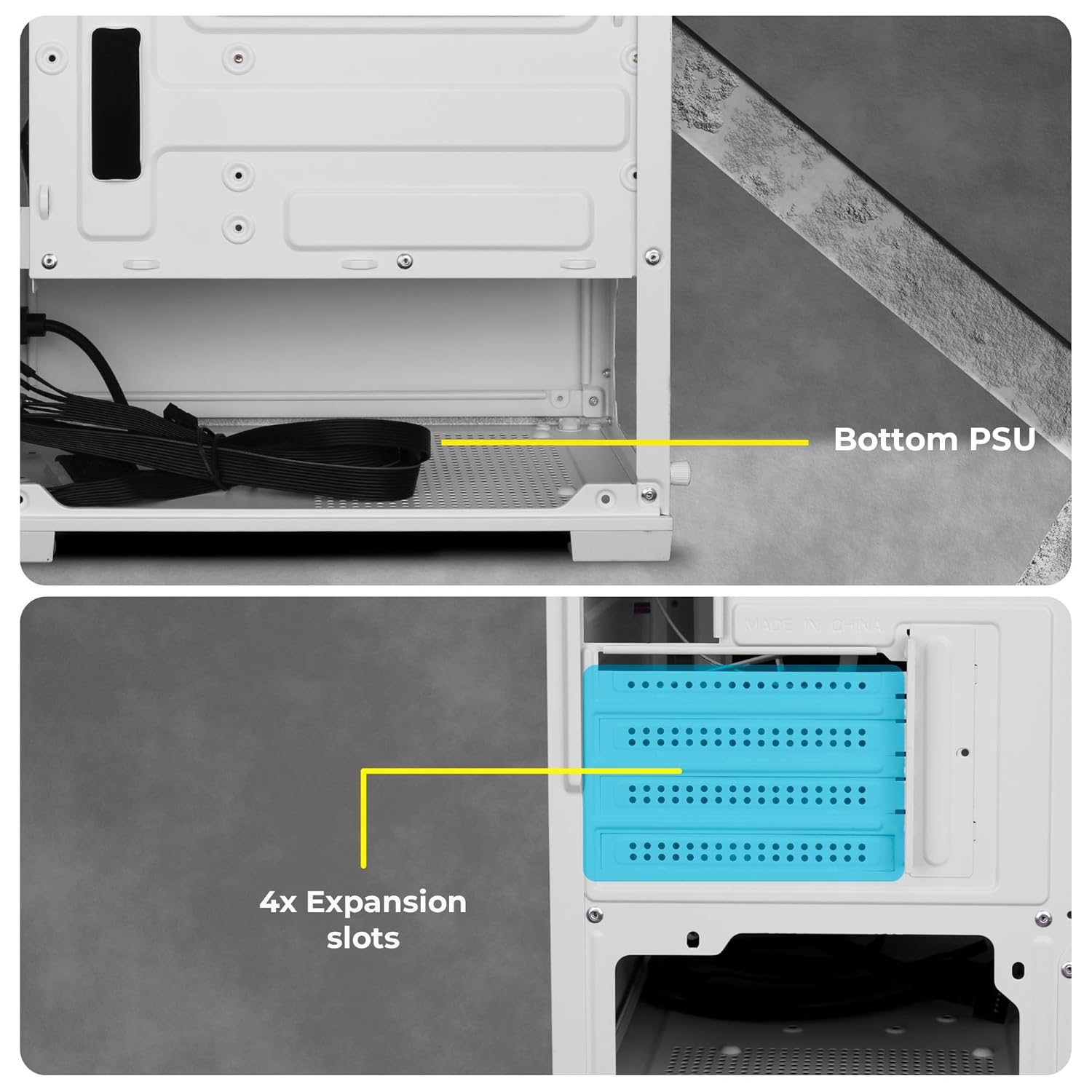
Obraz: View of the chassis interior showing the designated area for bottom-mounted PSU and the four expansion slots.
5.4. Instalace úložného disku
The chassis provides mounting options for 2.5-inch SSDs and 3.5-inch HDDs. Refer to the chassis interior for specific drive bay locations and secure drives with appropriate screws.
5.5. Instalace grafické karty (GPU) a rozšiřující karty
- Remove the necessary expansion slot covers at the rear of the chassis.
- Vložte grafickou kartu nebo jiné rozšiřující karty do příslušných slotů PCIe na základní desce.
- Secure the cards with screws. Note that the chassis accommodates GPUs up to 255mm in length.
5.6. Správa kabelů
Utilize the cable routing cutouts and tie-down points behind the motherboard tray to organize cables. This improves airflow and gives a cleaner look to your build.
6. Návod k obsluze
6.1. Front Panel Connectivity
The front panel provides convenient access to essential ports:
- Vypínač: Zapnutí/vypnutí systému.
- RGB LED Control Switch: To cycle through various lighting modes for the pre-installed fans.
- LED indikátory: For power and HDD activity.
- Zvukové porty: Dedicated ports for microphone and headphones.
- USB porty: 2.0 Two ports for connecting peripherals.
- Port USB 3.0: One high-speed port for data transfer.

Obrázek: Detail view of the front panel showing the power button, RGB control switch, LED indicators, audio jacks, and USB ports.
6.2. Fan Operation and RGB Control
The chassis comes with 5 pre-installed 120mm multicolor LED ring fans. These fans provide effective cooling and aesthetic lighting. Use the dedicated RGB LED Control Switch on the front panel to change the lighting effects of the fans. Connect the fan power cables to your motherboard or power supply as per your system's requirements.

Image: The chassis interior with the multicolor LED ring fans illuminated, showcasing various lighting effects.

Obrázek: Podrobný view highlighting the five pre-installed 120mm multicolor LED ring fans located at the top and rear of the chassis.
7. Údržba
Pravidelná údržba pomáhá zajistit optimální výkon a dlouhou životnost vašeho podvozku.
7.1. Čištění prachového filtru
The chassis features a top magnetic dust filter and a detachable bottom dust filter. Regularly remove and clean these filters to prevent dust buildup, which can impede airflow and affect cooling performance.

Image: Close-up of the top magnetic dust filter, designed for easy removal and cleaning.
7.2. Generální úklid
Use a soft, dry cloth to wipe down the exterior surfaces of the chassis. For tempered glass panels, use a glass cleaner and a microfiber cloth. Avoid abrasive cleaners or solvents.
8. Řešení problémů
- Systém se nezapíná: Ensure all power cables (24-pin ATX, 8-pin CPU, GPU, etc.) are securely connected to the motherboard and components. Verify the PSU switch is in the 'ON' position. Check front panel power button connections to the motherboard.
- Ventilátory se netočí nebo RGB nefunguje: Confirm that the fan power cables are correctly connected to the motherboard or fan controller. Ensure the RGB control switch is functioning. If individual fans are not working, check their specific connections.
- Overheating issues: Ensure all fans are spinning correctly and oriented for optimal airflow (e.g., bottom fans as intake, top/rear as exhaust). Clean dust filters regularly. Verify CPU cooler and GPU cooler are properly installed.
- Problémy se správou kabelů: Due to the compact nature of the chassis, careful planning is required. Utilize all available tie-down points and route cables behind the motherboard tray where possible.
- Front panel ports not working: Check that the front panel header cables (USB 3.0, USB 2.0, Audio) are correctly connected to the corresponding pins on your motherboard.
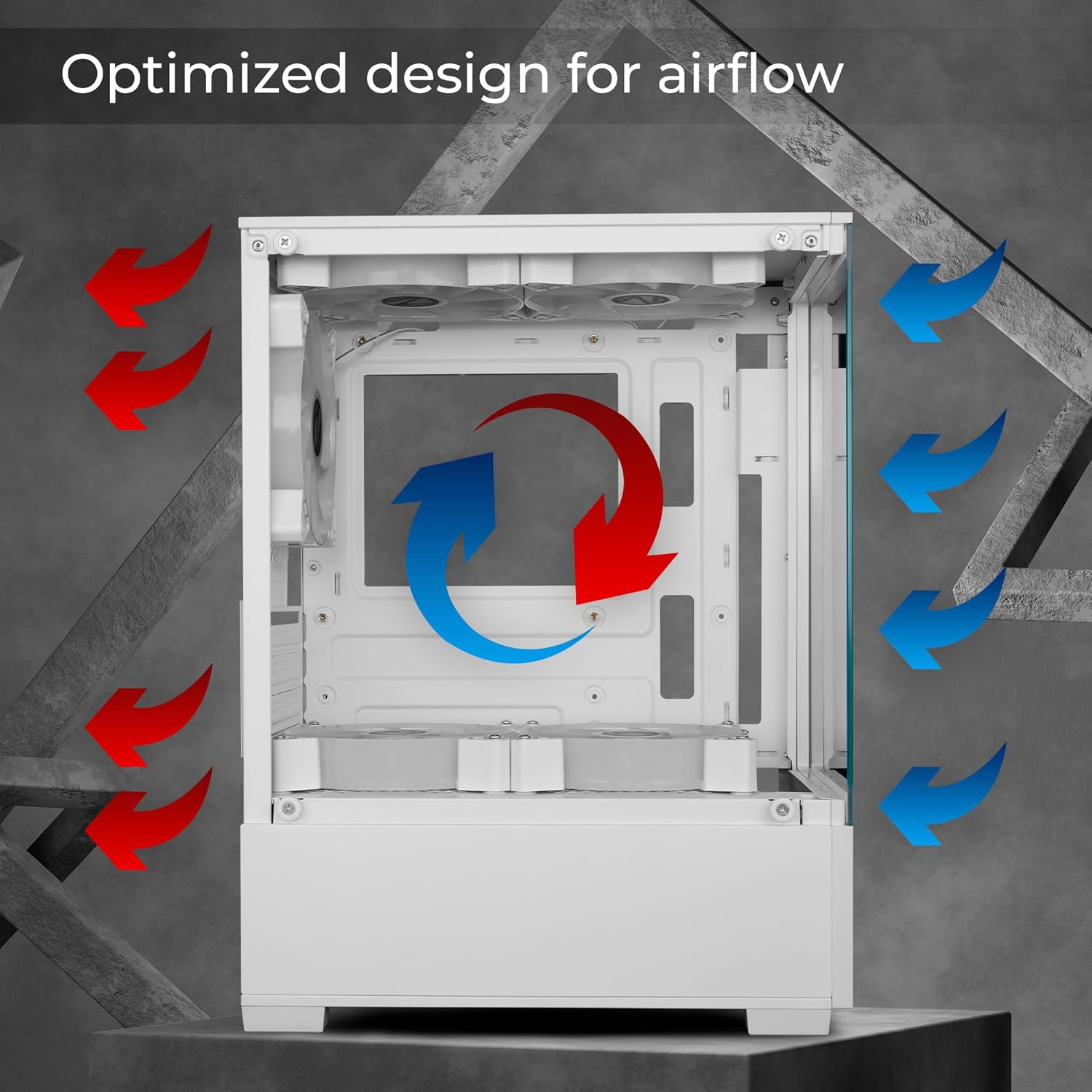
Image: Diagram illustrating the optimized airflow design within the chassis, with red arrows indicating exhaust and blue arrows indicating intake.
9. Technické specifikace
| Funkce | Specifikace |
|---|---|
| Značka | ZEBRONIKA |
| Číslo modelu | Zeb-Iceberg |
| Kompatibilita základní desky | Micro-ATX, Mini-ITX |
| Typ pouzdra | Střední věž |
| Materiál | Tvrzené sklo |
| Předinstalované ventilátory | 5 x 120mm Multicolor LED Ring Fans (2 Top, 2 Bottom, 1 Rear) |
| Podpora délky GPU | Až 255 mm |
| Podpora výšky chladiče CPU | Až 165 mm |
| Přední I / O porty | 1x USB 3.0, 2x USB 2.0, Mic, Headphone, RGB Control Switch, Power Button |
| Rozšiřující sloty | 4 |
| Rozměry produktu (DxŠxV) | 24.5 x 34.7 x 43.5 cm |
| Hmotnost položky | 3.2 kg |
10. Informace o záruce
Your ZEBRONICS Iceberg Premium Gaming Chassis comes with a standard manufacturer's warranty. Please refer to the warranty card included with your product or visit the official ZEBRONICS webPodrobné podmínky týkající se záručního krytí a doby trvání naleznete na webových stránkách.
11. Podpora
For technical assistance, product inquiries, or support, please contact ZEBRONICS customer service. Contact details can typically be found on the official ZEBRONICS webmístě nebo na obalu produktu.
ZEBRONICS INDIA PRIVATE LIMITED
13/7, Smith Road, Royapettah, Chennai-600002


