
1. Úvod
This manual provides comprehensive instructions for the setup, operation, and maintenance of your Teglu Smart Lock Box K471. Please read this manual thoroughly before using the device to ensure proper functionality and security.
2. Konec produktuview
The Teglu Smart Lock Box K471 is a wireless key lockbox designed for secure storage and remote access to keys and small valuables. It offers multiple unlocking methods and app-based management for convenience and enhanced security.
Klíčové vlastnosti:
- Bluetooth & App Remote Access: Control the lock box from anywhere using the Tuya or Yeeuu mobile application.
- Více způsobů odblokování: Access the lock box via password, fingerprint recognition, NFC card key, or temporary access codes.
- Odolná konstrukce: Made from high-quality ABS material and metal for reliable protection.
- Bezpečnostní funkce: Equipped with a high-quality lock mechanism and a built-in alarm system for unauthorized access alerts.
- Všestranná instalace: Designed for hanging on doorknobs, handles, car handles, or railings using the included hanger.

This image displays the Teglu Smart Lock Box K471, a black, oval-shaped device with a numerical keypad and a central fingerprint sensor. To its right, a smartphone screen shows the accompanying mobile application, illustrating the digital interface for managing the lock box.
3. Obsah balení
Zkontrolujte prosím, zda jsou ve vašem balení obsaženy všechny následující položky:
- Teglu Smart Lock Box K471 (Main Unit)
- Shackle (for hanging installation)
- Šroub bateriového prostoru
- NFC Fob
- NFC nálepka Tag
- Uživatelská příručka (tento dokument)

This image shows the Teglu Smart Lock Box K471 open, revealing its internal storage capacity. Dimensions are indicated, and alongside it are illustrations of items that can be stored, such as keys, cards, and USB drives. Below, the included accessories are depicted: a shackle, a battery compartment screw, an NFC Fob, and an NFC Sticker Tag.
4. Nastavení
4.1 Instalace a párování aplikace
- Stáhněte si Tuya Smart app from the Apple App Store or Google Play Store. Alternatively, if you are an Apple user, you may use the Yeeuu app from the Apple App Store.
- Vytvořte si účet nebo se přihlaste ke svému stávajícímu účtu.
- Ujistěte se, že je ve vašem smartphonu zapnutá funkce Bluetooth.
- Follow the in-app instructions to add your Teglu Smart Lock Box K471. This typically involves pressing a button on the lock box to activate pairing mode.
- Once paired, you can configure initial settings, including administrator passwords and fingerprints.
4.2 Fyzická instalace
The Teglu Smart Lock Box K471 is designed for easy hanging installation. The hanger version does not support wall mounting.
- Identify a suitable location such as a doorknob, door handle, car handle, or railing.
- Attach the included shackle to the top of the lock box.
- Hang the lock box securely in your chosen location.

This image illustrates the versatility of the Teglu Smart Lock Box K471's hanging installation. It shows the lock box attached to a door handle, a car handle, and a railing, demonstrating its suitability for various non-wall-mounted applications.
5. Návod k obsluze
5.1 Metody odemykání
The Teglu Smart Lock Box K471 offers four primary ways to unlock:
- Bluetooth (App Control): Use the Tuya/Yeeuu app on your smartphone to remotely unlock the device.
- Rozpoznávání otisků prstů: Place a registered fingerprint on the sensor for quick access.
- Kód klávesnice: Enter a pre-set numerical code on the keypad.
- NFC Keycard: Tap a registered NFC Fob or Sticker Tag against the designated area on the lock box.

This image displays four panels illustrating the different ways to unlock the Teglu Smart Lock Box K471: via Bluetooth using the mobile app, fingerprint recognition, keypad code entry, and by tapping an NFC keycard.
5.2 App Remote Access and Management
The mobile application allows for comprehensive control and monitoring of your lock box:
- Odemykání na dálku: Unlock the box from anywhere with an internet connection.
- Správa uživatelů: Add, modify, or remove authorized users, including their fingerprints, passcodes, and NFC access.
- Timed Passcodes: Generate temporary or time-limited passcodes for guests, service providers, or temporary access needs.
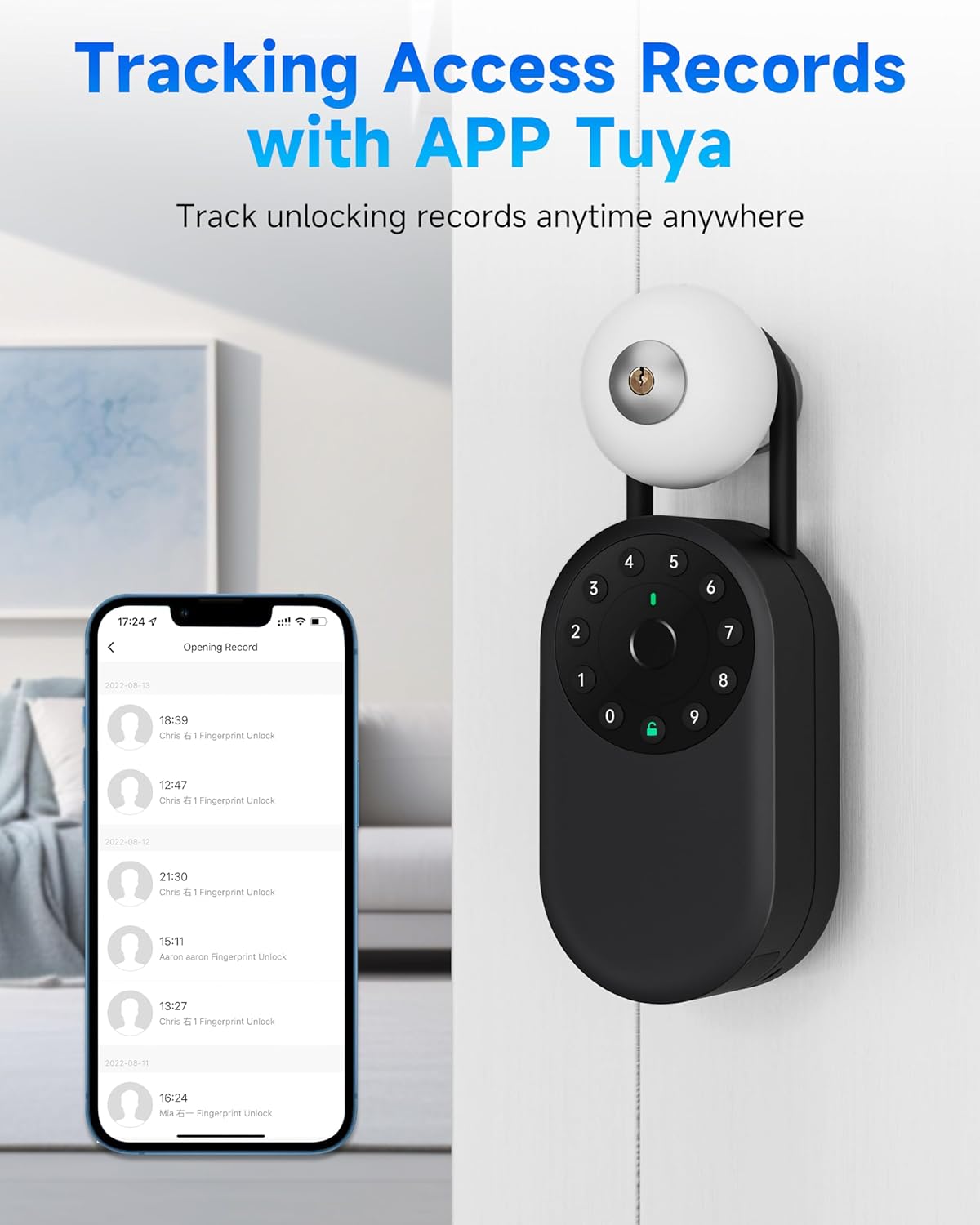
- Přístup k záznamům: View a detailed history of all unlocking events, including the method used and the timestamp.

This image depicts a scenario where a user is sharing a timed passcode for the lock box via a mobile phone conversation, highlighting the convenience for situations like Airbnb hosting.

This image shows a smartphone screen displaying the "Opening Record" within the Tuya app, detailing a list of unlocking events for the Teglu Smart Lock Box K471, including dates, times, and the method of unlock (e.g., Fingerprint Unlock).
6. Údržba
6.1 Výměna baterie
The lock box is powered by internal batteries. When the battery level is low, the app will notify you, and the device may indicate a low battery status. To replace the batteries:
- Locate the battery compartment, typically on the underside or back of the unit.
- Use the provided battery compartment screw or a suitable tool to open the compartment.
- Replace the old batteries with new ones of the specified type (refer to the device's internal markings or app for battery type).
- Bezpečně zavřete přihrádku na baterie.
Poznámka: Ensure proper battery orientation. Dispose of old batteries responsibly.
6.2 Cleaning and Environmental Considerations
- Clean the exterior of the lock box with a soft, damp hadříkem. Nepoužívejte abrazivní čisticí prostředky ani rozpouštědla.
- Keep the fingerprint sensor and keypad clean for optimal performance.
- While the lock box is designed with durable materials, for prolonged outdoor use, consider placement in a sheltered area to protect it from extreme weather conditions.
This image illustrates the manufacturer's claims regarding the lock box's ability to withstand bad weather, showing it in a rainy environment. It also depicts the lock box resisting hammering and drilling, indicating its robust construction.
7. Řešení problémů
- Zařízení nereaguje:
- Check battery level in the app or for any low battery indicators on the device. Replace batteries if necessary.
- Ensure the device is within Bluetooth range of your smartphone for app control.
- Otisk prstu nebyl rozpoznán:
- Ujistěte se, že máte prst čistý a suchý.
- Zkuste změnit polohu prstu na senzoru.
- If issues persist, re-register your fingerprint through the app.
- Keypad code not working:
- Verify that you are entering the correct code.
- Ujistěte se, že klávesnice je čistá a bez překážek.
- Check if the code has expired or been deactivated via the app.
- Problémy s připojením aplikace:
- Ensure Bluetooth is enabled on your phone and the lock box is powered on.
- Restartujte aplikaci a/nebo telefon.
- If using remote access, ensure your phone has an active internet connection.
- Alarm system triggers unexpectedly:
- Check the access records in the app to identify any unauthorized attempts.
- Ensure the lock box is securely closed and not being tampered s.
8. Specifikace
| Číslo modelu | K471 |
| Značka | Teglu |
| Rozměry (D x Š x V) | 50 × 77 × 147 mm (5 × 7.7 × 14.7 cm) |
| Hmotnost položky | 454 g |
| Materiál | Kov, ABS |
| Konektivita | Bluetooth |
| Metody odemykání | Fingerprint, Passcode, NFC, App |
| Kompatibilita aplikací | Tuya Smart (Apple/Android), Yeeuu (Apple only) |
| Zdroj napájení | Internal Batteries (type to be confirmed by device markings) |
9. Záruka a podpora
For warranty information, technical support, or service inquiries, please refer to the documentation provided with your purchase or contact Teglu customer service directly. Contact details can typically be found on the manufacturer's official webwebu nebo na účtence.