
Zavedení
Welcome to the Cinnado D1 5MP Indoor Security Camera user manual. This guide provides detailed instructions for setting up, operating, and maintaining your security camera. Please read this manual thoroughly before use to ensure proper functionality and to maximize your product experience.
Konec produktuview
Obsah balení
Po otevření balení se prosím ujistěte, že obsahuje všechny následující položky:
- 1x Cinnado D1 5MP Indoor Security Camera
- 1x montážní držák
- 1x Sada šroubů
- 1x kabel typu C
- 1x napájecí adaptér
- 1x Installation Guide (this manual)
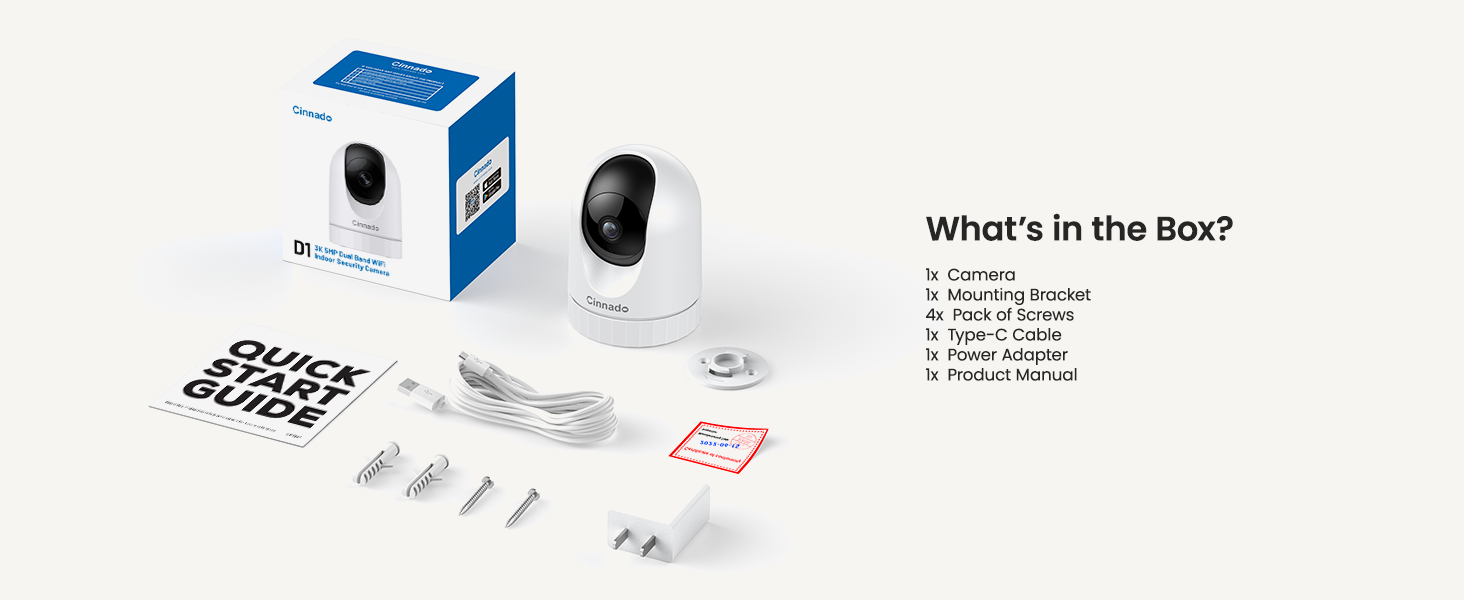
Image: Contents of the Cinnado D1 Security Camera package.
Klíčové vlastnosti
- Rozlišení 5MP Super HD: Poskytuje jasné a podrobné video footage.
- Dual-Band WiFi (2.4Ghz/5Ghz): Nabízí flexibilní a stabilní síťové připojení.
- Vynikající noční vidění: Equipped with 4x 940nm invisible IR lights for clear viewza zhoršených světelných podmínek.
- 360° Auto Tracking: Automaticky sleduje detekovaný pohyb ve svém poli view.
- Smooth Two-Way Audio: Vestavěný mikrofon a reproduktor pro komunikaci v reálném čase.
- Flexibilní možnosti úložiště: Supports local SD card storage (up to 128GB, not included) and optional cloud storage.
- Přístup pro více uživatelů: Allows sharing camera access with family and friends.
- Kompatibilita chytré domácnosti: Funguje s Amazon Alexou a Google Home.
- Upozornění detekce pohybu: Sends instant notifications upon detecting movement.

Image: Cinnado D1 5MP Indoor Security Camera.
Průvodce nastavením
Krok 1: Připravte se na instalaci
Before beginning the installation, ensure you have a stable 2.4Ghz or 5Ghz Wi-Fi network available. The camera requires a corded electric power source and is designed for indoor use only.
Krok 2: Stáhněte a nainstalujte aplikaci
- Hledat the 'Wansview Cloud' app on the Apple App Store (for iOS devices) or Google Play Store (for Android devices).
- Stáhněte si a nainstalujte aplikaci do svého smartphonu nebo tabletu.
- Otevřete aplikaci a vytvořte si nový účet nebo se přihlaste, pokud jej již máte.

Image: Download the companion app from your device's app store.
Krok 3: Připojení kamery
- Plug the Type-C cable into the camera and connect the power adapter to an electrical outlet. The camera will power on and initiate its startup sequence.
- Once the camera is ready (indicated by a specific LED status or voice prompt), open the Wansview Cloudová aplikace.
- V aplikaci klepněte na ikonu „+“ pro přidání nového zařízení.
- Follow the on-screen instructions to scan the QR code located on the camera or its packaging.
- Select your 2.4Ghz or 5Ghz Wi-Fi network and enter the password. Ensure your phone is connected to the same Wi-Fi network during this process.
- The camera will attempt to connect to your Wi-Fi network. Once connected, you will hear a confirmation sound or see a steady LED indicator.

Image: The Cinnado D1 camera supports both 2.4Ghz and 5Ghz Wi-Fi bands for flexible connectivity.
Krok 4: Montáž kamery
The Cinnado D1 camera can be placed on a flat surface or mounted to a ceiling using the included mounting bracket and screws.
- Vyberte vhodné vnitřní místo s jasným view and within Wi-Fi range.
- If mounting, use the bracket as a template to mark screw positions on the ceiling.
- Drill pilot holes and secure the mounting bracket with the provided screws.
- Attach the camera to the mounting bracket, ensuring it is securely fastened.
- Adjust the camera's angle as needed within the app after installation.
Návod k obsluze
Žít View a monitorování
Otevřete Wansview Cloud app and select your camera from the device list to access the live video feed. You can use the on-screen controls to pan (horizontal) and tilt (vertical) the camera to adjust its viewúhel.

Image: The camera offers 360-degree coverage with pan and tilt functionality.
Obousměrný zvuk
Kamera je vybavena vestavěným mikrofonem a reproduktorem. Použití obousměrného zvuku:
- Zatímco v přímém přenosu view, klepněte v aplikaci na ikonu mikrofonu.
- Mluvte do mikrofonu telefonu, aby se váš hlas přenášel přes reproduktor fotoaparátu.
- Tap the speaker icon to hear audio from the camera's environment.

Image: Smooth two-way audio allows communication through the camera.
Detekce pohybu a upozornění
The Cinnado D1 camera can detect motion and send alerts to your phone:
- V aplikaci přejděte do nastavení fotoaparátu.
- Enable motion detection and adjust sensitivity levels as desired.
- Configure alert notifications to receive instant messages on your device when motion is detected.
- The 360° Auto Tracking feature, when enabled, will automatically pan and tilt the camera to follow detected movement.
Přehrávání a ukládání videa
Kamera podporuje dva způsoby ukládání nahraných fotografiítage:
- Paměťová karta Micro SD: Insert a Micro SD card (up to 128GB, not included) into the camera's designated slot for 24/7 continuous recording.
- Cloudové úložiště: An optional cloud storage service is available, often with a 30-day free trial. This allows for secure, off-site storage of your recordings.
Na view zaznamenané footage, access the playback feature within the Wansview Cloud app. You can browse recordings by date and time.

Image: Flexible storage options including SD card and cloud storage.
Sdílení přístupu
You can share access to your camera's live feed with family members or trusted individuals:
- Ve Wansview Cloud app, go to the camera settings.
- Locate the 'Share Device' or similar option.
- Follow the prompts to invite other users, who will need their own Wansview Cloud accounts.
Integrace chytré domácnosti
The Cinnado D1 camera supports integration with Amazon Alexa and Google Home. Refer to the respective smart home assistant's app or documentation for specific instructions on connecting your camera and using voice commands.
Údržba
To ensure optimal performance and longevity of your Cinnado D1 camera:
- Čištění: Jemně otřete objektiv a tělo fotoaparátu měkkým, suchým hadříkem. Nepoužívejte agresivní chemikálie ani abrazivní materiály.
- Aktualizace firmwaru: Pravidelně kontrolujte Wansview Cloud app for available firmware updates. Keeping your camera's firmware up-to-date ensures access to the latest features and security enhancements.
- Umístění: Ensure the camera is placed in a stable indoor environment, away from direct sunlight, extreme temperatures, and moisture.
Odstraňování problémů
If you encounter issues with your Cinnado D1 camera, please refer to the following common solutions:
| Problém | Možné řešení |
|---|---|
| Fotoaparát se nedaří připojit k Wi-Fi | Ensure your Wi-Fi network is 2.4Ghz or 5Ghz. Verify the Wi-Fi password is correct. Move the camera closer to the router. Restart the camera and your router. |
| Špatná kvalita videa | Check your internet connection speed. Ensure the camera lens is clean. Adjust camera placement to avoid glare or insufficient lighting. |
| Detekce pohybu nefunguje | Verify motion detection is enabled in the app settings. Adjust sensitivity levels. Ensure there are no obstructions in the camera's field of view. |
| Problémy s obousměrným zvukem | Check volume settings on your phone and in the app. Ensure microphone and speaker permissions are granted to the app. |
| Fotoaparát je často offline | Improve Wi-Fi signal strength by moving the camera closer to the router or using a Wi-Fi extender. Ensure the power supply is stable. |
If these solutions do not resolve your issue, please contact Cinnado customer support for further assistance.
Specifikace
| Funkce | Detail |
|---|---|
| Název modelu | D1 |
| Rezoluce | 5MP (3K) |
| Konektivita | Dual-Band Wi-Fi (2.4Ghz/5Ghz) |
| Pole View | 110 Degrees (Lens), 360 Degrees (Pan/Tilt Coverage) |
| Noční vidění | 4x 940nm Invisible IR Lights |
| Možnosti úložiště | Karta Micro SD (až 128 GB), cloudové úložiště (volitelné) |
| Zdroj napájení | Elektrický kabel |
| Kompatibilní zařízení | iOS, Android |
| Rozměry (D x Š x V) | 2.89 x 2.89 x 4.01 palce |
| Hmotnost položky | 10.2 unce |
| Typ montáže | Ceiling Mount, Tabletop |
| Typ upozornění | Pouze pohyb |
Záruka a podpora
Cinnado is committed to providing high-quality products and customer satisfaction. Your Cinnado D1 5MP Indoor Security Camera comes with lifelong technical support and after-sales service.
For any questions, technical assistance, or support needs, please do not hesitate to contact Cinnado customer service. Our team is available to provide professional guidance and resolve any issues you may encounter.
Please refer to the contact information provided with your product packaging or visit the official Cinnado webstránky pro podrobnosti o podpoře.