
Zavedení
Thank you for choosing the Qcwwy Portable Bladeless Desk Fan. This compact and elegantly designed fan provides efficient and quiet cooling with three adjustable speeds, making it ideal for various environments such as offices, dorms, bedrooms, or for travel and camping. This manual provides essential information for the safe and effective use of your new fan.
Bezpečnostní informace
Please read all safety instructions carefully before using the fan and retain this manual for future reference.
- Do not insert fingers or any objects into the fan's air inlets or outlets.
- Chraňte ventilátor před vodou nebo jinými kapalinami, abyste předešli úrazu elektrickým proudem.
- Do not use the fan in excessively humid or dusty environments.
- Ujistěte se, že zdroj napájení odpovídá výkonu ventilátoru.tagpožadavky (5 V DC).
- Před čištěním nebo prováděním jakékoli údržby odpojte ventilátor ze zásuvky.
- Nepokoušejte se ventilátor rozebírat ani opravovat sami. Požádejte o pomoc kvalifikovaný servisní personál.
- Uchovávejte mimo dosah dětí a domácích zvířat.
Obsah balení
Ověřte, zda jsou v balení přítomny všechny položky:
- 1 x Qcwwy Portable Bladeless Desk Fan
- 1 x USB kabel
- 1 x Uživatelská příručka
Konec produktuview
The Qcwwy Portable Bladeless Desk Fan features a sleek, compact design with intuitive controls. Its bladeless technology ensures safety and ease of cleaning.

Obrázek 1: Přední strana view of the Qcwwy Portable Bladeless Desk Fan, showing the main air outlet and control panel.
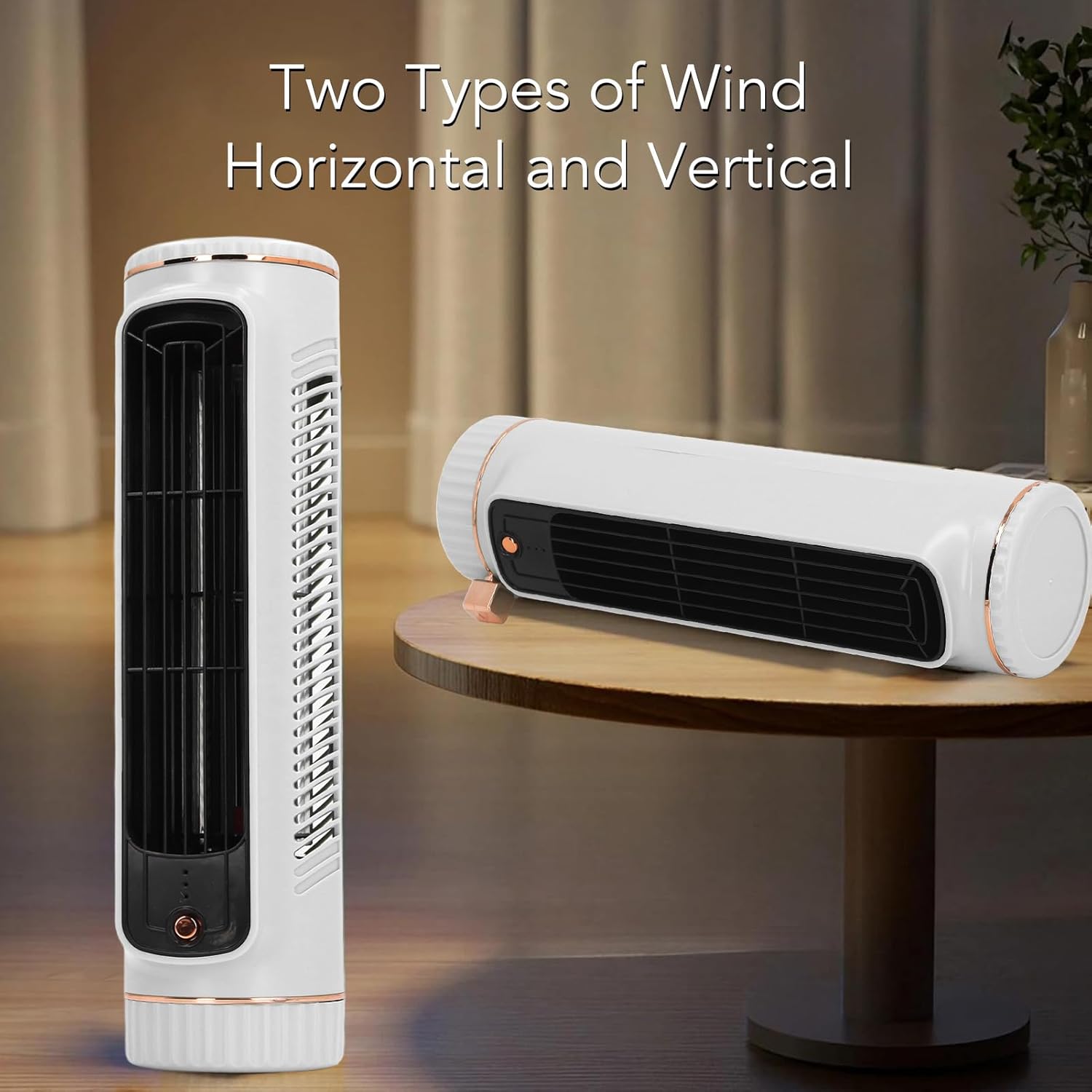
Figure 2: The fan can be used in both vertical (tower) and horizontal (lying flat) orientations for versatile cooling.

Obrázek 3: Zadní view of the fan, highlighting the USB-C charging port located at the bottom.
Klíčové komponenty:
- Ovládací tlačítko: Located on the front, used for power and speed adjustment.
- Vývod vzduchu: Front grille for airflow.
- Vstup vzduchu: Side vents for air intake.
- Nabíjecí port USB-C: Located at the rear bottom for power input.
- Kontrolky: Small LEDs near the control button to show speed setting and charging status.
Nastavení
Follow these steps to set up your Qcwwy Portable Bladeless Desk Fan:
- Rozbalit: Opatrně vyjměte ventilátor a veškeré příslušenství z obalu.
- Počáteční poplatek: Before first use, fully charge the fan. Connect the provided USB cable to the fan's USB-C port (Figure 3) and the other end to a compatible USB power adapter (not included) or a computer USB port. The indicator light will show charging status and turn off or change color when fully charged.
- Umístění: Place the fan on a stable, flat surface. Ensure there is adequate space around the air inlets and outlets for optimal airflow. The fan can be positioned vertically or horizontally depending on your preference and space availability.

Figure 4: The fan comes with a USB cable for convenient charging.
Návod k obsluze
The fan features a simple touch control for ease of use.
- Zapnutí/vypnutí: Press the control button once to turn the fan on at the lowest speed setting. Press and hold the button for approximately 2 seconds to turn the fan off.
- Upravte rychlost ventilátoru: While the fan is on, press the control button repeatedly to cycle through the three available speed settings: Low → Medium → High. The indicator lights will change to reflect the current speed setting.
- Nabíjení: When the battery is low, the indicator light may flash. Connect the fan to a power source using the USB cable to recharge. The fan can be used while charging.
Údržba
Regular maintenance helps ensure the longevity and optimal performance of your fan.
- Čištění: Disconnect the fan from the power source before cleaning. Use a soft, dry cloth to wipe the exterior surfaces of the fan. For the air inlets and outlets, a soft brush or compressed air can be used to remove dust. Do not use abrasive cleaners, solvents, or immerse the fan in water.
- Skladování: Pokud ventilátor delší dobu nepoužíváte, skladujte jej na chladném a suchém místě, mimo dosah přímého slunečního záření a extrémních teplot.
Odstraňování problémů
Pokud narazíte na jakékoli problémy s ventilátorem, podívejte se na následující běžné problémy a jejich řešení:
| Problém | Možná příčina | Řešení |
|---|---|---|
| Ventilátor se nezapne. | Baterie je vybitá. | Connect the fan to a power source using the USB cable and charge it. |
| Power cable is not properly connected. | Ensure the USB cable is securely connected to both the fan and the power adapter. | |
| Slabé proudění vzduchu. | Vstupy/výstupy vzduchu jsou zablokované. | Odstraňte veškeré překážky z přívodů a odvodů vzduchu. |
| Ventilátor je na nízké rychlosti. | Press the control button to increase the fan speed. | |
| Ventilátor vydává neobvyklý zvuk. | Ventilátor není na stabilním povrchu. | Umístěte ventilátor na rovný a stabilní povrch. |
| Vnitřní ucpání nebo poškození. | Discontinue use and contact customer support. Do not attempt to open the fan. |
Specifikace
| Funkce | Specifikace |
|---|---|
| Název modelu | Qcwwy0g3x2u9etw-11 |
| Typ položky | Desk Cooler Fan |
| Materiál | ABS, Electronic Components, Metal |
| Barva | Bílý |
| Výška (přibližně) | 26.67 cm / 10.5 palce |
| Diameter (Approx.) | 6.1 cm / 2.4 palce |
| Rozměry produktu | 11.02"H x 4.33"Š x 3.93"V |
| Hmotnost položky | 1.19 liber (přibližně 538 g) |
| Typ baterie | Lithiová baterie (vestavěná) |
| Kapacita baterie | 1200 XNUMX mAh |
| Zdroj napájení | AC/DC (USB Rechargeable) |
| svtage | 5 V (DC) |
| Počet úrovní výkonu | 3 |
| Kontrolní metoda | Dotek |
| Speciální funkce | Adjustable Speeds, Bladeless Design |
| Doporučené použití | Indoor/Outdoor (Office, Dorm, Bedroom, Travel, Camping) |
Záruka a podpora
For any questions, concerns, or technical support regarding your Qcwwy Portable Bladeless Desk Fan, please contact the seller or manufacturer through the platform where the product was purchased. Please have your model number (Qcwwy0g3x2u9etw-11) and purchase details ready when contacting support.