
WOLFANG WT02
Uživatelská příručka k solární kameře WOLFANG WT02
Model: WT02
Zavedení
Thank you for choosing the WOLFANG WT02 Solar Trail Camera. This advanced wildlife camera is designed for capturing high-quality photos and videos of wildlife, monitoring property, or for general outdoor surveillance. Featuring 4K video resolution, 48MP image capture, integrated solar power, and robust IP66 waterproofing, the WT02 offers reliable performance in various environmental conditions. This manual provides detailed instructions for setup, operation, maintenance, and troubleshooting to ensure you get the most out of your camera.

Image: WOLFANG WT02 Solar Trail Camera banner highlighting 4K 48MP and integrated solar.
Bezpečnostní informace
- Do not expose the camera to extreme temperatures or direct sunlight for prolonged periods when not in use.
- Ensure all covers and latches are securely closed to maintain the IP66 waterproof rating.
- Use only recommended battery types (AA batteries) and ensure correct polarity during installation.
- Uchovávejte fotoaparát mimo dosah silných magnetických polí.
- Nepokoušejte se kameru rozebírat ani upravovat. Ztratíte tak záruku.
- Baterie a elektronické součástky zlikvidujte zodpovědně v souladu s místními předpisy.
Obsah balení
Po otevření zkontrolujte obsah balení, abyste se ujistili, že jsou přítomny všechny položky:
- 1 x WOLFANG WT02 Trail Camera
- 1 x 32GB Micro SD karta (předinstalovaná)
- 1 x montážní popruh
- 1 x Nastavitelná montážní konzola
- 1 x USB kabel
- Šrouby a hmoždinky
- Uživatelská příručka

Image: All components included in the WOLFANG WT02 Trail Camera package, including the camera, mounting accessories, USB cable, and user manual.
Konec produktuview
The WOLFANG WT02 Trail Camera features a robust design with integrated solar charging capabilities. Key components include:
- Solární panel: Located on top for continuous charging of the built-in battery.
- Objektiv fotoaparátu: High-resolution lens for capturing 4K video and 48MP images.
- Infračervené LED diody: 26pcs 850nm infrared LEDs for clear night vision up to 65ft.
- PIR Motion Sensor: Detekuje pohyb pro spuštění nahrávání.
- LCD obrazovka: For menu navigation and viewzachycených médií.
- Ovládací tlačítka: For navigating the camera's settings.
- Přihrádka na baterie: For optional 4x AA batteries (not included) for auxiliary power.
- Slot pro SD kartu: Podporuje Micro SD karty až do 128 GB.
- USB port: Pro připojení k počítači nebo externímu zdroji napájení.

Obrázek: Detailní přední strana view of the WOLFANG WT02 Solar Trail Camera, showing the lens, infrared LEDs, motion sensor, and solar panel.
Nastavení
1. Napájení kamery
The WT02 camera features a built-in 2500mAh rechargeable battery powered by the integrated solar panel. For optimal performance, especially in low temperatures or during initial setup, it is recommended to charge the solar power before use.
- Solární nabíjení: Place the camera in direct sunlight to allow the solar panel to charge the internal battery.
- Auxiliary AA Batteries: For extended operation or in low-light conditions, you can install 4 AA batteries (not included) in the battery compartment. These act as auxiliary power.

Image: Illustration showing the solar panel charging the built-in 2500mAh battery and the option for 4x AA backup batteries.
2. Vložení Micro SD karty
A 32GB Micro SD card is included and pre-installed in the card slot. The camera supports Micro SD cards up to 128GB.
- Open the camera's side latch to access the internal compartment.
- Najděte slot pro kartu Micro SD.
- If replacing, gently push the existing card until it clicks and ejects. Insert the new Micro SD card with the gold contacts facing down until it clicks into place.
- Přihrádku bezpečně uzavřete.

Obrázek: Detail view of the WOLFANG WT02 camera's side, showing the Micro SD card slot and USB port for easy access.
3. Montáž kamery
The WT02 can be mounted using the included strap or the adjustable mounting bracket.
- Montáž popruhu: Thread the provided strap through the slots on the back of the camera and secure it around a tree or pole.
- Montáž držáku: Use the adjustable mounting bracket and screws to attach the camera to a wall or flat surface. This allows for precise angle adjustment.
Position the camera at a height that allows for optimal detection of subjects and ensures the solar panel receives sufficient sunlight.
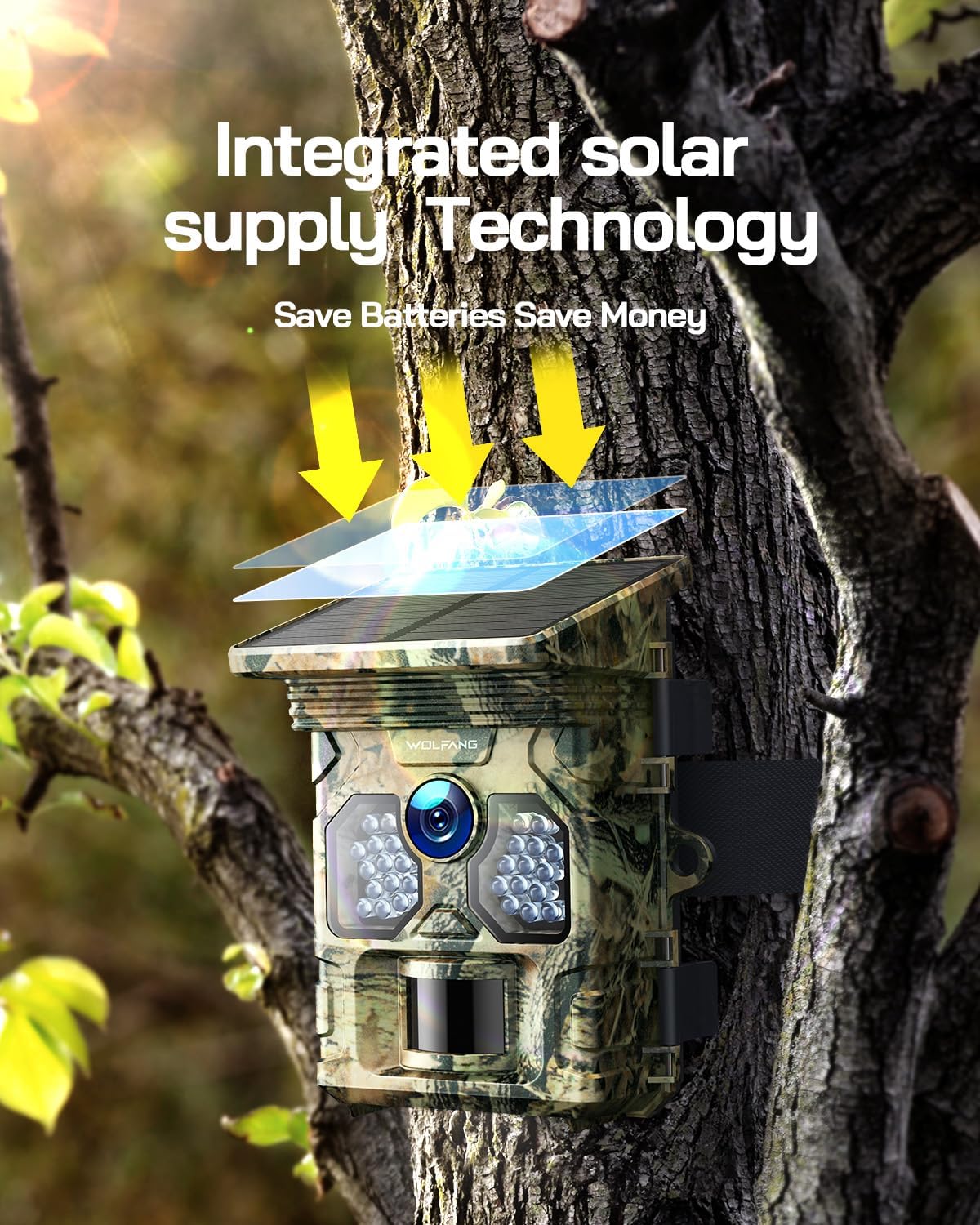
Image: The WOLFANG WT02 Trail Camera mounted on a tree, illustrating its integrated solar supply technology in action.
Obsluha fotoaparátu
1. Zapnutí/vypnutí a navigace v nabídce
To power on the camera, slide the mode switch to the "ON" position. The LCD screen will illuminate. Use the navigation buttons (Up, Down, Left, Right, OK, Menu) to browse through settings and options.

Obrázek: Vnitřní view of the WOLFANG WT02 camera, showing the LCD screen and control buttons for intuitive setup and navigation.
2. Nastavení režimů foto a video
Access the menu to configure various settings:
- režim: Vyberte mezi režimem Foto, Video nebo Foto+Video.
- Rozlišení fotografie: Choose from various resolutions up to 48MP. Higher resolution results in larger file velikosti.
- Rozlišení videa: Select from resolutions up to 4K at 30fps.
- Citlivost PIR: Adjust the sensitivity of the motion sensor (Low, Medium, High) based on the environment to avoid false triggers.
- Interval spouštění: Nastavte prodlevu mezi po sobě jdoucími spouštěči.
- Časosběr: Nastavte kameru tak, aby pořizovala fotografie v nastavených intervalech bez ohledu na pohyb.
- Datum a čas: Pro přesný čas nastavte správné datum a časampna vašich médiích.

Image: Visual representation of the WOLFANG WT02's ability to capture 4K video and 48MP photos.

Image: Depiction of the WOLFANG WT02's ultra-fast 0.1-second trigger speed, capturing a running fox.
3. Night Vision Operation
The WT02 automatically switches to night vision mode in low-light conditions, utilizing its 26pcs 850nm infrared LEDs to capture clear black and white images and videos without disturbing wildlife.

Image: A close-up of the camera's infrared LEDs, illustrating its superb night vision capabilities with a panther's eyes in the background.

Image: Comparison showing the clarity and detail of night vision captured by the WT02, contrasting with insufficient light and overexposure.
4. ViewZachycení médií
Můžete view photos and videos directly on the camera's LCD screen by switching to "Playback" mode. Alternatively, remove the Micro SD card and insert it into a computer's card reader, or connect the camera directly to a computer using the USB cable to access the files.
Údržba
- Čištění: Use a soft, dry cloth to clean the camera lens and solar panel. For stubborn dirt, a slightly damp Lze použít hadřík, ale dbejte na to, aby se do fotoaparátu nedostala vlhkost.
- Péče o baterie: If using AA batteries, replace them when the low battery indicator appears. For the built-in rechargeable battery, ensure the solar panel is regularly exposed to sunlight.
- Hydroizolace: Always ensure the camera's latches and seals are clean and properly closed to maintain its IP66 waterproof rating.
- Skladování: When storing the camera for extended periods, remove any auxiliary AA batteries and ensure the built-in battery is partially charged. Store in a cool, dry place.

Image: The WOLFANG WT02 camera mounted on a tree in the rain, demonstrating its IP66 super waterproof capability.
Odstraňování problémů
| Problém | Možná příčina | Řešení |
|---|---|---|
| Fotoaparát se nezapíná. | Low battery; incorrect battery installation; faulty SD card. | Ensure solar panel is charged or install fresh AA batteries with correct polarity. Check if SD card is properly inserted or try a different card. |
| Nebyly pořízeny žádné fotografie/videa. | PIR sensitivity too low; SD card full or corrupted; camera in wrong mode. | Increase PIR sensitivity. Format or replace SD card. Ensure camera is in Photo, Video, or Photo+Video mode. |
| Špatná kvalita nočního vidění. | Infrared LEDs obstructed; low battery. | Clear any obstructions from the front of the camera. Ensure sufficient battery power. |
| Falešné spouštěče. | Citlivost PIR je příliš vysoká; kamera směřuje k pohybujícím se větvím nebo zdrojům tepla. | Decrease PIR sensitivity. Reposition camera to avoid unwanted motion sources. |
Specifikace
| Funkce | Detail |
|---|---|
| Značka | WOLFANG |
| Model | WT02 |
| Rozlišení fotografie | Až 48 MP |
| Rozlišení videa | 4K@30FPS |
| Rychlost spouštění | 0.1 sekund |
| Rozsah nočního vidění | Up to 65ft (20m) with 26pcs 850nm IR LEDs |
| Hodnocení voděodolnosti | IP66 |
| Skladování | Micro SD card, up to 128GB (32GB included) |
| Napájení | Built-in 2500mAh rechargeable battery (solar charged), supports 4x AA batteries (not included) |
| Provozní teplota | -4 °F až 140 °F (-20 °C až 60 °C) |
| Konektivita | USB |

Image: Four common applications for the WOLFANG WT02 Trail Camera: hunting, farm security, wildlife monitoring, and home security.
Záruka a zákaznická podpora
WOLFANG provides a 2-year warranty for the WT02 Solar Trail Camera. If you encounter any issues or have questions regarding your product, please contact our customer service team.
E-mail zákaznického servisu: support.vc@wolfang.co
Please include your model number (WT02) and a detailed description of your issue when contacting support for faster assistance.
Ask a question about this manual
Ask about setup, troubleshooting, compatibility, parts, safety, or missing instructions. Manuals+ will review the question and use this page’s manual context to help answer it.