
DACOM Q10
DACOM Q10 Neckband Headphones User Manual
Model: Q10 | Brand: DACOM
1. Úvod
Thank you for choosing the DACOM Q10 Neckband Headphones. These open-ear earbuds are designed for comfort, durability, and high-quality audio, perfect for active lifestyles. This manual provides detailed instructions to help you get the most out of your new headphones.

Image 1.1: DACOM Q10 Neckband Headphones and Charging Case. The headphones are shown in their open charging case, highlighting their sleek black design and compact form factor.
2. Klíčové vlastnosti
- Otevřený design ucha: Provides a breathable listening experience, allowing for better awareness of surroundings.
- Ergonomický střih: Liquid silicone ear hooks ensure a secure and comfortable fit, ideal for sports and active use.
- Vodotěsnost IPX7: Offers robust protection against sweat and water, making them suitable for various environments.
- Dlouhá doba hraní: Up to 12 hours of continuous playback on a single charge, with extended playtime using the charging case.
- lehký: Each earbud weighs approximately 10.6g, ensuring minimal discomfort during prolonged wear.
- Bezdrátové připojení Bluetooth: Stable and reliable connection for seamless audio streaming.
- Dotykové ovládání: Intuitive touch controls for media playback and call management.

Image 2.1: Open Ear Design for Situational Awareness. A man is shown wearing the DACOM Q10 headphones, illustrating how the open-ear design allows for better awareness of ambient sounds.

Image 2.2: Extended Playtime Capabilities. This image displays the headphones and charging case, highlighting the 10-12 hours of single charge playtime and up to 36 hours with the charging case.

Image 2.3: Comfortable and Lightweight Wearing. A woman is shown relaxing while wearing the headphones, emphasizing their ergonomic design, ear-free comfort, and lightweight nature.
3. Co je v krabici
Upon opening your DACOM Q10 package, you should find the following items:
- DACOM Q10 Neckband Headphones (Left and Right Earbuds)
- Nabíjecí pouzdro
- USB nabíjecí kabel
- Uživatelská příručka
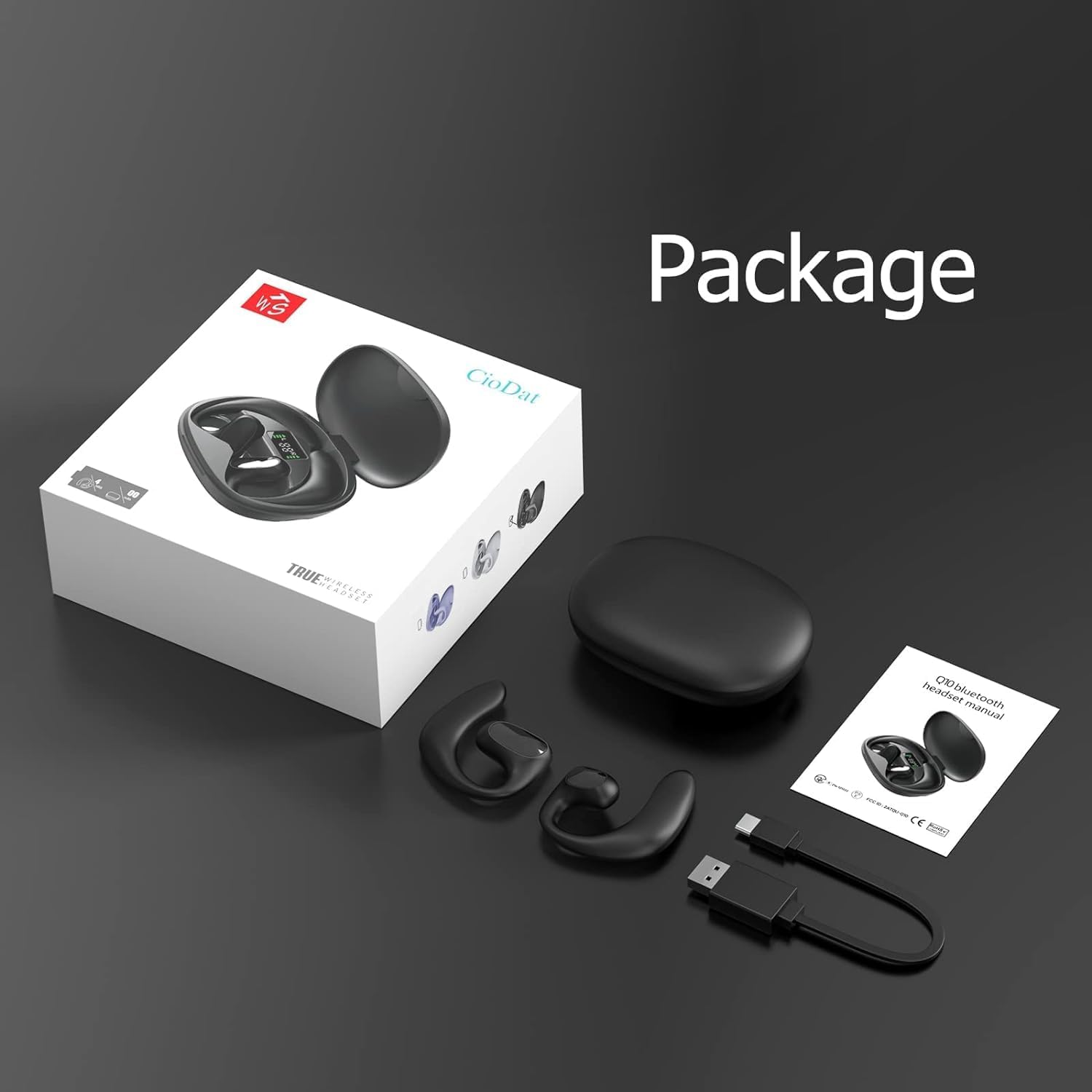
Image 3.1: Package Contents. This image displays all items included in the DACOM Q10 retail package: the headphones, charging case, USB cable, and user manual.
4. Nastavení
4.1 Nabíjení sluchátek a pouzdra
- Počáteční poplatek: Před prvním použitím plně nabijte sluchátka i nabíjecí pouzdro.
- Připojit: Plug the USB charging cable into the charging port on the case and connect the other end to a USB power source (e.g., computer, wall adapter).
- Indikátory: The LED indicators on the charging case will show the charging status. Once fully charged, the indicators will typically turn solid or turn off.
4.2 Párování se zařízením Bluetooth
- Zapnutí: Open the charging case or take out the earbuds. They will automatically enter pairing mode (indicated by flashing LED lights on the earbuds).
- Povolit Bluetooth: Na svém zařízení (chytrý telefon, tablet, počítač) přejděte do nastavení Bluetooth a ujistěte se, že je Bluetooth povoleno.
- Vyberte zařízení: In the list of available Bluetooth devices, select "DACOM Q10" (or similar name).
- Potvrdit připojení: Once connected, the earbud LEDs will stop flashing, and you may hear a confirmation tone.
- Znovu připojit: Sluchátka se po vyjmutí z pouzdra automaticky znovu připojí k poslednímu spárovanému zařízení, pokud je na zařízení povoleno Bluetooth.
5. Návod k obsluze
The DACOM Q10 headphones feature intuitive touch controls for easy management of your audio and calls.

Image 5.1: Earbud Control Points. This diagram illustrates the LED/MIC, Trumpet (speaker), and MFB (Multi-Function Button) areas on the DACOM Q10 earbud, indicating where touch controls are located.
5.1 Přehrávání hudby
- Přehrát/pozastavit: Single tap on either earbud's MFB.
- Další skladba: Double tap on the right earbud's MFB.
- Předchozí skladba: Double tap on the left earbud's MFB.
- Zvýšit hlasitost: Triple tap on the right earbud's MFB.
- Snížit hlasitost: Triple tap on the left earbud's MFB.
5.2 Správa hovorů
- Přijmout/ukončit hovor: Single tap on either earbud's MFB.
- Odmítnout hovor: Press and hold either earbud's MFB for 2 seconds.
5.3 Hlasový asistent
- Aktivovat Voice Assistant: Press and hold either earbud's MFB for 3 seconds.
6. Údržba
6.1 Čištění
- Pravidelně otírejte sluchátka a nabíjecí pouzdro měkkým, suchým hadříkem, který nepouští vlákna.
- Nepoužívejte abrazivní čisticí prostředky, alkohol ani chemická rozpouštědla.
- Ujistěte se, že nabíjecí kontakty jsou čisté a bez nečistot.
6.2 Skladování
- Pokud sluchátka nepoužíváte, uložte je do nabíjecího pouzdra, aby byla chráněna a zůstala nabitá.
- Neskladujte v extrémních teplotách (horko nebo zima) nebo při vysoké vlhkosti.
6.3 Péče o baterii
- Pro prodloužení životnosti baterie se vyvarujte častého úplného vybíjení sluchátek.
- Charge the case and earbuds regularly, even if not used for extended periods.
7. Řešení problémů
| Problém | Možná příčina | Řešení |
|---|---|---|
| Sluchátka se nezapnou. | Slabá baterie. | Plně nabijte sluchátka a nabíjecí pouzdro. |
| Nelze spárovat se zařízením. | Bluetooth is off; headphones not in pairing mode; device list cluttered. | Ensure Bluetooth is on. Place headphones in pairing mode. Forget "DACOM Q10" from device's Bluetooth list and try pairing again. |
| Žádný zvuk nebo nízká hlasitost. | Hlasitost je příliš nízká; není připojeno; média jsou pozastavena. | Increase volume on both headphones and device. Ensure headphones are connected. Check if media is paused. |
| Přerušované připojení. | Příliš daleko od zařízení; rušení. | Move closer to your device. Avoid strong Wi-Fi signals or other Bluetooth devices. |
8. Specifikace
| Funkce | Detail |
|---|---|
| Název modelu | Q10 |
| Značka | DACOM |
| Technologie připojení | Bezdrátové (Bluetooth) |
| Umístění uší | Otevřete ucho |
| Typ ovládání | Ovládání médií, dotykové ovládání |
| Hodnocení voděodolnosti | IPX7 |
| Doba přehrávání (na jedno nabití) | Až 12 hodin |
| Hmotnost sluchátek | Approx. 10.6g (0.37 oz) per earbud |
| Celková hmotnost položky | 4.2 unce |
| Barva | Černý |
| Zahrnuté komponenty | Charging Station, USB Cable |
9. Oficiální video produktu
Video 9.1: DACOM Q10 Neckband Headphones Overview. This official product video provides a visual overview of the DACOM Q10 headphones, showcasing their key features, design, and benefits for active users.
10. Záruka a podpora
For warranty information and customer support, please refer to the official DACOM webnebo se obraťte přímo na jejich zákaznický servis. Uschovejte si účtenku jako doklad o koupi pro případné reklamace.
For further assistance, you may also visit the product's detail page on Amazon.com: DACOM Q10 on Amazon
Ask a question about this manual
Ask about setup, troubleshooting, compatibility, parts, safety, or missing instructions. Manuals+ will review the question and use this page’s manual context to help answer it.