
1. Úvod
Děkuji za nákupasing the FYDEE A7 Vinyl Turntable. This record player combines vintage aesthetics with modern functionality, offering a rich audio experience. It features built-in stereo speakers, 3-speed playback, two-way Bluetooth connectivity, RCA output, and AUX input. This manual provides essential information for safe operation, setup, and maintenance of your turntable.
2. Bezpečnostní pokyny
- Zdroj napájení: Use only the provided power adapter (5V 1A DC). Ensure the voltage matches before connecting.
- Voda a vlhkost: Nevystavujte jednotku dešti, vlhkosti ani kapalinám. Nepokládejte na jednotku předměty naplněné tekutinami, například vázy.
- Teplo: Udržujte jednotku mimo dosah zdrojů tepla, jako jsou radiátory, topná tělesa, sporáky nebo jiná zařízení (včetně amplifikátory), které produkují teplo.
- Větrání: Zajistěte dostatečné větrání. Neblokujte žádné větrací otvory.
- Čištění: Před čištěním odpojte přístroj ze zásuvky. Použijte měkký, suchý hadřík. Nepoužívejte tekuté ani aerosolové čisticí prostředky.
- Servis: Nepokoušejte se o opravu jednotky sami. Veškerý servis svěřte kvalifikovanému servisnímu personálu.
- Umístění: Umístěte jednotku na stabilní, rovný povrch, abyste zabránili jejímu poškození v důsledku pádu.
3. Obsah balení
Zkontrolujte prosím, zda jsou ve vašem balení obsaženy všechny níže uvedené položky:
- FYDEE A7 Vinyl Turntable
- Napájecí adaptér (5V 1A)
- RCA kabel
- Prachový kryt
- Adaptér 45 RPM
- Uživatelská příručka
4. Konec produktuview (Komponenty)
Familiarize yourself with the various parts of your FYDEE A7 Turntable.

Image 4.1: Turntable Top View. This image shows the top of the turntable with key components labeled, including the 45 RPM Adapter, Lift Lever, Tone Arm, Auto-stop switch, Speed selector, and Stylus.
- Talíř: Otočná plošina, na které se umisťují záznamy.
- Vřeteno: The central pin on the platter for placing records.
- Adaptér 45 ot./min: Používá se pro přehrávání 7palcových desek s velkým středovým otvorem.
- Zvedací páka: Zvedne a spustí tonearm.
- Raménko tónu: Drží kazetu a stylus.
- Stylus (jehla): Část, která čte drážky desky.
- Auto-stop Switch: Povolí nebo zakáže funkci automatického zastavení na konci záznamu.
- Volič rychlosti: Allows selection of 33, 45, or 78 RPM playback speeds.
- Protiváha: Adjusts the tracking force of the tonearm.

Image 4.2: Turntable Front and Rear Panels. This image highlights the Indicator Light, Mode/Power knob, Volume knob on the front, and the RCA Output and AUX In ports on the rear.
- Mode/Power Knob: Turns the unit on/off and selects the audio source (LP, Bluetooth, AUX).
- Knoflík hlasitosti: Nastavuje hlasitost přehrávání.
- Kontrolka: Shows the current status or mode.
- RCA výstup: Connects the turntable to external amplifikátory nebo aktivní reproduktory.
- AUX vstup: Connects external audio devices (e.g., MP3 player, smartphone) to play through the turntable's speakers.
- Jack pro sluchátka (3.5 mm): Pro soukromý poslech se sluchátky.
5. Nastavení
- Rozbalení: Opatrně vyjměte gramofon a veškeré příslušenství z obalu. Obal si uschovejte pro budoucí přepravu nebo skladování.
- Umístění: Umístěte gramofon na stabilní, rovný povrch mimo dosah přímého slunečního záření, zdrojů tepla a nadměrného prachu či vibrací.
- Protiprachový kryt: Install the removable dust cover by aligning its hinges with the slots on the back of the turntable. The dust cover protects the platter and tonearm assembly when not in use.
- Ochrana stylusu: Remove the clear plastic stylus protector from the stylus assembly. Be careful not to touch the stylus itself.
- Nastavení protizávaží: The counterweight helps reduce needle skipping. Gently slide the counterweight onto the rear of the tonearm. Rotate it until the tonearm is balanced horizontally. Then, rotate the counterweight to apply the recommended tracking force (refer to cartridge specifications if available, otherwise a light, even pressure is suitable).
- Připojení napájení: Connect the power adapter to the DC IN port on the back of the turntable, then plug the adapter into a wall outlet.
6. Návod k obsluze
6.1. Přehrávání vinylových desek
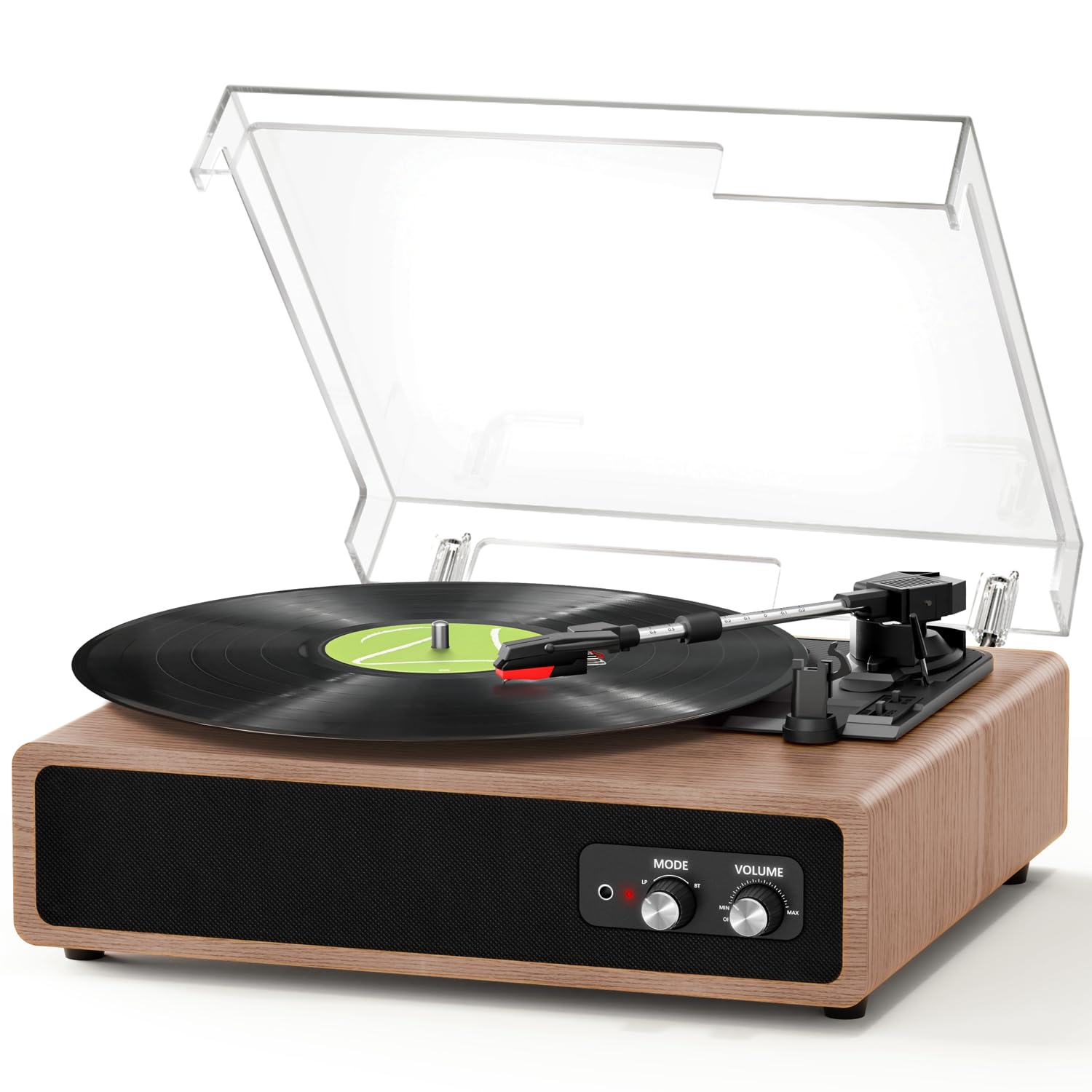
Image 6.1: Record Size Compatibility. The turntable supports 7-inch, 10-inch, and 12-inch vinyl records, with a 45 RPM adapter included for smaller records with larger center holes.
- Zapnutí: Turn the Mode/Power knob clockwise to power on the unit.
- Select LP Mode: Rotate the Mode/Power knob to the 'LP' position.
- Záznam o místě: Place a vinyl record on the platter. If playing a 7-inch record with a large center hole, place the 45 RPM adapter on the spindle first.
- Vyberte rychlost: Set the Speed selector switch to the appropriate speed (33, 45, or 78 RPM) for your record.
- Automatické zastavení: Set the Auto-stop switch to ON if you want the platter to stop automatically at the end of the record. Set to OFF for continuous play or for some records that may trigger auto-stop prematurely.
- Spustit přehrávání: Gently push the Lift Lever up to raise the tonearm. Manually move the tonearm over the desired starting groove of the record. Slowly push the Lift Lever down to lower the tonearm onto the record.
- Upravit hlasitost: Otočte knoflík hlasitosti na požadovanou úroveň poslechu.
- Ukončit přehrávání: When the record finishes (or if auto-stop is ON), gently lift the tonearm using the Lift Lever and return it to its rest.
6.2. Bluetooth Reception (Playing Music from a Mobile Device)

Image 6.2: Two-Way Bluetooth Connectivity. This image illustrates the turntable's ability to receive Bluetooth audio from a smartphone and transmit Bluetooth audio to an external speaker.
- Zapnutí: Turn the Mode/Power knob clockwise to power on the unit.
- Vyberte režim BT: Rotate the Mode/Power knob to the 'BT' position. The indicator light will flash, indicating it's in pairing mode.
- Spárovat zařízení: On your mobile device (smartphone, tablet), enable Bluetooth and search for 'FYDEE A7' (or similar). Select it to pair.
- Přehrát hudbu: Once paired, the indicator light will stop flashing. You can now play music from your mobile device through the turntable's built-in speakers.
- Upravit hlasitost: Control volume using both your mobile device and the turntable's Volume knob.
6.3. Bluetooth Transmission (Playing Turntable Audio to an External Bluetooth Speaker)

Image 6.3: Bluetooth Streaming. The turntable can stream audio from records or AUX input to a Bluetooth-enabled speaker, offering flexible listening options.
- Zapnutí: Turn the Mode/Power knob clockwise to power on the unit.
- Prepare External Speaker: Put your external Bluetooth speaker into pairing mode.
- Zahájit přenos: While in LP or AUX mode, the turntable will automatically search for nearby Bluetooth speakers. The indicator light will flash during search.
- Připojit: Once connected, the indicator light will stop flashing. Audio from the turntable will now play through the external Bluetooth speaker.
- Upravit hlasitost: Control volume primarily on your external Bluetooth speaker.
6.4. Vstup AUX
Connect an external audio device (e.g., MP3 player, smartphone) to the turntable using a 3.5mm audio cable (not included).
- Připojovací kabel: Plug one end of the 3.5mm audio cable into the AUX IN port on the turntable and the other end into the headphone jack or audio output of your external device.
- Vyberte režim AUX: Rotate the Mode/Power knob to the 'AUX' position.
- Přehrát hudbu: Start playback on your external device. Audio will play through the turntable's speakers.
- Upravit hlasitost: Control volume using both your external device and the turntable's Volume knob.
6.5. RCA výstup
Připojte gramofon k externímu amplifier or powered speakers for enhanced sound.
- Připojení kabelu RCA: Plug the RCA cable (included) into the RCA OUT ports on the back of the turntable (Red to Red, White to White).
- Připojte se k Ampživější: Connect the other end of the RCA cable to the corresponding audio input on your ampzesilovač nebo aktivní reproduktory.
- Vyberte vstup: Vyberte správný vstup na vašem amplifier/reproduktory.
- Přehrát zvuk: Play a record or use AUX/Bluetooth reception on the turntable. Audio will be routed through your external system.
- Upravit hlasitost: Control volume primarily on your external ampzesilovač nebo aktivní reproduktory.
6.6. Výstup pro sluchátka
For private listening, connect headphones to the 3.5mm headphone jack on the front of the unit.
- Připojení sluchátek: Plug your 3.5mm headphones into the headphone jack.
- Upravit hlasitost: Use the turntable's Volume knob to adjust the headphone volume.
7. Údržba
- Čištění stylusu: Use a soft brush (not included) to gently clean the stylus. Always brush from the back to the front of the stylus. Do not use liquid cleaners on the stylus.
- Čištění jednotky: Wipe the turntable's surface with a soft, dry, lint-free cloth. Do not use abrasive cleaners, waxes, or solvents.
- Péče o kryt proti prachu: The dust cover can be wiped with a soft, damp cloth. Avoid harsh chemicals that may scratch or cloud the plastic.
- Péče o záznamy: Keep your records clean and free of dust to ensure optimal sound quality and prolong stylus life. Store records vertically in their sleeves.
8. Řešení problémů
| Problém | Možná příčina | Řešení |
|---|---|---|
| Žádná síla | Napájecí adaptér není připojen nebo je vadný. | Ujistěte se, že je napájecí adaptér bezpečně připojen k jednotce a k funkční zásuvce. |
| Žádný zvuk z reproduktorů | Volume too low; incorrect mode selected; external speakers connected via RCA. | Increase volume. Ensure correct mode (LP, BT, AUX) is selected. If RCA is connected, sound will output through external speakers. |
| Přeskakující nebo zkreslený zvuk | Record is dirty or damaged; stylus is dirty or worn; tracking force incorrect; turntable not level. | Clean the record. Clean or replace the stylus. Adjust the counterweight. Place the turntable on a level surface. |
| Párování Bluetooth se nezdařilo | Gramofon není v režimu párování; zařízení je příliš daleko; rušení. | Ensure turntable is in BT mode (flashing indicator). Move device closer. Turn off other Bluetooth devices. |
| Auto-stop not working correctly | Auto-stop switch is OFF; specific record type. | Ensure Auto-stop switch is ON. Some records, especially older or very light ones, may not trigger auto-stop reliably. |
9. Specifikace
| Funkce | Specifikace |
|---|---|
| Číslo modelu | A7 |
| Značka | FYDEE |
| Rychlosti přehrávání | 33 1/3, 45, 78 ot./min |
| Typ motoru | Pohon řemenem |
| Konektivita | Bluetooth (Reception & Transmission), AUX In, RCA Out |
| Vestavěné reproduktory | Yes (2 x 3W stereo speakers) |
| Výstup pro sluchátka | 3.5mm Jack |
| Zdroj napájení | DC 5V 1A napájecí adaptér |
| Materiál | Dřevo, ABS |
| Hmotnost položky | 2.67 kg |
| Rozměry (D x Š x V) | 37.4 x 33.3 x 18.1 cm |
| Speciální funkce | Auto-stop function, Removable Dust Cover, Counterweight, Portable, Retro Design |
10. Záruka a podpora
This product comes with a standard manufacturer's warranty. For specific warranty details, please refer to the documentation provided at the time of purchase or contact your retailer. If you encounter any issues or require technical assistance, please contact FYDEE customer support through your purchase platform or the official FYDEE webmísto.