
1. Úvod
Thank you for choosing the Yunir MP3 Player. This device is designed to provide a portable and versatile music experience with its Bluetooth 5.0 connectivity, 2.4-inch TFT touch screen, and support for various audio formats. This manual will guide you through the setup, operation, and maintenance of your new MP3 player.
2. Obsah balení
Zkontrolujte prosím balení, zda neobsahuje následující položky:
- Yunir MP3 Player
- Kabelová sluchátka
- Nabíjecí kabel (USB)
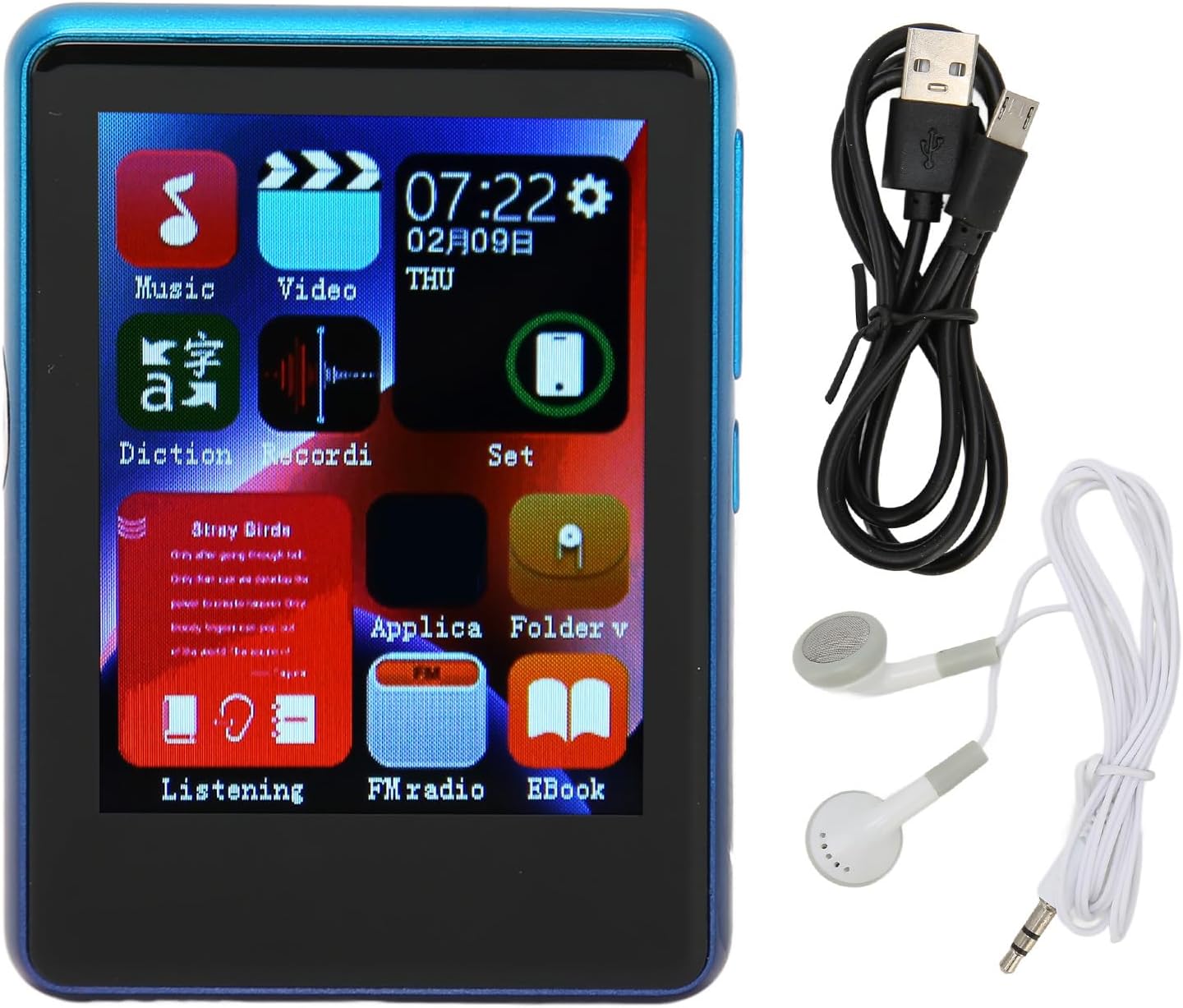
Image: The Yunir MP3 Player, accompanied by its wired headphones and USB charging cable, as included in the package.
3. Konec produktuview
3.1 Rozložení zařízení
Familiarize yourself with the buttons, ports, and screen of your MP3 player.

Image: Multiple side views of the MP3 player, highlighting the volume control buttons (+ and -) and the power button on the side.

Image: A close-up of the bottom edge of the MP3 player, displaying the speaker grille, 3.5mm headphone jack, and Micro USB charging/data port.
- 2.4palcová TFT dotyková obrazovka: Pro navigaci a interakci.
- Tlačítka hlasitosti (+/-): Upravte úroveň zvukového výstupu.
- Vypínač: Zapnutí/vypnutí zařízení nebo zamknutí/odemknutí obrazovky.
- 3.5mm konektor pro sluchátka: Připojte drátová sluchátka.
- Micro USB port: Pro nabíjení a přenos dat.
- Slot pro kartu Micro SD: Expand storage up to 256GB (card not included).
4. Nastavení
4.1 Nabíjení zařízení
- Connect the small end of the included USB charging cable to the Micro USB port on the MP3 player.
- Připojte větší konec kabelu USB k napájecímu adaptéru USB (není součástí balení) nebo k portu USB počítače.
- The device will indicate that it is charging. Allow sufficient time for a full charge before first use.
Poznámka: Ensure the charging port is clean and free of debris to prevent connection issues.
4.2 Vložení Micro SD karty
The device has 4GB of built-in memory and supports expansion up to 256GB via a Micro SD card (not included).
- Vyhledejte slot pro kartu Micro SD na boku přehrávače.
- Opatrně vložte kartu Micro SD do slotu zlatými kontakty směrem dolů, dokud nezacvakne na místo.
- Chcete-li kartu vyjmout, lehce ji zatlačte, dokud nevyskočí.
5. Návod k obsluze
5.1 Zapnutí/vypnutí
- Zapnutí: Stiskněte a podržte tlačítko Napájení, dokud se nerozsvítí obrazovka.
- Vypnutí: Stiskněte a podržte tlačítko napájení a poté na obrazovce vyberte možnost „Vypnout“.
- Uzamčení/odemknutí obrazovky: Krátkým stisknutím tlačítka napájení zamknete nebo odemknete obrazovku.
5.2 Navigace
The MP3 player features a 2.4-inch TFT touch screen for intuitive navigation. Tap icons to open applications or settings, and swipe to scroll through lists.

Image: The MP3 player's main menu interface, showing various application icons such as Music, Video, FM Radio, and EBook, indicating touch screen functionality.
5.3 Přehrávání hudby
The player supports a wide range of audio formats including MP3, APE, FLAC, WMA, WAV, and AAC, up to 24-bit quality.

Image: The MP3 player screen showing a music playback interface, with text indicating support for multiple audio formats like MP3, APE, FLAC, WMA, WAV, and AAC.
- From the main menu, tap the "Music" icon.
- Procházejte hudební knihovnu podle interpreta, alba, žánru nebo složky.
- Klepnutím na skladbu spusťte přehrávání.
- Use the on-screen controls for play/pause, skip tracks, and adjust volume.
5.4 Připojení Bluetooth
Připojte se k Bluetooth sluchátkům nebo reproduktorům pro bezdrátový zvuk.

Image: The MP3 player connected to wired headphones, illustrating its audio output capabilities, including the 3.5mm stereo line output jack for stable transmission.
- From the main menu, tap the "Set" or "Bluetooth" icon (if available).
- Zapněte Bluetooth a vyhledejte dostupná zařízení.
- Vyberte ze seznamu zařízení Bluetooth, které chcete spárovat.
- Once paired, audio will stream wirelessly to your connected device.
5.5 FM rádio
The MP3 player includes an FM radio function.
- Connect wired headphones to the 3.5mm jack; they act as the antenna.
- From the main menu, tap the "FM Radio" icon.
- Pomocí ovládacích prvků na obrazovce můžete vyhledávat stanice nebo je ladit ručně.
5.6 E-book Function
Přečtěte si text files directly on your device.
- From the main menu, tap the "EBook" icon.
- Browse for compatible text files stored on your device or Micro SD card.
- Klepněte na a file otevřít a číst.
6. File Řízení
6.1 Převod Files
- Connect the MP3 player to your computer using the USB charging cable.
- Přehrávač by se měl v počítači zobrazit jako vyměnitelná disková jednotka.
- Drag and drop music, video, or e-book files into the appropriate folders on the device's internal storage or the Micro SD card.
- Před odpojením kabelu USB bezpečně vyjměte zařízení z počítače.
7. Údržba
- Čištění: Use a soft, dry cloth to clean the screen and body of the player. Avoid liquid cleaners.
- Skladování: Přístroj skladujte na chladném a suchém místě mimo dosah přímého slunečního záření a extrémních teplot.
- Péče o baterie: Chcete-li prodloužit životnost baterie, vyvarujte se častého úplného vybíjení. Zařízení pravidelně nabíjejte, i když jej delší dobu nepoužíváte.
- Vyhněte se kapkám: Chraňte zařízení před fyzickými nárazy a pády.
8. Řešení problémů
| Problém | Možné řešení |
|---|---|
| Zařízení se nezapne. | Ujistěte se, že je baterie nabitá. Připojte ke zdroji napájení a zkuste to znovu. |
| Nelze přenést files k zařízení. | Check USB cable connection. Ensure the device is recognized by the computer. Try a different USB port or cable. |
| Ze sluchátek není slyšet žádný zvuk. | Check headphone connection. Ensure volume is not muted or too low. Test with different headphones. |
| Zařízení Bluetooth se nespáruje. | Ensure Bluetooth is enabled on both devices. Place devices close to each other. Try unpairing and re-pairing. |
| Charging port issues. | Inspect the charging port for debris or damage. Use the original charging cable. If issues persist, contact support. |
9. Specifikace
| Funkce | Detail |
|---|---|
| Název modelu | Yunirc3gg08n9f6-12 |
| Zobrazit | 2.4 Inches TFT, Touch Screen |
| Konektivita | Bluetooth 5.0, USB |
| Vnitřní paměť | 4 GB |
| Rozšiřitelná paměť | Up to 256GB (Micro SD Card) |
| Podporované zvukové formáty | MP3, APE, FLAC, WMA, WAV, AAC (up to 24-bit) |
| Speciální funkce | FM Radio, E-book Function |
| Hmotnost | 0.11 kg |
| Zahrnuté komponenty | Wired Headphone, Charging Cable |
10. Záruka a podpora
This product comes with a standard manufacturer's warranty. For detailed warranty information, please refer to the warranty card included in your package or contact your retailer.
For technical support or customer service, please contact the vendor through your purchase platform or refer to the contact information provided with the product.