
Zavedení
This manual provides detailed instructions for the safe and effective use of your Andoer Portable Digital Camera. Please read this manual thoroughly before operating the device and retain it for future reference.
Obsah balení
Ověřte, zda jsou v balení obsaženy všechny níže uvedené položky:
- 1 x Andoer Digital Camera
- Paměťová karta 1 x 32GB
- 1 x USB kabel (typu C)
- 1 x Čisticí hadřík
- 1 x šňůrka
- 1 x úložný sáček
- 1 x Uživatelská příručka
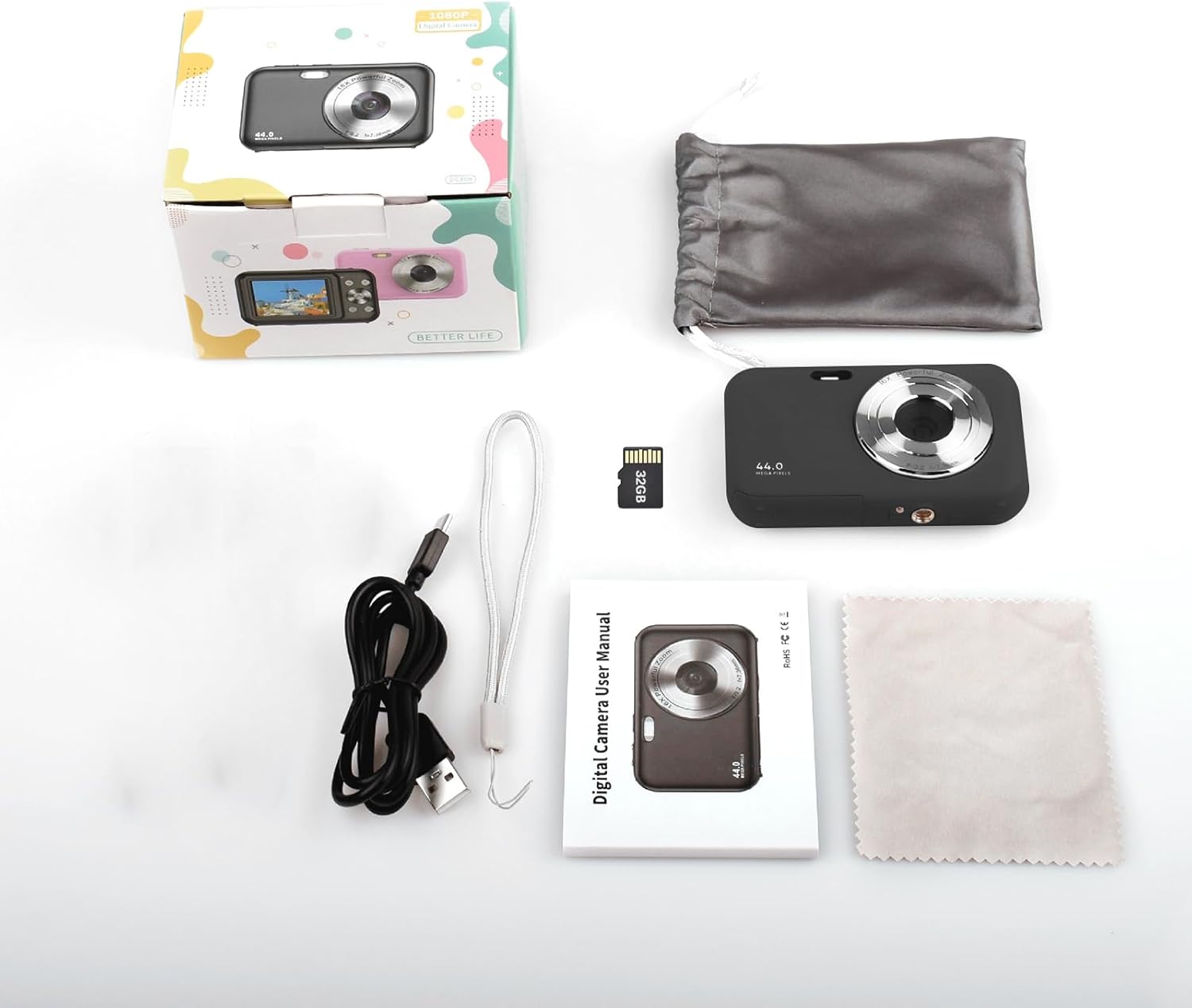
Image: Contents of the Andoer Digital Camera package.
Fotoaparát skončilview
Seznamte se s různými částmi fotoaparátu.

Image: Multi-angle view of the Andoer Digital Camera, highlighting its compact design and button layout.
- Přední: Lens, Flash, Microphone.
- Nahoře: Power Button, Shutter Button.
- Zadní: 2.4-inch IPS Screen, Navigation Buttons (Up, Down, Left, Right, OK), Menu Button, Mode Button, Zoom (W/T).
- Strana: USB Type-C Port.
- Dno: Battery/Memory Card Compartment.
Nastavení
1. Nabíjení baterie
The camera is equipped with a built-in 700mAh rechargeable lithium battery. Before first use, fully charge the battery.
- Connect the included USB Type-C cable to the camera's USB port.
- Druhý konec kabelu USB připojte k napájecímu adaptéru USB (není součástí balení) nebo k portu USB počítače.
- Rozsvítí se kontrolka nabíjení. Po dokončení nabíjení zhasne nebo změní barvu.
Poznámka: The camera can be used while charging. A full charge provides approximately 150 minutes of continuous shooting or 90 minutes of video recording.

Image: Battery life information for the 700mAh battery.
2. Vložení paměťové karty
The camera supports a 32GB memory card (included). Ensure the camera is powered off before inserting or removing the memory card.
- Locate the battery/memory card compartment cover on the bottom of the camera.
- Otevřete kryt.
- Insert the 32GB memory card into the designated slot with the metal contacts facing the correct direction (refer to the diagram inside the compartment if available) until it clicks into place.
- Bezpečně zavřete kryt přihrádky.
Důležité: Format the memory card in the camera's settings menu before first use to ensure optimal performance.
Návod k obsluze
1. Zapnutí/vypnutí
- Pro zapnutí stiskněte a podržte Tlačítko napájení on the top of the camera.
- Chcete-li přístroj vypnout, stiskněte a podržte tlačítko Tlačítko napájení again. The camera also features an auto power-off function (configurable in settings).
2. Fotografování
The camera captures photos up to 44MP resolution.
- Zapněte fotoaparát.
- Ensure the camera is in photo mode (indicated on the 2.4-inch IPS screen). If not, press the Tlačítko režimu přepnout.
- Frame your shot using the IPS screen.
- Stiskněte tlačítko Tlačítko spouště halfway down to focus, then press it fully to take the picture.

Obrázek: Přample of a high-resolution photo taken with the 44MP camera.
3. Nahrávání videí
The camera records videos in 1080P resolution.
- Zapněte fotoaparát.
- Stiskněte tlačítko Tlačítko režimu to switch to video recording mode.
- Stiskněte tlačítko Tlačítko spouště to start recording. A red indicator will typically appear on the screen.
- Stiskněte tlačítko Tlačítko spouště znovu pro zastavení nahrávání.

Image: Screen view during 1080P video recording.
4. Použití digitálního zoomu
The camera features 16X digital zoom.
- In photo or video mode, press the T (Telephoto) button přiblížit.
- Stiskněte tlačítko W (Wide-angle) button oddálit.

Image: Comparison of 1x and 16x digital zoom effects.
5. Další funkce
- Samospoušť: Set a delay (e.g., 2s, 5s, 10s) before a photo is taken. Access this option in the camera's menu.
- Souvislé fotografování: Take multiple photos in quick succession. This setting is also found in the menu.
- Anti-shaking: Digital image stabilization helps reduce blur from camera movement. This feature is typically enabled by default or can be toggled in settings.
- Přehrávání: Stiskněte tlačítko Tlačítko přehrávání (often indicated by a triangle icon) to view photos and videos. Use the navigation buttons to browse.
- Nastavení nabídky: Stiskněte tlačítko Tlačítko Menu to access various camera settings, including resolution, white balance, exposure, date/time, and formatting the memory card.
Přenos Files to a Computer or Phone
You can transfer photos and videos from the camera to a computer or a mobile phone.
1. Via USB Cable (to Computer)
- Connect the camera to your computer using the provided USB Type-C cable.
- Zapněte fotoaparát.
- The camera should appear as a removable disk or media device on your computer.
- Open the camera's folder and copy the desired files do vašeho počítače.
2. Via Memory Card Reader (to Computer/Phone)
For direct transfer from the memory card, you can use a card reader.
- Remove the memory card from the camera.
- Insert the memory card into a compatible card reader.
- Connect the card reader to your computer or mobile phone (via an OTG adapter if necessary).
- Přístup k files on the memory card and transfer them.

Image: OTG usage diagram for transferring files from memory card to phone.
Údržba
- Čištění těla fotoaparátu: K otření těla fotoaparátu použijte měkký, suchý hadřík. V případě odolných nečistot lehceampOpláchněte hadřík vodou. Vyhněte se agresivním chemikáliím.
- Čištění objektivu: Use the included cleaning cloth or a specialized lens cleaning cloth. Gently wipe the lens in a circular motion. Do not use abrasive materials.
- Péče o obrazovku: The 2.4-inch IPS screen can be cleaned with a soft, lint-free cloth. Avoid pressing too hard.
- Skladování: When not in use for extended periods, store the camera in the provided storage bag in a cool, dry place, away from direct sunlight and extreme temperatures.
- Péče o baterie: Recharge the battery regularly, even if the camera is not used frequently, to maintain battery health. Avoid fully discharging the battery for long periods.
Odstraňování problémů
| Problém | Možná příčina | Řešení |
|---|---|---|
| Fotoaparát se nezapne. | Baterie je vybitá nebo není správně vložena. | Plně nabijte baterii. Ujistěte se, že je baterie správně vložena. |
| Nelze fotografovat/nahrávat videa. | Paměťová karta je plná, není vložena nebo je poškozená. | Check memory card insertion. Delete unnecessary files or replace the card. Format the card (this will erase all data). |
| Obrázky jsou rozmazané. | Lens is dirty, insufficient light, or camera shake. | Clean the lens. Ensure adequate lighting. Hold the camera steady or enable anti-shaking. |
| Fotoaparát se zasekne nebo přestane reagovat. | Závada softwaru nebo vybitá baterie. | Remove and reinsert the battery (if possible) or press and hold the power button for 10 seconds to force a shutdown. Recharge the battery. |
| Nelze přenést filek počítači. | Nesprávné připojení USB nebo problém s ovladačem. | Ensure the USB cable is securely connected. Try a different USB port or computer. Check if the camera is recognized as a device. |
Specifikace
| Funkce | Detail |
|---|---|
| Zobrazit | 2.4 palcový displej IPS |
| Rozlišení videa | 1080P/720P/480P |
| Rozlišení obrazu | 44MP/42MP/36MP/24MP (Effective Still Resolution: 44 MP) |
| File Formát | JPG (Image), AVI (Video) |
| Elektronický zoom | 16X |
| USB port | Typ-C |
| Baterie | 3.7V/ 700mAh Rechargeable Lithium Battery |
| Ohnisková vzdálenost | f=7.36 mm |
| Otvor | F/3.2 |
| Úspora energie | Auto power off in 1Min/2Mins/3Mins/4Mins/5Mins/10Mins |
| Podporovaný systém | Windows XP, Vista, 7, 8, 10, Mac 10.2 and above |
| Kapacita paměti | 32 GB (včetně) |
| Technologie automatického ostření | Detekce kontrastu |
| Stabilizace obrazu | Digitální |
| Popis věkového rozmezí | Dítě |
Záruka a podpora
For warranty information and technical support, please refer to the contact details provided with your purchase documentation or visit the official Andoer webUschovejte si doklad o koupi pro případ reklamace.