
Zavedení
This manual provides essential information for the safe and efficient operation of your DATOUBOSS 2000W 24V Pure Sine Wave Power Inverter. Please read these instructions carefully before installation and use. Keep this manual for future reference.
Bezpečnostní opatření
- Zajistěte řádné větrání kolem měniče, aby nedošlo k přehřátí.
- Nevystavujte měnič vodě, dešti ani nadměrné vlhkosti.
- Avoid operating the inverter near flammable materials or gases.
- Měnič připojujte pouze ke zdroji napájení 24 V DC.
- Always disconnect the power source before performing any maintenance or cleaning.
- Neotevírejte měnič casing; uvnitř nejsou žádné součásti, které by mohl uživatel opravit.
- Uchovávejte mimo dosah dětí.
Konec produktuview
The DATOUBOSS 2000W 24V Pure Sine Wave Power Inverter converts 24V DC battery power to 230V AC household power, suitable for sensitive electronics. It features a continuous output of 2000W and a peak power of 4000W.
Klíčové vlastnosti
- Výstup čisté sinusové vlny: Provides clean, stable power suitable for sensitive electronics, reducing noise and energy consumption.
- Komplexní ochrana: Includes protection against reverse connection, short circuit, undervoltage, přeptage, overheating, overload, and overcurrent.
- Inteligentní chladicí ventilátor: Activates automatically when the load exceeds 40% or internal temperature reaches 45°C, ensuring efficient heat dissipation and quiet operation.
- Odolná konstrukce: Hliník casing for enhanced heat dissipation.
- Možnost dálkového ovládání: Allows for convenient power management from a distance.
Identifikace součásti

Obrázek 1: Rozložení předního a zadního panelu měniče
This image illustrates the various ports and controls on the inverter. The front panel includes AC output sockets, USB and Type-C ports, an ON/OFF switch, and an LCD display. The rear panel shows the DC input terminals (positive and negative) and cooling fans.
- AC výstupní zásuvky: Two EU standard AC 230V outlets for connecting appliances.
- USB rozhraní: Pro nabíjení zařízení napájených přes USB.
- Rozhraní typu C: For charging Type-C powered devices.
- Přepínač ON/OFF: Hlavní vypínač pro měnič.
- Připojení dálkového spínače: Port for connecting the wired remote control.
- LCD displej: Zobrazuje výstupní objemtage, power, and error codes.
- Vstupní svorky stejnosměrného proudu: Red for positive (+), Black for negative (-) connection to the 24V battery.
- Chladicí ventilátory: Two high-speed fans for thermal management.
- Zemnící terminál: Pro bezpečnostní uzemnění.

Figure 2: Inverter Dimensions and Output Waveform
This image displays the physical dimensions of the inverter (approximately 32.6cm length, 20cm width, 7.9cm height) and a graphical representation of its pure sine wave output, indicating stable and efficient power delivery.

Figure 3: Intelligent Cooling System
This image highlights the inverter's dual high-speed cooling fans and intelligent chip control, which activate based on load and temperature to maintain optimal operating conditions and ensure quiet performance.
Pokyny pro nastavení
Follow these steps to properly set up your DATOUBOSS power inverter.
1. Výběr lokality
- Umístěte střídač na suché a dobře větrané místo, mimo dosah přímého slunečního záření, zdrojů tepla a vlhkosti.
- Ensure there is sufficient space around the inverter for proper airflow, especially around the cooling fans.
- Mount the inverter securely on a stable surface using the integrated mounting brackets.
2. Connecting to a 24V DC Power Source
- Ujistěte se, že je vypínač střídače v poloze „VYPNUTO“.
- Connect the red battery cable to the positive (+) terminal of your 24V battery bank.
- Connect the other end of the red cable to the positive (+) DC input terminal on the inverter.
- Connect the black battery cable to the negative (-) terminal of your 24V battery bank.
- Connect the other end of the black cable to the negative (-) DC input terminal on the inverter.
- Ensure all connections are tight and secure to prevent loose connections and sparking.
- Connect the ground terminal of the inverter to a proper earth ground.
Důležité: Always connect the positive (+) terminals first, then the negative (-) terminals. When disconnecting, disconnect the negative (-) terminals first.
3. Connecting the Remote Control (Optional)
- If using the remote control, plug its cable into the "Remote Switch Connection" port on the inverter.
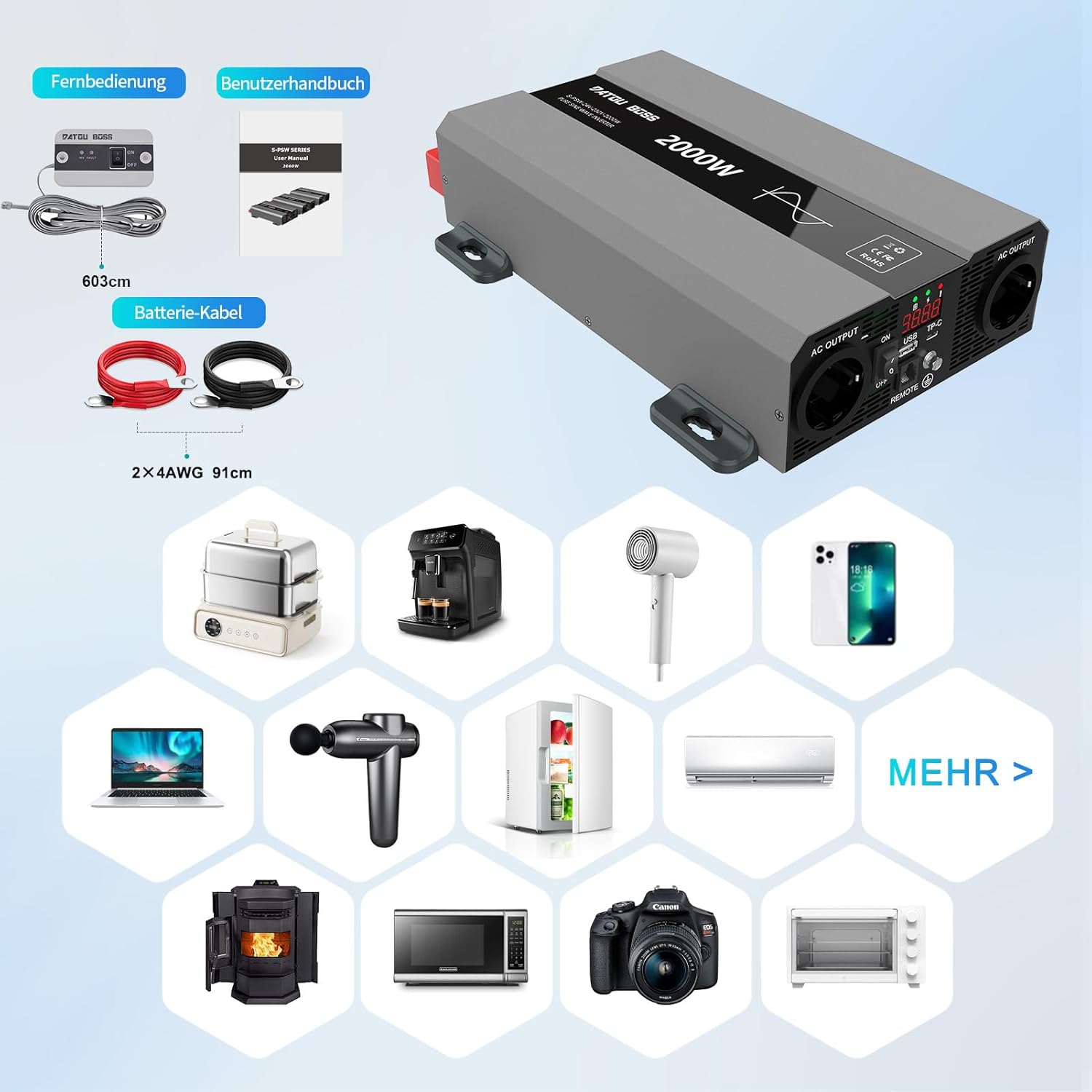
Obrázek 4: Zahrnuté součásti
This image shows the items typically included with the inverter: the inverter unit, battery connection cables (red and black), and a remote control unit with its cable. A user manual is also included.
Návod k obsluze
1. Powering On the Inverter
- After ensuring all DC connections are secure, switch the inverter's ON/OFF switch to the "ON" position.
- LCD displej se rozsvítí a zobrazí výstupní hlasitosttage a moc.
- The cooling fans may briefly spin up during startup.
2. Připojení spotřebičů střídavého proudu
- Plug your 230V AC appliances into the AC output sockets on the inverter.
- Zajistěte celkový watttage of all connected appliances does not exceed the inverter's continuous power rating (2000W).
- For inductive loads (e.g., motors, refrigerators), consider their startup surge power, which can be several times their running wattage.
3. Using USB and Type-C Ports
- Connect your USB or Type-C compatible devices to the respective ports for charging.
4. Powering Off the Inverter
- Disconnect all AC appliances from the inverter.
- Switch the inverter's ON/OFF switch to the "OFF" position.

Figure 5: Inverter in an Outdoor Application
This image demonstrates the inverter being used outdoors to power a laptop, highlighting its portability and utility for various scenarios like camping or remote work.
Údržba
Pravidelná údržba zajišťuje dlouhou životnost a optimální výkon vašeho měniče.
Čištění
- Periodically clean the exterior of the inverter with a soft, dry cloth.
- Ensure the cooling vents and fans are free from dust and debris. Use compressed air if necessary to clear blockages.
- Nepoužívejte tekuté čisticí prostředky ani rozpouštědla.
Kontrola připojení
- Regularly check all DC and AC connections for tightness and signs of corrosion.
- Loose connections can cause overheating and damage to the inverter or battery.
Skladování
- When not in use for extended periods, store the inverter in a cool, dry place.
- Ensure the battery connected to the inverter is properly maintained and charged according to its manufacturer's instructions.
Odstraňování problémů
This section addresses common issues you might encounter with your inverter. The inverter is equipped with multiple protection functions, and an alarm will sound with an LED flashing to indicate a protection state.

Obrázek 6: Funkce ochrany střídače
This diagram illustrates the internal components and various protection mechanisms of the inverter, including reverse polarity, over-temperature, overload, over-voltage, pod-voltage a ochranu proti zkratu.
| Problém | Možná příčina | Řešení |
|---|---|---|
| Žádný výstupní objemtage / Měnič se nezapíná |
|
|
| Inverter shuts down with alarm / LED flashing |
|
|
| Nízký výstupní výkon / Spotřebiče nefungují správně |
|
|
Specifikace
| Funkce | Detail |
|---|---|
| Značka | DATOUBOSS |
| Číslo modelu | SAK-2000W24V |
| Nepřetržitý výkon | 2000 wattů |
| Špičkový výkon | 4000 wattů |
| Vstupní objemtage | 24 V DC |
| Výstupní objemtage | 230 voltů AC |
| Výstupní průběh | Čistá sinusová vlna |
| Účinnost | > 95 % |
| Rozměry produktu | 32.6 l x 20 š x 7.9 v centimetrů |
| Barva | Šedá |
| Doporučená použití | Office, Home, Vehicle (RV, Camping) |
| Zahrnuté komponenty | 1 Pure Sine Wave Inverter, 2 Connection Cables, 1 Remote Control, 1 User Manual |
Informace o záruce
This product is typically covered by a return policy that allows for refund or replacement within 30 days of purchase, as per standard retail terms. For specific warranty details, including duration and coverage, please refer to the documentation provided with your purchase or contact the seller directly.
Uschovejte si doklad o koupi pro případné reklamace.
Zákaznická podpora
If you encounter any issues or have questions regarding the DATOUBOSS 2000W 24V Pure Sine Wave Power Inverter that are not covered in this manual, please contact the seller or manufacturer for assistance.
prodejce: Henan Zhongri New Energy Co., Ltd.