
Zavedení
This manual provides detailed instructions for the installation, operation, and maintenance of your DELLA 6000 BTU Window Air Conditioner. Please read this manual thoroughly before using the appliance and retain it for future reference.
Bezpečnostní informace
Při používání elektrických spotřebičů vždy dodržujte základní bezpečnostní opatření, abyste snížili riziko požáru, úrazu elektrickým proudem a zranění osob.
- Ujistěte se, že je jednotka řádně uzemněna.
- Neprovozujte jednotku s poškozeným kabelem nebo zástrčkou.
- Nevkládejte prsty ani cizí předměty do vstupu/výstupu vzduchu.
- Před čištěním nebo prováděním jakékoli údržby odpojte jednotku ze zásuvky.
- Udržujte hořlavé materiály v dostatečné vzdálenosti od jednotky.
Konec produktuview
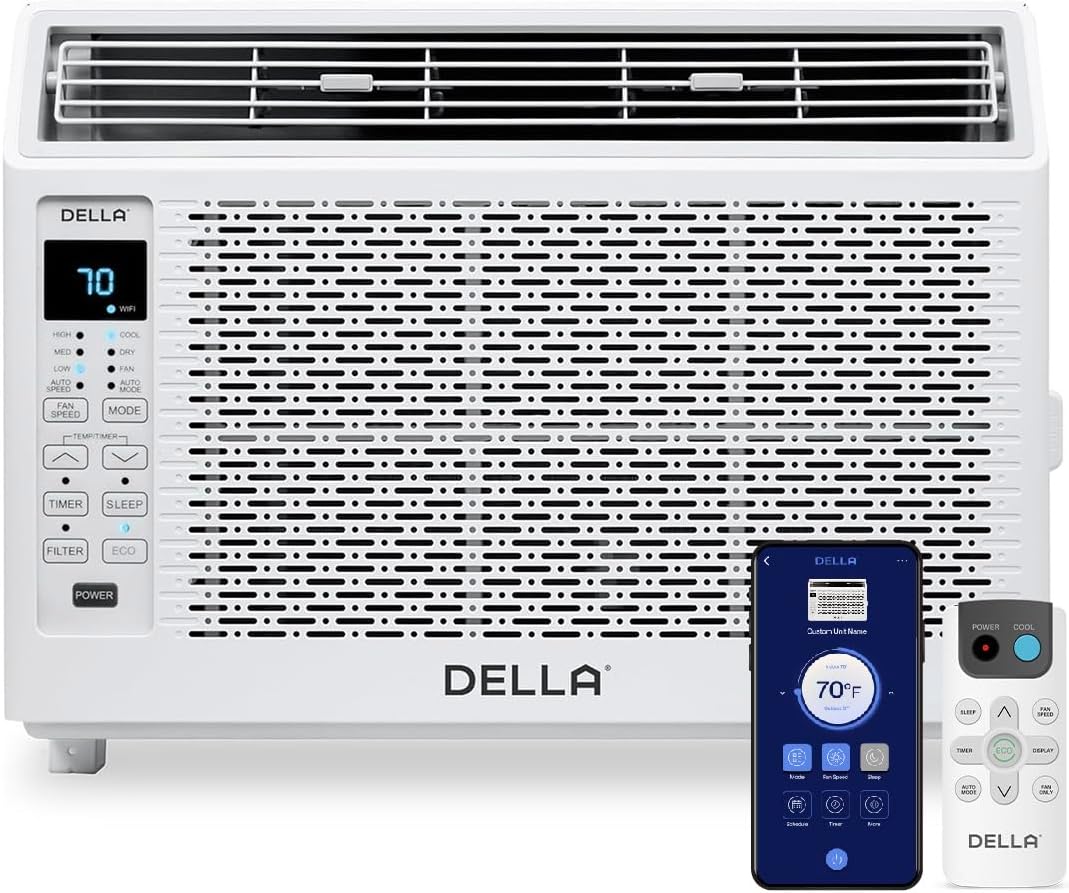
Figure 1: DELLA 6000 BTU Window Air Conditioner Unit, Remote Control, and Smartphone App Interface.
Ovládací panel
The unit features an intuitive control panel with various buttons and indicator lights for easy operation.
- Vypínač: Zapíná nebo vypíná jednotku.
- Tlačítko režimu: Cycles through Cool, Dry (Dehumidifier), Fan, Auto Mode, and ECO Mode.
- Tlačítko rychlosti ventilátoru: Adjusts fan speed (High, Med, Low, Auto Speed).
- Temp/Timer Buttons: Adjusts temperature settings or sets timer.
- Tlačítko spánku: Aktivuje režim spánku pro tichý a energeticky úsporný provoz v noci.
- Tlačítko filtru: Indikuje, kdy je třeba filtr vyčistit.
- Indikátor WiFi: Zobrazuje stav připojení k Wi-Fi.
Dálkové ovládání

Figure 2: Remote Control for the DELLA Air Conditioner.
The remote control allows for convenient operation of all unit functions from a distance. Ensure batteries are correctly installed.
Instalace
The DELLA 6000 BTU Window Air Conditioner features a T-design for simplified installation.
Kroky instalace

Figure 3: T-design installation allows for flexible window opening.

Figure 4: Simplified 3-step installation process.
- Step 1: Secure into window frame. Place the unit into the window opening, ensuring it is securely seated.
- Step 2: Mount with four screws. Fasten the unit to the window frame using the provided screws for stability.
- Step 3: Extend side panels into wall. Extend the accordion side panels to fill the gap between the unit and the window frame, providing insulation and reducing air leaks.
Součásti instalační sady

Figure 5: Included installation kit components.
The installation kit includes filler panels, insulation strips, lock frame & sash lock, screws, window sash seal, and a top mounting rail to ensure a secure and efficient installation.
Rozměry produktu

Figure 6: Unit dimensions and recommended window opening.
The unit dimensions are approximately 15.94"D x 16.02"W x 12.05"H. It is designed for window widths between 23"-34" and requires at least 14.5" vertical clearance.
Návod k obsluze
Režimy a rychlosti ventilátoru

Figure 7: Available operating modes and fan speeds.
The unit offers 5 operating modes (Cool, Auto, Dehumidify, Fan Only, ECO Mode) and 4 fan speeds (Auto, Low, Mid, High) to suit various comfort needs. Use the 'Mode' and 'Fan Speed' buttons on the control panel or remote to select your desired settings.
Regulace teploty
Use the up and down arrow buttons on the control panel or remote to set your desired temperature. The digital display will show the current setting.
Smart Features (Wi-Fi Control)

Figure 8: Control your unit wirelessly with the Della+ APP.

Figure 9: Della+ app supports Google Assistant and Alexa for voice control.
Download the free Della+ app to control your unit from anywhere. The app allows for remote control, scheduling, and integration with smart home systems like Google Assistant and Alexa.
Geo Location Function

Figure 10: Smart Geo Location feature for automatic operation.
The Geo Location feature allows the unit to automatically turn on or off based on your proximity to your home. This feature can be configured via the Della+ app.
Video 1: Demonstration of the Geo Location Function setup and customization within the Della+ app.
Režim spánku

Figure 11: Intelligent sleep mode adjusts temperature for optimal comfort.
Intelligent sleep mode automatically adjusts the temperature overnight to maintain comfort and save energy. Activate it using the 'Sleep' button.
Funkce časovače
The 24-hour auto on/off timer allows you to program the unit to turn on or off at specific times, enhancing convenience and energy efficiency.
Údržba
Opakovaně použitelné čištění filtru

Figure 12: The unit features a washable and reusable filter.
The unit is equipped with a washable and reusable filter. A clean filter helps maintain optimal cooling performance and air quality. When the 'Filter' indicator light illuminates, it's time to clean the filter.
- Vypněte a odpojte klimatizaci.
- Sejměte přední panel a vysuňte vzduchový filtr.
- Filtr umyjte teplou mýdlovou vodou. Důkladně opláchněte.
- Před opětovným vložením filtru nechte zcela vyschnout.
- Vyměňte přední panel.
Obecná péče
- Vyčistěte vnější část jednotky měkkým, damp tkanina.
- Nepoužívejte drsné chemikálie ani abrazivní čisticí prostředky.
- Ujistěte se, že je odtoková oblast bez překážek.
Odstraňování problémů
Pokud máte s klimatizací problémy, podívejte se na následující běžné problémy a jejich řešení:
| Problém | Možná příčina | Řešení |
|---|---|---|
| Jednotka se nezapne | No power; circuit breaker tripped; unit unplugged. | Zkontrolujte napájení; resetujte jistič; ujistěte se, že je zástrčka zcela zasunuta. |
| Jednotka nechladí efektivně | Dirty air filter; blocked air intake/outlet; room too large; windows/doors open. | Clean air filter; clear obstructions; ensure unit is sized correctly for room; close windows/doors. |
| Hlučný provoz | Uvolněné díly; jednotka není v rovině; ventilátor je zablokovaný. | Check for loose components; ensure unit is level; remove any fan obstructions. |
| Venku kape voda | Normální provoz (kondenzace). | This is normal during cooling. Ensure proper drainage. |
Specifikace
| Funkce | Detail |
|---|---|
| Název značky | Della |
| Informace o modelu | 048-TL-W6KWD |
| Rozměry produktu | 15.94 x 16.02 x 12.05 palce |
| Číslo modelu položky | 048-TL-W6KWD |
| Účinnost | Energeticky efektivní |
| Kapacita | 0.5 tuny |
| Hluk | 51 dB |
| Typ instalace | Okno |
| Číslo dílu | 048-TL-W6KW_2 |
| Form Factor | Okenní klimatizace |
| Speciální funkce | Dálkové ovládání |
| svtage | 115 voltů (AC) |
| Wattage | 517.5 wattů |
| Baterie jsou součástí dodávky? | Žádný |
| Podlahová plocha | 250 čtverečních stop |
| Výkon chlazení | 6000 britských tepelných jednotek |
| Hodnocení hvězdičkami BEE | Ano |
| Sezónní energetický poměr (SEER) | 11 |
| Zdroj napájení | Elektrický kabel |
Záruka a podpora
Your DELLA 6000 BTU Window Air Conditioner comes with a 1 rok záruka. For any inquiries or technical assistance, Della provides Zákaznická podpora 24/7.
Navštivte prosím Obchod Della na Amazonu pro více informací nebo kontaktujte podporu.