
HP Edge E100
Uživatelská příručka IP telefonu Poly Edge E100
Model: Edge E100
Brand: Poly (Manufactured by HP)
1. Úvod
The Poly Edge E100 IP Phone is designed to provide professional and productive communication for various office environments. This corded desktop phone offers essential features for daily use, ensuring clear audio and reliable performance. It integrates Poly's advanced noise reduction technologies, such as NoiseBlockAI and Acoustic Fence, to minimize distractions during calls. The phone is also enhanced with Microban® antimicrobial product protection for a cleaner, more durable surface.
2. Obsah balení
Verify that all items are present in your Poly Edge E100 IP Phone package:
- Poly Edge E100 IP Phone Unit
- Sluchátko
- Handset Cord (coiled)
- Ethernetový kabel
- Stolní stojan
3. Průvodce nastavením
3.1 Fyzické připojení
Follow these steps to connect your Poly Edge E100 IP Phone:
- Connect the coiled handset cord to the handset and the handset port on the phone unit.
- Connect one end of the Ethernet cable to the LAN port on the phone and the other end to a Power over Ethernet (PoE) enabled network switch or router. If PoE is not available, an optional power adapter (sold separately) will be required.
- If connecting a PC, use a second Ethernet cable to connect the PC port on the phone to your computer's network port.
- Attach the desk stand to the phone unit for desktop use, or prepare for wall mounting if desired.
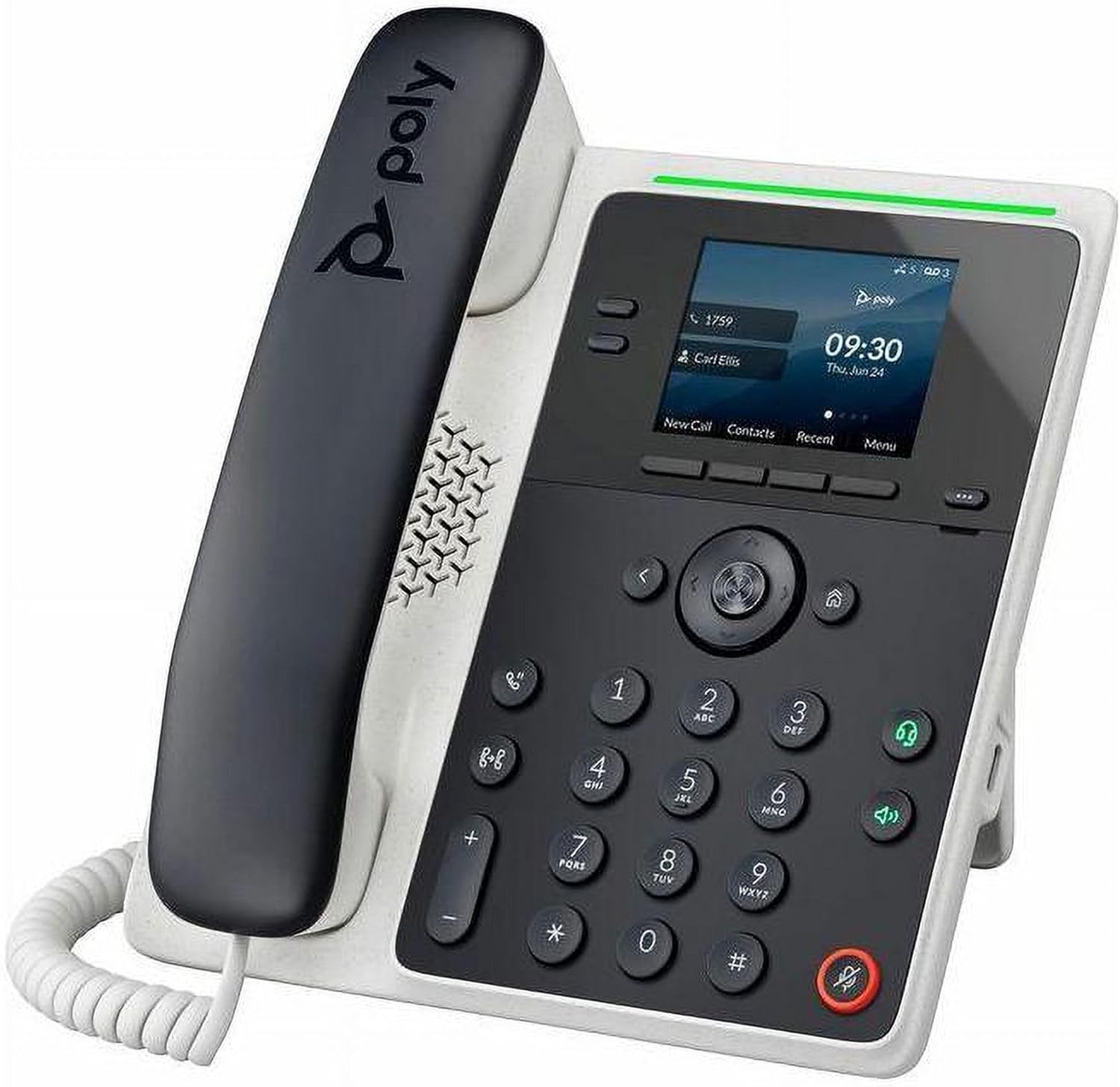
Image: The Poly Edge E100 IP Phone, showcasing its black handset, white base, 2.8-inch color display, and numeric keypad. The phone is designed for desktop use with an integrated stand.
3.2 Počáteční zapnutí
Once connected to a PoE network or an optional power adapter, the phone will automatically power on. The display will show a boot sequence, and then the main screen will appear, indicating network status and time.
4. Návod k obsluze
4.1 Základní funkce volání
- Uskutečnění hovoru: Pick up the handset or press the Speakerphone button. Dial the number using the keypad and press the 'Dial' soft key or wait for automatic dialing.
- Přijetí hovoru: Pick up the handset, press the 'Answer' soft key, or press the Speakerphone button.
- Ukončení hovoru: Zavěste sluchátko nebo stiskněte funkční tlačítko „Ukončit hovor“.
- Hlasitý telefon: Stiskněte tlačítko Hlasitý telefon button to toggle speakerphone mode on or off.
- Ztlumit: Stiskněte tlačítko Ztlumit tlačítko pro ztlumení mikrofonu během hovoru. Dalším stisknutím ztlumení zapnete.
4.2 Zobrazení a navigace
The Poly Edge E100 features a 2.8-inch color display. Navigate through menus and options using the navigation cluster and the soft keys located directly below the display. The pagination key allows you to view additional lines or contacts.
4.3 Pokročilé funkce
- Poly HD hlas: Experience high-definition audio quality for clearer conversations.
- Poly NoiseBlockAI & Acoustic Fence: These technologies actively reduce background noise and distractions, ensuring your voice is heard clearly.
- Headset Connectivity: The phone supports various headset types including USB, RJ9, and Electronic Hook Switch (EHS) for hands-free communication.
- Funkce usnadnění: Enhance user experience with features like text-to-speech, screen color adjustments for color blindness, and adjustable font settings.
5. Údržba a péče
The Poly Edge E100 IP Phone is enhanced with Microban® antimicrobial product protection, which helps keep the device cleaner and more durable by actively reducing the growth of bacteria. To maintain your phone:
- Wipe the phone's surfaces regularly with a soft, damp tkanina.
- Vyhněte se používání agresivních chemikálií, abrazivních čisticích prostředků nebo rozpouštědel.
- Keep the phone away from excessive moisture and extreme temperatures.
6. Řešení problémů
This section addresses common issues you might encounter with your Poly Edge E100 IP Phone.
| Problém | Možné řešení |
|---|---|
| Žádný oznamovací tón | Check network cable connection. Ensure the phone is receiving power (PoE or power adapter). |
| Displej je prázdný | Verify power connection. Restart the phone by disconnecting and reconnecting the network cable/power. |
| Neslyším volajícího / Volající neslyší mě | Adjust volume. Check mute status. Ensure handset or speakerphone is properly engaged. |
| Problémy s připojením k síti | Verify Ethernet cable is securely connected to both the phone and the network port. Contact your network administrator if issues persist. |
If you encounter issues not listed here or if the suggested solutions do not resolve the problem, please contact Poly technical support or your service provider.
7. Specifikace
- Model: Poly Edge E100
- Výrobce: Hewlett Packard (HP)
- Technologie připojení: Corded (Handset and Base Unit)
- IP Phone Technology: VoIP
- Porty: 2 x Network (RJ-45) with PoE support
- Zobrazit: 2.8palcový barevný displej
- Hlasitý telefon: Ano
- Rozměry (balení): 9 x 8 x 3 palce
- Hmotnost položky: 1 liber
- Montáž: Stolní, Nástěnná montáž
- Speciální vlastnosti: Poly HD Voice, Poly NoiseBlockAI, Acoustic Fence, Microban® Antimicrobial Protection, Accessibility features (text-to-speech, screen color adjustments, font settings)
8. Záruka a podpora
For information regarding the product warranty, please refer to the warranty card included with your purchase or visit the official Poly (HP) support website. Technical support and additional resources can be found on the manufacturer's website or by contacting your service provider.
Ask a question about this manual
Ask about setup, troubleshooting, compatibility, parts, safety, or missing instructions. Manuals+ will review the question and use this page’s manual context to help answer it.