
1. Úvod
This manual provides detailed instructions for the safe and effective operation of your Andoer Mini WiFi Action Camera L11. This compact digital video camera is designed for capturing high-quality 1080P video at 30 frames per second, featuring a 0.96-inch LCD screen, built-in rechargeable battery, motion detection, and versatile mounting options. Please read this manual thoroughly before using the device.
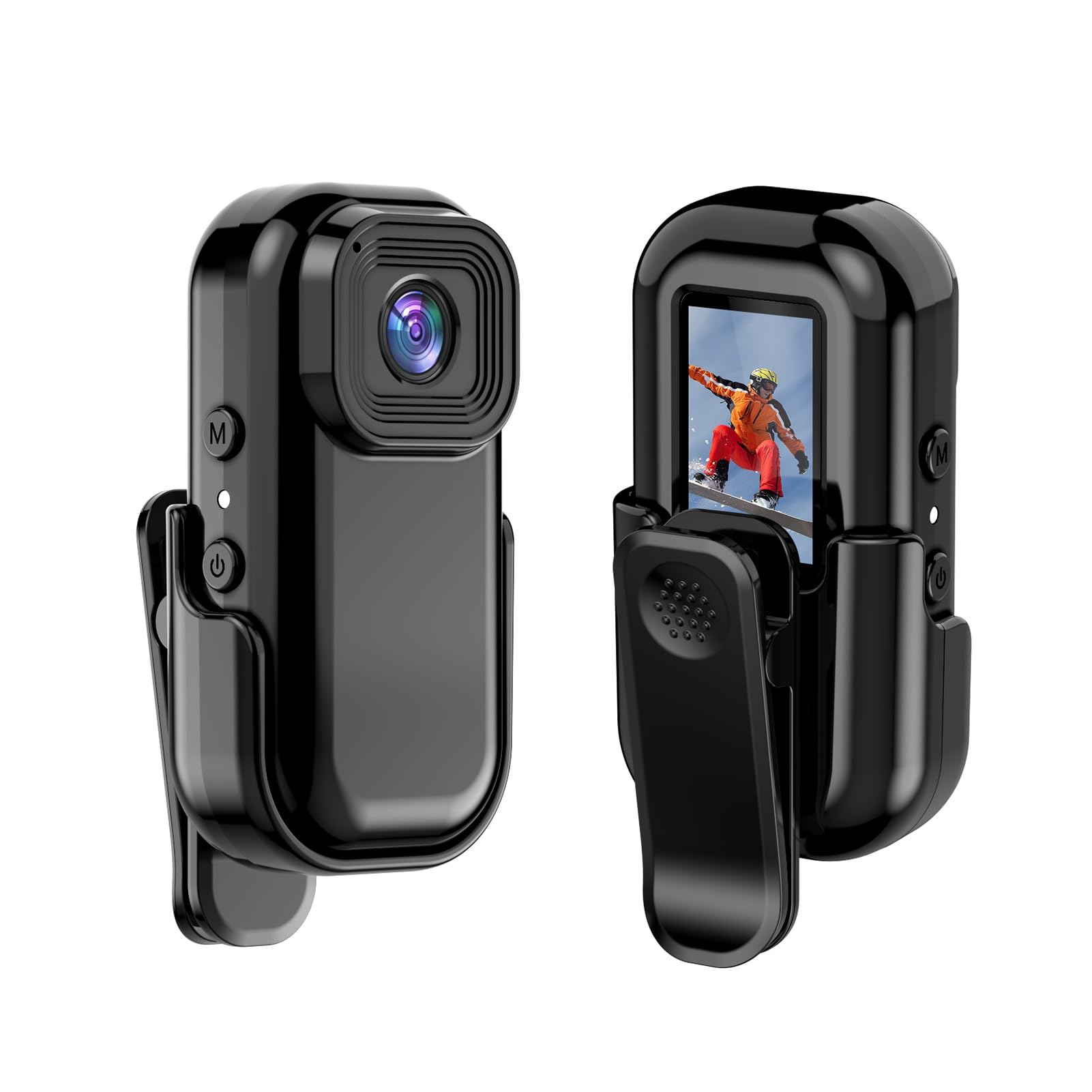
Obrázek: Přední a zadní strana view of the Andoer Mini WiFi Action Camera L11, showing the lens and the 0.96-inch LCD screen.
2. Obsah balení
Ověřte, zda jsou všechny níže uvedené položky součástí balení. Pokud některé položky chybí nebo jsou poškozené, kontaktujte zákaznickou podporu.
- 1 x Andoer Mini WiFi Action Camera L11
- 1x Ochranný kryt
- 1 x 1/4in Adapter Mount
- 1 x Back Clip Mount
- 1 x Čtečka karet
- 1 x kabel typu C
- 1 x Uživatelská příručka (tento dokument)
3. Vlastnosti produktu
- Video ve vysoké kvalitě: Records in 1080P at 30 frames per second, suitable for various applications including live broadcasting and video conferencing.
- Kompaktní a přenosné: Super mini size allows for easy portability and discreet placement.
- Magnetic Body: Features a magnetic base for secure attachment to smooth metal surfaces.
- Seamless WiFi Connectivity: Connects wirelessly to a dedicated app for live view a ovládání.
- Všestranná montáž: Includes a 1/4-inch adapter mount and a back clip mount for diverse installation options.

Obrázek: Přamples of application scenarios for the camera, including parachute jumping, cycling, parent-child activities, and skiing.

Image: The camera being used as a portable video recorder in various outdoor activities like camping, cycling, climbing, and sports.
4. Nastavení
4.1 Nabíjení baterie
Before first use, fully charge the camera's built-in 400mAh battery. Connect the provided Type-C cable to the camera's USB port and the other end to a standard USB power adapter (5V, ≥1A). The charging indicator light will typically show the charging status and turn off or change color when fully charged.
4.2 Vložení paměťové karty
The camera supports TF (Micro SD) cards up to 128GB. Ensure the card is formatted to FAT32 for optimal performance. Gently insert the TF card into the designated slot until it clicks into place. To remove, press the card in slightly until it springs out.
Note: A memory card is required for recording video and taking photos.
4.3 Zapnutí/vypnutí
- Zapnutí: Press and hold the Power button (usually marked with a power symbol) for a few seconds until the screen illuminates.
- Vypnutí: Press and hold the Power button again for a few seconds until the screen turns off.
5. Návod k obsluze
5.1 Základní obsluha
The 0.96-inch color display provides visual feedback for modes and settings. Use the navigation buttons (if present, typically 'M' for Mode and another for selection/shutter) to cycle through options and confirm selections.
5.2 Nahrávání videa
In video mode, press the Shutter/Record button to start recording. Press it again to stop. Videos are saved in AVI format at 1920x1080P resolution. The camera supports loop recording with 3-minute segments.

Image: The camera's screen displaying a family scene, indicating video recording at 1920x1080P resolution.
5.3 Fotografování
Switch to photo mode using the Mode button. Press the Shutter button to capture a still image. Photos are saved in JPG format.

Image: Icons representing photo, video, and audio recording modes, illustrating the camera's ability to capture various moments.
5.4 Detekce pohybu
The camera features motion detection capabilities. Refer to the on-screen menu or the dedicated app for instructions on how to activate and configure this feature. When enabled, the camera will automatically begin recording when motion is detected within its field of view.
6. WiFi připojení
The Andoer L11 camera supports wireless WiFi connectivity for remote control and live viewing via a smartphone application. Follow these general steps:
- Download the official Andoer camera app from your device's app store (iOS or Android).
- Power on the camera and activate its WiFi mode (refer to the camera's on-screen menu).
- On your smartphone, go to WiFi settings and connect to the camera's WiFi network (SSID and password will be displayed on the camera screen or in the app).
- Open the Andoer app. You should now see a live view from the camera and be able to control recording and settings remotely.

Obrázek: Chytrý telefon zobrazující živý přenos view from the camera, demonstrating the WiFi connectivity feature.
7. Možnosti montáže
The Andoer L11 offers flexible mounting solutions:
- Magnetický držák: The camera body has a magnetic feature, allowing it to be securely attached to smooth metal surfaces like refrigerator doors or metal poles.
- 1/4-inch Adapter Mount: Use the included 1/4-inch adapter mount to attach the camera to standard tripods, monopods, or other accessories with a 1/4-inch screw.
- Back Clip Mount: The back clip mount allows you to attach the camera to clothing, backpacks, or other thin objects for hands-free recording.
8. Údržba
- Čištění: K čištění těla fotoaparátu používejte měkký, suchý hadřík. Na objektiv použijte speciální hadřík a roztok na čištění objektivů. Nepoužívejte agresivní chemikálie.
- Skladování: Fotoaparát skladujte na chladném a suchém místě mimo dosah přímého slunečního záření a extrémních teplot.
- Péče o baterie: Pro dlouhodobé skladování nabijte baterii přibližně na 50 % každé několik měsíců, aby se zachovala její životnost.
- Aktualizace firmwaru: Check the official Andoer webPravidelně kontrolujte webové stránky, zda nejsou k dispozici aktualizace firmwaru, aby byl zajištěn optimální výkon a nové funkce.
9. Řešení problémů
| Problém | Možné řešení |
|---|---|
| Fotoaparát se nezapne. | Ujistěte se, že je baterie plně nabitá. Připojte ji ke zdroji napájení a zkuste to znovu. |
| Nelze nahrávat video/fotit. | Check if a TF card is inserted and properly formatted. Ensure there is sufficient storage space. |
| Problémy s připojením k Wi-Fi. | Ensure WiFi is enabled on the camera and your smartphone. Restart both devices. Verify the correct app is installed. |
| Špatná kvalita videa/obrázku. | Ensure the lens is clean. Check lighting conditions. Verify camera settings are correct (e.g., resolution). |
| Fotoaparát se zasekne nebo přestane reagovat. | Perform a soft reset by holding the power button until it turns off, then restart. If persistent, remove and reinsert the memory card. |
10. Specifikace
| Funkce | Detail |
|---|---|
| Typ stroje | L11 |
| Úhel objektivu | 140 stupňů |
| TFT displej | 0.96 palcový barevný displej |
| Rozlišení videa | 1920 * 1080P |
| Baterie | 400 XNUMX mAh |
| Video File Formát | AVI |
| Formát fotografie | JPG |
| Smyčka Video | 3 minut |
| Záznam File Formát | WAV (Audio) |
| Pracovní vlhkost | 30 % |
| Provozní teplota | -25 až + 75 ° C (-13 až + 167 ° F) |
| Napájení | USB svtage 5V, proud ≥1A |
| Paměťová karta | TF karta, podporuje až 128G |
| Technologie připojení | Wi-Fi |
| Form Factor | Kompaktní |
| Hmotnost položky | 4.2 unce (přibližně 119 g) |
| Rozměry balení | 3.94 x 2.36 x 1.97 palce |
11. Bezpečnostní informace
- Do not expose the camera to extreme temperatures outside the specified operating range (-25°C to +75°C).
- Avoid operating the camera in humidity levels exceeding 30%.
- Keep the device away from water and other liquids unless explicitly stated as waterproof.
- Nepokoušejte se fotoaparát rozebírat ani upravovat, mohlo by dojít ke ztrátě záruky a poškození.
- Use only the specified power supply (USB 5V, ≥1A) for charging.
- Uchovávejte mimo dosah dětí.