
Amazon Fire TV Soundbar Plus
Uživatelská příručka k Amazon Fire TV Soundbar Plus
Model: Fire TV Soundbar Plus
Značka: Amazon
1. Úvod
The Amazon Fire TV Soundbar Plus is designed to deliver a comprehensive cinematic audio experience for your home. This 5.1 channel system includes a soundbar, a wireless subwoofer, and two wireless surround sound speakers, providing immersive audio with Dolby Atmos and DTS:X support, along with crystal-clear dialogue.

Figure 1: The Amazon Fire TV Soundbar Plus system, including the soundbar, wireless subwoofer, and two wireless surround speakers.
This manual provides detailed instructions for setting up, operating, and maintaining your Fire TV Soundbar Plus system, ensuring you get the best possible audio performance.

Figure 2: The immersive sound experience provided by the Fire TV Soundbar Plus with Dolby Atmos and DTS:X.
2. Co je v krabici
Ověřte, zda jsou v balení přítomny všechny součásti:
- Fire TV Soundbar Plus
- Subwoofer
- Two Surround Speakers
- Vzdálený
- Kabel HDMI 2.0
- 4 AC Cords
- 2 AAA baterie
- Wall mount kit (soundbar only)
- Rychlý průvodce

Figure 3: All items included in the Fire TV Soundbar Plus package.
3. Specifikace
| Funkce | Detail |
|---|---|
| Velikost soundbaru (DxŠxV) | 37” x 5.2” x 2.5” |
| Hmotnost soundbaru | 8.8 liber |
| Subwoofer Size (LxWxH) | 10.4” x 10.4” x 13.4” |
| Hmotnost subwooferu | 14.3 liber |
| Surround Speaker Size (LxWxH) | 5.1” x 5.1” x 6.0” |
| Surround Speaker Weight | 2.6 lb |
| Konektivita subwooferu | Bezdrátový |
| Surround Speaker Connectivity | Bezdrátový |
| Kanály reproduktorů | 5.1 (external subwoofer and two external surround speakers) |
| Režimy EQ | Film, hudba, sport, noc |
| Podporován prostorový zvuk | Dolby Atmos, DTS:X |
| Porty | HDMI, optický, AC, USB-A |
| Podpora Bluetooth | Ano |
| Kompatibilita | Chytré televizory a televizory s přehrávači streamovaných médií |
Figure 4: Dimensions of the Fire TV Soundbar Plus components.
4. Průvodce nastavením
Follow these steps to set up your Fire TV Soundbar Plus system:
- Connect the Soundbar to your TV:
Locate the HDMI (ARC) port on your TV. Connect one end of the included HDMI 2.0 cable to the HDMI (ARC) port on the soundbar and the other end to the HDMI (ARC) port on your TV. This connection enables audio return channel functionality, allowing your TV to send audio to the soundbar.

Figure 5: Rear ports of the Fire TV Soundbar Plus, highlighting the HDMI (ARC) port.
- Power On Components:
Plug the AC power cords into the soundbar, subwoofer, and each of the two surround speakers, then plug them into a power outlet. The subwoofer and surround speakers are designed to connect wirelessly to the soundbar automatically once powered on. A white light on these speakers indicates a successful connection.
- Nastavení zvuku televizoru:
Ensure your TV's audio output is set to the HDMI (ARC) port. You may need to enable HDMI-CEC (Consumer Electronics Control) or ARC functionality in your TV's settings for proper operation and remote control integration.
- Úvodní zvuková zkouška:
Play some audio content on your TV to confirm sound is coming from the soundbar system. The system should be ready for use.
5. Návod k obsluze
The Fire TV Soundbar Plus offers various features to enhance your audio experience:
- Dálkové ovládání: Use the included remote control or your TV's remote (if HDMI-CEC is enabled) to adjust volume. The soundbar's remote also features dedicated buttons for dialogue enhancement, bass, and treble adjustments. Pressing these buttons will audibly indicate the current level (e.g., "Dialogue Level 3"). The soundbar's indicator lights will also show the level, with nine levels being the maximum.
- Režimy EQ: Optimize your audio for different content types using the EQ modes:
- Režim filmu: Vylepšuje filmové zvukové efekty a dialogy.
- Hudební režim: Poskytuje vyvážený zvuk pro přehrávání hudby.
- Sportovní režim: Optimizes audio for sports broadcasts, often emphasizing commentary.
- Noční režim: Snižuje dynamický rozsah, aby se zabránilo náhlým hlasitým zvukům, ideální pro pozdní noční poslech viewIng.
- Bluetooth streamování: Connect your mobile device or tablet via Bluetooth to stream audio directly to the soundbar.
- Povolte na svém mobilním zařízení Bluetooth.
- Select the Fire TV Soundbar Plus from the list of available devices.
- Once paired, you can play music or podcasts from your device through the soundbar system.
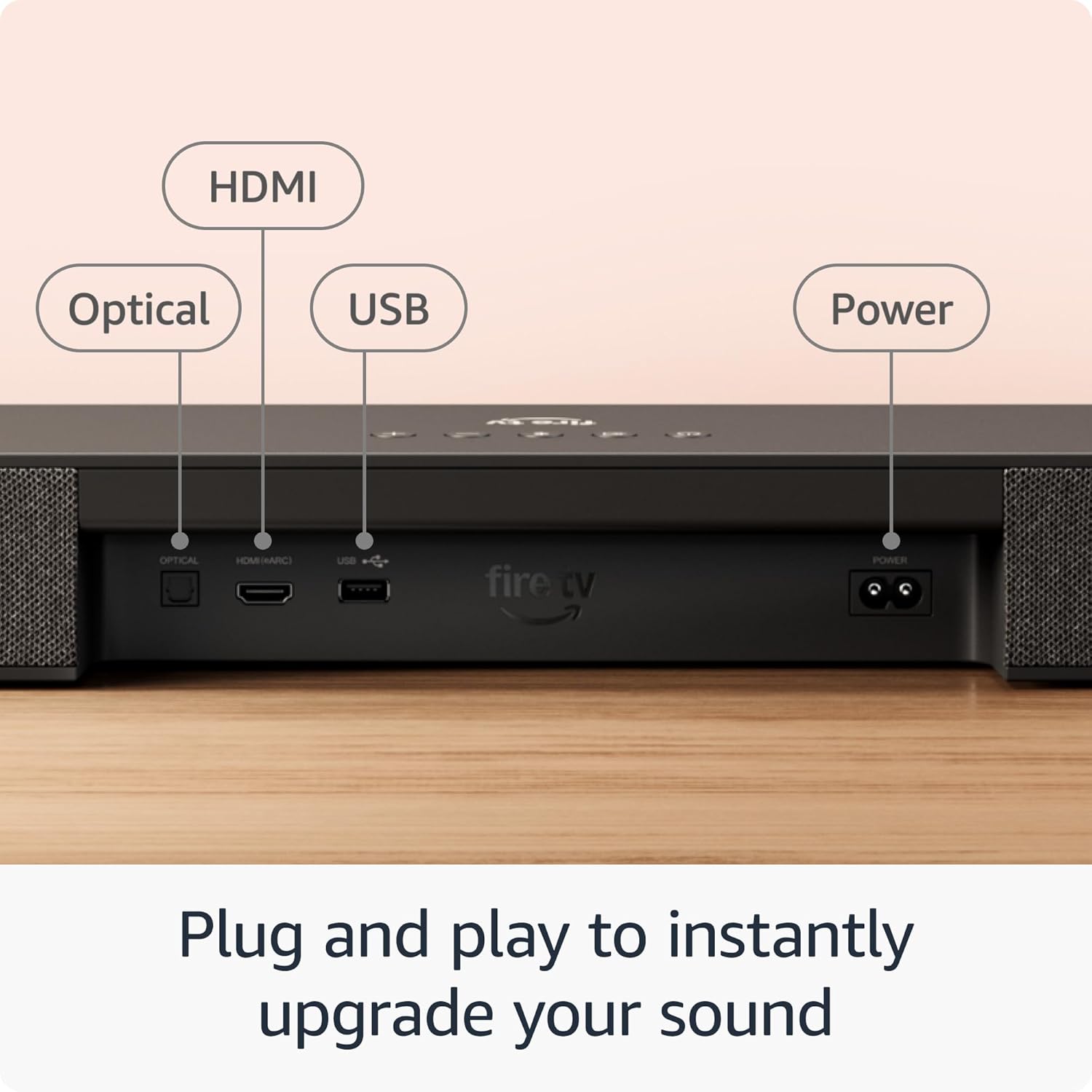
Figure 6: Streaming audio via Bluetooth to the Fire TV Soundbar Plus.
6. Údržba
To ensure the longevity and optimal performance of your Fire TV Soundbar Plus system, follow these simple maintenance guidelines:
- Čištění: Use a soft, dry, lint-free cloth to clean the surfaces of the soundbar, subwoofer, and surround speakers. Do not use liquid cleaners, aerosols, or abrasive solvents, as they may damage the finish or internal components.
- Umístění: Ensure the components are placed in a well-ventilated area, away from direct sunlight, heat sources, and excessive moisture. Avoid placing the subwoofer directly against a wall or in a corner if possible, as this can affect bass performance.
- Moc: Pokud systém nebudete delší dobu používat, odpojte napájecí kabely ze zásuvky.
7. Řešení problémů
If you encounter issues with your Fire TV Soundbar Plus, refer to the following common problems and solutions:
| Problém | Možná příčina / řešení |
|---|---|
| Žádný zvuk ze soundbaru. |
|
| Subwoofer or surround speakers are not producing sound. |
|
| Špatná kvalita zvuku nebo zkreslení. |
|
| Zařízení Bluetooth se nemůže připojit. |
|
8. Záruka a podpora
Informace o záruce:
The Amazon Fire TV Soundbar Plus comes with a 1-year limited warranty and service included. Optional 1-Year, 2-Year, and 3-Year extended warranties are available for U.S. customers and are sold separately. Use of the Fire TV Soundbar Plus is subject to the terms provided by Amazon.
Zákaznická podpora:
Pro další pomoc, technickou podporu nebo reklamace navštivte oficiální podporu Amazonu. website or contact Amazon customer service directly. You can find detailed support information and contact options on the Amazon webwebu v sekcích „Nápověda“ nebo „Zákaznický servis“.
Související dokumenty - Fire TV Soundbar Plus
 |
Amazon Fire TV Soundbar Plus: Průvodce nastavením, funkcemi a řešením problémů Komplexní průvodce pro soundbar Amazon Fire TV Soundbar Plus, který zahrnuje nastavení, možnosti připojení (HDMI, optické, Bluetooth), nastavení zvuku, LED indikátory, párování subwooferu a pokyny k montáži na zeď. Obsahuje tipy pro řešení problémů. |
 |
Amazon Fire TV Soundbar Plus Quick Start Guide A comprehensive guide to setting up and using your Amazon Fire TV Soundbar Plus, covering connections, audio configurations, and wall mounting instructions. |
 |
Amazon Fire TV Soundbar Plus: Průvodce nastavením a funkce Naučte se, jak nastavit, připojit a optimalizovat soundbar Amazon Fire TV Soundbar Plus. Tato příručka se zabývá funkcemi dálkového ovládání, nastavením zvuku, LED indikátory a montáží na zeď. |
 |
Fire TV Stick 4K Max (2e génération) : Spécifications Techniques et Caractéristiques Informations détaillées sur le Fire TV Stick 4K Max (2e génération), incluant ses spécifications techniques, compatibilité TV, fonctionnalités d'accessibilité, et contenu de la boîte. |
 |
Stručný průvodce Amazon Fire TV Stick 4K Learn how to set up and connect your Amazon Fire TV Stick 4K and Alexa Voice Remote with this quick start guide. Includes setup instructions, remote pairing, and device connection. |
 |
Stručný průvodce spuštěním Amazon Fire HD 10 A quick start guide for the Amazon Fire HD 10 tablet, covering what's in the box, device overview, and getting started instructions. |
Ask a question about this manual
Ask about setup, troubleshooting, compatibility, parts, safety, or missing instructions. Manuals+ will review the question and use this page’s manual context to help answer it.