
Zavedení
This manual provides essential instructions for setting up, operating, maintaining, and troubleshooting your HP ProOne 245 G10 All-in-One PC. Please read this guide thoroughly to ensure proper use and to maximize the performance and longevity of your device. The HP ProOne 245 G10 is designed for efficiency and reliability, featuring an AMD Ryzen 3 7320U processor, 8GB DDR5 RAM, a 512GB SSD, and a 23.8-inch LED display running Windows 11 Home.
1. Nastavení
1.1 Unpacking the PC
Opatrně vyjměte všechny součásti z obalu. Ujistěte se, že jsou přítomny následující položky:
- HP ProOne 245 G10 All-in-One PC
- Napájecí adaptér a kabel
- Kabelová klávesnice
- Wired Mouse
- Dokumentace (tato příručka, informace o záruce)

Obrázek 1: Přední view of the HP ProOne 245 G10 All-in-One PC, showing the integrated display, webcam, and connected wired keyboard and mouse.
1.2 Připojení periferních zařízení
- Připojení klávesnice: Plug the USB connector of the keyboard into an available USB port on the back of the PC.
- Připojte myš: Plug the USB connector of the mouse into another available USB port on the back of the PC.
- Připojte napájení: Connect the power cable to the power adapter, then plug the adapter into the PC's power input port. Finally, plug the power cable into a wall outlet.
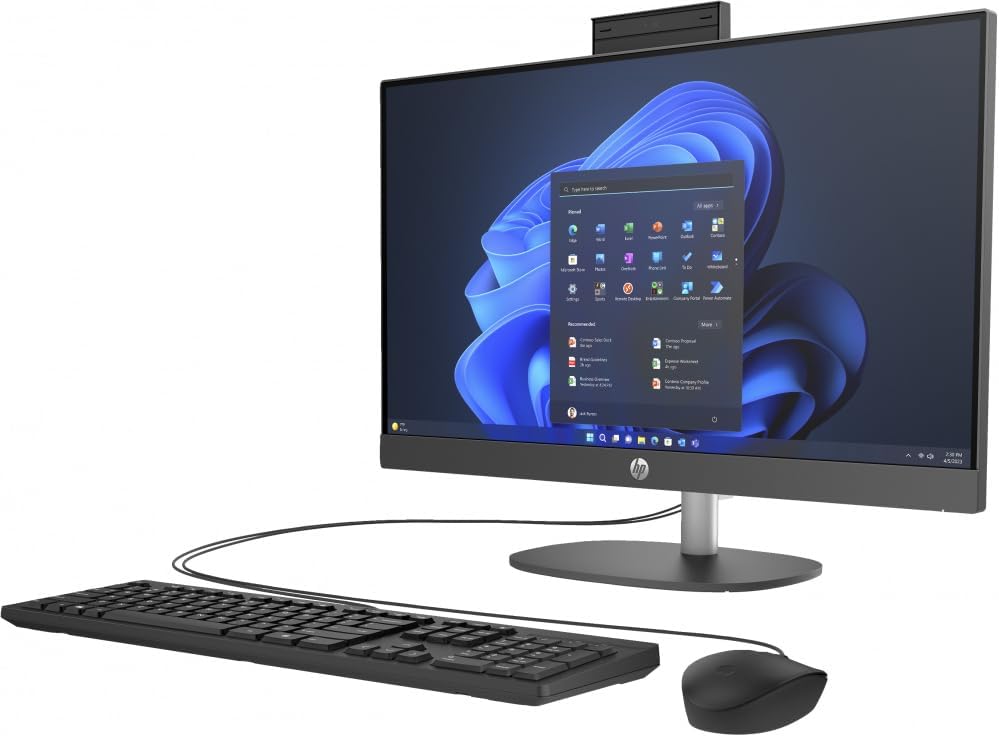
Obrázek 2: Úhlové view of the HP ProOne 245 G10 All-in-One PC, illustrating the side profile a možnosti připojení.
1.3 Počáteční spuštění
Press the power button, usually located on the side or bottom bezel of the display. The PC will power on, and the HP logo will appear. Follow the on-screen instructions to complete the Windows 11 Home setup process, which includes selecting your region, language, and creating a user account.
2. Návod k obsluze
2.1 Basic Navigation (Windows 11)
The HP ProOne 245 G10 runs on Windows 11 Home. Familiarize yourself with the Start Menu (center of the taskbar), Taskbar, and File Explorer for managing applications and files.
2.2 Připojení k Wi-Fi
- Klikněte na Síť icon (Wi-Fi or Ethernet) on the right side of the Taskbar.
- Ze seznamu vyberte požadovanou síť Wi-Fi.
- Klikněte Připojit a v případě potřeby zadejte bezpečnostní klíč sítě (heslo).
2.3 Používání USB portů
Your PC includes USB 2.0 and USB 3.0 ports for connecting external devices such as USB drives, printers, and other peripherals. USB 3.0 ports offer faster data transfer speeds.
2.4 Úprava nastavení zobrazení
To adjust brightness, resolution, or multiple display settings:
- Klikněte pravým tlačítkem myši na prázdné místo na ploše a vyberte Nastavení displeje.
- From here, you can modify various display options to suit your preferences.
3. Údržba
3.1 Čištění počítače
- Obrazovka: Použijte měkký hadřík, který nepouští vlákna dampvodou nebo čističem obrazovek. Nestříkejte tekutinu přímo na obrazovku.
- Podvozek: Vnější povrchy otřete měkkým, suchým hadříkem. Nepoužívejte abrazivní čisticí prostředky.
- Průduchy: Pravidelně čistěte prach z větracích otvorů stlačeným vzduchem, abyste zajistili správné proudění vzduchu a zabránili přehřátí.
3.2 Aktualizace softwaru
Regularly update your Windows operating system and drivers to ensure optimal performance and security. Go to Nastavení > Aktualizace systému Windows pro kontrolu a instalaci aktualizací.
3.3 Zálohování dat
Doporučuje se pravidelně zálohovat důležitá data na externí disk nebo cloudové úložiště, abyste předešli jejich ztrátě.
4. Řešení problémů
| Problém | Možné řešení |
|---|---|
| Počítač se nezapne. | Ensure the power cable is securely connected to the PC and the wall outlet. Test the outlet with another device. |
| Žádné zobrazení na obrazovce. | Check power connection. Ensure the PC is powered on. If an external monitor is connected, ensure it's on and correctly configured. |
| Klávesnice nebo myš nereaguje. | Verify USB connections. Try plugging them into different USB ports. Restart the PC. |
| Pomalý výkon. | Close unnecessary applications. Check for background updates. Run a disk cleanup. Ensure sufficient free space on the SSD. |
V případě složitějších problémů se obraťte na podporu HP webnebo kontaktujte zákaznický servis.
5. Specifikace
| Funkce | Detail |
|---|---|
| Model | HP ProOne 245 G10 (9P7K6LA) |
| Procesor | AMD Ryzen 3 7320U (až 4.1 GHz) |
| Paměť | 8GB DDR5 RAM |
| Skladování | 512GB SSD |
| Zobrazit | 23.8palcová LED |
| Grafika | Grafická karta AMD Radeon (integrovaná) |
| Operační systém | Windows 11 Home (64bitový) |
| USB porty | 1x USB 2.0, 1x USB 3.0 |
| Rozměry (hloubka x šířka x výška) | 45.6 x 17.6 x 63.5 cm |
| Hmotnost | 11 kg |
6. Záruka a podpora
Your HP ProOne 245 G10 PC comes with a standard manufacturer's warranty. For detailed information regarding warranty terms and conditions, please refer to the warranty document included with your product or visit the official HP support webmísto.
Zdroje podpory HP:
- Online podpora: support.hp.com
- Ovladače a software: Download the latest drivers and software for your device.
- Průvodci řešením problémů: Access a knowledge base for common issues and solutions.
- Kontaktujte podporu: Find contact information for technical assistance.
Please have your product model number (9P7K6LA) and serial number ready when contacting support.