
Zavedení
Thank you for choosing the MARVO Monka Contra PS4 Wireless Game Controller. This manual provides detailed instructions for setting up, operating, and maintaining your new controller. Please read this manual carefully before use to ensure optimal performance and longevity of your device. Keep this manual for future reference.
Obsah balení
- MARVO Monka Contra PS4 Wireless Game Controller
- USB nabíjecí kabel
- Uživatelská příručka (tento dokument)
Konec produktuview
The MARVO Monka Contra controller is designed for an immersive gaming experience on your PlayStation 4. It features a wireless connection, ergonomic design for comfortable extended play, and responsive controls for precise input.

Obrázek 1: Přední strana view of the MARVO Monka Contra PS4 Wireless Game Controller. This image displays the layout of the dual analog sticks, directional pad, action buttons (Triangle, Circle, Cross, Square), Share, Options, Home, and Turbo buttons, as well as the central touch pad and light bar.
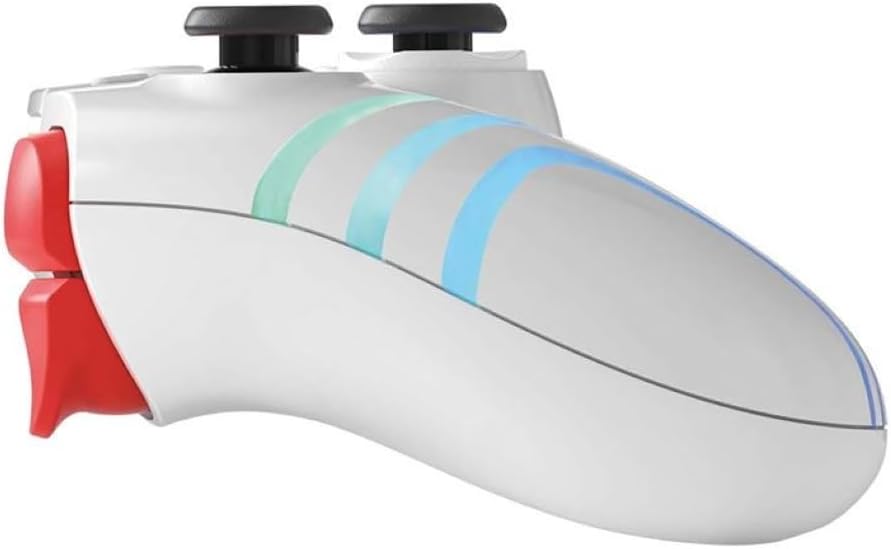
Obrázek 2: Strana view of the MARVO Monka Contra PS4 Wireless Game Controller. This image illustrates the ergonomic curvature of the controller's handles and the placement of the L1, L2, R1, and R2 shoulder/trigger buttons.
Rozložení ovladače:
- Levá analogová páčka: Ovládání pohybu a kamery.
- Pravá analogová páčka: Ovládání a zaměřování kamery.
- Směrový ovladač (D-Pad): Menu navigation and specific game actions.
- Akční tlačítka (trojúhelník, kruh, kříž, čtverec): In-game actions.
- Tlačítko SDÍLET: Sdílejte herní momenty.
- Tlačítko MOŽNOSTI: Přístup k herním menu nebo pozastavení.
- PS Button (HOME): Access the PS4 system menu.
- Tlačítko TURBO: Activates turbo function for assigned buttons.
- Touch Pad: Interactive input for compatible games.
- Tlačítka L1/R1: Ramenní knoflíky pro různé úkony.
- Spouštěče L2/R2: Analog triggers for precise input.
- Reproduktor: In-game audio output.
- Jack pro sluchátka: Connect a compatible headset.
- USB port: Charging and wired connection.
Nastavení
Počáteční nabíjení:
Before first use, fully charge the controller. Connect the supplied USB charging cable to the controller's USB port and the other end to a powered USB port on your PS4 console or a USB wall adapter (not included). The light bar on the controller will slowly flash orange while charging and turn off when fully charged.
Spárování s PS4:
- Ujistěte se, že je vaše konzole PS4 zapnutá.
- Connect the controller to the PS4 console using the supplied USB charging cable.
- Stiskněte tlačítko PS Button (HOME) on the controller. The controller will power on and automatically pair with the console.
- Once paired, you can disconnect the USB cable to use the controller wirelessly. The light bar will glow a solid color (e.g., blue for Player 1) indicating a successful connection.
- To pair additional controllers, repeat steps 2-4 for each controller.
Note: If the controller does not pair, ensure the PS4 system software is up to date.
Návod k obsluze
Zapnutí/vypnutí:
- Zapnutí: Stiskněte tlačítko PS Button (HOME).
- Vypnutí: Podržte PS Button (HOME) for approximately 10 seconds until the light bar turns off, or select "Power Off Controller" from the PS4 Quick Menu.
Funkce Turbo:
The Turbo function allows a button to be repeatedly pressed automatically as long as it is held down, which can be useful in certain games.
- Stiskněte a podržte Tlačítko TURBO.
- Při držení TURBO, press the action button (e.g., Cross, Circle, Square, Triangle, L1, R1, L2, R2) you wish to assign the turbo function to.
- Release both buttons. The assigned button will now activate the turbo function when pressed.
- To disable turbo for a specific button, repeat steps 1-2.
- To clear all turbo settings, hold the Tlačítko TURBO a stiskněte tlačítko Tlačítko SDÍLET zároveň.
Připojení sluchátek:
Connect a compatible 3.5mm headset to the headset jack on the bottom of the controller for in-game audio and voice chat.
Nabíjení
The controller contains a built-in rechargeable battery. When the battery level is low, the light bar may flash or change color to indicate low power.
- Connect the controller to your PS4 console or a USB wall adapter using the provided USB cable.
- The light bar will slowly flash orange during charging.
- The light bar will turn off when the controller is fully charged.
- Charging time may vary depending on the power source and remaining battery level.
Údržba
- Čištění: K čištění ovladače používejte měkký, suchý hadřík. Nepoužívejte agresivní chemikálie ani abrazivní materiály.
- Skladování: Regulátor skladujte na chladném a suchém místě mimo dosah přímého slunečního záření a extrémních teplot.
- Péče o baterie: Chcete-li prodloužit životnost baterie, vyvarujte se častého úplného vybíjení ovladače. Pravidelně jej nabíjejte, i když jej delší dobu nepoužíváte.
- Vyhněte se kapkám: Chraňte ovladač před pády a nárazy, které by mohly poškodit vnitřní součásti.
Odstraňování problémů
| Problém | Řešení |
|---|---|
| Ovladač se nezapne. | Ensure the controller is charged. Connect it to the PS4 with the USB cable and press the PS Button. |
| Controller does not connect to PS4 wirelessly. |
|
| Tlačítka nebo analogové páčky nereagují. |
|
| Ovladač se často odpojuje. |
|
Specifikace
- Model: Monka Contra
- Konektivita: Wireless (Bluetooth), Wired (USB)
- Kompatibilita: PlayStation 4
- Baterie: Vestavěná dobíjecí lithium-iontová
- Rozměry: Přibližně 17.4 x 17.2 x 7.6 cm
- Hmotnost: Přibližně 460 g
Záruka a podpora
MARVO products are designed for reliability and performance. For warranty information or technical support, please refer to the warranty card included with your product or visit the official MARVO webstránky. Uschovejte si prosím doklad o koupi pro případ reklamace.
For further assistance, contact MARVO customer support through their official channels.