
1. Úvod
This manual provides instructions for the safe and effective use of your TORRAS COOLIFY Cyber Alpha Thermochromic Limited Edition Neck Air Conditioner. This device is designed to provide personal cooling and heating through advanced thermoelectric cooling (TEC) modules and airflow systems. Please read this manual thoroughly before operating the device and retain it for future reference.
2. Bezpečnostní informace
- Neponořujte zařízení do vody nebo jiných kapalin.
- Chraňte zařízení před extrémními teplotami, přímým slunečním zářením a vysokou vlhkostí.
- Do not attempt to disassemble, repair, or modify the device. Contact authorized service personnel for assistance.
- Use only the provided charging cable and a compatible power adapter (20W fast charging recommended).
- Uchovávejte mimo dosah dětí a domácích zvířat.
- Avoid prolonged direct contact with the cooling/heating plates on bare skin to prevent discomfort or skin irritation, especially for individuals with sensitive skin or circulatory issues.
- Ensure hair is clear of the air vents to prevent tangling.
3. Obsah balení
Ověřte, zda jsou v balení přítomny všechny položky:
- TORRAS COOLIFY Cyber Alpha Neck Air Conditioner
- Nabíjecí kabel USB-C
- Uživatelská příručka
4. Konec produktuview
The COOLIFY Cyber Alpha features a wearable design with integrated cooling and heating elements, along with multiple air vents for comprehensive temperature control. The device includes a thermochromic semiconductor that changes color based on temperature.

Obrázek: Přední a zadní strana view of the TORRAS COOLIFY Cyber Alpha Neck Air Conditioner, showcasing its ergonomic design and vent placement.

Obrázek: Side profile of the COOLIFY Cyber Alpha, highlighting the stainless steel painted finish and integrated components.
Klíčové komponenty:
- Thermoelectric Cooling (TEC) Modules: Three modules covering a 14,975mm² cooling area, with 366 cooling particles, providing cooling and heating.
- Větrací otvory: Six upper and two lower air vents create a 3D convection system for enhanced airflow.
- Ovládací tlačítka: Located on the device for power, mode selection, and fan speed adjustment.
- Displej: Shows current mode, temperature, and battery status.
- Nabíjecí port USB-C: Pro dobíjení interní baterie.
- Thermochromic Semiconductor: Changes color (Blue below 87°F, Orange above 87°F) to indicate temperature.
5. Nastavení
5.1 Nabíjení zařízení
- Připojte dodaný nabíjecí kabel USB-C k nabíjecímu portu na zařízení.
- Connect the other end of the cable to a 20W fast charging power adapter (not included) or a compatible USB power source.
- The display will indicate charging status. A full charge ensures optimal performance. The 6000mAh battery can charge to 80% in approximately 1.2 hours.
- Zařízení lze používat během nabíjení.
5.2 Počáteční nastavení a seřízení
The COOLIFY Cyber Alpha features an ErgoFit design with an adjustable angle (approximately 75°) to accommodate various neck sizes. Gently adjust the device to ensure a comfortable and secure fit around your neck.

Image: Two individuals wearing the COOLIFY Cyber Alpha, demonstrating its ergonomic fit and how the airflow is directed around the neck.
5.3 Připojení aplikace (volitelné)
For advanced control and personalized settings, download the official TORRAS COOLIFY app from your device's app store. Follow the in-app instructions to pair your COOLIFY Cyber Alpha via Bluetooth.
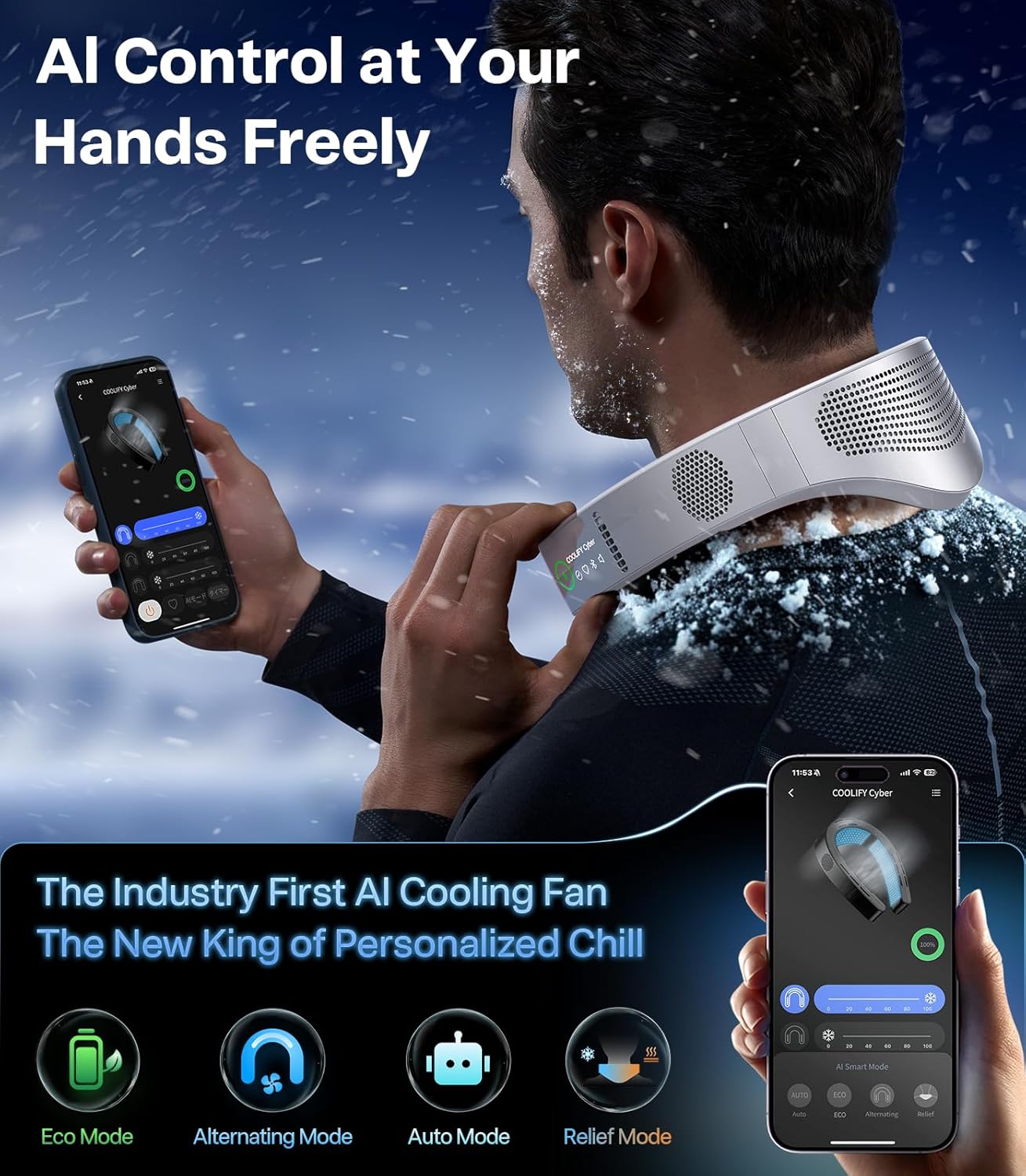
Image: A smartphone screen showing the TORRAS COOLIFY app interface, illustrating the AI control options for the neck air conditioner.
6. Návod k obsluze
6.1 Zapnutí/vypnutí
Press and hold the power button (usually located on the side of the device) for a few seconds to turn the device on or off. The display will illuminate upon activation.
6.2 Výběr režimu
The COOLIFY Cyber Alpha offers multiple operating modes:
- Chladicí režim: Activates the TEC modules and fans to provide a cooling sensation. The thermochromic semiconductor will shift to blue below 87°F.
- Heat Therapy Mode: Activates the TEC modules to provide warmth. The thermochromic semiconductor will shift to orange above 87°F.
- Režim ventilátoru: Operates only the fans to circulate ambient air without active cooling or heating.
Cycle through modes by pressing the mode button (refer to the device's physical buttons for exact layout).

Image: Close-up of the thermochromic semiconductor, illustrating its color-shifting capability from orange (heat) to blue (cool) based on temperature changes.
6.3 Fan Speed/Intensity Adjustment
Adjust the fan speed or cooling/heating intensity by pressing the dedicated control buttons on the device. Multiple levels are available to suit personal preference.

Image: A diagram illustrating the extensive cooling area (14,975mm²) and the distribution of 366 cooling particles within the device, contributing to its cooling efficiency.
6.4 AI Control and Smart Modes (via App)
When connected to the app, you can access additional AI-powered modes:
- Eko režim: Optimizes settings for energy efficiency while maintaining comfort.
- Střídavý režim: Alternates cooling zones and adjusts intensity to prevent numbness and provide consistent refreshment.
- Automatický režim: Intelligently senses ambient temperature and adjusts cooling or heating automatically for optimal comfort.
- Relief Mode: Enhances blood circulation through hot and cold exchange.

Image: A person wearing the COOLIFY Cyber Alpha, with visual effects depicting immersive cooling airflow around the neck and upper body.
7. Údržba
7.1 Čištění
- Otřete zařízení měkkým suchým hadříkem.
- Nepoužívejte abrazivní čisticí prostředky, rozpouštědla ani agresivní chemikálie.
- Ensure the air vents are free from dust and debris. Use a soft brush or compressed air if necessary.
7.2 Skladování
When not in use for extended periods, store the device in a cool, dry place, away from direct sunlight and extreme temperatures. Ensure the device is fully charged before storing to prolong battery life.
8. Řešení problémů
- Zařízení se nezapne: Ujistěte se, že je zařízení nabité. Připojte jej ke zdroji napájení a zkuste to znovu.
- No cooling/heating effect: Check if the correct mode is selected. Ensure the device is properly positioned on the neck. If using in very high ambient temperatures, the cooling effect may be less noticeable.
- Špatné proudění vzduchu: Check if the air vents are obstructed. Clean any dust or debris.
- Problémy s připojením aplikace: Ensure Bluetooth is enabled on your smartphone and the device is within range. Restart both the device and the app.
- Device feels too tight: Gently adjust the flexible arms of the device to achieve a more comfortable fit.
9. Specifikace
| Funkce | Specifikace |
|---|---|
| Rozměry produktu | 10 x 8.2 x 3.9 palců (10"H x 8.2"Š x 3.9"V) |
| Hmotnost položky | 3.16 libry |
| Číslo modelu položky | TORRAS COOLIFY Cyber Alpha |
| Baterie | Vyžadovány 2 lithium -polymerové baterie (součástí balení) |
| Kapacita baterie | 6000 XNUMX mAh |
| Form Factor | Wearable Neck |
| Výkon chlazení | 18000 britských tepelných jednotek |
| Speciální funkce | Programovatelné |
| Barva | Nerez |
| Zdroj napájení | Napájení z baterie |
| Kontrolní metoda | Dotyk, Aplikace |
10. Záruka a podpora
TORRAS provides a 1-year full coverage warranty for the COOLIFY Cyber Alpha, ensuring peace of mind and free replacement service for manufacturing defects or malfunctions under normal use. This product is designed for long-term use.
Jak kontaktovat podporu:
For any inquiries, technical assistance, or warranty claims, please contact TORRAS customer support through the following methods:
- Přejděte do historie objednávek.
- Select the order for your COOLIFY Cyber Alpha.
- Click on "Problems with orders" or "Contact the seller".
- Submit your question or issue.
A 24/7 expert team is available to provide fast and friendly support, with replies typically within 12 hours.
Připomenutí: If you receive a product that is not new (e.g., unsealed plastic bag, used product) or has weak cooling, low airflow, or fails to charge, please contact support promptly for replacement.