
Zavedení
Thank you for choosing the Thunderobot K87 Wired Mechanical Keyboard. This manual provides essential information for the proper setup, operation, maintenance, and troubleshooting of your new keyboard. Please read this manual thoroughly before using the product to ensure optimal performance and longevity.

Obrázek 1: Úhlové view of the Thunderobot K87 Mechanical Keyboard.
Nastavení
Obsah balení
Než budete pokračovat, ověřte si prosím, zda váš balíček obsahuje následující položky:
- Thunderobot K87 Wired Mechanical Keyboard
- USB kabel
- Uživatelská příručka (tento dokument)
Připojení klávesnice
- Unpack the Thunderobot K87 keyboard and the included USB cable.
- Connect the USB-C end of the cable to the port located on the keyboard.
- Připojte konec kabelu USB-A k volnému portu USB v počítači.
- Klávesnici váš operační systém automaticky rozpozná. Pro základní funkce obvykle nejsou vyžadovány žádné další ovladače.

Obrázek 2: Spodní část view of the keyboard, illustrating adjustable feet and cable management options.
Návod k obsluze
Základní funkce
The Thunderobot K87 is a standard 87-key (TKL) layout mechanical keyboard. Simply plug it into your computer, and it is ready for typing. The keyboard features Red mechanical switches, known for their linear feel and quiet operation, making them suitable for both typing and gaming.
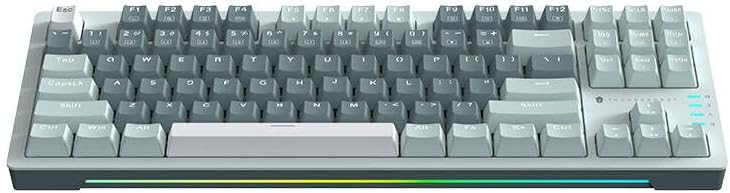
Obrázek 3: Shora dolů view of the Thunderobot K87 keyboard layout.
Multimediální a funkční klávesy
The keyboard includes a Function (Fn) key, typically located near the right Alt key. This key, when pressed in combination with the F1-F12 keys, activates various multimedia and system functions. Refer to the keycap legends for specific functions.
- Fn + F1–F12: Typically control media playback, volume, and other system shortcuts.
- Fn + klávesa Windows: Zamkne/odemkne klávesu Windows, aby se zabránilo nechtěnému stisknutí během hraní.
Ovládání podsvícení
The Thunderobot K87 keyboard features customizable RGB backlighting. Specific key combinations allow you to change lighting modes, brightness, and speed. Consult the keyboard's keycap legends or the manufacturer's website for detailed instructions on lighting customization.

Obrázek 4: Přední strana view showing the RGB lighting strip.

Obrázek 5: Boční profíkfile view demonstrating keycap height and keyboard angle.
Údržba
Čištění klávesnice
Pravidelné čištění pomáhá udržovat vzhled a funkčnost klávesnice.
- Odpojit: Před čištěním vždy odpojte klávesnici od počítače.
- Odstranění prachu: Pomocí stlačeného vzduchu odfoukněte prach a nečistoty z prostoru mezi klávesami.
- Čištění povrchu: Jemně otřete klávesy a povrch klávesnice měkkým hadříkem, který nepouští vlákna, lehceampOpláchněte vodou nebo jemným, neabrazivním čisticím roztokem. Zabraňte nadměrné vlhkosti.
- Vyhněte se: Do not use harsh chemicals, solvents, or abrasive materials, as these can damage the keyboard's finish or keycap legends.
Skladování
When not in use for extended periods, store the keyboard in a dry, cool place away from direct sunlight and extreme temperatures. Consider covering it to prevent dust accumulation.
Odstraňování problémů
If you encounter issues with your Thunderobot K87 keyboard, please refer to the following common solutions:
| Problém | Možná příčina | Řešení |
|---|---|---|
| Klávesnice nereaguje | Volné USB připojení, vadný USB port, problém s ovladačem. | Ujistěte se, že je kabel USB bezpečně připojen. Zkuste jiný port USB na počítači. Restartujte počítač. |
| Nefungují konkrétní klávesy | Nečistoty pod krytkou kláves, porucha spínače. | Use compressed air to clear debris. If the issue persists, contact customer support. |
| Podsvícení nefunguje nebo je nesprávné | Lighting mode disabled, software conflict. | Check keyboard's lighting control key combinations (Fn + specific keys). Ensure no conflicting software is running. |
| Keyboard input lag | USB port issues, system performance. | Try a different USB port. Close unnecessary background applications. |
If the problem persists after trying these solutions, please contact Thunderobot customer support for further assistance.
Specifikace
| Funkce | Detail |
|---|---|
| Číslo modelu | JM03NQ002 |
| Značka | Thunderobot |
| Konektivita | Kabelové (USB) |
| Typ přepínače | Červené mechanické spínače |
| Rozložení | 87-key (Tenkeyless) |
| Podsvícení | RGB |
| Výrobce | Thunderobot |
| ASIN | B0CWS77B83 |
| Záruka | 2 let výrobce |
Informace o záruce
The Thunderobot K87 Wired Mechanical Keyboard (Model JM03NQ002) comes with a 2letá záruka výrobce from the date of purchase. This warranty covers defects in materials and workmanship under normal use. It does not cover damage caused by accident, misuse, abuse, neglect, unauthorized modification, or improper installation.
To claim warranty service, please retain your proof of purchase. For detailed warranty terms and conditions, or to initiate a warranty claim, please contact Thunderobot customer support.
Podpora
For technical assistance, product inquiries, or warranty claims, please visit the official Thunderobot website or contact their customer support team. Please have your product model number (JM03NQ002) and proof of purchase ready when seeking support.
Official Thunderobot Webmísto: www.thunderobot.com (Poznámka: Toto je zástupný symbol URL protože žádná konkrétní podpora URL was provided in the product data. Refer to your product packaging or official Thunderobot documentation for the correct support contact information.)