
N35
N35 LED Display Low Latency Wireless Earphone TWS 5.3 User Manual
Model: N35
1. Úvod
This manual provides detailed instructions for the safe and effective use of your N35 LED Display Low Latency Wireless Earphone TWS 5.3. Please read this manual thoroughly before using the product and retain it for future reference.
The N35 earbuds are designed to deliver a seamless and immersive audio experience with features such as low latency technology, intuitive touch controls, and an LED display for battery status and connectivity.
2. Bezpečnostní informace
- Nevystavujte sluchátka ani nabíjecí pouzdro extrémním teplotám, vlhkosti nebo kapalinám.
- Zabraňte pádu, nárazům nebo rozebírání zařízení.
- Používejte pouze dodaný nabíjecí kabel a kompatibilní napájecí adaptér.
- Dlouhodobé vystavení vysokým úrovním hlasitosti může způsobit poškození sluchu. Upravte hlasitost na bezpečnou úroveň.
- Uchovávejte mimo dosah dětí a domácích zvířat.
- Clean the earbuds and charging case with a soft, dry cloth.
3. Obsah balení
Zkontrolujte prosím balení, zda neobsahuje následující položky:
- N35 Wireless Earbuds (Left and Right)
- Nabíjecí pouzdro
- USB nabíjecí kabel
- Uživatelská příručka
4. Konec produktuview
Familiarize yourself with the components of your N35 earbuds and charging case.
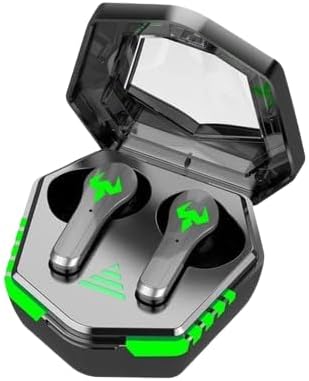
Figure 4.1: N35 Earbuds and Charging Case. The earbuds feature a sleek design with green accents, housed within a transparent-lidded charging case that displays battery status.
4.1 Sluchátka do uší
- Oblast dotykového ovládání: Pro správu přehrávání, hovorů a režimů.
- LED indikátor: Zobrazuje stav párování a úroveň nabití baterie.
- Mikrofon: Pro hlasové hovory.
- Kontakty pro nabíjení: Připojuje se k nabíjecímu pouzdru.
4.2 Nabíjecí pouzdro
- LED displej: Indicates charging status and battery level of the case and individual earbuds.
- Nabíjecí port: USB port pro nabíjení pouzdra.
- Sloty pro sluchátka: Bezpečně drží a nabíjí sluchátka.
5. Nastavení
5.1 Počáteční nabíjení
Před prvním použitím sluchátka a nabíjecí pouzdro plně nabijte.
- Vložte obě sluchátka do nabíjecího pouzdra.
- Připojte nabíjecí kabel USB k nabíjecímu portu na pouzdře a ke zdroji napájení (např. USB port počítače, adaptér do zásuvky).
- The LED display on the case will show the charging progress. A full charge typically takes 1-2 hours.
- Once fully charged, the LED display will indicate a full battery.

Figure 5.1: Charging the N35 Earbuds. The image suggests the earbuds' long battery life, suitable for extended use with devices like laptops and smartphones.
5.2 Spárování se zařízením
The earbuds will automatically enter pairing mode when taken out of the case.
- Otevřete nabíjecí pouzdro a vyjměte obě sluchátka. Sluchátka se automaticky zapnou a pokusí se o vzájemné spárování.
- Na svém zařízení (chytrý telefon, tablet, počítač) povolte Bluetooth.
- Hledat available Bluetooth devices. You should see "N35" or a similar name in the list.
- Select "N35" to connect. Once connected, the earbud LED indicators will turn off or flash slowly, and you may hear a confirmation tone.
- Pokud se párování nezdaří, vložte sluchátka zpět do pouzdra, zavřete víko, počkejte několik sekund a poté kroky opakujte.
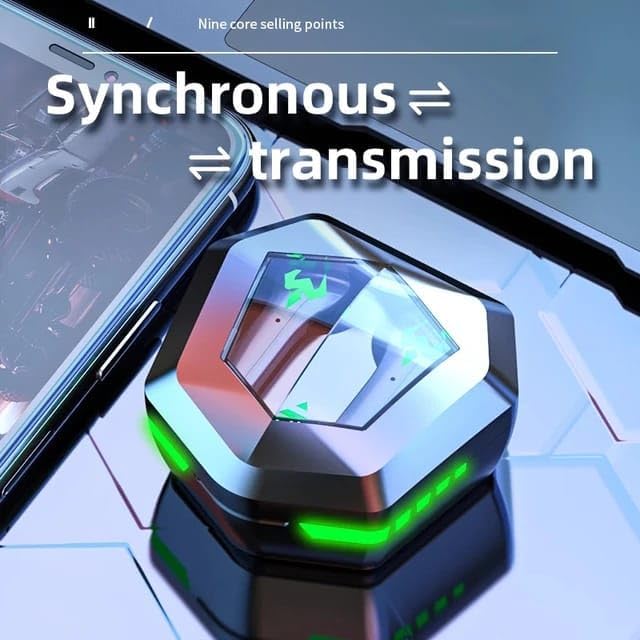
Figure 5.2: Synchronous Transmission. The closed case indicates the earbuds are ready for seamless connection and audio transmission.
6. Návod k obsluze
6.1 Dotykové ovládání
The N35 earbuds feature intuitive touch controls on each earbud. The functions may vary slightly depending on the specific model variant.
| Akce | Funkce |
|---|---|
| Jednoduché klepnutí (L/R) | Přehrát/Pozastavit hudbu, Přijmout/Ukončit hovor |
| Dvojité klepnutí (L) | Předchozí stopa |
| Dvojité klepnutí (R) | Další stopa |
| Trojité klepnutí (L/R) | Aktivujte hlasového asistenta |
| Dlouhé stisknutí (2 s) (L/P) | Odmítnout hovor |
| Dlouhé stisknutí (3 s) (L/P) | Přepnout herní/hudební režim |
6.2 Music/Game Dual Mode
The N35 earbuds support a dual mode for optimized audio experience, switching between music and gaming modes.

Figure 6.1: Music/Game Dual Mode. This image emphasizes the low latency and high sound quality for both music listening and gaming.
- Hudební režim: Provides balanced audio for general listening.
- Herní režim: Snižuje latenci zvuku pro synchronizovanější herní zážitek.
- To switch modes, perform a long press (3 seconds) on either earbud's touch control area. You will hear an audible prompt indicating the mode change.

Figure 6.2: Bluetooth 5.2 Chip. This image showcases the advanced Bluetooth technology within the earbud, contributing to its low latency performance.
7. Údržba
7.1 Čištění
- Regularly clean the earbuds and charging case to ensure optimal performance and hygiene.
- Use a soft, dry, lint-free cloth to wipe the surfaces of the earbuds and case.
- For earwax or debris in the earbud tips, use a small, soft brush or cotton swab. Do not use sharp objects.
- Nepoužívejte abrazivní čisticí prostředky, alkohol ani chemická rozpouštědla.
7.2 Skladování
- Pokud sluchátka nepoužíváte, uložte je do nabíjecího pouzdra, aby byla chráněna a zůstávala nabitá.
- Přístroj skladujte na chladném a suchém místě, mimo dosah přímého slunečního záření a extrémních teplot.
8. Řešení problémů
| Problém | Možné řešení |
|---|---|
| Sluchátka se nespárují se zařízením | Ensure Bluetooth is enabled on your device. Place earbuds back in case, close lid, then reopen and try pairing again. Forget "N35" from your device's Bluetooth list and re-pair. |
| Funkční pouze jedno sluchátko | Ensure both earbuds are charged. Place both earbuds back in the case, close the lid, then reopen. This often re-syncs them. |
| Žádný zvuk nebo nízká hlasitost | Check volume levels on both the earbuds and your connected device. Ensure earbuds are properly seated in your ears. Clean earbud tips if necessary. |
| Nabíjecí pouzdro se nenabíjí | Check the USB cable and power adapter. Ensure the charging cable is securely connected to both the case and the power source. |
| Dotykové ovládání nereaguje | Ujistěte se, že máte čisté a suché prsty. Zkuste sluchátka restartovat tak, že je vložíte do pouzdra a znovu je vyjmete. |

Figure 8.1: Clear Call Performance. The image highlights the earbuds' capability for clear communication, even in potentially noisy environments.
9. Specifikace
| Funkce | Detail |
|---|---|
| Název modelu | N35 |
| Technologie připojení | Bezdrátové připojení (Bluetooth 5.3) |
| Kontrola hluku | Aktivní potlačení hluku |
| Umístění uší | V uchu |
| Kontrolní metoda | Dotek |
| Materiál | Plast |
| Úroveň odolnosti proti vodě | Vodotěsný |
| Impedance | 8 Ohmy |
| Barva | Černý |
10. Záruka a podpora
Informace o záruce a technickou podporu získáte na kontaktních údajích uvedených při nákupu nebo na oficiálních webových stránkách výrobce. webmísto.
Uschovejte si prosím doklad o koupi pro uplatnění záruky.
Ask a question about this manual
Ask about setup, troubleshooting, compatibility, parts, safety, or missing instructions. Manuals+ will review the question and use this page’s manual context to help answer it.