
OMTech SH-G570
Návod k obsluze pro laserový gravírovací stroj OMTech 100W CO2 (model SH-G570)
Komplexní průvodce nastavením, provozem a údržbou.
1. Úvod
This manual provides essential information for the safe and efficient operation of your OMTech 100W CO2 Laser Engraver, Model SH-G570. Please read this manual thoroughly before operating the machine to ensure proper usage and to prevent damage or injury.
The OMTech 100W CO2 Laser Engraver is designed for precision cutting and engraving of various non-metallic materials such as acrylic, wood, and glass. It features a 20x28 inch work area, 4-way pass-through, integrated air assist, and a water pump for cooling.
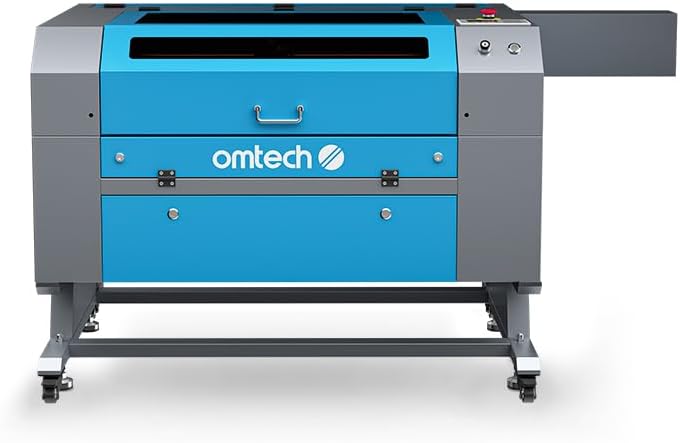
Obrázek 1.1: Přední strana view of the OMTech 100W CO2 Laser Engraver.
2. Bezpečnostní informace
Operating a laser engraver involves inherent risks. Adhere to all safety precautions to prevent accidents and ensure safe operation.
- Laserové záření: This is a Class 2 laser product with 0.827 mW output power. Never look directly into the laser beam or its reflection. Always use appropriate laser safety eyewear.
- Větrání: Ensure adequate ventilation to remove smoke and fumes generated during laser processing. The integrated air assist system helps, but additional room ventilation may be required.
- Nebezpečí požáru: Certain materials can ignite during laser processing. Never leave the machine unattended during operation. Keep a fire extinguisher nearby.
- Elektrická bezpečnost: Ujistěte se, že je stroj řádně uzemněn. Neobsluhujte ho s mokrýma rukama nebo vamp podmínky. Před prováděním jakékoli údržby odpojte napájení.
- Chladicí systém: The water pump maintains the laser tube's temperature. Ensure the water level is adequate and the pump is functioning correctly before operation.
- Viewing Window: The flame-retardant viewing window allows for safe observation of the engraving process.
- Nouzové zastavení: Seznamte se s umístěním a obsluhou tlačítka nouzového zastavení.
- Ochrana heslem: Utilize the machine's password protection feature to prevent unauthorized use.

Image 2.1: The flame-retardant viewing window allows for safe observation of the engraving process.
3. Nastavení
3.1 Vybalení a umístění
- Carefully remove the laser engraver from its packaging.
- Place the machine on a stable, level surface capable of supporting its weight (251 lb). Ensure sufficient space around the machine for ventilation and access.
- Install the included wheels for mobility, if desired.
3.2 Připojení komponent
- Připojení napájení: Connect the power cable to a grounded electrical outlet.
- Vodní čerpadlo: Connect the water pump to the laser cooling system as per the diagram provided in the quick start guide. Ensure the water reservoir is filled with distilled water.
- Vzduchová asistence: Connect the air assist hose. This system helps clear debris and smoke from the engraving area.
- Výfukový systém: Connect the exhaust fan and ducts to properly vent fumes outside.
- Datové připojení: Connect the machine to your computer using a USB cable or Ethernet cable. Alternatively, use a USB flash drive for offline operation.

Obrázek 3.1: Konecview of included components for setup, such as the exhaust system and cables.
4. Návod k obsluze
4.1 Zapnutí a úvodní kontroly
- Ensure all connections are secure and the water pump is running.
- Zapněte hlavní vypínač.
- The control panel will illuminate. Enter your password if prompted.
4.2 Umístění materiálu a zaostřování
- Place your material on the honeycomb workbed.
- For this manual focus model, adjust the workbed height or laser head manually to achieve the optimal focal distance. Refer to the quick start guide for specific instructions on manual focusing.
- Utilize the 4-way pass-through doors for oversized materials. The front-rear pass-through supports materials up to 31.5" x 3.94", and left-right supports up to 19.69" x 0.79".

Image 4.1: Laser head positioned over material on the honeycomb workbed.
4.3 Software a příprava úlohy
The OMTech 100W CO2 Laser Engraver is compatible with various software, including LightBurn, CorelDRAW, and AutoCAD. Prepare your design file in your preferred software.
- Import your design into the laser control software.
- Set appropriate power and speed settings for your material. The machine supports engraving speeds up to 600 mm/s.
- Use the "Frame" function on the control panel to preview the job area and ensure correct material placement.

Image 4.2: The machine's control panel for operation and settings.
4.4 Zahájení procesu gravírování/řezání
- Once settings are confirmed, send the job to the laser engraver.
- Press the "Start/Pause" button on the control panel to begin the process.
- Monitor the process through the flame-retardant viewing okno.
- In case of an emergency, press the emergency stop button immediately.

Image 4.3: The laser engraver actively processing a design on wood.
5. Údržba
Pravidelná údržba zajišťuje optimální výkon a prodlužuje životnost vašeho laserového gravírovacího stroje.
- Čištění optiky: Regularly clean the laser lenses and mirrors to maintain engraving quality. Refer to the detailed cleaning instructions in the full manual.
- Systém vodního chlazení: Check and maintain the water level in the cooling system. Replace the water periodically (e.g., every 1-2 months) with distilled water to prevent algae growth and mineral buildup.
- Čištění pracovní desky: Clean the honeycomb workbed regularly to remove debris and residue. The anti-scorch plate can be removed for easier cleaning.
- Tryska pro pomocný vzduch: Ensure the air assist nozzle is clear of obstructions to maintain effective smoke and debris removal.
- Mazání: Periodically lubricate the guide rails and moving parts as recommended in the full manual.

Image 5.1: Detail of the laser head and air assist nozzle, which requires regular cleaning.
6. Řešení problémů
Tato část se zabývá běžnými problémy, se kterými se můžete setkat během provozu.
| Problém | Možná příčina | Řešení |
|---|---|---|
| Žádný laserový výstup | Power not connected, emergency stop engaged, water flow error, laser tube failure. | Check power, release emergency stop, verify water pump operation and flow, contact support if laser tube is suspected. |
| Špatná kvalita gravírování | Incorrect focus, dirty optics, wrong power/speed settings, material issues. | Adjust focus, clean lenses/mirrors, optimize power/speed settings for material, ensure material is flat. |
| Stroj se nepřipojuje k počítači | Loose USB/Ethernet cable, driver issues, software configuration. | Check cable connections, reinstall drivers, verify software communication settings. |
| Upozornění na přehřátí | Insufficient water flow, high ambient temperature, faulty water pump. | Check water level, ensure water pump is running, clean cooling system, operate in a cooler environment. |
For more detailed troubleshooting, refer to the complete user manual or contact OMTech customer support.
7. Specifikace
- Model: SH-G570
- Výkon laseru: 100W CO2
- Pracovní oblast: 20" × 28" (508 mm × 711 mm)
- Max. rychlost gravírování: 600 mm/s
- Max. Cutting Thickness (Acrylic): Až 0.98" (25 mm)
- Max. Cutting Thickness (Wood): Až 0.59" (15 mm)
- Pass-Through (Front-Rear): 31.5" x 3.94"
- Pass-Through (Left-Right): 19.69" x 0.79"
- Rozměry stroje: 64.96" x 34.25" x 36.61" (165 cm x 87 cm x 93 cm)
- Hmotnost položky: 251 lb (113.8 kg)
- Třída laseru: 2
- Výstupní výkon: 0.827 mW
- Přenos dat: USB Cable, Ethernet Cable, USB Flash Drive (Offline)
- Chlazení: Vodní pumpa
- Vzduchová asistence: Integrovaný

Image 7.1: Visual representation of the machine's key specifications.
8. Záruka a podpora
OMTech provides comprehensive customer service and support for your laser engraver.
- Záruka: The product comes with 2 years of comprehensive support.
- Služby zákazníkům: A 24-hour support team is available across the U.S., the Philippines, and China.
- Technická podpora: Professional pre-sales and after-sales service, along with technical support, are provided.
- Demo Room Program: Over 60 demo room hosts are available in the U.S. for on-site experiences by appointment.
For assistance, please refer to the contact information provided with your product or visit the official OMTech webmísto.

Image 8.1: Map illustrating the widespread availability of OMTech demo rooms for customer support.
Ask a question about this manual
Ask about setup, troubleshooting, compatibility, parts, safety, or missing instructions. Manuals+ will review the question and use this page’s manual context to help answer it.