
1. Úvod
This manual provides detailed instructions for the assembly, operation, maintenance, and troubleshooting of your FLEXISPOT E6 MAX Electric Height Adjustable Standing Desk. Please read this manual thoroughly before assembly and use to ensure safe and efficient operation of your desk.
The FLEXISPOT E6 MAX features a durable bamboo desktop, a robust dual-motor system for smooth height adjustments, and a programmable control panel for personalized ergonomic settings. It is designed to support a healthy and productive workspace.

Image: The FLEXISPOT E6 MAX standing desk in an office setup, showcasing its bamboo desktop and black frame with integrated control panel.
2. Bezpečnostní informace
Důležité bezpečnostní pokyny:
Always use the height adjustment feature slowly and carefully to prevent injury. Do not exceed the weight capacity of 352 pounds to ensure stability and safety.
- Ujistěte se, že všechny kabely jsou správně vedeny a zajištěny, aby se zabránilo zamotání během nastavování výšky.
- Během provozu držte děti a domácí zvířata v dostatečné vzdálenosti od stolu.
- Neseďte ani nestojte na rámu stolu.
- Neumisťujte tekutiny přímo na ovládací panel nebo do blízkosti elektrických součástí.
- Pravidelně kontrolujte všechny spojovací prvky a spoje, abyste se ujistili, že jsou bezpečné.
- If any unusual noise or movement occurs, discontinue use and contact support.
3. Obsah balení
Verify that all components are present before beginning assembly. If any parts are missing or damaged, please contact FLEXISPOT customer support.
- Bamboo Desktop (48"x24" Whole-Piece)
- Black Frame (Dual Motor, 3-Stage Legs)
- Control Panel with Digital Display and Memory Presets
- Napájecí adaptér a kabel
- Montážní materiál (šrouby, vruty atd.)
- Assembly Tools (Hex keys, etc.)
- Bezplatné příslušenství:
- Velcro Straps (for cable management)
- Set of Wheels (casters)
- Cable Manager (under-desk clip)

Image: Complimentary accessories included with the desk, such as Velcro straps, a set of wheels, and a cable manager.
4. Nastavení a montáž
Assembly typically requires 1-2 hours. While it is possible to assemble alone, having a second person can make the process easier due to the weight of the components.
- Rozbalte komponenty: Opatrně vyjměte všechny díly z obalu a položte je na čistý, měkký povrch, abyste zabránili poškrábání.
- Sestavení rámu stolu: Follow the included assembly guide to connect the crossbar, side brackets, and lifting columns. Ensure all bolts are tightened securely.
- Připevnění nožiček/koleček: Decide whether to install the included casters (wheels) or the standard leveling feet.
- If installing casters, note that the lowest desk height will be approximately 27.5 inches. Removing the casters can lower the minimum height by an additional 2.5 inches.
- Připojit plochu: Carefully place the bamboo desktop upside down on a soft surface. Align the assembled frame with the pre-drilled holes on the desktop.
- Poznámka: Some pre-drilled holes may not perfectly align, or some parts may require new holes. A power drill is highly recommended for securing all components firmly to the desktop.
- Instalace ovládacího panelu: Připevněte ovládací panel na spodní stranu pracovní desky na určené místo.
- Connect Motors and Control Box: Connect the motor cables to the control box, and then connect the control box to the control panel. Ensure all connections are firm.
- Správa kabelů: Use the provided Velcro straps and cable manager to organize and secure all cables, preventing them from interfering with the desk's movement.
- Připojení napájení: Connect the power adapter to the control box and then plug it into a wall outlet.

Image: Illustration of the desk's three-stage leg system, providing continuous height adjustment from 24.4 inches to 50 inches.
5. Návod k obsluze
The FLEXISPOT E6 MAX desk features a user-friendly control panel for easy height adjustments and memory settings.
5.1 Funkce ovládacího panelu
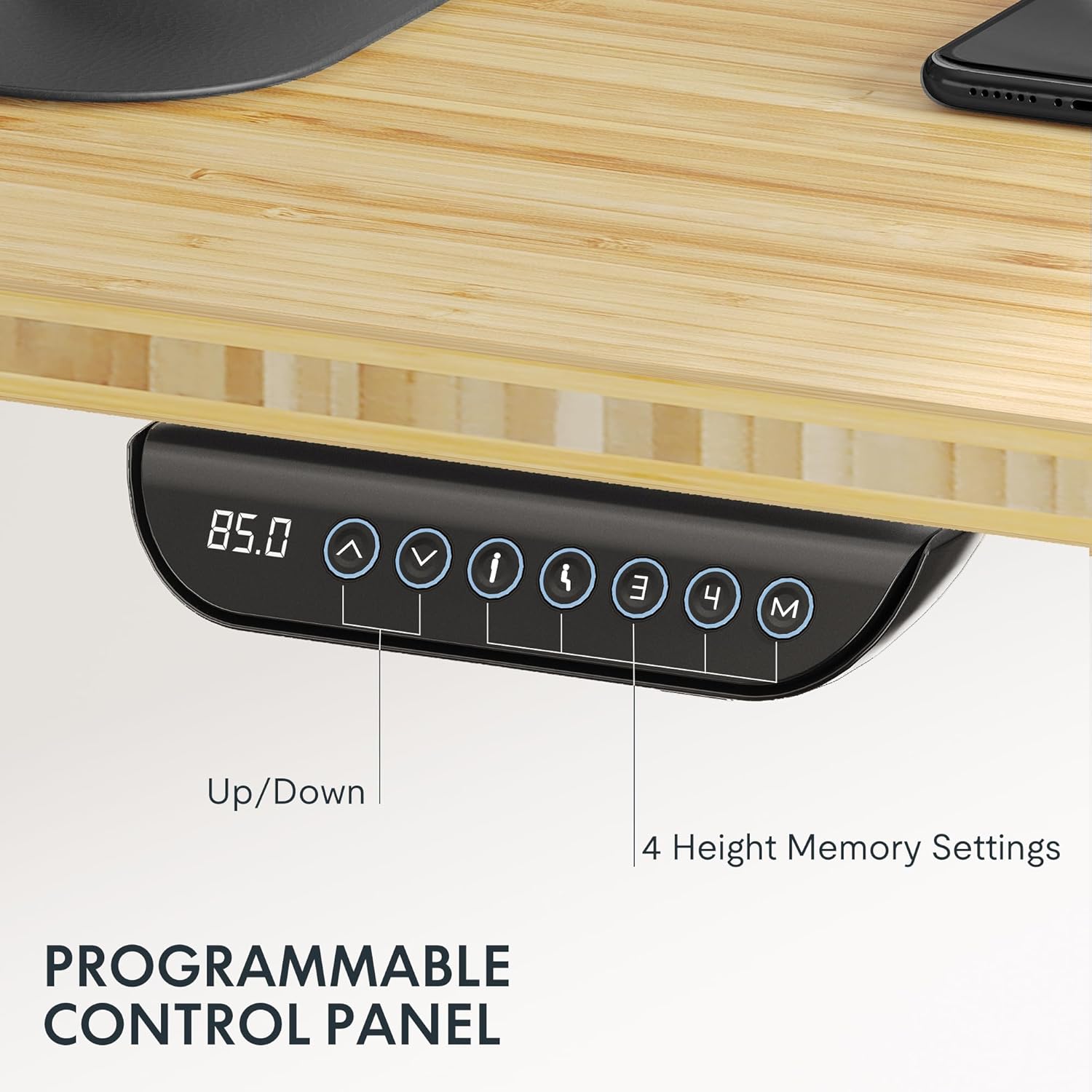
Image: The programmable control panel, featuring a digital height display, up/down buttons, and four memory preset buttons.
- Up/Down Arrows (↑ / ↓): Press and hold to adjust the desk height manually. Release to stop.
- Digitální displej: Zobrazuje aktuální výšku stolu v palcích nebo centimetrech.
- Tlačítka paměti (1, 2, 3, 4): These buttons allow you to save and recall preferred height settings.
- Uložení výšky: Adjust the desk to your desired height. Press the "M" button, then immediately press one of the number buttons (1, 2, 3, or 4) until you hear a beep or see the display flash. The height is now saved.
- Vyvolání výšky: Press the corresponding number button (1, 2, 3, or 4). The desk will automatically move to the saved height.
- Funkce proti kolizi: The desk is equipped with an anti-collision system. If the desk encounters an obstacle during adjustment, it will automatically stop and reverse slightly to prevent damage or injury.
Nosnost 5.2 kg
The FLEXISPOT E6 MAX desk has a maximum load capacity of 330 lbs (150 kg). Do not exceed this weight to ensure proper function and safety.

Image: The desk demonstrating its robust 330 lbs load capacity with heavy items placed on the desktop.
6. Údržba
- Čištění: Otřete pracovní plochu a rám měkkým hadříkemamp hadříkem. Nepoužívejte agresivní chemikálie ani abrazivní čisticí prostředky.
- Správa kabelů: Periodically check that all cables are securely managed and not interfering with the desk's movement.
- Kontrola upevňovacích prvků: Every few months, inspect all screws and bolts to ensure they remain tight. Tighten if necessary.
- Kontrola motoru: Listen for any unusual noises during operation. If you notice anything abnormal, contact customer support.
7. Řešení problémů
If you encounter any issues with your FLEXISPOT E6 MAX desk, refer to the following common solutions. If the problem persists, contact customer support.
| Problém | Možná příčina | Řešení |
|---|---|---|
| Stůl se nehýbe | Power cable disconnected, control panel cable loose, overload. | Check power connection. Ensure all cables are securely plugged in. Reduce weight on the desk. Perform a reset (refer to specific reset instructions in the full manual, if available). |
| Nerovnoměrné nastavení výšky | Obstruction, uneven weight distribution. | Odstraňte všechny překážky. Rovnoměrně rozložte váhu na pracovní ploše. |
| Stůl se během nastavování zastaví | Aktivovaný antikolizní systém, přehřátí motoru. | Check for obstructions. Allow motors to cool down if used continuously for an extended period. |
| Předvolby paměti nefungují | Předvolby nebyly správně uloženy. | Re-save your desired height settings following the instructions in Section 5.1. |
8. Specifikace
| Funkce | Detail |
|---|---|
| Značka | FLEXISPOT |
| Číslo modelu | E6 |
| Materiál pro stolní počítače | Bambus (celokusová deska) |
| Materiál rámu | Kov |
| Rozměry pracovní plochy | 48"W x 24"D (121.9 cm x 61 cm) |
| Rozsah nastavení výšky | 24.4" - 50" (60 cm - 124 cm) |
| Typ motoru | Duální motor |
| Stages | 3-Stage Lifting Columns |
| Kapacita zatížení | Až 330 liber (150 kg) |
| Úroveň hluku | Méně než 50 dB |
| Ovládací panel | Programovatelné se 4 předvolbami paměti |
| Speciální funkce | Anti-collision system, Includes assembly tools, Optional casters |
| UPC | 810072854940 |

Image: Detailed dimensions of the desktop and the adjustable height ranges of the desk frame.
9. Informace o záruce
FLEXISPOT provides comprehensive warranty coverage for your E6 MAX Standing Desk:
- Dvouleté krytí: Applies to the desk frame and motor components.
- Dvouleté krytí: Applies to the control panel and other electronic components.
This warranty ensures peace of mind regarding the quality and durability of your product. For warranty claims or detailed terms and conditions, please contact FLEXISPOT customer support.
10. Zákaznická podpora
For any questions, assistance with assembly, troubleshooting, or warranty inquiries, please contact FLEXISPOT customer support.
You can find more information and contact details by visiting the official FLEXISPOT store: