
Zavedení
Thank you for choosing the AZDOME M550 Pro 3 Channel Dash Cam. This manual provides detailed instructions for the installation, operation, and maintenance of your device. Please read this manual carefully before using the product to ensure proper functionality and safety. Keep this manual for future reference.
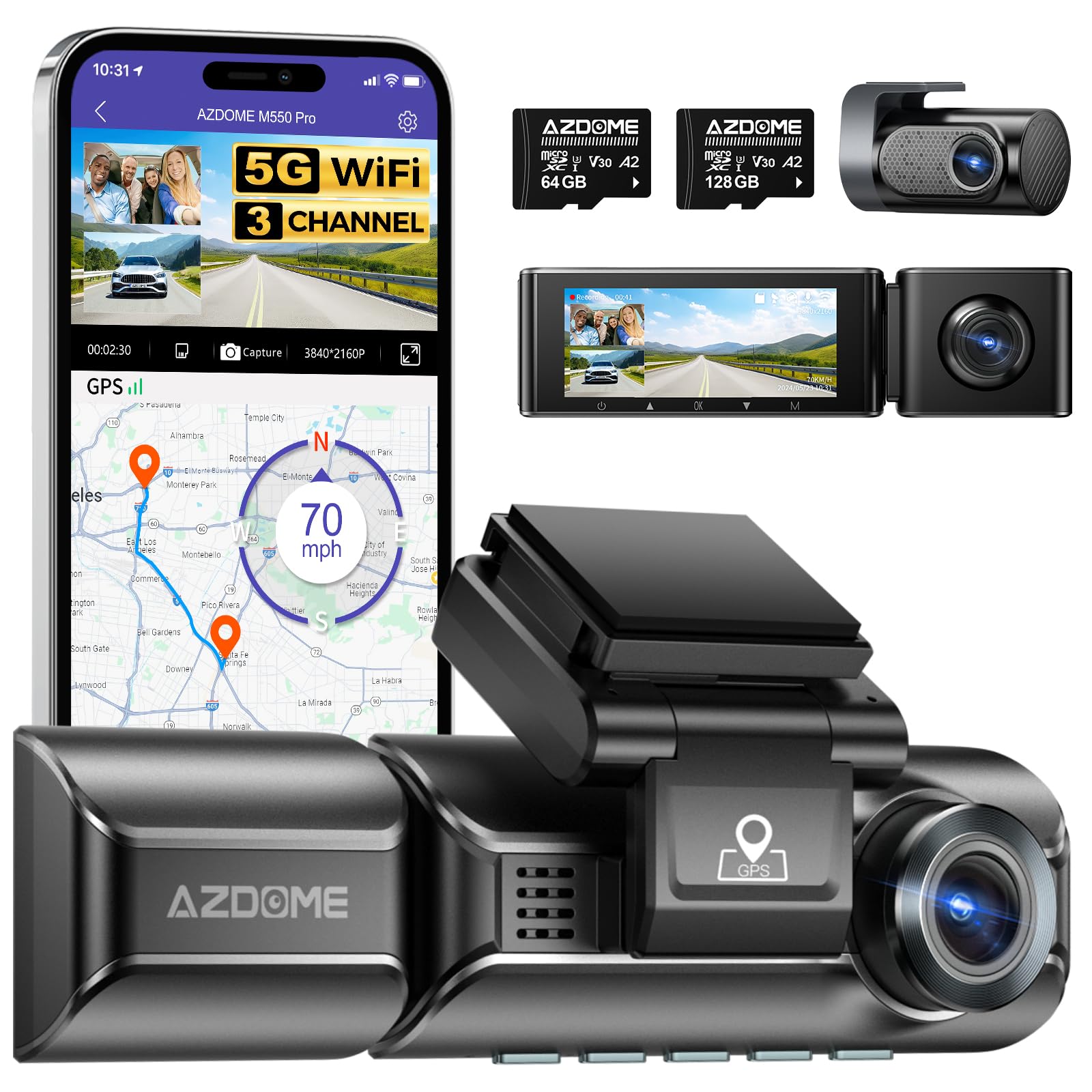
Image: The AZDOME M550 Pro dash cam, showing the main unit, interior camera, rear camera, and a smartphone displaying the companion app interface with GPS and video playback.
Obsah balení
Po vybalení zkontrolujte obsah balení. Pokud některé položky chybí nebo jsou poškozené, kontaktujte zákaznickou podporu.
- Palubní kamera AZDOME M550 Pro (hlavní jednotka)
- Vnitřní kamera
- Zadní kamera
- AZDOME 128GB TF Card (Memory Card)
- Napájecí kabel (nabíječka do auta)
- Montážní konzola
- Uživatelská příručka

Image: A close-up of the AZDOME 128GB MicroSD TF Card, included with the dash cam.
Konec produktuview
The AZDOME M550 Pro is a 3-channel dash cam system designed to record video from the front, interior, and rear of your vehicle. It features a 3.19-inch IPS screen, built-in 5.8G WiFi, GPS, and various parking monitoring modes.
Main Unit (Front Camera)
- Front Lens: Records the road ahead in up to 4K resolution.
- Display Screen: 3.19-inch IPS screen for live view a přehrávání.
- Control Buttons: For menu navigation and settings.
- GPS Module: Integrated for location and speed data.
- MicroSD Card Slot: For memory card insertion.
Vnitřní kamera
- Records the vehicle's interior in 1080P.
- Equipped with 6 IR LEDs for enhanced night vision inside the cabin.
- Removable (Type-C Port) for flexible installation.
Zadní kamera
- Záznamy zezadu view of the vehicle in 1080P.
- Připojuje se k hlavní jednotce pomocí speciálního kabelu.
Nastavení
1. Vložení karty MicroSD
- Ujistěte se, že je palubní kamera vypnutá.
- Locate the MicroSD card slot on the main unit.
- Insert the 128GB TF card with the gold contacts facing the back of the dash cam until it clicks into place.
- Chcete-li kartu vyjmout, jemně ji zatlačte, dokud nevyskočí.
2. Montáž Dash Cam
- Vyčistěte oblast čelního skla, kam chcete namontovat palubní kameru.
- Připevněte montážní držák k palubní kameře.
- Secure the dash cam with the bracket to the windshield, ensuring a clear view of the road. Adjust the lens angle as needed.
3. Připojení napájení
- Připojte nabíječku do auta ke vstupnímu portu napájení palubní kamery.
- Zapojte druhý konec autonabíječky do zásuvky zapalovače cigaret ve vozidle.
- Route the power cable neatly along the windshield and dashboard to avoid obstructing your view.
4. Installing the Interior and Rear Cameras
- Connect the interior camera to its dedicated port on the main unit. Mount it to capture the cabin view.
- Connect the rear camera to its dedicated port on the main unit. Mount it on the rear windshield, ensuring a clear view. Route the cable discreetly.
5. Počáteční zapnutí a nastavení
- Po zapnutí se palubní kamera automaticky zapne a začne nahrávat.
- Access the menu to set the correct date and time.
- It is recommended to format the MicroSD card within the dash cam's settings before first use and periodically thereafter to ensure optimal performance.
Návod k obsluze
1. 3 Channel Recording
The M550 Pro supports simultaneous recording from three cameras: front, interior, and rear. You can configure recording resolutions:
- Pouze přední: 4K (3840x2160P)
- Přední a zadní: 4K + 1080P
- Front and Interior: 2K (2560x1440P) + 1080P
- Front, Interior, and Rear: 2K + 1080P + 1080P
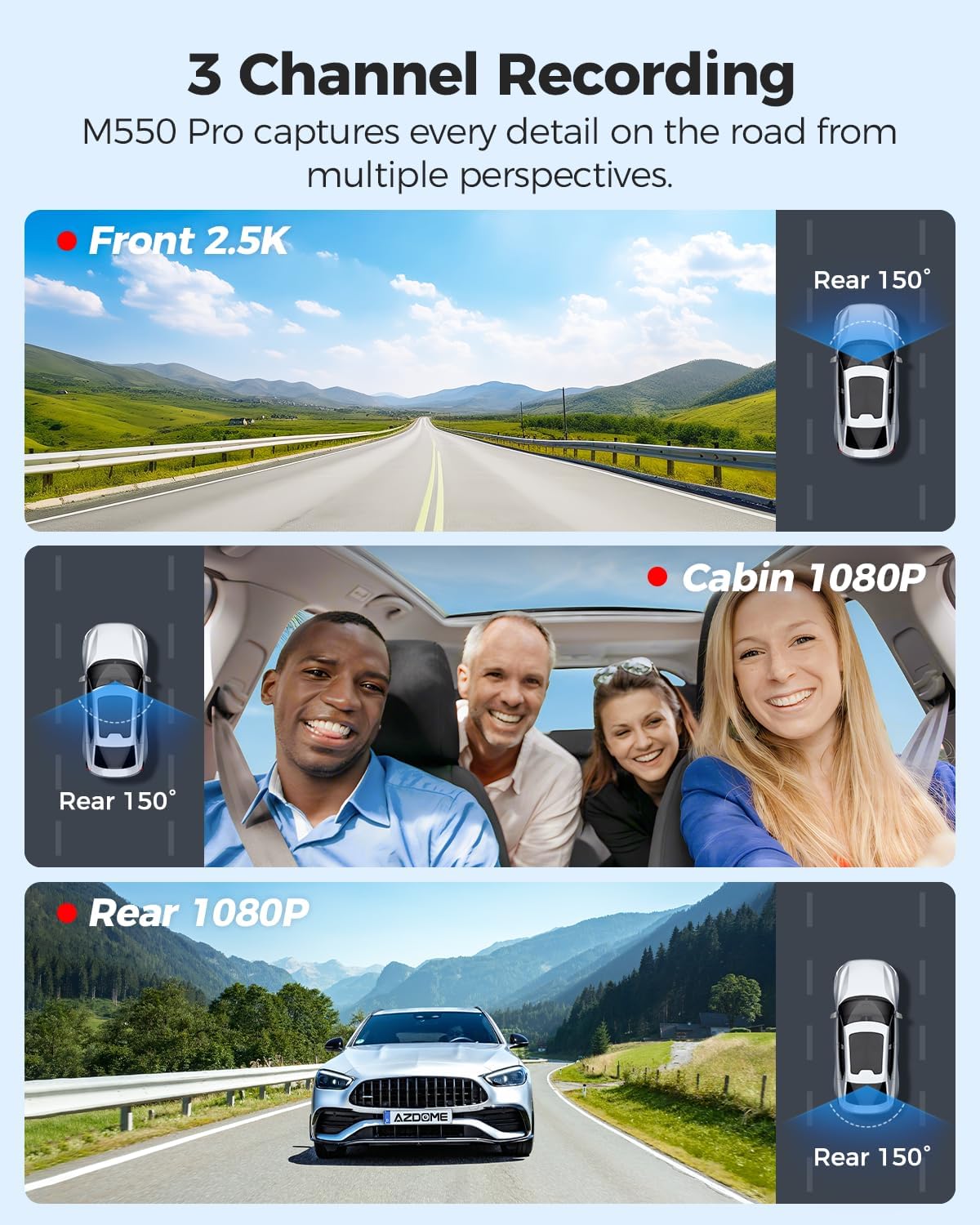
Obrázek: Vizuální znázornění 3kanálového nahrávání, zobrazující viewz přední (2.5K), kabinové (1080P) a zadní (1080P) kamery.
2. Nahrávání ve smyčce
Autokamera nahrává video v nepřetržitých smyčkách. Když je paměťová karta plná, nejstarší odemčená filese automaticky přepisují novými nahrávkami. Tím je zajištěno nepřetržité nahrávání bez ručního zásahu.
3. G-senzor (detekce kolize)
The built-in G-sensor detects sudden impacts or collisions. When triggered, it automatically locks the current video segment, preventing it from being overwritten by loop recording. The sensitivity of the G-sensor can be adjusted in the settings.
4. 24hodinový parkovací monitor
The M550 Pro offers two modes for 24-hour parking monitoring. A 3-lead hardwire kit (not included, ASIN: B096G6FKZP) is required for this feature.
- Parkovací režim detekce kolize: The G-sensor detects impacts and automatically records and locks video segments.
- Režim časosběrného parkování: The dash cam records continuously at a low frame rate (e.g., 1 FPS) for 24 hours, compressing long periods into short videos.

Image: Illustration of the 24-hour parking mode, detailing collision detection and time-lapse recording options, with a car parked under a protective shield icon.
5. Built-in 5.8G WiFi and App Usage
The dash cam features built-in 5.8G WiFi for faster data transfer. Download the AZDOME app on your smartphone to connect to the dash cam.
- Download the AZDOME app from the Google Play Store or Apple App Store.
- Enable WiFi on your dash cam and smartphone.
- Connect your smartphone to the dash cam's WiFi network (SSID and password displayed on the dash cam screen).
- Použijte aplikaci pro živé vysílání view, video playback, downloading recorded files, and adjusting settings. 5.8GHz WiFi allows for downloading 800MB video within 10 seconds.
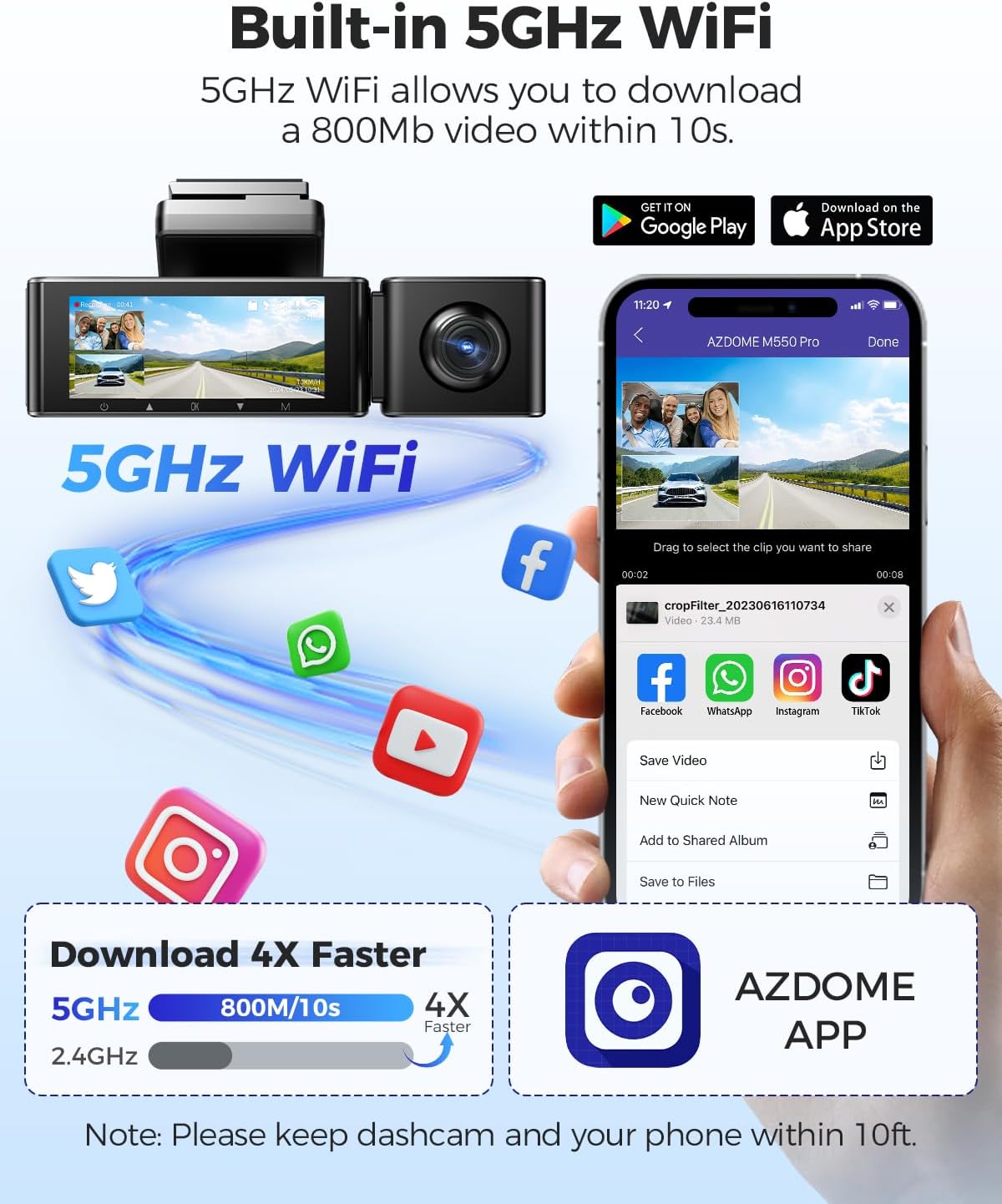
Image: Diagram showing the dash cam connecting to a smartphone via 5GHz WiFi, highlighting faster download speeds for videos through the AZDOME app.
6. Vestavěná funkce GPS
Integrovaný GPS modul zaznamenává trasu vaší jízdy, rychlost, zeměpisnou šířku a délku. Tyto informace lze viewed using the AZDOME GPS Player software on a computer.
- Download the AZDOME GPS Player software from the official AZDOME webmísto.
- Přenos nahraného videa files do vašeho počítače.
- Otevřete video files GPS přehrávačem AZDOME view synchronized video, map, and driving data.

Image: A laptop screen displaying the AZDOME GPS Player, showing video playback alongside a map with the driving route, speed, and location details.
7. Noční vidění
The interior camera is equipped with 6 IR LEDs and a Starvis Sensor to provide clear recordings in low-light conditions inside the vehicle. The front camera also features a 6-glass lens and F=1.8 aperture for improved low-light performance.
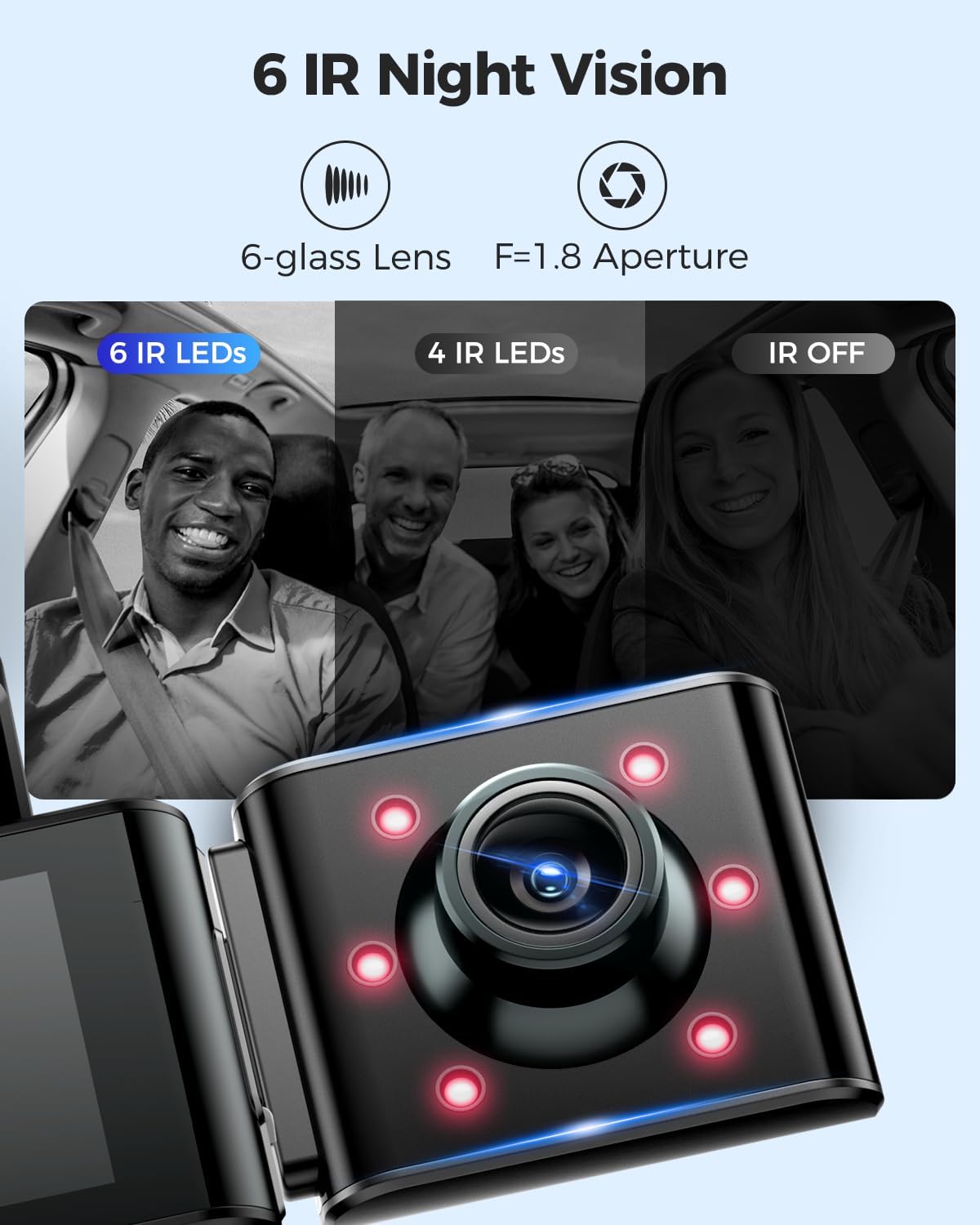
Image: A visual comparison demonstrating the effectiveness of 6 IR LEDs for night vision in the interior camera, showing clearer images compared to 4 IR LEDs or IR off.
Údržba
1. Péče o paměťovou kartu
- Regularly format the MicroSD card (at least once a month) through the dash cam's settings to prevent data corruption and ensure optimal recording performance.
- Use high-quality, high-endurance MicroSD cards (Class 10 or U3 recommended) for reliable operation.
- Avoid removing or inserting the MicroSD card while the dash cam is powered on to prevent damage to the card or device.
2. Čištění zařízení
- Use a soft, dry cloth to clean the dash cam's body and screen.
- For camera lenses, use a lens cleaning cloth and specialized lens cleaning solution to avoid scratches and ensure clear video quality.
- Nepoužívejte abrazivní čisticí prostředky ani rozpouštědla, protože by mohly poškodit zařízení.
Odstraňování problémů
- Palubní kamera se nezapne: Check the power connection. Ensure the car charger is properly plugged into both the dash cam and the vehicle's power outlet. Test the power outlet with another device.
- Palubní kamera přestane nahrávat: Ensure the MicroSD card is inserted correctly and has sufficient free space. Format the card. If the issue persists, try a different MicroSD card.
- Video files are corrupted or unplayable: Format the MicroSD card. Ensure the card is a high-quality, high-endurance type.
- Problémy s připojením k Wi-Fi: Ensure the dash cam's WiFi is enabled. Keep your smartphone within 10 feet of the dash cam for optimal connection. Restart both the dash cam and your phone.
- GPS nefunguje: Ujistěte se, že palubní kamera má volný view of the sky. GPS signal acquisition may take a few minutes, especially after initial setup or in areas with poor signal.
- Parkovací monitor nefunguje: Ensure the 3-lead hardwire kit is correctly installed and connected. Check parking monitor settings in the menu.
Specifikace
Below are the key specifications for the AZDOME M550 Pro Dash Cam:
| Funkce | Specifikace |
|---|---|
| Model | M550 Pro |
| Velikost displeje | 3.19" IPS displej |
| Rozlišení videa (max.) | Front: 4K (3840x2160P) |
| 3-Channel Resolution | 2K(F)+1080P(I)+1080P(R) |
| Technologie připojení | 5.8G Wi-Fi |
| Speciální funkce | Parking Monitor (Collision Detection, Time-lapse) |
| Vestavěná GPS | Ano |
| Vnitřní kamera | Removable (Type-C Port), 6 IR LEDs, Starvis Sensor |
| Pole View | 170 stupňů (vpředu) |
| Kontrolní metoda | App |
| Typ paměti Flash | TF (MicroSD) |
| Zahrnuté komponenty | Paměťová karta (128 GB) |

Image: A detailed comparison table highlighting features and specifications of the M550 Pro against other AZDOME models, including display size, video resolution, WiFi, and parking modes.
Záruka a podpora
Informace o záruce
Produkty AZDOME se obvykle dodávají se standardní zárukou výrobce. Prostudujte si prosím záruční list, který je součástí balení, nebo navštivte oficiální webové stránky AZDOME. webKonkrétní záruční podmínky naleznete na webových stránkách. Uschovejte si doklad o koupi pro případ reklamace.
Zákaznická podpora
For technical assistance, troubleshooting, or any questions regarding your AZDOME M550 Pro Dash Cam, please contact AZDOME customer support. Contact information can usually be found on the official AZDOME webna webu nebo na záručním listu.