
Zavedení
The ZEBRONICS Z310 NVMe Micro-ATX Motherboard is designed for modern computing needs, supporting Intel 6th, 7th, 8th, and 9th Generation Processors with an LGA 1151 socket. It features DDR4 memory support up to 2666 MHz, an NVMe M.2 slot, 5.1 channel audio, and various connectivity options including USB 3.0, SATA, RJ45 LAN, and HDMI. This manual provides essential information for the proper installation, operation, and maintenance of your motherboard.
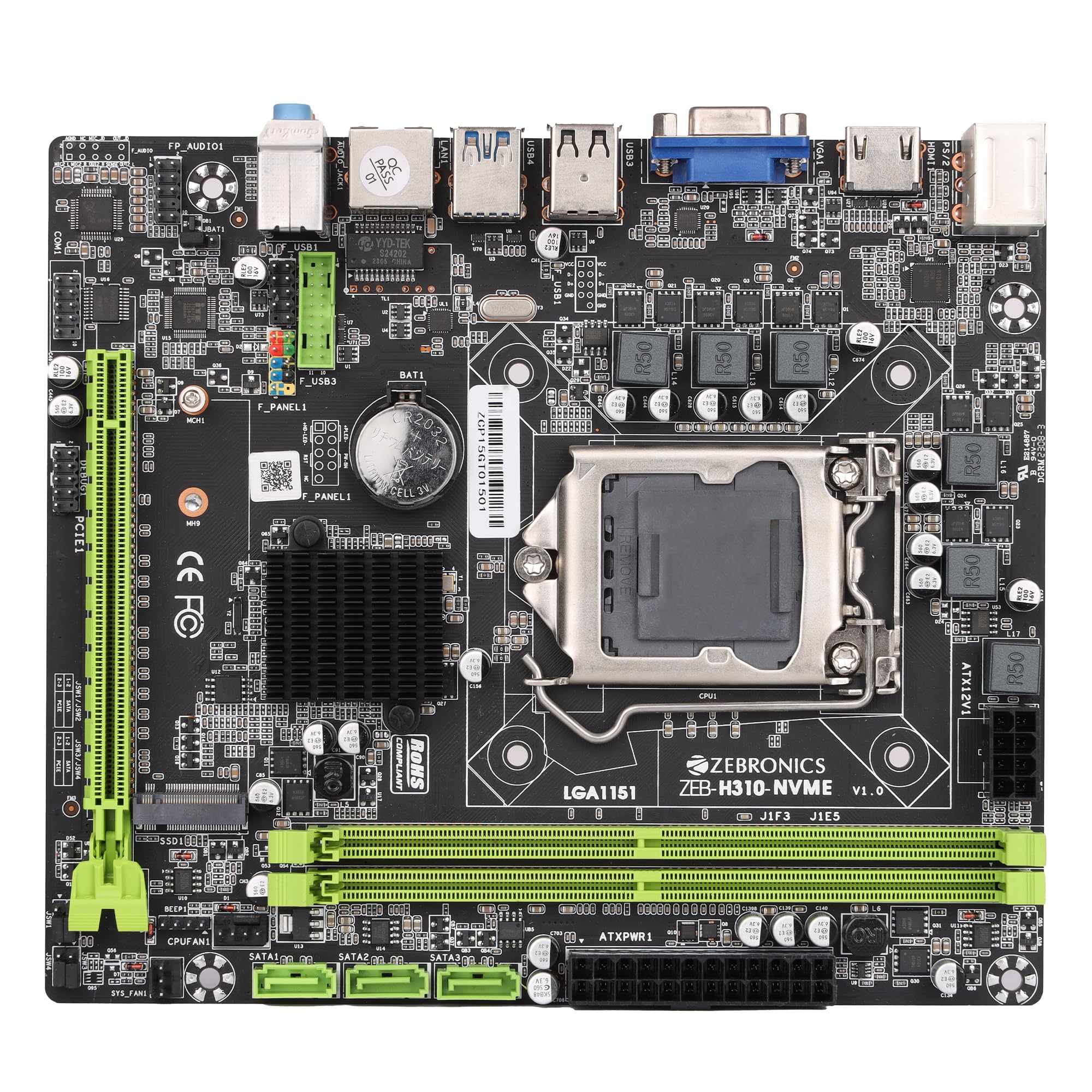
Figure 1: ZEBRONICS Z310 NVMe Micro-ATX Motherboard overview.
Klíčové vlastnosti
- Podpora pamětí DDR4: Compatible with DDR4 memory modules, supporting speeds from 2133MHz to 2666MHz for optimal system performance.
- Patice LGA 1151: Designed to support Intel 6th, 7th, 8th, and 9th Generation Processors, ensuring smooth data transfer and increased processing power.
- 5.1kanálový zvuk: Provides a captivating audio experience with crystal-clear sound.
- LAN připojení: Equipped with 10/100/1000 Mbps LAN support for fast and reliable internet connection.
- Slot PCIe 16: Facilitates seamless data transfer for graphics cards and other expansion cards.
- Možnosti úložiště: Includes 3 SATA ports for connecting multiple storage devices (HDDs, SSDs) and a SATA M.2 (NVMe) slot for high-speed M.2 drives.
- USB porty: 3.0 Elevates data transfer speeds for external devices.

Figure 2: Visual representation of key features including DDR4, NVMe M.2, LGA 1151, and PCIe X16 support.
Nastavení a instalace
Před zahájením instalace se ujistěte, že je systém vypnutý a odpojený ze zásuvky. Používejte antistatický náramek, abyste zabránili poškození součástí elektrostatickým výbojem (ESD).
1. Instalace procesoru
- Najděte na základní desce patici procesoru LGA 1151.
- Otevřete páčku patice procesoru a zvedněte nosnou desku.
- Opatrně zarovnejte procesor s paticí a ujistěte se, že zlatý trojúhelník na procesoru odpovídá trojúhelníku na patici. Nezasouvejte procesor silou.
- Spusťte nosnou desku dolů a zajistěte ji pákou.

Obrázek 3: Shora dolů view základní desky s paticí procesoru LGA 1151.
2. Instalace paměti RAM (paměť DDR4)
- Vyhledejte dva sloty pro DDR4 DIMM.
- Otevřete klipy na obou koncích slotu DIMM.
- Align the RAM module with the slot, ensuring the notch on the RAM module matches the key in the slot.
- Pevně zatlačte na oba konce modulu RAM, dokud klipsy nezacvaknou na své místo.
3. Instalace úložných zařízení
- SATA disky: Connect SATA data cables from your storage devices (HDDs/SSDs) to the SATA ports on the motherboard. Connect power cables from your power supply to the drives.
- NVMe M.2 Drive: Locate the M.2 slot. Insert the NVMe M.2 drive at an angle and then gently push it down. Secure it with the provided screw.

Figure 4: Labeled diagram of the motherboard highlighting various ports including SATA and M.2 interface.
4. Připojení napájení
- Připojte 24pinový ATX napájecí konektor ze zdroje do hlavní napájecí zásuvky na základní desce.
- Connect the 8-pin (or 4-pin, depending on your PSU) CPU power connector to the ATX12V socket near the CPU. Ensure all 8 pins are connected if your PSU provides an 8-pin connector for stable operation.
5. Connecting Peripherals and Front Panel
- Connect USB devices, keyboard, mouse, and display cables to the rear I/O panel.
- Connect the front panel headers (power button, reset button, HDD LED, power LED, front USB, front audio) to their respective pins on the motherboard. Refer to the motherboard diagram for correct pin alignment.

Figure 5: Rear I/O panel with various ports including PS/2, VGA, USB, LAN, and audio jacks.
Návod k obsluze
After completing the hardware installation, you can proceed with the initial boot-up and operating system installation.
- Připojte monitor, klávesnici a myš.
- Zapněte systém.
- During boot-up, press the designated key (usually DEL or F2) to enter the BIOS/UEFI setup.
- Nakonfigurujte pořadí spouštění pro instalaci operačního systému z jednotky USB nebo optického disku.
- Save changes and exit BIOS. The system will restart and begin the OS installation process.
- Install necessary drivers for the motherboard components (chipset, audio, LAN, etc.) from the provided driver CD or the ZEBRONICS webmísto.
Údržba
Pravidelná údržba pomáhá zajistit dlouhou životnost a stabilní výkon vaší základní desky.
- Udržujte to čisté: Pravidelně čistěte prach ze základní desky a dalších součástí pomocí stlačeného vzduchu. Před čištěním se ujistěte, že je systém vypnutý a odpojený od sítě.
- Zkontrolujte připojení: Ensure all power and data cables are securely connected. Loose connections can cause system instability.
- Aktualizace BIOSu: Check the official ZEBRONICS website for BIOS/UEFI updates. Update only if necessary and follow the instructions carefully.
- Kontrola prostředí: Operate the motherboard in a well-ventilated area to prevent overheating.
Odstraňování problémů
Pokud narazíte na problémy, postupujte podle následujících běžných kroků pro řešení potíží:
- Bez napájení:
- Ensure the power supply is connected correctly to both the 24-pin ATX and 8-pin (or 4-pin) CPU power connectors. A common issue is not fully connecting the 8-pin CPU power.
- Verify the power button is correctly connected to the front panel header.
- Check if the power supply unit (PSU) is functional.
- Bez displeje:
- Ensure the monitor is connected to the correct video output (motherboard integrated graphics or dedicated graphics card).
- Reseat the RAM modules. Incorrectly seated RAM is a common cause of no display.
- Pokud používáte samostatnou grafickou kartu, ujistěte se, že je správně usazena ve slotu PCIe a má dostatečné napájení.
- Nestabilita/pády systému:
- Check for overheating. Ensure CPU cooler is properly installed and fans are spinning.
- Verify RAM compatibility and stability. Test with one RAM stick at a time.
- Ujistěte se, že všechny ovladače jsou aktuální.
- Problémy se zvukem:
- Ensure audio cables are connected to the correct jacks on the rear I/O panel or front panel.
- Install or update audio drivers.
- Zkontrolujte nastavení zvuku ve vašem operačním systému.
For further assistance, consult the ZEBRONICS support webnebo kontaktujte zákaznický servis.
Specifikace
| Funkce | Detail |
|---|---|
| Značka | ZEBRONIKA |
| Název modelu | Z310 NVMe |
| Zásuvka CPU | LGA 1151 |
| Kompatibilní procesory | Intel Core 6th Gen, 7th Gen, 8th Gen, 9th Gen |
| Typ čipové sady | Intel Z310 |
| Technologie paměti RAM | DDR4 |
| Rychlost paměti | 2400 MHz (podporuje až 2666 MHz) |
| K dispozici paměťové sloty | 2 |
| Drive/Memory Storage Capacity (Max) | 32 GB |
| Total SATA Ports | 3 |
| Slot M.2 | 1 (NVMe support) |
| Rozhraní grafické karty | PCI Express |
| Total PCIe Ports | 1 (PCIe 16x) |
| Celkový počet portů USB | 6 (včetně USB 3.0) |
| Porty USB 2.0 | 2 |
| Počet ethernetových portů | 1 (10/100/1000 Mbps) |
| Total HDMI Port | 1 |
| Typ hlavního napájecího konektoru | 24-pin |
| Hmotnost položky | 800 gramů |
| Rozměry položky (D x Š x V) | 22.1L x 5.5W x 27.5H centimetrů |
Záruka a podpora
The ZEBRONICS Z310 NVMe Micro-ATX Motherboard comes with a 1-year carry-in service center warranty. For warranty claims or technical support, please contact ZEBRONICS customer service or visit their official webmísto.
Více informací a podpůrných zdrojů naleznete na ZEBRONICS Store on Amazon.in.
Produktové videoview
Video: Oficiální video s produktemasing the features and overview of the ZEBRONICS Z310 NVMe Micro-ATX Motherboard.