
1. Úvod
This manual provides comprehensive instructions for the FTDI TTL-232R-3V3 USB to UART cable. This cable offers a simple and reliable solution for connecting devices with +3.3V TTL level UART signals to a computer via a USB port. It is designed for engineers, hobbyists, and developers working with embedded systems, microcontrollers, and other serial communication applications.
2. Bezpečnostní informace
- Zajistěte správný objemtage levels (+3.3V) are maintained to prevent damage to connected devices.
- Nevystavujte kabel extrémním teplotám, vlhkosti nebo korozivnímu prostředí.
- Neohýbejte ani nekruťte kabel nadměrně, mohlo by dojít k poškození vnitřních vodičů.
- Disconnect the cable from both the computer and the target device before performing any maintenance or modifications.
3. Obsah balení
Ověřte, zda jsou v balení přítomny všechny položky:
- 1 x FTDI TTL-232R-3V3 USB to UART Cable
- (Optional: Driver CD or link to driver download, if applicable. Refer to manufacturer's website for latest drivers.)
4. Konec produktuview
The FTDI TTL-232R-3V3 is a USB to serial UART (Universal Asynchronous Receiver/Transmitter) converter cable. It provides a USB-A connector on one end and a 6-pin SIL (Single In-Line) connector with 0.1" pitch on the other, offering +3.3V TTL level signals. The cable integrates an FT232R IC, handling all USB signaling and protocols.
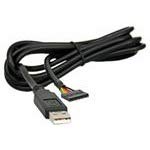
Obrázek 1: FTDI TTL-232R-3V3 USB to UART Cable. This image shows the black USB-A connector on one end and the 6-pin header on the other, with the cable coiled.
4.1 Popis pinoutu
The 6-pin SIL connector provides the following signals:
| Kolík | Signál | Popis |
|---|---|---|
| 1 | GND | Země |
| 2 | CTS | Clear To Send (Input to FT232R) |
| 3 | VCC | +5V power output from USB |
| 4 | TXD | Transmit Data (Output from FT232R) |
| 5 | RXD | Receive Data (Input to FT232R) |
| 6 | RTS | Request To Send (Output from FT232R) |
Note: The VCC pin (Pin 3) provides +5V from the USB port, which can be used to power external circuitry up to 75mA. The data signals (TXD, RXD, CTS, RTS) operate at +3.3V TTL levels.
5. Nastavení
5.1 Instalace ovladače
The FTDI TTL-232R-3V3 cable requires specific drivers to function correctly on your computer. These drivers are often automatically installed by modern operating systems (Windows 10/11, macOS, Linux) when the cable is first connected. If automatic installation fails, or for older operating systems, manual installation may be necessary.
- Stáhnout ovladače: Visit the official FTDI webweb (www.ftdichip.com/Drivers/VCP.htm) to download the latest Virtual COM Port (VCP) drivers for your operating system.
- Nainstalujte ovladače: Follow the instructions provided with the downloaded driver package. This typically involves running an executable file or following on-screen prompts.
- Připojovací kabel: Plug the USB-A end of the TTL-223R-3V3 cable into an available USB port on your computer.
- Ověřte instalaci:
- Windows: Open Device Manager (search for "Device Manager" in the Start menu). Look under "Ports (COM & LPT)" for an entry like "USB Serial Port (COMx)", where 'x' is a number.
- MacOS: Open Terminal and type
ls /dev/tty.usbserial*. You should see an entry corresponding to the cable. - Linux: Open Terminal and type
ls /dev/ttyUSB*. You should see an entry corresponding to the cable.
5.2 Connecting to a Target Device
Connect the 6-pin SIL connector to your target device's UART interface. Ensure correct pin alignment:
- Connect the cable's TXD (Pin 4) to the target device's RXD.
- Connect the cable's RXD (Pin 5) to the target device's TXD.
- Connect the cable's GND (Pin 1) to the target device's GND.
- If hardware flow control is used, connect CTS (Pin 2) to target's RTS a RTS (Pin 6) to target's CTS.
- If powering the target device from the cable, connect the cable's VCC (Pin 3) to the target device's +5V input (ensure the target device can accept 5V and its current draw does not exceed 75mA).
Pozor: Always double-check the pinout of your target device to avoid damage due to incorrect connections.
6. Návod k obsluze
Once the drivers are installed and the cable is connected to your target device, you can use a serial terminal program to communicate.
- Open Terminal Program: Use a serial terminal application such as PuTTY (Windows), CoolTerm (macOS/Windows), or Minicom/screen (Linux).
- Vyberte COM port: In the terminal program settings, select the COM port number identified during driver installation (e.g., COM3, /dev/ttyUSB0).
- Configure Serial Settings:
- Přenosová rychlost: Set to match your target device's baud rate (e.g., 9600, 115200, up to 3MBaud).
- Datové bity: Typicky 8
- Parita: Žádný
- Zastavit bity: Typicky 1
- Řízení toku: None, or Hardware (RTS/CTS) if enabled on your target device.
- Navázat spojení: Open the serial connection in your terminal program. You should now be able to send and receive data from your target device.
7. Údržba
- Čištění: K čištění kabelu a konektorů použijte měkký, suchý hadřík. Nepoužívejte tekuté čisticí prostředky ani rozpouštědla.
- Skladování: Store the cable in a cool, dry place, away from direct sunlight and extreme temperatures. Avoid tangling the cable.
- Inspekce: Periodically inspect the cable for any signs of damage, such as frayed wires, bent pins, or cracked insulation. Discontinue use if damage is found.
8. Řešení problémů
8.1 Běžné problémy a řešení
- No COM Port Detected:
- Ensure drivers are correctly installed (refer to Section 5.1).
- Zkuste jiný port USB na počítači.
- Restartujte počítač.
- Check the cable for physical damage.
- Žádný přenos/příjem dat:
- Verify the pinout connections between the cable and your target device (TXD to RXD, RXD to TXD, GND to GND).
- Confirm that the serial settings (baud rate, data bits, parity, stop bits, flow control) in your terminal program match those of your target device.
- Ensure the target device is powered on and functioning correctly.
- Check if the target device's UART is enabled and configured.
- Přerušované připojení:
- Check for loose connections at both the USB and 6-pin ends.
- Zabraňte elektromagnetickému rušení od jiných zařízení.
- Ensure the cable is not excessively bent or stressed.
9. Specifikace
| Číslo dílu | TTL-232R-3V3 |
| Rychlost USB | Plná rychlost (12 Mbps) |
| UART Signal Levels | +3.3V TTL |
| Datové rychlosti | Up to 3 MBaud |
| Konektor USB | Typ A |
| Koncový konektor | 6 pin SIL, 0.1" pitch |
| Délka kabelu | 1.8 m |
| Podrobnosti o kabelu | 6 core, 5mm UL2464 24 AWG |
| I/O svtage | 3.3V |
| Max Power Output (VCC) | +5V / 75mA |
| Internal IC | FT232R |
| Provozní teplota | -40°C až +85°C |
| Kompatibilní operační systémy | Windows, MacOS, Linux, Android |
10. Záruka a podpora
For warranty information and technical support, please refer to the official FTDI website or contact your point of purchase. FTDI provides extensive documentation and support resources for their products.
- FTDI Webmísto: www.ftdichip.com
- Podpora ovladačů: www.ftdichip.com/Drivers/VCP.htm