
1. Konec produktuview
The LIORQUE Digital Kitchen Timer Model YGH5249 is a multi-functional device designed to assist with various timing needs. It features a large LCD display, adjustable alarm volume, and multiple placement options. This timer can function as a countdown timer, a count-up stopwatch, and a digital clock.

Obrázek 1.1: Přední strana view of the LIORQUE Digital Kitchen Timer, highlighting its large LCD screen and control buttons.
Klíčové vlastnosti:
- Funkce 3 v 1: Timer, Stopwatch, and Clock modes.
- Velký LCD displej: Ensures clear readability of time.
- Nastavitelná hlasitost budíku: Three levels (Mute, Low, High) to suit different environments.
- Vlastní režim: Save frequently used countdown times for quick access.
- Všestranné umístění: Magnetic back, foldable stand, and lanyard hole for flexible use.
- Delay Reminder: Automatically starts counting up after countdown finishes.
- Auto-Restore: Remembers the last set countdown time.

Image 1.2: Visual representation of the timer's main features and functions.
2. Nastavení a instalace baterií
The timer requires 2 AAA batteries (included) for operation. Follow these steps to install them:
- Najděte kryt přihrádky na baterie na zadní straně časovače.
- Posunutím otevřete kryt.
- Vložte dvě baterie typu AAA a dbejte na správnou polaritu (+ a -) vyznačenou uvnitř přihrádky.
- Bezpečně zavřete kryt bateriového prostoru.
The timer will power on automatically once batteries are installed.
3. Návod k obsluze
3.1 Switching Modes (Timer/Stopwatch/Clock)
The LIORQUE timer offers three modes: Timer (countdown), Stopwatch (count-up), and Clock. To switch between Timer mode and Clock mode, press and hold the ST/SP button for 2 seconds. The timer will display the current time in Clock mode or the timer interface in Timer mode.

Image 3.1: Switching between Counting Mode and Clock Mode.
3.2 Setting Countdown Timer
- Ensure the timer is in Timer mode (displaying H:M:S).
- Použijte 1H, 5M, 1Ma 5S buttons to set the desired countdown time. Each press adds the corresponding time increment.
- Stiskněte tlačítko ST/SP tlačítko pro spuštění odpočítávání.
- Chcete-li pozastavit odpočítávání, stiskněte ST/SP znovu. Stiskněte jej ještě jednou pro obnovení.
- To reset the timer to zero, press the RESETOVAT tlačítko.
- When the countdown reaches zero, the alarm will sound for 1 minute.
3.3 Using Stopwatch (Count-Up)
- Ensure the timer is in Timer mode and reset to 00:00:00.
- Stiskněte tlačítko ST/SP tlačítko pro zahájení odpočítávání.
- Chcete-li pozastavit stopky, stiskněte ST/SP znovu. Stiskněte jej ještě jednou pro obnovení.
- Chcete-li stopky vynulovat, stiskněte tlačítko RESETOVAT tlačítko.

Image 3.2: Illustration of Count-up and Countdown modes.
3.4 Shortcut Setting
The timer allows for quick setting of common intervals:
- Stiskněte 1H po dobu 1 hodiny.
- Stiskněte 5M po dobu 5 minut.
- Stiskněte 1M po dobu 1 minuty.
- Stiskněte 5S po dobu 5 sekund.

Obrázek 3.3: Příkladamples of using shortcut buttons for quick time setting.
3.5 Vlastní režim
The Custom Mode allows you to save a frequently used countdown time for instant recall.
- In Timer mode, set your desired countdown time using the 1H, 5M, 1Ma 5S tlačítka.
- Stiskněte a podržte ZVYK button for 2 seconds. The timer will remember this setting.
- Each subsequent short press of the ZVYK button will automatically load the saved time.

Image 3.4: Setting and recalling a custom timer value.
3.6 Nastavení hlasitosti alarmu
The timer features a 3-level alarm volume adjustment (Mute, Low, High). A switch on the side of the timer allows you to select the desired volume level.

Image 3.5: Volume adjustment switch and its three settings.
3.7 Možnosti umístění
The LIORQUE timer offers flexible placement options:
- Magnetický: Attach the timer to metal surfaces like refrigerators using its strong magnetic back.
- Stánek: Use the integrated foldable stand to place the timer on any flat surface, such as a countertop or desk.
- Otvor pro šňůrku: Hang the timer using a rope through the designated lanyard hole.
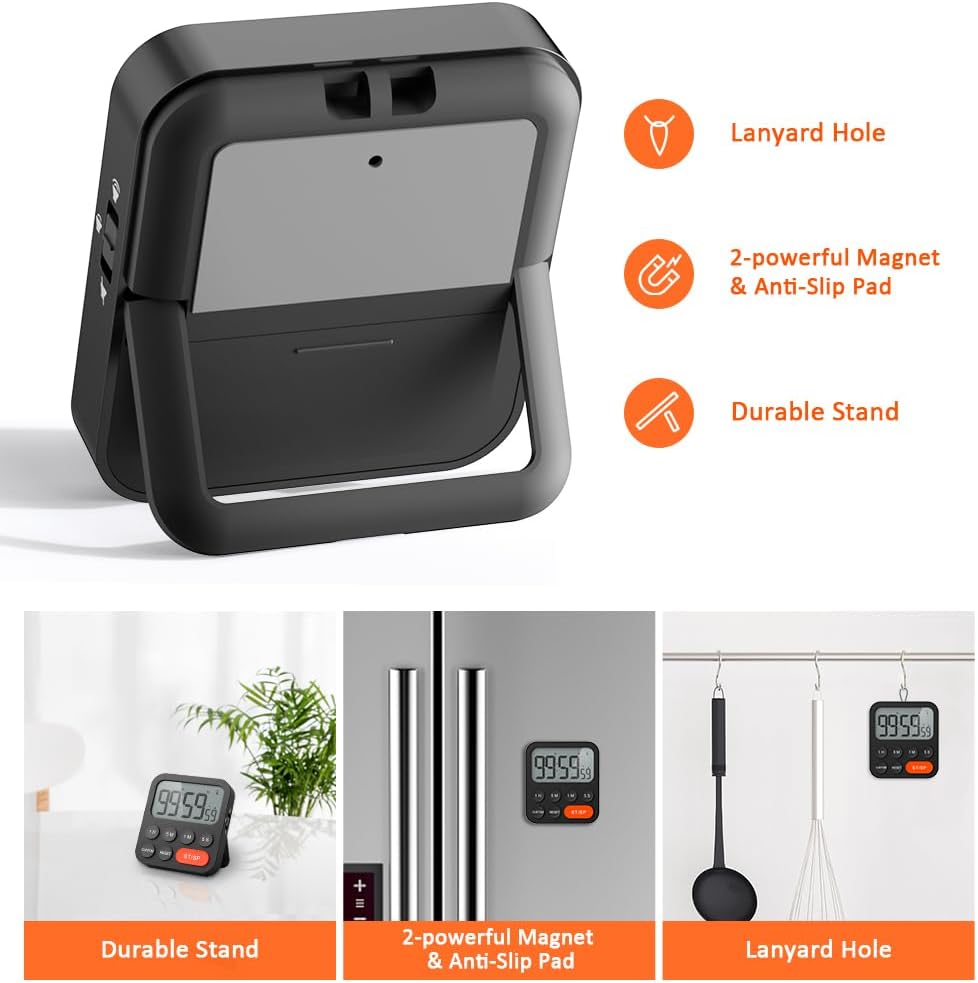
Image 3.6: Various ways to place and use the timer.
3.8 Doplňkové funkce
- Delay Reminder: After a countdown finishes, the timer will automatically start counting up, indicating the elapsed time since the alarm.
- Auto-Restore: Once a countdown is complete and the alarm has sounded, pressing the ST/SP button will restore the timer to the last set countdown time, making it convenient for repetitive tasks.

Image 3.7: Explanation of Delay Reminder and Auto-restore features.
4. Údržba
- Clean the timer with a soft, dry cloth. Do not use abrasive cleaners or immerse in water.
- Replace batteries when the display becomes dim or the timer functions erratically.
- Store the timer in a cool, dry place when not in use for extended periods.
5. Řešení problémů
- Časovač nereaguje: Zkontrolujte, zda jsou baterie správně vloženy a zda jsou dostatečně nabité. V případě potřeby je vyměňte.
- Alarm too quiet/loud: Adjust the volume switch on the side of the timer to your preferred level.
- Displej je prázdný: Ensure batteries are installed and functional. If the issue persists, contact customer support.
6. Specifikace
| Funkce | Detail |
|---|---|
| Značka | LIORQUE |
| Číslo modelu | YGH5249 |
| Barva | Černý |
| Rozměry produktu | 0.94 cm hloubka x 0.94 cm výška |
| Hmotnost položky | 4.2 unce |
| Zdroj napájení | 2 baterie AAA (součástí balení) |
| Počet nastavení | 3 (svazek) |
| Velikost obrazovky | 1E+1 centimetry |
7. Záruka a podpora
For warranty information or technical support, please refer to the product packaging or contact LIORQUE customer service through their official webnebo prodejce, u kterého byl produkt zakoupen. Uschovejte si doklad o koupi pro případ reklamace.