
1. Úvod
This manual provides essential instructions for the safe and effective operation of your HIKMICRO B01S Thermal Camera. Please read this manual thoroughly before using the device and retain it for future reference. The HIKMICRO B01S is a handheld thermal imaging camera designed for various applications, including home inspection, electrical maintenance, and mechanical fault detection.
2. Bezpečnostní informace
Dodržujte následující bezpečnostní opatření, abyste předešli zranění a poškození zařízení:
- Do not point the camera directly at intense heat sources such as the sun or lasers, as this may damage the thermal sensor.
- Uchovávejte zařízení v suchu. Nevystavujte ho dešti ani vlhkosti.
- Operate the camera within the specified temperature and humidity ranges.
- Use only the charger and accessories provided or approved by HIKMICRO.
- Nepokoušejte se zařízení rozebírat ani upravovat. Opravy by měl provádět pouze autorizovaný personál.
- Před prvním použitím se ujistěte, že je baterie plně nabitá.
3. Nastavení
3.1 Obsah balení
Ověřte, zda jsou v balení přítomny všechny položky:
- HIKMICRO B01S Thermal Camera
- 2-in-1 USB C to USB A and USB C Cable
- Carrying Case with Shoulder Strap
- Řemínek na zápěstí
- Uživatelská příručka
- Kalibrační karta

Figure 3.1: Included items in the HIKMICRO B01S Thermal Camera package.
3.2 Zařízení je u konceview
Familiarize yourself with the physical components of the HIKMICRO B01S Thermal Camera.

Obrázek 3.2: Přední strana view of the HIKMICRO B01S Thermal Camera and included accessories.

Figure 3.3: The 3.2-inch LCD screen provides a clear display for thermal imaging.
3.3 První zapnutí a nabíjení
- Nabíjení baterie: Connect the camera to a power source using the provided USB-C cable. The charging indicator will illuminate. A full charge supports approximately 6 hours of continuous operation.
- Zapnutí/vypnutí: Press and hold the power button until the screen illuminates to power on. Repeat the action to power off.
- Upevnění na zápěstí: Attach the wrist strap to the designated loop on the camera for secure handling.
- Instalace stativu: The camera features a standard tripod mount for stable, scheduled captures. This is useful for monitoring temperature changes over time in a fixed location.

Figure 3.4: The camera can be mounted on a tripod for stable, continuous monitoring.
4. Návod k obsluze
4.1 Základní termovize
The HIKMICRO B01S provides clear thermal imagery with a 25Hz refresh rate for smooth viewIng.
- ViewŽivý obraz: Once powered on, the camera displays a live thermal image on the 3.2-inch LCD screen.
- Pořizování snímků: Press the capture button to save a thermal image to the internal 16GB eMMC flash storage, which can hold over 90,000 images.
- Barevné palety: The camera supports 6 color palettes to visualize temperature differences. Cycle through these palettes using the dedicated button to find the most suitable display for your inspection.

Figure 4.1: Multiple color palettes are available for different viewing preferences and analysis.
4.2 Měření teploty
The B01S offers precise temperature measurement capabilities:
- Measurement Presets: Utilize automatic Center Spot, Hot Spot, and Cold Spot tracking to quickly identify temperature extremes. Three user-defined spots can also be set for specific areas of interest.
- Rozsah teplot: The camera measures temperatures from -20°C to 550°C (-4°F to 1022°F).
- Nastavitelná nastavení: For improved accuracy, adjust emissivity settings based on the material being inspected and input the distance to the object.
- Alarm vysoké/nízké teploty: Configure the camera to trigger an audio alarm and warning light when temperatures exceed or fall below preset thresholds.
- Level and Span Selection: Switch between automatic and manual level and span adjustments to precisely highlight specific temperature ranges.

Figure 4.2: Instant temperature display with automatic and user-defined spot measurements.

Figure 4.3: High/Low temperature alarm indicators on the display.

Figure 4.4: Adjustable settings for emissivity and temperature range to enhance measurement accuracy.

Figure 4.5: Manual level and span selection for precise temperature visualization.
4.3 Pokročilé funkce
- SuperIR Image Enhancement: The B01S utilizes HIKMICRO's SuperIR technology to upscale thermal images from 256x192 pixels to 640x480 pixels, providing enhanced detail for analysis.
- SuperScene Detection: This feature, powered by deep learning, automatically detects potential moisture leaks and insulation defects, simplifying inspections.
- Pro Scene Color Alarm: For advanced diagnostics, the Pro Scene Color Alarm provides customized data-driven alerts for thermal anomalies, such as condensation or insulation issues.
- Image Transfer & Auto-Update: Wirelessly transfer images and reports to mobile devices using the HIKMICRO Viewer app (available on Google Play and Apple App Store). The app also facilitates seamless firmware updates.
- Image Analysis & Instant Projection: Use the HIKMICRO Analyzer PC software for comprehensive image analysis, screen projection, real-time monitoring, and 3D plotting.

Figure 4.6: SuperIR technology enhances thermal image resolution for greater detail.

Figure 4.7: SuperScene detection highlights potential water leaks and insulation voids.

Figure 4.8: Pro Scene Color Alarm identifies specific thermal anomalies like condensation.

Figure 4.9: Wireless image transfer and auto-update functionality via the HIKMICRO Viewer aplikace.
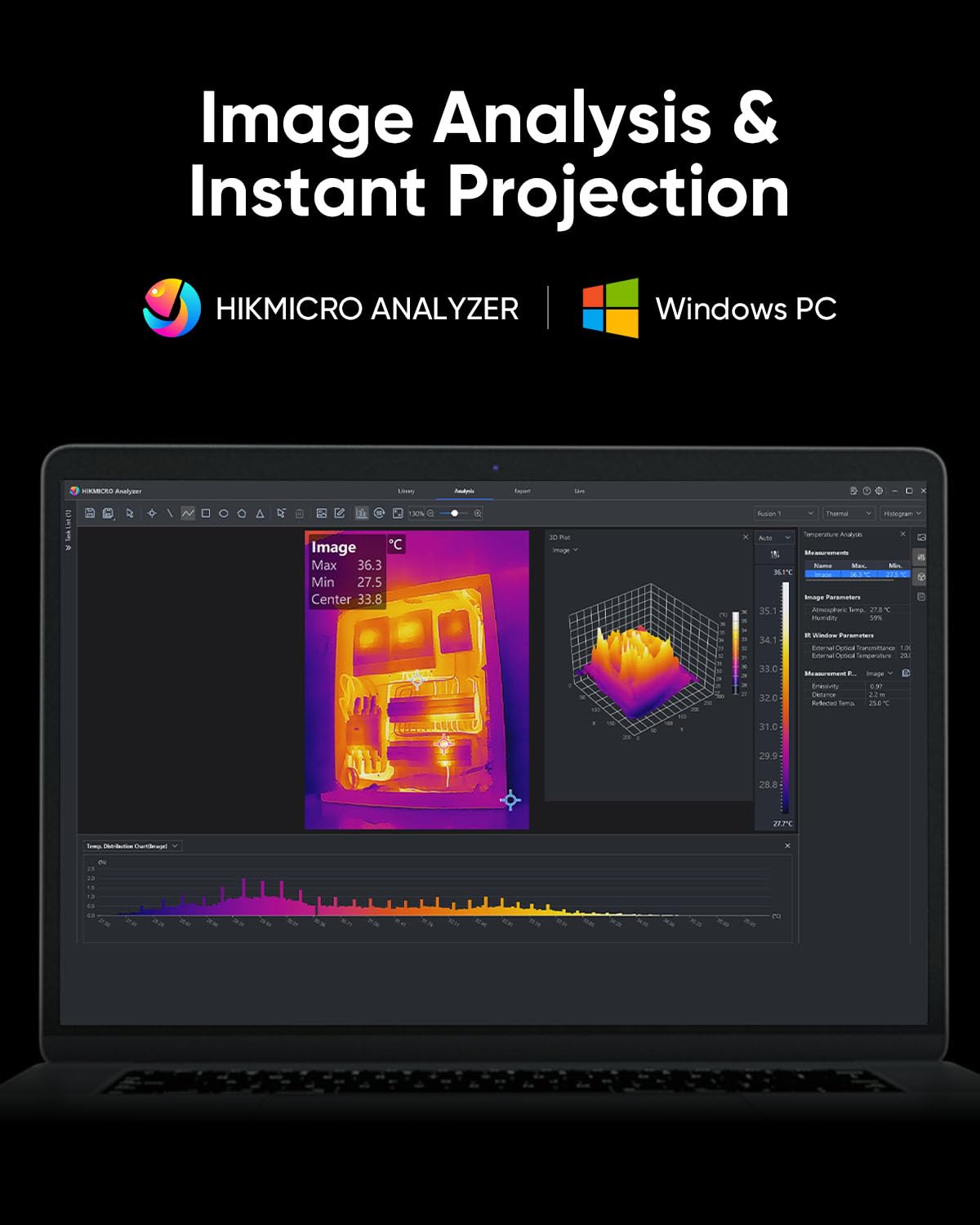
Figure 4.10: HIKMICRO Analyzer PC software for detailed image analysis and projection.
5. Údržba
5.1 Čištění
- K čištění těla fotoaparátu použijte měkký, suchý hadřík.
- Na čočky použijte speciální hadřík a roztok na čištění čoček, abyste zabránili poškrábání.
- Nepoužívejte abrazivní čisticí prostředky nebo rozpouštědla.
5.2 Skladování
- Store the camera in its protective carrying case when not in use.
- Uchovávejte zařízení na chladném a suchém místě, mimo dosah přímého slunečního záření a extrémních teplot.
- Pokud baterii skladujete delší dobu, ujistěte se, že je částečně nabitá (kolem 50 %), a dobíjejte ji každé několik měsíců, aby se zachovala její životnost.
5.3 Trvanlivost
The HIKMICRO B01S is designed for durability, featuring an IP54 rating for dust and water resistance and a 2-meter (6.6 ft) drop resistance.

Figure 5.1: The B01S is built to be durable with IP54 protection and 6.6 ft drop resistance.
6. Řešení problémů
If you encounter issues with your HIKMICRO B01S, refer to the following common problems and solutions:
| Problém | Možná příčina | Řešení |
|---|---|---|
| Zařízení se nezapne | Slabá baterie; Tlačítko napájení nebylo správně stisknuto | Charge the battery; Press and hold the power button firmly for a few seconds |
| Fuzzy or unclear image | Lens is dirty; Incorrect focus (if applicable); Extreme temperature difference | Clean the lens; Adjust focus (if manual focus is available); Allow camera to acclimate to environment |
| Nepřesné údaje o teplotě | Incorrect emissivity setting; Incorrect distance setting; Object outside temperature range | Adjust emissivity for the material; Input correct distance; Ensure object temperature is within camera's range |
| Cannot connect to app/PC software | Wi-Fi/USB connection issue; Outdated app/software; Firewall blocking connection | Ensure Wi-Fi is enabled on camera and device; Check USB cable connection; Update app/software; Temporarily disable firewall |
| Krátká výdrž baterie | Battery degradation; Frequent use of power-intensive features | Contact support for battery replacement; Reduce screen brightness or turn off Wi-Fi when not needed |
7. Specifikace
| Funkce | Specifikace |
|---|---|
| Rozlišení IR | 256 x 192 (49,152 XNUMX pixelů) |
| Rozlišení SuperIR | 640 x 480 (307,200 XNUMX pixelů) |
| Tepelná citlivost (NETD) | < 40 mK |
| Teplotní rozsah | -20 °C až 550 °C (-4 °F až 1022 °F) |
| Přesnost teploty | ±2 °C nebo ±2 % (podle toho, která hodnota je větší) |
| Obnovovací frekvence | 25 Hz |
| Obrazovka displeje | 3.2" LCD, 640 x 480 resolution |
| Skladování | 16GB eMMC (pro více než 90 000 obrázků) |
| Konektivita | Wi-Fi, USB-C |
| Typ baterie | 1 lithium-iontová baterie (součástí balení) |
| Životnost baterie | Approx. 6 hours continuous operation |
| Hodnocení IP | IP54 |
| Odolnost proti pádu | 2 metrů (6.6 stop) |
| Rozměry (balík) | 31.2 x 21.1 x 11.8 cm |
| Hmotnost (balíku) | 1.08 kg |
| Číslo modelu | HM-TP52+-3AQF/W-B01S |
| Výrobce | HIKMICRO |
| Země původu | Čína |
8. Záruka a podpora
HIKMICRO products are covered by a limited warranty. Please refer to the warranty card included in your package for specific terms and conditions. For technical support, service, or warranty claims, please contact HIKMICRO customer service through their official website or the contact information provided on your calibration card.