
1. Úvod
The Aubess Mini Smart Wi-Fi Switch 16A (Model WSM02) is designed to integrate seamlessly into your smart home ecosystem. This device enables remote control of connected appliances via your smartphone or tablet, offering convenience and enhanced energy management. It features an integrated energy monitor that provides real-time consumption data, helping you make informed decisions about your energy usage.
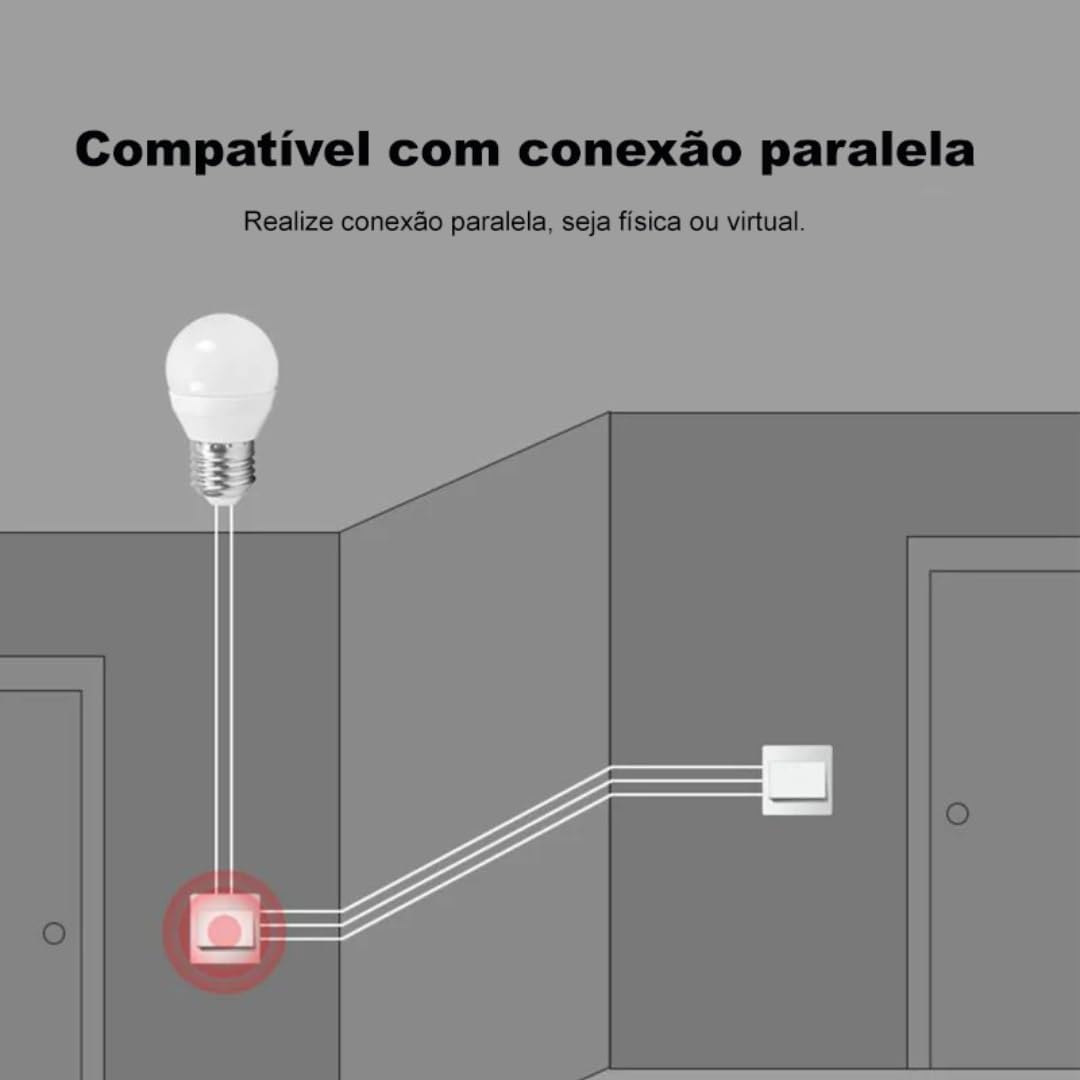
The switch is compatible with popular voice assistants such as Amazon Alexa and Google Home, and works with smart home platforms like Tuya Smart, Smart Life, and Home Assistant. Its compact design allows for simple and quick installation, including parallel installation with existing switches.
2. Bezpečnostní informace
VAROVÁNÍ: Electrical installation should only be performed by a qualified electrician to ensure safety and compliance with local electrical codes. Incorrect installation can lead to electric shock, fire, or device damage.
- Před instalací nebo údržbou vždy odpojte napájení jističem.
- Ujistěte se, že je zařízení používáno v rámci jeho specifikovaného objemutage and current ratings (110V, 16A, 1600W).
- Nevystavujte zařízení vlhkosti nebo extrémním teplotám.
- Toto zařízení je určeno pouze pro vnitřní použití.
3. Obsah balení
- 1 x Aubess Mini Smart Wi-Fi Switch
- 1 x Uživatelská příručka
4. Vlastnosti produktu
- Wi-Fi připojení: Operates on 2.4GHz Wi-Fi networks for remote control.
- Sledování energie: Provides real-time and historical energy consumption data.
- Hlasové ovládání: Kompatibilní s Amazon Alexa a Google Home pro ovládání bez použití rukou.
- Ovládání aplikace: Works with Tuya Smart and Smart Life applications for comprehensive management.
- Vysoký výkon: Podporuje až 16 Amperes and 1600 Watts.
- Paralelní instalace: Designed to facilitate parallel wiring with existing traditional switches.
- Kompaktní design: Small form factor for easy integration into electrical boxes.


5. Specifikace
| Specifikace | Hodnota |
|---|---|
| Provozní režim | Zapnuto-Vypnuto |
| Aktuální hodnocení | 16 Amperes |
| Provozní svtage | 110 voltů |
| Typ kontaktu | Normálně zavřeno |
| Typ konektoru | Clamp |
| Typ přepínače | Skluzavka |
| Terminál | Šroub |
| Typ obvodu | 1-cestný |
| Typ montáže | Držák na zeď |
| Počet pozic | 2 |
| Maximální teplotní hodnocení | 55 stupňů Celsia |
| Typ ovládání | Amazon Alexa, Push Button, Google Assistant |
| Kontrolní metoda | Application, Remote, Touch, Voice |
| Typ připojení | Wi-Fi (2.4 GHz) |
| Moc | 1600 wattů |
| Barva | Bílý |
| Rozměry položky | 41 x 20 x 41 milimetrů |
| Počet jednotek | 1 jednotka |
| Množství položek | 1 |
| Materiál | Plast |
| Kontaktní materiál | Kov |
| Hodnocení mezinárodní ochrany | IP00 |
| Compliant Specification | CE, RoHS |
| Výrobce | Aubess |
| Číslo dílu | WSM02 |
6. Nastavení a instalace
6.1 Pokyny pro zapojení
Důležité: Ensure power is disconnected at the circuit breaker before proceeding with any wiring. Professional installation is highly recommended.
- Identifikace vodičů: Locate the Live (L), Neutral (N), and Load (L1, L2, etc.) wires in your electrical box. The Aubess switch requires a Neutral wire for operation.
- Připojit dráty: Connect the Live wire from your power source to the 'L' terminal on the switch. Connect the Neutral wire to the 'N' terminal. Connect the Load wire(s) (to your light fixture or appliance) to the 'L1' (and 'L2' if applicable) terminal(s).
- Zabezpečená připojení: Ujistěte se, že všechna vodičová spojení jsou bezpečná a řádně izolovaná.
- Montážní spínač: Carefully place the switch into the electrical box and secure it.
- Obnovit napájení: Jakmile je instalace dokončena a ověřena, obnovte napájení jističem.
6.2 Spárování aplikací
To control your Aubess Mini Smart Wi-Fi Switch, you need to pair it with the Tuya Smart or Smart Life application.
- Stáhnout aplikaci: Stáhněte si aplikaci „Tuya Smart“ nebo „Smart Life“ z obchodu s aplikacemi pro váš chytrý telefon (iOS nebo Android).
- Registrace/Přihlášení: Otevřete aplikaci a zaregistrujte si nový účet, nebo se přihlaste, pokud již nějaký máte.
- Přidat zařízení: Klepnutím na ikonu „+“ v pravém horním rohu aplikace přidáte nové zařízení.
- Vyberte typ zařízení: Choose 'Electrical Switch' or 'Switch (Wi-Fi)'.
- Zadejte podrobnosti o Wi-Fi: Ensure your phone is connected to a 2.4GHz Wi-Fi network. Enter your Wi-Fi password in the app.
- Put Device in Pairing Mode: Power on the switch. If the indicator light is not blinking rapidly, press and hold the reset button on the switch for 5-10 seconds until it blinks rapidly.
- Potvrzení blikání: V aplikaci ověřte, zda kontrolka rychle bliká.
- Připojit: The app will begin searching for the device. Once found, you can rename it and complete the setup.
7. Návod k obsluze
7.1 Ovládání aplikace
Once paired, you can control the switch from anywhere using the Tuya Smart or Smart Life app:
- Zapnuto/Vypnuto: Tap the switch icon in the app to turn the connected appliance on or off.
- Plánování: Set schedules or timers for automatic operation.
- scény: Create custom scenes to control multiple devices simultaneously.
7.2 Hlasové ovládání (Alexa/Google Home)
To enable voice control, link your Tuya Smart/Smart Life account with Amazon Alexa or Google Home:
- Otevřete aplikaci Alexa nebo Google Home.
- Přejděte na „Dovednosti a hry“ (Alexa) nebo „Funguje s Googlem“ (Google Home).
- Hledat 'Tuya Smart' or 'Smart Life'.
- Enable the skill/service and link your account using your app credentials.
- Discover devices. You can now control your switch using voice commands like: "Alexa, turn on the living room light" or "Hey Google, turn off the fan."
7.3 Monitorování energie
The integrated energy monitor allows you to track power consumption:
- In the Tuya Smart/Smart Life app, select your Aubess switch.
- Look for the 'Energy Monitoring' or 'Power Statistics' section.
- View real-time power usage (Watts), current (Amperes), and voltage (Volts).
- Access historical data, including daily, weekly, or monthly consumption graphs.

8. Údržba
- Čištění: K čištění zařízení používejte měkký, suchý hadřík. Nepoužívejte agresivní chemikálie ani abrazivní čisticí prostředky.
- Aktualizace firmwaru: Periodically check the Tuya Smart/Smart Life app for available firmware updates to ensure optimal performance and security.
- Podmínky prostředí: Ensure the device is kept within its operating temperature range (max 55°C) and away from excessive humidity.
9. Řešení problémů
- Zařízení nereaguje:
- Zkontrolujte, zda je zařízení napájeno.
- Verify your Wi-Fi network is active and stable (2.4GHz).
- Ensure your smartphone has an internet connection.
- Try restarting the switch by cycling its power at the circuit breaker.
- Nelze spárovat:
- Make sure the switch's indicator light is blinking rapidly (pairing mode). If not, reset it by holding the button for 5-10 seconds.
- Ověřte, zda vaše Wi-Fi síť používá frekvenci 2.4 GHz. Sítě 5 GHz nejsou podporovány.
- Ujistěte se, že jste zadali správně heslo k Wi-Fi.
- Move the switch closer to your Wi-Fi router during pairing.
- Hlasové ovládání nefunguje:
- Verify that the Tuya Smart/Smart Life skill/service is enabled and linked correctly in your Alexa/Google Home app.
- Ensure the device name in the smart home app matches the name you are using in voice commands.
- Try rediscovering devices in your Alexa/Google Home app.
10. Záruka a podpora
For warranty information, technical support, or service inquiries, please contact Aubess customer support through their official website or the contact information provided at the point of purchase. Please have your product model (WSM02) and purchase details ready when contacting support.