
1. Úvod
The Minolta MND60V VLOG Camera Kit is designed for capturing high-quality photos and videos. This kit includes a 64MP camera capable of 4K Ultra HD video at 60 frames per second, along with essential accessories such as a tripod, external microphone, LED light, and wide-angle/macro lenses. This manual provides instructions for setting up, operating, and maintaining your camera kit to ensure optimal performance.

Image 1.1: The Minolta MND60V VLOG Camera Kit, showcasing its core capabilities for high-resolution photography and video recording.
2. Obsah balení
Než začnete, ověřte si prosím, zda je v balení obsaženo vše, co je uvedeno níže:
- Minolta MND60V Camera
- Accessory Mount Arms
- LED video světlo
- Přepravní pouzdro
- Tripod Pouch
- Stereo mikrofon
- Ramenní popruh
- Paměťová karta 32GB
- Stativ s dálkovým ovládáním
- Lithium-iontová baterie
- AC adaptér
- Wide-angle + Macro Lens
- Kabely USB
- Uživatelská příručka (tento dokument)
- Záruční list

Image 2.1: All components included in the Minolta MND60V VLOG Camera Kit.
3. Nastavení
3.1 Nabíjení baterie
- Insert the Lithium-Ion Battery into the camera.
- Connect the AC Adaptor to the camera's USB port and plug it into a power outlet.
- Rozsvítí se kontrolka nabíjení. Po úplném nabití se světlo změní nebo zhasne.
3.2 Vložení paměťové karty
The camera supports Micro SD cards. A 32GB card is included.
- Locate the memory card slot on the camera (refer to the camera diagram).
- Vložte kartu Micro SD zlatými kontakty směrem dolů, dokud nezacvakne na místo.
- Chcete-li kartu vyjmout, jemně na ni zatlačte, dokud nevyskočí.
3.3 Připevnění příslušenství
The kit includes various accessories to enhance your recording experience.

Image 3.1: Minolta MND60V camera with all accessories mounted.
- Stativ: Attach the camera to the tripod's mounting screw. The tripod can be used as a stand, a selfie stick, or a power source with its built-in 2,500mAh battery.
- Externí mikrofon: Mount the stereo microphone onto one of the accessory mount arms and plug its cable into the camera's microphone input jack.
- LED video světlo: Mount the LED light onto another accessory mount arm. Ensure it is charged or has fresh batteries if applicable.
- Wide-angle + Macro Lens: Screw the desired lens onto the front of the camera's main lens.
4. Ovládání fotoaparátu
4.1 Zapnutí/vypnutí
Press and hold the power button located on the camera body to turn the camera on or off.
4.2 Basic Photo and Video Recording
- Výběr režimu: Use the mode dial or menu to select between photo and video modes.
- Rámování: Use the 3-inch LCD screen to compose your shot. The screen can be flipped for self-recording.
- Nahrávání/Závěrka: Press the dedicated record button for video or the shutter button for photos.
4.3 Using the LCD Screen
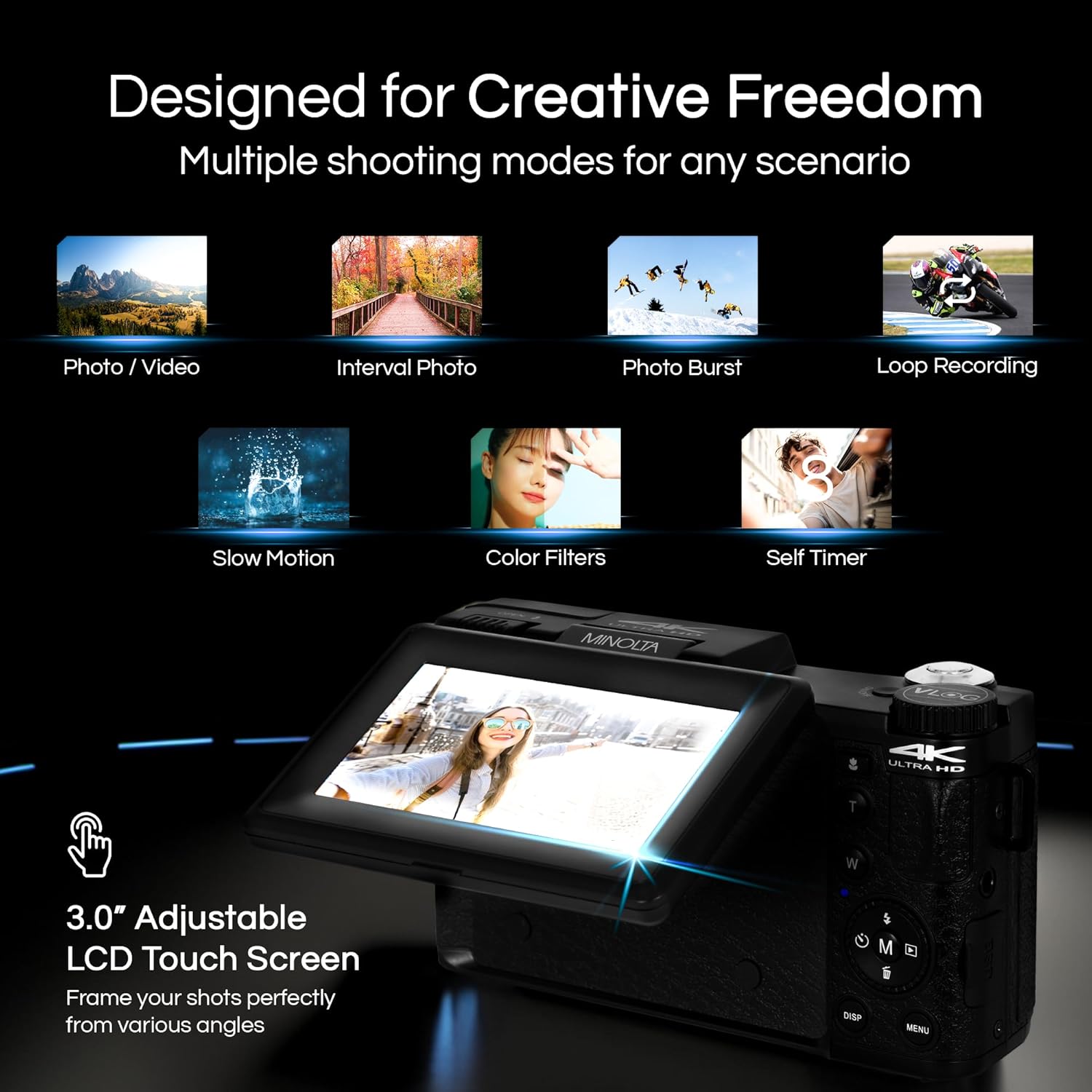
Image 4.1: The adjustable LCD screen showing various shooting modes.
The 3-inch LCD screen provides a live view, access to menus, and playback options. It can be rotated and flipped, making it suitable for vlogging and shooting from various angles. Navigate menus using the touch screen or physical buttons.
4.4 Funkce zoom
The camera features 16x digital zoom. Use the zoom lever (often marked 'W' for Wide and 'T' for Telephoto) to adjust the focal length. Note that digital zoom may reduce image quality compared to optical zoom.

Obrázek 4.2: Příkladample of using digital zoom to capture distant details.
4.5 Special Features and Modes

Image 4.3: Icons illustrating the camera's creative modes.
The MND60V offers several creative modes:
- Zpomalený pohyb: Nahrává video s vyšší snímkovou frekvencí pro zpomalené přehrávání.
- Nahrávání ve smyčce: Continuously records video, overwriting the oldest files, když je paměťová karta plná.
- Časová prodleva: Captures a series of photos at set intervals and combines them into a video.
- Výběr scény: Pre-set modes optimized for specific shooting conditions (e.g., portrait, landscape).
- Samospoušť: Delays the shutter release for a few seconds, allowing you to get into the shot.
4.6 Používání dálkového ovladače
The included tripod features a built-in wireless remote. This allows you to start/stop recording or take photos from a distance, ideal for group shots or vlogging.
4.7 Převod Files
Connect the camera to a computer using the provided USB cable. The camera will appear as a removable drive, allowing you to copy photos and videos to your computer.
5. Údržba
5.1 Čištění fotoaparátu
- K čištění těla fotoaparátu použijte měkký, suchý hadřík.
- Na čočku použijte speciální hadřík a roztok na čištění čoček. Nedotýkejte se povrchu čočky prsty.
- Nepoužívejte agresivní chemikálie nebo abrazivní materiály.
5.2 Péče o baterii
- Před prvním použitím baterii plně nabijte.
- Pokud baterii nepoužíváte, uchovávejte ji na chladném a suchém místě.
- Nevystavujte baterii extrémním teplotám.
5.3 Skladování
When not in use, store the camera and its accessories in the provided carrying case to protect them from dust, moisture, and physical damage.
6. Řešení problémů
If you encounter issues with your Minolta MND60V camera, refer to the following common problems and solutions:
| Problém | Možná příčina | Řešení |
|---|---|---|
| Fotoaparát se nezapne. | Battery is drained or incorrectly inserted. | Ujistěte se, že je baterie plně nabitá a správně vložená. |
| Photos/Videos are blurry. | Autofocus issue, insufficient light, or camera shake. | Ensure proper lighting. Allow camera to focus before capturing. Use the tripod for stability. Avoid excessive digital zoom in low light. |
| Baterie se rychle vybíjí. | Frequent use of screen/LED light, cold environment, or aging battery. | Reduce screen brightness. Turn off LED light when not needed. Keep battery warm in cold conditions. Consider a replacement battery if performance significantly degrades. |
| Chyba paměťové karty. | Karta je plná, poškozená nebo nekompatibilní. | Format the memory card (this will erase all data). Try a different compatible Micro SD card. |
| No audio in video recordings. | External microphone not connected or faulty. | Ensure the external microphone is securely plugged into the camera's microphone input. Check microphone settings in the camera menu. |
7. Specifikace
Key technical specifications for the Minolta MND60V VLOG Camera Kit:
| Funkce | Specifikace |
|---|---|
| Číslo modelu | MND60V |
| Efektivní rozlišení | 64 MP |
| Rozlišení videa | 4K (3840 Pixels Effective Video Resolution) |
| Snímková frekvence videa | 60 FPS (for 4K) |
| Technologie fotosenzoru | CMOS (2/3-inch Photo Sensor Size) |
| Zobrazit | 3palcový LCD displej |
| Typ zaměření | Automatické ostření |
| Digitální zoom | 16x |
| Typ objektivu | Wide Angle (Minimum/Maximum Focal Length: 3.95 mm) |
| Maximální clona | 1.8 f |
| Stabilizace obrazu | Digitální |
| Typ paměti Flash | Micro SD |
| Technologie připojení | USB |
| Formát záznamu videa | MP4 |
| Podporovaný formát zvuku | AAC |
| Podporovaný formát obrázku | JPEG |
| Zdroj napájení | Lithium-Ion Battery (1 AAA battery required for remote, included) |
| Hmotnost položky | 3.5 libry |
| Barva | Černý |
| Vlastnosti | Anti-Shake, Built-In Flash, Microphone Input, Remote Control, Slow Motion, Time Lapse, Timer |
8. Informace o záruce
The Minolta MND60V VLOG Camera Kit comes with a Limited 1 Year Manufacturer WarrantyPodrobné podmínky, včetně krytí, omezení a způsobu uplatnění reklamace, naleznete v přiložené záruční kartě.
9. Zákaznická podpora
For further assistance, technical support, or inquiries regarding your Minolta MND60V VLOG Camera Kit, please visit the official Minolta webnebo se obraťte na jejich oddělení zákaznických služeb. Kontaktní informace obvykle naleznete na záručním listu nebo na etiketě výrobce. webmísto.