
1. Úvod
This manual provides comprehensive instructions for the installation, operation, and maintenance of your Taffio CH7102-F3 Android Car Radio GPS CarPlay System. This system is specifically designed for Mazda 3 vehicles, models BM and BN, manufactured between 2013 and 2019. It integrates advanced navigation, communication, and entertainment features into your vehicle's dashboard, enhancing your driving experience with modern multimedia capabilities.
Please read this manual thoroughly before installation and use to ensure proper functionality and to prevent damage to the unit or your vehicle. Keep this manual for future reference.
2. Bezpečnostní informace
- Doporučená profesionální instalace: Due to the complexity of car electrical systems, professional installation is highly recommended to avoid damage to the unit or vehicle.
- Odpojení napájení: Před prováděním jakýchkoli elektrických prací vždy odpojte baterii vozidla, abyste předešli zkratu nebo úrazu elektrickým proudem.
- Zapojení: Ensure all wiring connections are secure and properly insulated to prevent electrical hazards. Do not modify the wiring harness unless specifically instructed.
- Bezpečnost jízdy: Nepoužívejte systém způsobem, který by vás rozptyloval od řízení. Vždy upřednostňujte bezpečnost silničního provozu.
- Větrání: Ensure the unit has adequate ventilation and is not obstructed by other components.
- Čištění: K čištění obrazovky a zařízení používejte měkký, suchý hadřík. Nepoužívejte abrazivní čisticí prostředky ani rozpouštědla.
3. Obsah balení
Before beginning installation, verify that all components listed below are present in your package. If any items are missing or damaged, please contact your vendor.

Obrázek 3.1: Nadview of all components included in the delivery. This includes the Android Display, Main Unit, Frame, Power Cable, LVDS cable, Speaker Cables, USB Cable, Mic Cable, Aux Adapter, Screws, Display Cable, GPS Antenna, and 4G Antenna.
- Android Display (10.25-inch touchscreen)
- Main Unit (Processor box)
- Rám specifický pro vozidlo
- Kabelový svazek napájecího kabelu
- Kabel LVDS
- Kabely reproduktorů
- USB kabel(y)
- Kabel mikrofonu
- Aux adaptér
- Montážní šrouby
- Kabel displeje
- GPS anténa
- 4G anténa
4. Nastavení a instalace
The Taffio CH7102-F3 system is designed for a plug-and-play installation, requiring no modifications, restrictions, or coding of the original vehicle system. The original system's functions, including radio, controller, steering wheel controls, and vehicle settings, are fully preserved and supported.
4.1 Instalace skončilaview
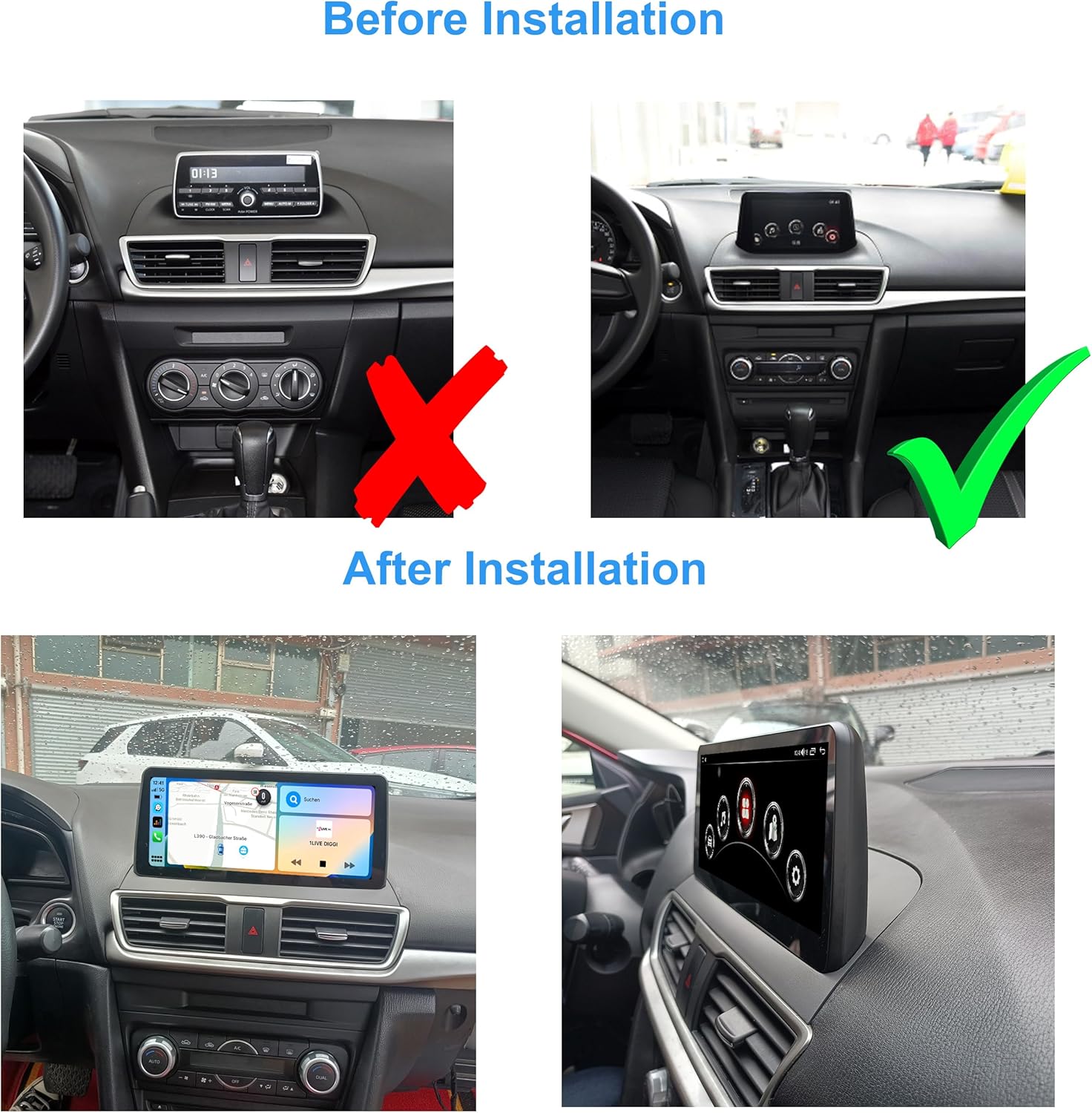
Obrázek 4.1: Visual comparison of the Mazda 3 dashboard before and after the Taffio Android display installation. The original small display is replaced with the larger 10.25-inch Android unit.
The installation involves replacing the original display with the new 10.25-inch Android display and connecting the main unit and associated cables. The process is designed to be straightforward, primarily involving connecting the display and the main connection cable.
4.2 Schéma připojení
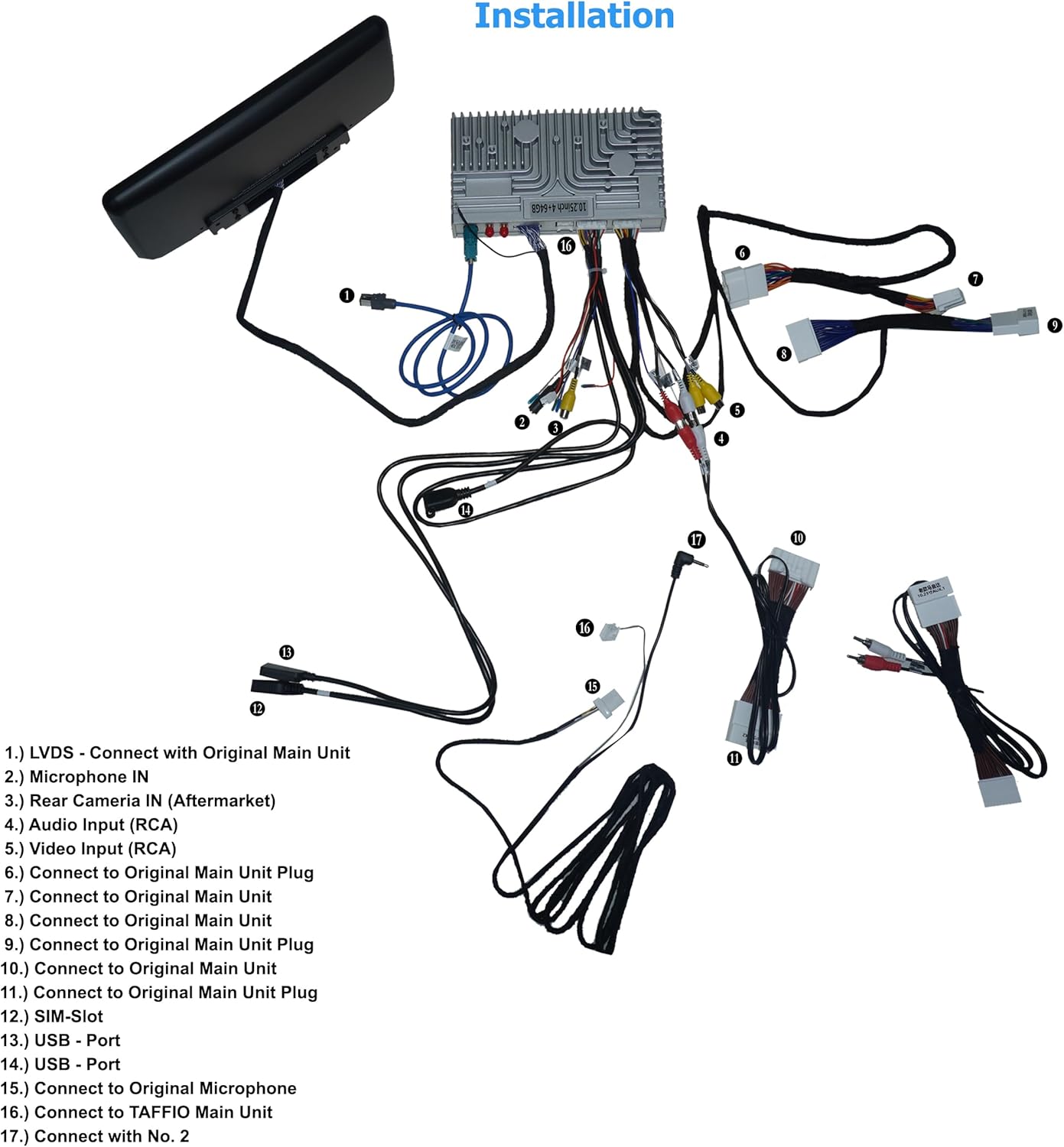
Obrázek 4.2: Detailed wiring diagram illustrating how to connect the Taffio CH7102-F3 components. Key connections include LVDS to the original main unit, microphone input, rear camera input, audio/video inputs, USB ports, SIM slot, and antennas.
Refer to the diagram above for specific connection points. The numbered points correspond to the following:
- LVDS: Connect with Original Main Unit.
- Microphone IN: Input for external microphone.
- Rear Camera IN (Aftermarket): Connect aftermarket rear view fotoaparát.
- Audio vstup (RCA): Pro externí audio zdroje.
- Video Input (RCA): Pro externí zdroje videa.
- Connect to Original Main Unit Plug: Main power and data connection.
- Connect to Original Main Unit: Additional data connection.
- Connect to Original Main Unit: Additional data connection.
- Connect to Original Main Unit Plug: Main power and data connection.
- Connect to Original Main Unit Plug: Main power and data connection.
- Connect to Original Main Unit Plug: Main power and data connection.
- SIM-Slot: Insert 3G/4G SIM card for mobile data.
- USB - Port: Připojte zařízení USB.
- USB - Port: Připojte zařízení USB.
- Connect to Original Microphone: If applicable, connect to the vehicle's original microphone.
- Connect to TAFFIO Main Unit: Connect the display to the main processing unit.
- Connect with No. 2: Specific connection point as per diagram.
5. Návod k obsluze
The Taffio CH7102-F3 operates on Android 12, providing a familiar and intuitive user interface. The 10.25-inch capacitive multi-touch screen allows for easy navigation through menus and applications.
5.1 Systémové rozhraní

Obrázek 5.1: Main home screen of the Android system, displaying various application icons.

Obrázek 5.2: Secondary home screen with additional application icons, including vehicle settings.

Obrázek 5.3: Third home screen displaying connectivity and utility applications.
Swipe left or right on the screen to navigate between different home screens. Tap on an icon to launch the corresponding application. The system supports multi-touch gestures for zooming and scrolling.
5.2 CarPlay a Android Auto
The unit features integrated CarPlay and Android Auto functionality, allowing seamless integration with your smartphone without the need for additional adapters.
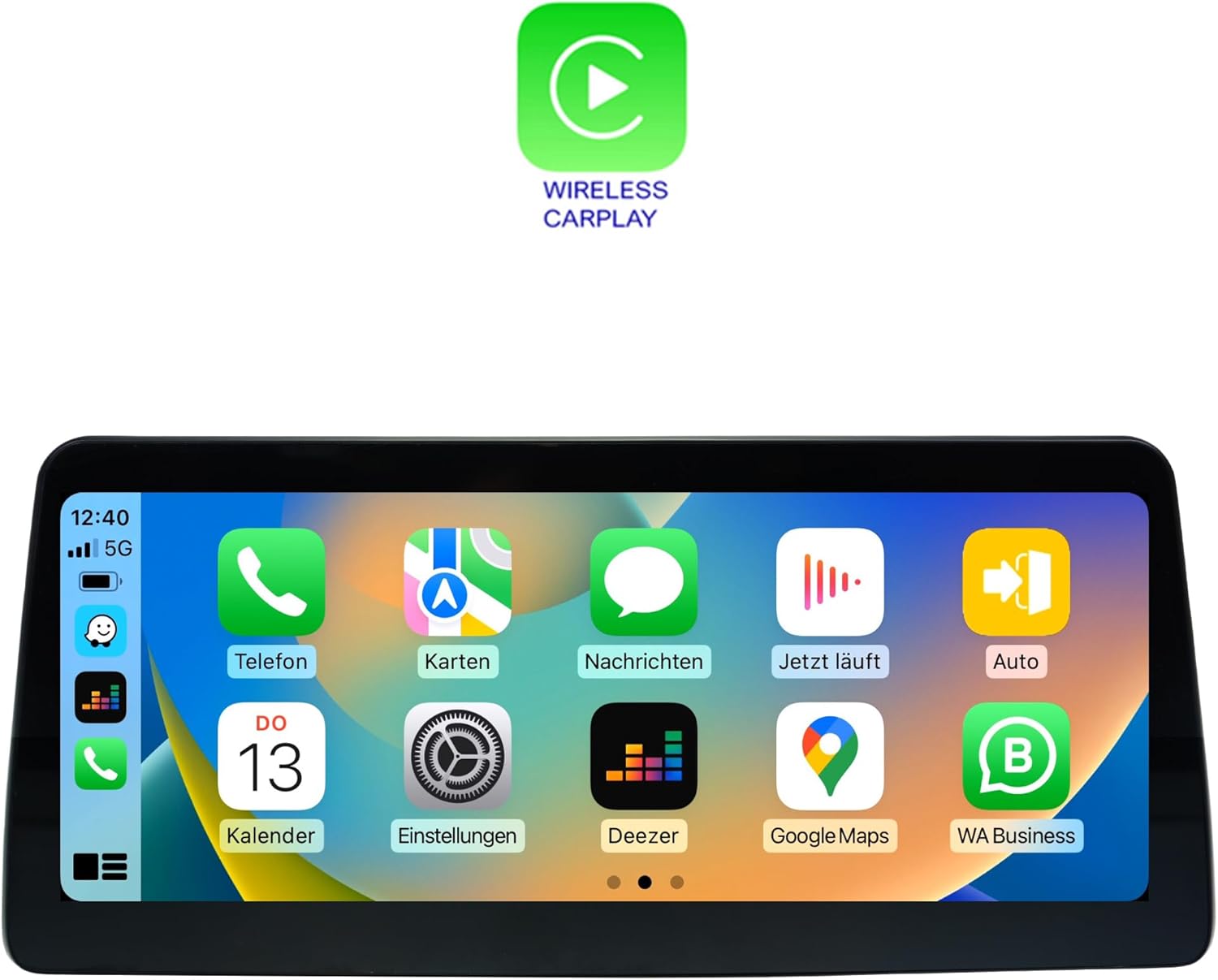
Obrázek 5.4: Wireless CarPlay interface, mirroring your iPhone's essential apps.

Obrázek 5.5: Android Auto interface, providing access to Android apps optimized for driving.
To use CarPlay or Android Auto, connect your compatible smartphone via USB or wirelessly (if supported by your phone and the unit). Follow the on-screen prompts to establish the connection. Once connected, you can access navigation, music, messages, and other apps directly from the unit's display.
5.3 Navigace (GPS)
The unit includes an integrated GPS receiver with high sensitivity and accuracy. It comes with 3D map material and free lifetime updates. To use navigation, launch the 'Navi' or 'Maps' application from the home screen. Ensure the GPS antenna is properly installed and has a clear view oblohy pro optimální příjem signálu.
5.4 Connectivity (Wi-Fi, Bluetooth, 4G LTE)
- Wi-Fi: Connect to Wi-Fi hotspots or your smartphone's hotspot for internet access. Go to Settings > Network & Internet > Wi-Fi to configure.
- Bluetooth 5.0: Pair your smartphone for hands-free calling and audio streaming. Go to Settings > Connected devices > Pair new device.
- 3G/4G LTE: Insert a SIM card into the dedicated slot for faster navigation and streaming capabilities. Ensure the 4G antenna is connected.
5.5 Přehrávání multimédií
The system supports various audio and video formats:
- Video formáty: 1080p, H264, AVI, RMVB, FLV, MKV.
- Zvukové formáty: MP3, WMA, FLAC, APE, AAC.
Play media from USB drives, internal storage, or streaming apps. The unit also supports DVR functions via USB 2.0 & AV/CVBS.
5.6 Připojení zadní kamery
The unit supports connection to a rear view camera. It features an automatic switching function when the vehicle is put into reverse gear, displaying the camera feed on the screen.
6. Specifikace
| Funkce | Specifikace |
|---|---|
| Číslo modelu | CH7102-F3 |
| Operační systém | Android 12 |
| CPU | 8-core (Cortex A75 x 2 @ 1.80 GHz, Cortex A55 x 6 @ 1.80 GHz) |
| BERAN | 4 GB |
| Interní úložiště | 64 GB |
| GPU | Mali-G52 |
| Velikost displeje | 10.25palcový LCD |
| Rozlišení displeje | 1920 x 1080 |
| Dotyková technologie | Kapacitní vícedotykový displej |
| Konektivita | Bluetooth 5.0, Wi-Fi, USB, Ethernet, 3G/4G LTE (SIM slot) |
| Modem | X11 LTE (Max 390 Mbit/s download, 150 Mbit/s upload) |
| GPS přijímač | Integrated, high sensitivity and accuracy |
| Integrace do auta | Built-in CarPlay, Android Auto |
| Podporované video formáty | 1080p, H264, AVI, RMVB, FLV, MKV |
| Podporované zvukové formáty | MP3, WMA, FLAC, APE, AAC |
| Podpora DVR | USB 2.0 & AV/CVBS |
| Vstup pro zadní kameru | Yes, with automatic switching |
| Hmotnost | 3 kg |
| Typ montáže | Držák na palubní desku |
7. Údržba
7.1 Čištění
To clean the display screen, use a soft, lint-free cloth. For stubborn smudges, slightly dampen the cloth with water or a screen-safe cleaning solution. Avoid using harsh chemicals, abrasive cleaners, or solvents, as these can damage the screen coating or plastic components.
7.2 Aktualizace softwaru
Periodically check for software updates to ensure optimal performance and access to new features. Updates can typically be found through the system's settings menu under 'System' or 'About device'. Ensure a stable internet connection (Wi-Fi or 4G) during the update process and do not power off the unit.
7.3 Obecná péče
- Nevystavujte jednotku extrémním teplotám nebo přímému slunečnímu záření po delší dobu.
- Do not place heavy objects on the unit or apply excessive force to the screen.
- Abyste předešli poškození elektrickým proudem, udržujte kapaliny v dostatečné vzdálenosti od jednotky.
8. Řešení problémů
This section addresses common issues you might encounter with your Taffio CH7102-F3 system. If you experience a problem not listed here, or if the suggested solutions do not resolve the issue, please contact customer support.
| Problém | Možná příčina | Řešení |
|---|---|---|
| Jednotka se nezapne | Uvolněné připojení napájení, spálená pojistka, problém s autobaterií. | Check all power cable connections. Verify vehicle's fuse box and battery. Consult a professional installer. |
| Žádný zvuk | Volume too low, incorrect audio source selected, speaker cable issue. | Increase volume. Ensure correct audio output is selected (e.g., AUX). Check speaker cable connections. |
| Ztráta signálu GPS nebo jeho nepřesnost | GPS antenna obstructed, antenna not connected, poor satellite coverage. | Ujistěte se, že je GPS anténa správně nainstalována a má volný view oblohy. Zkontrolujte připojení antény. Přejděte do otevřeného prostoru. |
| CarPlay/Android Auto se nepřipojuje | Nesprávný kabel USB, nastavení telefonu, nekompatibilita softwaru. | Use a high-quality USB data cable. Ensure CarPlay/Android Auto is enabled on your phone. Restart both phone and unit. |
| Dotykový displej nereaguje | Zamrznutí systému, fyzické poškození. | Perform a soft reset (refer to system settings for reset option). If issue persists, contact support. |
| Original vehicle functions not working | Incorrect wiring, system conflict. | Double-check all connections to the original main unit. Ensure the system is correctly configured to switch between original and Android modes. |
9. Záruka a podpora
9.1 Informace o záruce
Please refer to the warranty card included with your product for specific warranty terms and conditions. Typically, products come with a limited warranty covering manufacturing defects for a specified period from the date of purchase. Keep your proof of purchase for warranty claims.
9.2 Zákaznická podpora
For technical assistance, troubleshooting, or warranty inquiries, please contact your retailer or the manufacturer's customer support. Have your product model number (CH7102-F3) and purchase details ready when contacting support.
Manufacturer: Real Media GmbH & Co. KG