
1. Úvod
This manual provides essential information for the safe and efficient operation of your Sharp GX-BT190 Portable Bluetooth Speaker. Please read it thoroughly before using the device and retain it for future reference.
2. Bezpečnostní informace
- Nevystavujte reproduktor extrémním teplotám, přímému slunečnímu záření ani vysoké vlhkosti.
- Reproduktor nerozebírejte, neopravujte ani neupravujte. Mohlo by dojít ke zrušení záruky a k ohrožení bezpečnosti.
- Ensure the charging port cover is securely closed when using the speaker near water to maintain its IP67 rating.
- Používejte pouze dodaný nabíjecí kabel nebo jeho certifikovaný ekvivalent.
- Udržujte reproduktor mimo dosah dětí a domácích zvířat.
- Vyhněte se dlouhodobému poslechu při vysoké hlasitosti, abyste předešli poškození sluchu.
3. Obsah balení
- Sharp GX-BT190 Portable Bluetooth Speaker
- USB nabíjecí kabel
- Šňůrka
- Návod k použití
4. Konec produktuview

Přední view of the Sharp GX-BT190 speaker, showing the central speaker grille with the Sharp logo and the LED light ring.

Strana view of the Sharp GX-BT190 speaker, highlighting the textured speaker grille and the integrated lanyard.
Zadní view of the Sharp GX-BT190 speaker, showing the control buttons and the sealed charging port cover.
Ovládací prvky a indikátory:
- Vypínač: Stiskněte a podržte pro zapnutí/vypnutí.
- Tlačítko pro zvýšení hlasitosti / další skladbu (+): Krátké stisknutí pro zvýšení hlasitosti, dlouhé stisknutí pro další skladbu.
- Tlačítko pro snížení hlasitosti / Předchozí skladba (-): Krátké stisknutí pro snížení hlasitosti, dlouhé stisknutí pro předchozí skladbu.
- Play/Pause / Call Button (►||): Short press to play/pause, answer/end calls. Long press to reject calls.
- Mode / Light Button (M): Short press to cycle through LED light modes. Long press to turn off LED lights.
- Nabíjecí port USB-C: For charging the speaker. Ensure the rubber cover is sealed when not charging.
- LED indikátor: Zobrazuje stav nabíjení a stav párování Bluetooth.
5. Nastavení
5.1 Nabíjení reproduktoru
- Open the rubber cover on the back of the speaker to access the USB-C charging port.
- Připojte dodaný nabíjecí kabel USB k portu USB-C reproduktoru.
- Druhý konec kabelu USB připojte k napájecímu adaptéru USB (není součástí balení) nebo k portu USB počítače.
- The LED indicator will illuminate during charging and turn off once fully charged.
- Close the rubber cover securely after charging to maintain the speaker's waterproof rating.
5.2 Zapnutí/vypnutí
- Zapnutí: Press and hold the Power button for approximately 3 seconds. You will hear an audible prompt, and the LED indicator will flash.
- Vypnutí: Press and hold the Power button for approximately 3 seconds. You will hear an audible prompt, and the LED indicator will turn off.
5.3 Párování Bluetooth
- Ensure the speaker is powered on and the LED indicator is flashing, indicating it is in pairing mode.
- Na svém mobilním zařízení povolte Bluetooth a vyhledejte dostupná zařízení.
- Select "GX-BT190" from the list of devices.
- Po spárování přestane LED indikátor blikat a zůstane svítit nepřerušovaně a uslyšíte potvrzovací tón.
- Reproduktor se po zapnutí automaticky znovu připojí k poslednímu spárovanému zařízení, pokud je zařízení v dosahu a je povoleno připojení Bluetooth.
5.4 Párování s pravým bezdrátovým stereo (TWS) systémem
TWS allows you to pair two GX-BT190 speakers together for a stereo audio experience.

Two Sharp GX-BT190 speakers, one red and one blue, positioned together, illustrating the True Wireless Stereo (TWS) pairing feature.
- Ensure both GX-BT190 speakers are powered on and not connected to any Bluetooth device.
- Na jednom z reproduktorů (to bude primární reproduktor) dvakrát stiskněte tlačítko napájení. Reproduktor přejde do režimu párování TWS.
- The two speakers will automatically search for and connect to each other. You will hear a confirmation tone once TWS pairing is successful.
- Once TWS paired, connect your mobile device to the primary speaker via Bluetooth as described in section 5.3.
- To disconnect TWS, double-press the Power button on either speaker.
6. Provoz
6.1 Přehrávání zvuku
- Přehrát/pozastavit: Krátce stiskněte tlačítko Přehrát/Pozastavit.
- Zvýšit hlasitost: Krátce stiskněte tlačítko „+“.
- Snížit hlasitost: Krátce stiskněte tlačítko '-'.
- Další skladba: Dlouze stiskněte tlačítko „+“.
- Předchozí skladba: Dlouze stiskněte tlačítko '-'.
6.2 Volání bez použití rukou
- Přijmout hovor: Při příchozím hovoru krátce stiskněte tlačítko Přehrát/Pozastavit.
- Ukončit hovor: Během hovoru krátce stiskněte tlačítko Přehrát/Pozastavit.
- Odmítnout hovor: Dlouze stiskněte tlačítko Přehrát/Pozastavit, když zvoní příchozí hovor.
6.3 LED Mood Lights
- Short press the 'M' (Mode/Light) button to cycle through the 6 available LED mood light modes.
- Long press the 'M' button to turn off the LED lights.
6.4 Waterproof and Dustproof Usage (IP67)

The Sharp GX-BT190 speaker partially submerged in water, demonstrating its IP67 waterproof and dustproof capabilities.
The GX-BT190 speaker is rated IP67, meaning it is protected from dust ingress and can withstand immersion in water up to 1 meter for 30 minutes. To ensure this protection:
- Always ensure the rubber cover for the charging port is fully and securely sealed before exposing the speaker to water or dust.
- Reproduktor úmyslně neponořujte na delší dobu ani do hloubky, která překračuje stanovenou hodnotu.
- Po kontaktu s vodou reproduktor před nabíjením otřete do sucha měkkým hadříkem.
7. Údržba
7.1 Čištění
- Reproduktor otřete měkkým, damp tkanina.
- Nepoužívejte abrazivní čisticí prostředky, alkohol ani chemická rozpouštědla.
- Ensure the speaker is dry before charging or storing.
7.2 Skladování
- Reproduktor skladujte na chladném a suchém místě mimo dosah přímého slunečního záření a extrémních teplot.
- Pokud baterii skladujete delší dobu, pravidelně ji nabíjejte (např. každé 3 měsíce), aby byla zachována její životnost.
8. Řešení problémů
| Problém | Řešení |
|---|---|
| Reproduktor se nezapne. | Ujistěte se, že je baterie nabitá. Připojte reproduktor ke zdroji napájení pomocí kabelu USB. |
| Nelze spárovat přes Bluetooth. | Ensure the speaker is in pairing mode (LED flashing). Turn off and on Bluetooth on your device. Move the speaker closer to your device. Clear previous Bluetooth connections on your device. |
| Žádný zvuk nebo nízká hlasitost. | Increase the volume on both the speaker and your connected device. Ensure the speaker is properly paired. |
| Špatná kvalita zvuku. | Move the speaker closer to your device. Ensure there are no obstructions between the speaker and your device. Try playing a different audio source. |
| Párování TWS selhalo. | Ensure both speakers are GX-BT190 models and are not connected to any other Bluetooth device. Try powering both speakers off and on, then re-attempt TWS pairing. |
9. Specifikace

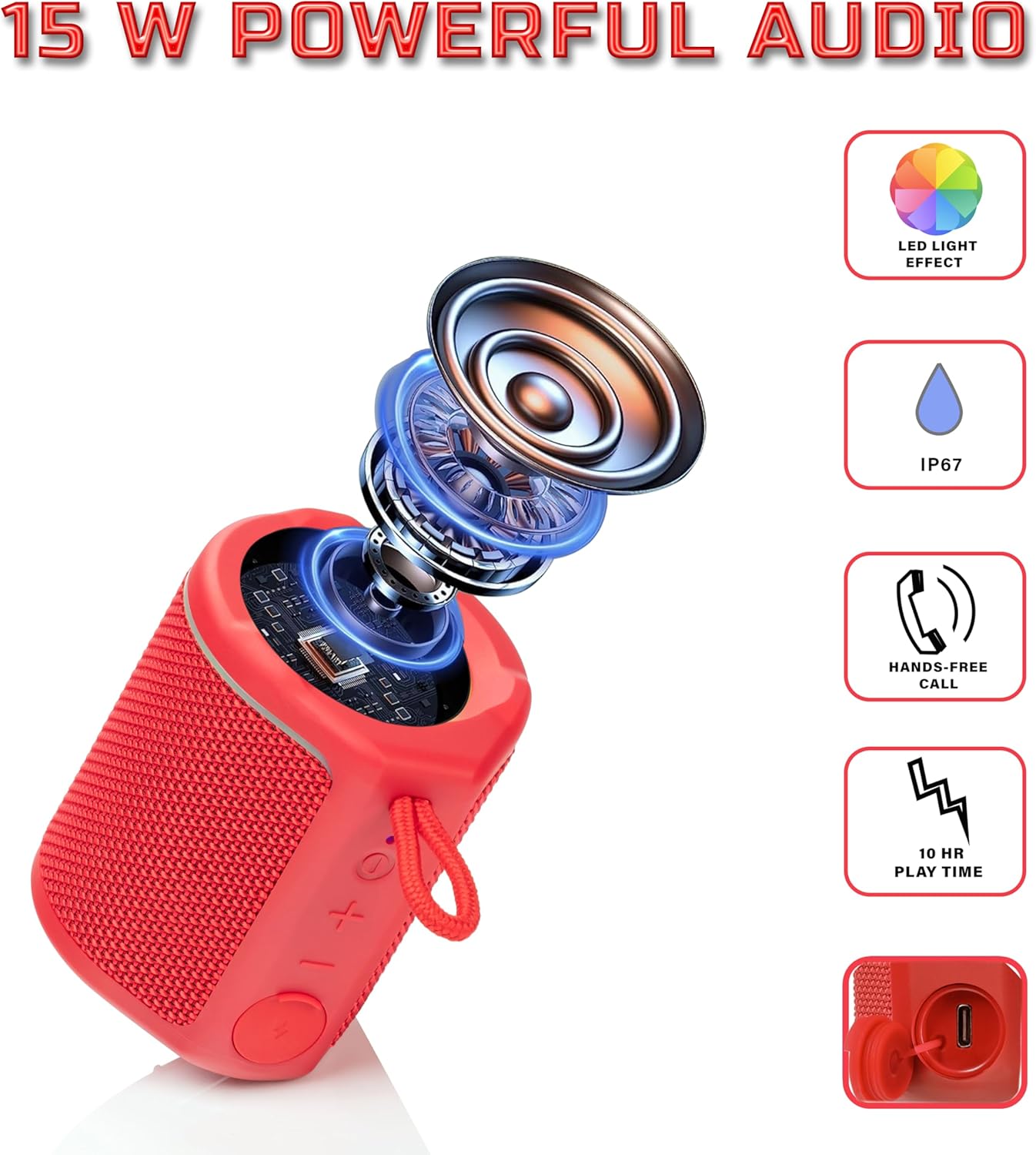
Diagram illustrating the internal components of the Sharp GX-BT190 speaker, including the speaker driver, and highlighting features like LED light effect, IP67 rating, hands-free call function, and battery life.
| Funkce | Detail |
|---|---|
| Číslo modelu | GX-BT190 |
| Technologie připojení | Bluetooth |
| Maximální výstupní výkon reproduktoru | 10 wattů |
| Hodnocení voděodolnosti | IP67 |
| Životnost baterie | Až 15 hodin |
| Typ baterie | 1 Lithium Ion (součástí balení) |
| Kapacita baterie | 1200 XNUMX mAh |
| Rozměry produktu (D x Š x V) | 7.5 x 7.5 x 7.5 cm (přibližně) |
| Hmotnost položky | 226.8 g (8 unce) |
| Bezdrátové Dosah | Až 33 stop |
| Další funkce | LED Light, True Wireless Stereo (TWS), Hands-Free Calling |
10. Záruka
The Sharp GX-BT190 Portable Bluetooth Speaker comes with a 1-Year Limited Warranty from the date of purchase. This warranty covers manufacturing defects under normal use. It does not cover damage caused by misuse, accidents, unauthorized modifications, or normal wear and tear. Please retain your proof of purchase for warranty claims.
11. Podpora
For technical assistance, warranty inquiries, or further information regarding your Sharp GX-BT190 speaker, please contact Sharp Inc. customer support:
- Kontakt na výrobce: Sharp Inc
- Telefon: 1-800-BE-SHARP