
1. Úvod
This manual provides detailed instructions for the setup, operation, and maintenance of your HUNSN RJ47 Micro Firewall Appliance. The RJ47 is a compact, fanless mini PC designed for network security applications, supporting various open-source firewall solutions like OPNsense and pfSense, as well as Linux distributions and Windows operating systems.
Equipped with an Intel 12th Gen Alder Lake-N N200 processor and multiple 2.5GbE network interfaces, this appliance offers robust performance for network routing and security tasks.
2. Vlastnosti produktu
- Procesor: Intel 12th Gen Alder Lake-N N200 with AES-NI support.
- Paměť: 1 x SO-DIMM DDR5 4800 MT/s slot, supporting up to 32GB RAM.
- Skladování: 2 x M.2 2280 NVMe x1 SSD slots and 1 x 2.5-inch SATA SSD/HDD bay.
- Síťová rozhraní: 6 x Intel 2.5GbE I226-V LAN ports.
- Video výstup: 2 x HDMI 2.1 ports and 1 x Type-C port for display.
- USB porty: 1 x USB 3.2, 4 x USB 2.0, and 1 x Type-C (data/display).
- Additional I/O: TF slot for data storage/system boot, Power ON/OFF button, RST button, DC_IN.
- Chlazení: Bezventilátorový design pro tichý provoz.
- Kompatibilita systému: Supports 5.10.x and above core-based FreeBSD router systems, Linux distributions, and Windows OS. UEFI support only.
- Řízení spotřeby: Supports hardware auto power-on (enabled by default), network wake-up, and system power management.
3. Průvodce nastavením
3.1 Obsah balení
Než budete pokračovat, ujistěte se, že balení obsahuje všechny položky:
- Firewall HUNSN RJ47
- Power Supply (12V3A)
- Napájecí kabel
- Záruční list
3.2 Překročení hardwaruview

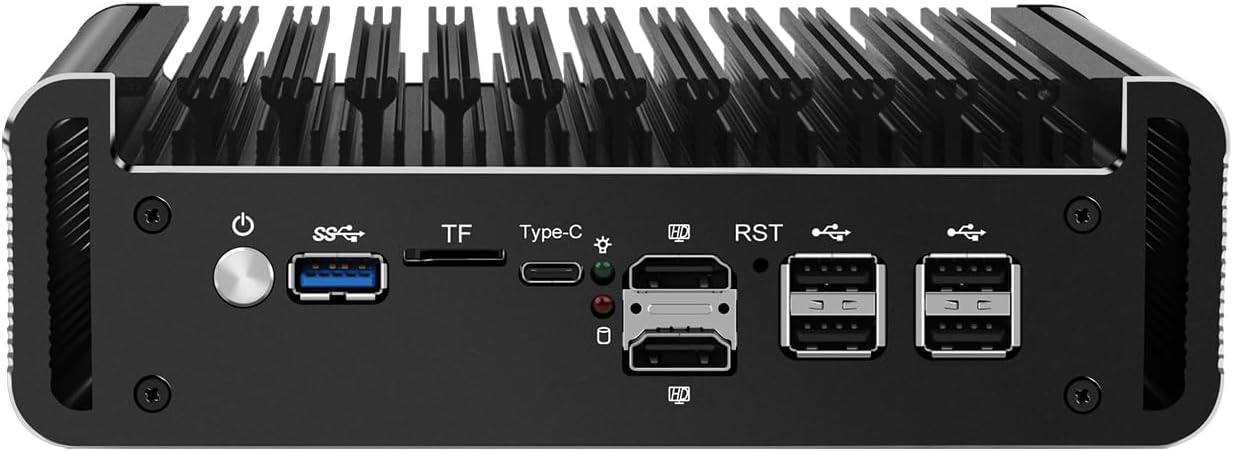
Obrázek 1: Přední panelview
This image displays the front panel of the HUNSN RJ47, featuring the power button, USB 3.2 port, TF card slot, Type-C port, two HDMI 2.1 ports, RST button, and four USB 2.0 ports.
Obrázek 2: Zadní panelview
This image illustrates the rear panel of the HUNSN RJ47, showing the DC 12V power input and six 2.5 Gigabit Ethernet (LAN) ports labeled ETH0 to ETH5.
3.3 Počáteční připojení
- Připojení displeje: Connect a monitor to one of the HDMI 2.1 ports or the Type-C port using an appropriate cable.
- Připojení periferií: Připojte USB klávesnici a myš k dostupným USB portům.
- Připojit síť: Connect your network cables to the 2.5GbE LAN ports as required for your network configuration.
- Připojte napájení: Connect the power supply to the DC_IN port on the appliance and then plug the power cord into an electrical outlet.
- Zapnutí: Press the power button on the front panel to turn on the appliance.
3.4 Instalace operačního systému
The HUNSN RJ47 supports various operating systems, including FreeBSD-based router systems (e.g., OPNsense, pfSense), Linux distributions, and Windows OS. It supports UEFI boot only.
- Prepare a bootable USB drive with your chosen operating system.
- Vložte bootovací USB disk do USB portu na zařízení.
- Power on the appliance and access the BIOS/UEFI settings (usually by pressing DEL or F2 during startup) to set the boot order or select the USB drive as the boot device.
- Při instalaci operačního systému postupujte podle pokynů na obrazovce.
4. Návod k obsluze
4.1 Zapnutí/vypnutí
- Zapnutí: Press the power button on the front panel. The system will automatically power on if configured in BIOS.
- Normální vypnutí: Initiate a shutdown through your installed operating system.
- Vynutit vypnutí: Press and hold the power button for approximately 5 seconds. Use this only when a normal shutdown is not possible.
4.2 Konfigurace sítě
The RJ47 features six 2.5GbE LAN ports. After installing your operating system, configure the network interfaces according to your specific network topology and firewall requirements. Refer to the documentation of your chosen operating system (e.g., OPNsense, pfSense) for detailed network setup instructions.
4.3 Nastavení BIOSu/UEFI
To access the BIOS/UEFI settings, power on the appliance and repeatedly press the DEL or F2 key. Here you can configure boot options, enable/disable features, and manage power settings such as "Auto Power On" and "Network Wake-up".
5. Údržba
5.1 Čištění
Due to its fanless design, the RJ47 requires minimal cleaning. Periodically wipe the exterior with a soft, dry cloth to remove dust. Ensure the ventilation fins are clear of obstructions to maintain optimal passive cooling.
- Nepoužívejte tekuté čisticí prostředky ani aerosolové spreje přímo na zařízení.
- Před čištěním se ujistěte, že je zařízení vypnuté a odpojené ze zásuvky.
5.2 Podmínky prostředí
To ensure longevity and stable operation, operate the appliance within the specified environmental conditions:
- Provozní teplota: -10 °C až 70 °C
- Skladovací teplota: 0 °C až 70 °C
- Relativní vlhkost: 5 % až 85 % (bez kondenzace)
6. Řešení problémů
- Bez napájení:
- Ensure the power adapter is securely connected to the appliance and the electrical outlet.
- Zkontrolujte, zda je elektrická zásuvka funkční.
- Zkontrolujte, zda je tlačítko napájení správně stisknuto.
- Žádný výstup na displej:
- Confirm the monitor is powered on and connected to the correct HDMI or Type-C port.
- Zkuste jiný kabel displeje nebo monitor.
- Ujistěte se, že je na monitoru vybrán správný vstupní zdroj.
- Problémy s připojením k síti:
- Check all Ethernet cable connections to the LAN ports.
- Verify network settings within your installed operating system.
- Ujistěte se, že váš router/switch funguje správně.
- Operating System Installation Failure:
- Confirm your bootable USB drive is created correctly and is recognized in BIOS/UEFI.
- Remember that the appliance supports UEFI boot only. Ensure your OS installer is configured for UEFI.
- Check the integrity of your OS image.
7. Technické specifikace
| Funkce | Specifikace |
|---|---|
| Číslo modelu | RJ47 |
| CPU | Procesor Intel N200 (12. generace Alder Lake-N), 6 MB mezipaměti, až 3.70 GHz |
| Podpora AES-NI | Ano |
| Paměť | 1 x SO-DIMM DDR5 4800 MT/s, až 32 GB |
| Skladování | 2 x M.2 2280 NVMe x1 SSD, 1 x 2.5 Inch SATA SSD/HDD |
| Síťová karta | 6 x Intel 2.5GbE I226-V |
| I/O rozhraní | Power ON/OFF, USB 3.2, TF slot, Type-C (display/data), 2 x HDMI 2.1, RST, 4 x USB 2.0, DC_IN, 6 x LAN |
| Rozšíření | Vestavěný rezervovaný TPM header, 1 x COM pin, 1 x GPIO pin |
| Vstup napájení | DC 100-240V AC/50-60Hz, 12V3A |
| Provozní teplota | -10 °C až 70 °C |
| Skladovací teplota | 0 °C až 70 °C |
| Relativní vlhkost | 5%~85% nekondenzující |
| TDP | 6W |
| Chladicí systém | Bez ventilátoru |
| Rozměry | Rozměr 178.3 x 126.5 x 55 mm |
| Hmotnost | 1.3 kgs (Appliance), 2 kg (Shipping Weight) |
| Kompatibilita systému | Routerové systémy FreeBSD (5.10.x+), distribuce Linuxu, operační systém Windows (pouze podpora UEFI) |
| Baterie | 1 baterie CR2032 (součástí balení) |
8. Informace o záruce
The HUNSN RJ47 Firewall Appliance includes a warranty card in its packaging. Please refer to this card for specific details regarding warranty coverage, terms, and conditions. Retain your proof of purchase for warranty claims.
9. Podpora
For technical assistance, product inquiries, or support, please contact HUNSN directly.
- Výrobce: Shenzhen Shi Han Song Ke Ji You Xian Gong Si
- Telefon: (86) 13613019665
- Fax: (86) 0755-23057094
- Internetový obchod: Navštivte úředníka HUNSN Store on Amazon pro více produktů a informací.