
Zavedení
This manual provides detailed instructions for the installation, operation, and maintenance of your Eiszuso 150M USB2.0 Wireless Network Card. This device is designed to provide wireless connectivity for computers running Windows, Linux, and Android operating systems, featuring a detachable 2dBi antenna for enhanced signal reception.

Image: The Eiszuso 150M USB2.0 Wireless Network Card with its detachable 2dBi antenna.
Obsah balení
Prosím, ověřte, zda jsou v balení přítomny všechny položky:
- Eiszuso 150M USB2.0 Wireless Network Card
- Detachable 2dBi Omnidirectional Antenna
- CD s ovladači (pokud je součástí balení)
Pokyny pro nastavení
- Připojení antény: Carefully screw the detachable 2dBi omnidirectional antenna onto the USB wireless network card. Ensure it is securely fastened but do not overtighten.
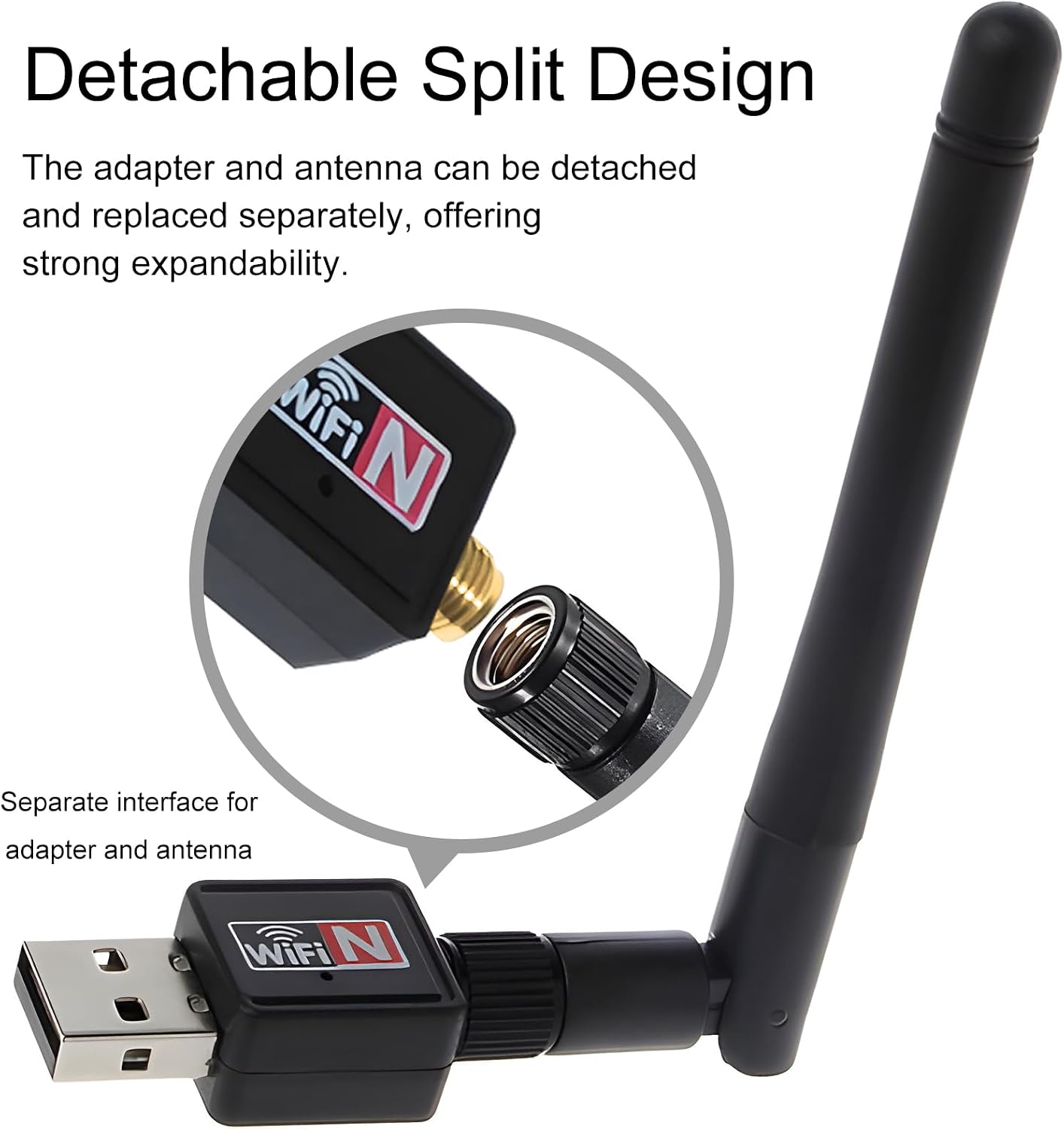
Image: Illustration of how to attach the detachable antenna to the USB adapter.
- Insert into USB Port: Plug the assembled wireless network card into an available USB 2.0 port on your computer or compatible device.
- Instalace ovladače:
- Windows:
For most modern Windows operating systems (Windows 10/11), the driver may install automatically. If not, insert the provided driver CD and follow the on-screen instructions. Alternatively, download the latest driver from the Eiszuso support website (if available) by searching for "RTL8188ETV driver".
- Linux:
Linux distributions often have built-in support for the RTL8188ETV chipset. If the device is not recognized automatically, you may need to install specific kernel modules or drivers. Consult your distribution's documentation or community forums for "RTL8188ETV Linux driver installation".
- Android:
For Android devices, driver support is typically integrated into the device's firmware. Ensure your Android device supports external USB Wi-Fi adapters. No separate driver installation is usually required.

Image: The network card is compatible with Windows, Linux, and Android operating systems.
- Windows:
Návod k obsluze
- Connect to a Wireless Network (Windows/Linux):
- Once the driver is installed, your system should detect the wireless network card.
- Otevřete síťové nastavení operačního systému nebo nabídku Wi-Fi.
- Select your desired Wi-Fi network (SSID) from the list of available networks.
- V případě potřeby zadejte heslo k síti (bezpečnostní klíč).
- The device should now connect to the wireless network.
- Adjusting Antenna Position: The antenna supports multi-dimensional rotation (360° vertical, 90° horizontal) to optimize signal reception. Adjust its position for the best signal strength and stability.

Image: The antenna can be rotated 360 degrees vertically and 90 degrees horizontally for optimal signal reception.
- Using with Android Devices:
For Android devices, ensure the device supports USB OTG (On-The-Go) and external Wi-Fi adapters. Once plugged in, the Android system should automatically recognize and use the adapter for wireless connectivity.
Údržba
- Čištění: K čištění zařízení používejte měkký, suchý hadřík. Nepoužívejte tekuté čisticí prostředky ani rozpouštědla.
- Péče o anténu: Handle the detachable antenna with care. Avoid excessive force when attaching or detaching it.
- Skladování: Pokud zařízení nepoužíváte, uložte jej na chladném a suchém místě mimo přímé sluneční světlo a extrémní teploty.
- Aktualizace firmwaru/ovladačů: Periodically check the Eiszuso support website for updated drivers or firmware to ensure optimal performance and compatibility.
Odstraňování problémů
- Zařízení nebylo detekováno:
- Ensure the device is fully plugged into a functional USB port.
- Vyzkoušejte jiný port USB.
- Znovu nainstalujte ovladače.
- Restartujte počítač.
- Nelze se připojit k Wi-Fi:
- Verify that the correct Wi-Fi password has been entered.
- Ujistěte se, že je váš router zapnutý a vysílá signál.
- Zkontrolujte, zda se ostatní zařízení mohou připojit ke stejné síti Wi-Fi.
- Adjust the antenna position for better signal reception.
- Restart your router and the computer.
- Pomalá rychlost připojení:
- Ensure the antenna is positioned optimally.
- Zkontrolujte, zda nedochází k rušení jinými elektronickými zařízeními.
- Update the device drivers.
- Verify that your internet service provider is delivering the expected speed.
Specifikace
| Funkce | Detail |
|---|---|
| Model | RTL8188ETV |
| Rozhraní | USB 2.0 |
| Bezdrátové Standardní | IEEE 802.11n / g / b |
| Rychlost přenosu dat | Až 150 Mbps |
| Typ antény | Detachable 2dBi Omnidirectional Antenna |
| Operační systémy | Windows, Linux, Android |
| Čipová sada | RTL8188ETV |
| Rozměry (cca) | 5.16 x 3.19 x 0.75 palce (balení) |
| Hmotnost (přibližně) | 0.634 unce |

Image: Approximate dimensions of the Eiszuso USB Wireless Network Card.
Záruka a podpora
For warranty information and technical support, please refer to the documentation provided with your purchase or visit the official Eiszuso webmísto. Uschovejte si doklad o koupi pro případ záručních reklamací.