
1. Bezpečnostní informace
Please read all safety instructions carefully before operating the WAINLUX K10 laser engraving machine. Failure to follow these instructions may result in injury or damage to the device.
- Ochrana očí: The machine features an eye-friendly shield and laser filtering. However, always ensure the shield is properly closed during operation. Avoid direct exposure to the laser beam.
- Uzavřený design: The WAINLUX K10 is designed with a fully enclosed structure to enhance safety.
- Automatic Stop Features:
- Micro-open Induction Safety Protection: The laser engraving machine will automatically stop operation immediately if the protective lid is opened during engraving.
- Tilt Induction Safety Protection: If the machine's angle relative to the horizontal plane exceeds 13(±5°) for more than 1 second, the laser will stop working immediately.
- Větrání: The machine includes a built-in fan for smoke extraction. Ensure proper ventilation in your workspace.
- Materiálová kompatibilita: This laser engraver is suitable for materials such as wood, plastic, leather, parchment, plywood, painted metal, and black plastic. Do not engrave or cut white, transparent, or reflective materials directly as the laser may not interact with them effectively or could cause unexpected reflections.
- Hořlavé materiály: Udržujte hořlavé materiály mimo dosah gravírovací oblasti.
- Dozor: Nenechávejte stroj během provozu bez dozoru.

Image: Micro-open Induction Safety Protection Design. The machine stops when the lid is opened.

Image: Tilt Induction Safety Protection Design. The machine stops if tilted beyond a safe angle.

Obrázek: Overview of multiple security protections including anti-blue light shield and built-in fan.
2. Konec produktuview
The WAINLUX K10 is a compact and versatile 3W mini laser engraving machine designed for various creative and practical applications. It offers high precision and multiple connectivity options.
Klíčové vlastnosti:
- Kompaktní velikost: Measuring 27 x 27 x 14 cm, it is highly portable and suitable for various environments.
- Laserový modul: Features a 3W compressed spot laser module with 24W input power.
- Vysoká přesnost: Achieves an engraving accuracy of 0.01 mm for detailed results.
- Oblast gravírování: Provides an 80 mm x 80 mm engraving range.
- Rychlost gravírování: Capable of speeds up to 3000 mm/min.
- Konektivita: Supports Bluetooth connection via a mobile app (Android/iOS) and USB connection to Windows or Mac computers.
- Podporováno File Formáty: JPG, BMP, PNG, PEG, GIF, PLT, XJ, HPGL, DXF.
- Engraving Modes: Black and white, discrete, and contour.
Podporované materiály:
The WAINLUX K10 can engrave a wide range of materials, including:
- Wood chips, Plywood, Bamboo
- Plastic, Black Plastic
- Leather, Parchment
- Coated Metal (painted metal surfaces)
- Karton, papír
- Silikagel
- Břidlice
- Ceramic, Glass (with preparation, see Operating Instructions)
- Akryl
- Jídlo
It can also be used as a laser cutter for parchment up to 0.5 mm thick.
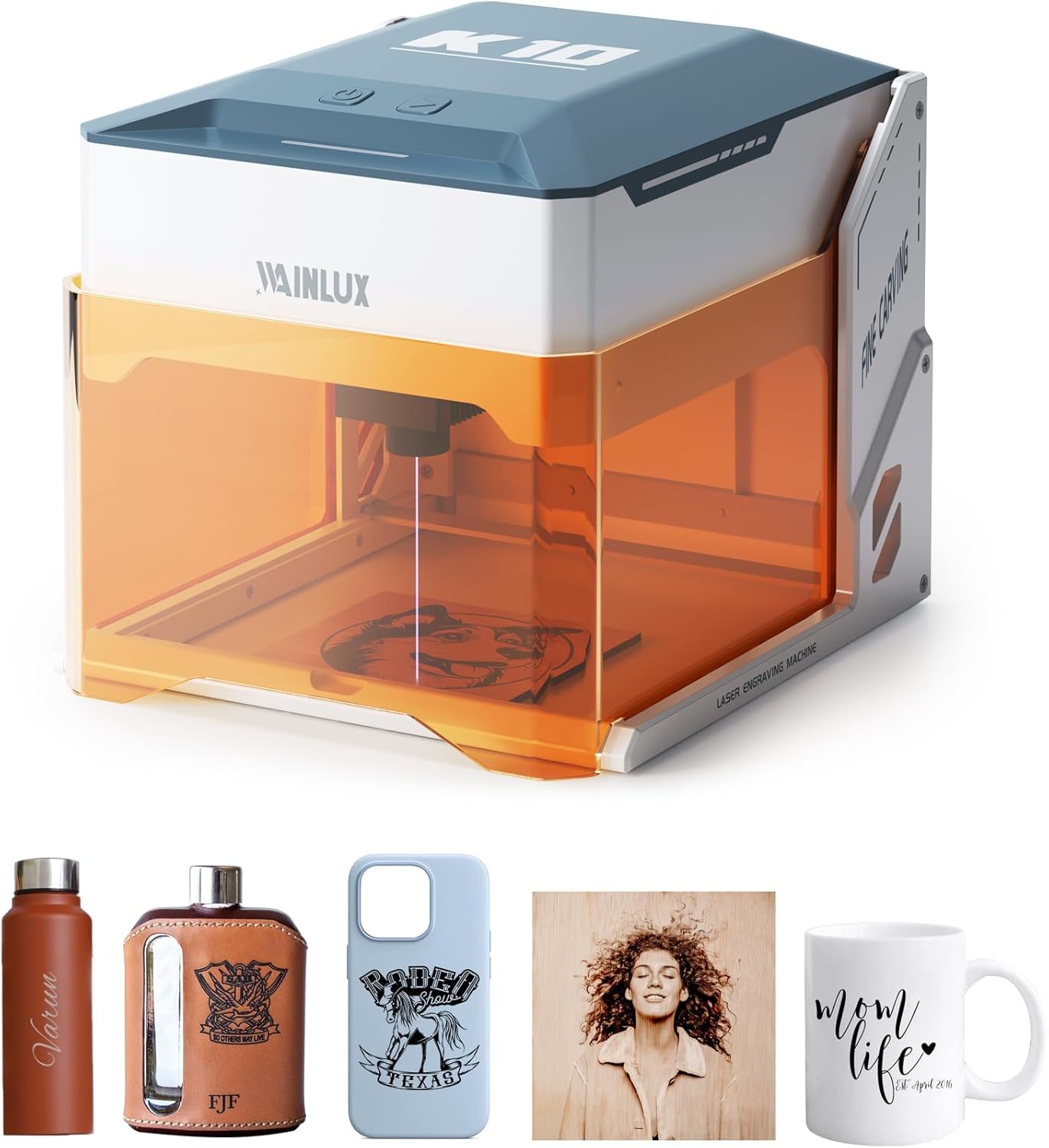
Image: The WAINLUX K10 laser engraver shown with various engraved items like a water bottle, flask, phone case, and mug.

Image: Demonstrates the compact size and capability of the K10, with a laptop displaying design software.

Obrázek: Přamples of unique designs engraved on different materials such as cardboard, plywood, bamboo, leather, slate, and glass.
3. Nastavení
Follow these steps to set up your WAINLUX K10 laser engraving machine.
Obsah balení:
Verify that all standard parts are included in your package:
- WAINLUX K10 Laser Engraver (3W)
- Uživatelská příručka
- Napájení
- Kabel typu C
- Maker Pen
- Dřevěná deska *2
- Brush Kraft Paper *2
- Klíč
Optional parts (sold separately) may include an Air Purifier and an Engraving Positioning Module.

Image: The WAINLUX K10 machine along with its standard accessories and optional parts.
Počáteční nastavení:
- Umístění: Place the WAINLUX K10 on a stable, level surface in a well-ventilated area.
- Připojení napájení: Connect the power supply to the machine and plug it into a suitable power outlet.
- Připojení zařízení:
- Bluetooth (mobilní aplikace): Download the official WAINLUX app on your Android or iOS mobile phone. Enable Bluetooth on your phone and pair it with the K10 machine.
- USB (počítač): Connect the machine to your Windows or Mac computer using the provided Type-C USB cable.
- Instalace softwaru/aplikace: Install the WAINLUX application on your mobile device or the recommended software (e.g., CutlabX, LightBurn, LaserGRBL) on your computer. The application is free and supports various file formátů.

Image: Demonstrates easy height adjustment for accommodating larger items or rotary attachments (not included).
4. Návod k obsluze
This section outlines the general steps for operating your WAINLUX K10 laser engraver.
Basic Engraving Process:
- Připravte materiál: Place the material you wish to engrave inside the machine's engraving area. Ensure it is flat and securely positioned.
- Připojit zařízení: Ensure your mobile phone or computer is connected to the K10 via Bluetooth or USB.
- Open Software/App: Launch the WAINLUX app or your chosen engraving software (e.g., CutlabX, LightBurn, LaserGRBL).
- Import/Vytvořit návrh: Import your desired image or design into the software. The app supports various image formats like JPG, BMP, PNG, etc.
- Upravit parametry: Set engraving parameters such as power, speed, and engraving mode (black and white, discrete, or contour) based on your material and desired outcome. Refer to the software's guide for detailed parameter settings.
- Předview (pokud je k dispozici): Použijte preview funkce pro zajištění správného umístění návrhu na materiálu.
- Začněte gravírovat: Close the protective lid and initiate the engraving process from the software/app. The machine will begin engraving.
- Sledovat průběh: Observe the engraving process through the eye-friendly shield. The machine will automatically stop if the lid is opened or if it is tilted.
- Dokončení: Once engraving is complete, the machine will stop. Carefully remove your engraved item.
Engraving on Glass (Example):
For engraving on transparent materials like glass, a preparatory step is often required:
- Soak Colored Paper: Soak a piece of colored paper (e.g., black) in water.
- Glue to Glass: Carefully glue the wet colored paper to the surface of the glass where you intend to engrave. This provides a surface for the laser to interact with.
- Mobile App Design: Use the mobile app to design or import your engraving pattern.
- Engrave: Place the prepared glass inside the machine and start the engraving process. The laser will engrave through the paper onto the glass.

Image: Step-by-step guide for engraving on glass, showing preparation with colored paper and the final engraved result.
5. Údržba
Regular maintenance ensures the longevity and optimal performance of your WAINLUX K10 laser engraver.
- Čištění objektivu: Periodically inspect the laser lens for dust or debris. Use a soft, lint-free cloth and a small amount of lens cleaning solution (if recommended by manufacturer, otherwise dry clean) to gently wipe the lens.
- Čištění gravírovací oblasti: After each use, clear any debris, dust, or small material scraps from the engraving platform and surrounding area. A small brush or vacuum can be used.
- Čištění ventilátoru: The built-in fan helps extract smoke and fumes. Over time, dust may accumulate. Gently clean the fan vents to ensure proper airflow.
- Vnější čištění: Otřete vnější část stroje měkkým, damp tkanina. Vyhněte se používání agresivních chemikálií nebo abrazivních čisticích prostředků.
- Skladování: Pokud stroj nepoužíváte, skladujte jej v čistém a suchém prostředí mimo dosah přímého slunečního záření a extrémních teplot.
6. Řešení problémů
If you encounter issues with your WAINLUX K10, refer to the following common problems and solutions.
| Problém | Možná příčina | Řešení |
|---|---|---|
| Stroj se nezapne. | Napájecí kabel není připojen; problém se zásuvkou. | Ensure power cable is securely connected to machine and outlet. Test outlet with another device. |
| Laser nefunguje nebo je gravírování slabé. | Lens dirty; incorrect material settings; material incompatible. | Clean the laser lens. Adjust power/speed settings in software. Ensure material is compatible (not white/transparent/reflective). |
| Connection issues (Bluetooth/USB). | Bluetooth not enabled; incorrect USB port/cable; software driver issue. | Ensure Bluetooth is on and paired. Try a different USB port or cable. Reinstall software/drivers. |
| Kvalita gravírování je špatná nebo nekonzistentní. | Material not flat; incorrect focus; machine vibration. | Ensure material is flat and secured. Verify laser focus. Place machine on a stable surface. |
| App/Software crashes or freezes. | Outdated software; system incompatibility; corrupted file. | Update app/software to the latest version. Check system requirements. Try a different design file. |
Pokud problém přetrvává i po vyzkoušení těchto řešení, obraťte se na zákaznickou podporu s žádostí o další pomoc.
7. Specifikace
| Funkce | Detail |
|---|---|
| Číslo modelu | K10-3W |
| Výrobce | DEWALLIE |
| Rozměry produktu | 21 x 21 x 0.1 cm (packaging/product base); Unit: 27 x 27 x 14 cm |
| Hmotnost | 2.6 kg |
| Výkon laseru | 3W (compressed spot laser module) |
| Vstupní výkon | 24W |
| Přesnost gravírování | 0.01 mm |
| Rychlost gravírování | Až 36 000 mm/min |
| Oblast gravírování | 80 mm x 80 mm |
| Konektivita | Bluetooth (Android/iOS App), USB (Windows/Mac) |
| Jsou vyžadovány baterie | Žádný |
| První dostupný termín | 31. ledna 2024 |
8. Záruka a podpora
WAINLUX is committed to providing quality products and excellent customer service.
- Zajištění kvality: The WAINLUX K10 laser engraving machine undergoes rigorous quality checks to ensure performance and reliability.
- Služby zákazníkům: A professional customer service team is available to assist you with any pre-sales inquiries or post-purchase issues.
- Podpora: For product services, technical support, or warranty information, please refer to the official support website or contact customer service directly. Contact details can typically be found in the product packaging or on the manufacturer's webmísto.