
1. Úvod
The HIKMICRO ECO-V Handheld Thermography Camera is a versatile thermal imaging device designed for various professional applications. It offers thermal, bi-spectrum image fusion, and visible light modes to meet diverse business needs. This manual provides essential information for the safe and effective operation of your ECO-V camera.
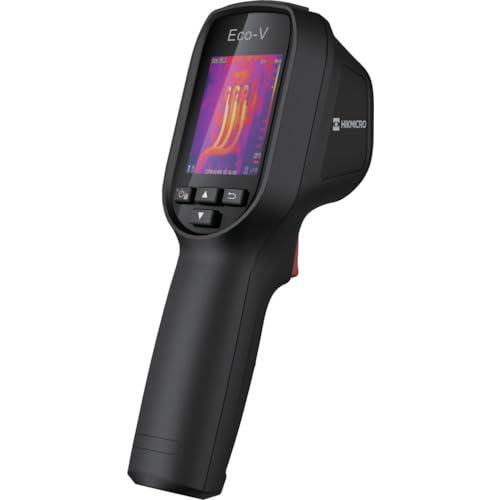
Figure 1: HIKMICRO ECO-V Handheld Thermography Camera
2. Bezpečnostní informace
Před použitím tohoto výrobku si prosím přečtěte a pochopte všechna bezpečnostní varování a pokyny. Nedodržení těchto pokynů může vést k úrazu elektrickým proudem, požáru nebo vážnému zranění.
Obecná bezpečnostní opatření
- Nepoužívejte zařízení ve výbušném prostředí, například v přítomnosti hořlavých kapalin, plynů nebo prachu.
- Udržujte zařízení mimo dosah vody a jiných kapalin.
- Nepokoušejte se zařízení otevírat ani upravovat. Veškerý servis svěřte kvalifikovanému personálu.
- Use only HIKMICRO-approved accessories.
- Avoid direct exposure of the thermal lens to strong light sources (e.g., sun, laser) as this may damage the detector.
Bezpečnost baterie
- The device contains a built-in Lithium-ion battery. Do not expose the battery to excessive heat, direct sunlight, or fire.
- Do not puncture, open, or disassemble the battery.
- Charge the battery only with the provided USB cable and a compatible power adapter.
- Zlikvidujte baterie v souladu s místními předpisy.
3. Obsah balení
The HIKMICRO ECO-V package includes the following items:
- HIKMICRO Handheld Thermography Camera ECO-V
- Kabel USB typu C
- Stručný průvodce (není výslovně uveden, ale je standardní)
- Calibration Certificate (not explicitly mentioned but standard)
Video 3.1: Unboxing the HIKMICRO M-Series (similar to ECO-V, showing typical package contents and device appearance).
4. Zařízení skončiloview
Familiarize yourself with the physical components and interface of your HIKMICRO ECO-V camera.
Vzhled a rozhraní
The ECO-V features a compact, ergonomic design for comfortable handheld use. Key components include the thermal lens, optical lens, laser indicator, white light, trigger button, navigation buttons, and a 2.4-inch display.
Video 4.1: This video demonstrates the physical appearance and interface of a HIKMICRO M-Series camera, which shares similar design elements and interface components with the ECO-V.
5. Nastavení
5.1 Nabíjení zařízení
Before initial use, fully charge the device's built-in Lithium-ion battery.
- Connect the provided USB Type-C cable to the device's USB port.
- Connect the other end of the USB cable to a compatible power adapter (5V2A recommended) and plug it into a power outlet.
- The charging indicator will show red during charging and turn green when fully charged.
Video 5.1: This HIKMICRO ECO operation video demonstrates the charging process for the device.
5.2 Zapnutí/vypnutí
To power on the device, press and hold the power button for more than 6 seconds. To power off, press and hold the power button again until the device shuts down.
Video 5.2: This HIKMICRO ECO operation video demonstrates how to power on the device.
6. Návod k obsluze
This section covers the basic and advanced operational features of your ECO-V camera.
6.1 Image Capture and Display
To capture a thermal image, aim the camera at the target and press the trigger button. The captured image will be saved to the internal EMMC storage. To view saved images, navigate to the 'Albums' section in the menu.
Video 6.1: This HIKMICRO ECO operation video demonstrates image capture and viewing saved snapshots.
6.2 Nástroje pro měření
The ECO-V provides various measurement tools to analyze thermal images:
- Horké místo: Automatically identifies and displays the highest temperature point.
- Studené místo: Automatically identifies and displays the lowest temperature point.
- Středové místo: Zobrazuje teplotu uprostřed obrazovky.
Video 6.2: This HIKMICRO ECO operation video demonstrates the use of measurement tools like hot, cold, and center spots.
6.3 SuperIR Image Enhancement
SuperIR technology enhances the thermal image resolution, providing more detail for analysis. You can enable or disable this feature in the settings menu.
Video 6.3: This HIKMICRO ECO operation video demonstrates how to enable and use the SuperIR image enhancement feature.
6.4 režimů obrazu
The ECO-V supports multiple image modes for different inspection needs:
- Tepelný: Displays only the thermal image.
- Fúze: Blends the thermal and visible light images for enhanced detail.
- PIP (obraz v obraze): Overlays a smaller thermal image on a visible light image.
- Optický: Zobrazuje pouze obraz ve viditelném světle.
Video 6.4: This HIKMICRO B10S product video demonstrates switching between different image modes, including Thermal, Fusion, PIP, and Optical.
6.5 Parallax Correction
When using fusion modes, adjust the parallax correction based on the distance to the target to ensure accurate alignment between thermal and visible images.
Video 6.5: This HIKMICRO B10S product video demonstrates how to adjust parallax correction for accurate image fusion.
6.6 Palette Adjustment
Select from various color palettes (e.g., White Hot, Black Hot, Rainbow, Ironbow) to visualize temperature differences more effectively. This can be adjusted in the settings menu.
Video 6.6: This HIKMICRO B10S product video demonstrates how to adjust color palettes.
6.7 Emissivity and Distance Settings
For accurate temperature measurements, it is crucial to set the correct emissivity value for the target material and the distance to the target. Refer to the general emissivity reference table in the specifications section.
Video 6.7: This HIKMICRO ECO operation video demonstrates setting emissivity and distance for accurate temperature readings.
6.8 Laserové ukazovátko
The built-in laser pointer helps to precisely identify the measurement target. It can be enabled or disabled in the settings menu.
Video 6.8: This HIKMICRO ECO operation video demonstrates how to enable and use the laser pointer.
6.9 Alarm vysoké teploty
Set a high temperature alarm threshold to be notified when temperatures exceed a predefined limit. This feature is useful for identifying potential overheating issues.
Video 6.9: This HIKMICRO B10S product video demonstrates how to set a high temperature alarm.
6.10 Hotspot Connection
The ECO-V can connect to a mobile device via Wi-Fi hotspot for live viewing and data transfer. Enable the Wi-Fi hotspot function in the device settings and connect your mobile device.
Video 6.10: This HIKMICRO M-Series video demonstrates how to establish a hotspot connection with a mobile device.
6.11 HIKMIKRO Viewer App Connection
Stáhněte si HIKMICRO Viewer app on your mobile device to access live view, manage images and videos, and generate reports. Connect the device to your phone via Wi-Fi.
Video 6.11: This HIKMICRO Pocket series video demonstrates connecting the device to the HIKMICRO Viewer app for various functions.
7. Údržba
7.1 Čištění
- Otřete tělo zařízení měkkým hadříkemamp tkanina. Nepoužívejte abrazivní čisticí prostředky nebo rozpouštědla.
- Gently clean the lenses with a lens cleaning cloth. Avoid touching the lens surface with bare hands.
7.2 Skladování
- Přístroj skladujte na chladném a suchém místě, mimo dosah přímého slunečního záření a extrémních teplot.
- Pokud baterii skladujete delší dobu, ujistěte se, že je částečně nabitá (kolem 50 %), a dobíjejte ji každé několik měsíců, aby se zachoval její stav.
8. Řešení problémů
If you encounter issues with your HIKMICRO ECO-V, refer to the following common problems and solutions:
| Problém | Možná příčina | Řešení |
|---|---|---|
| Zařízení se nezapne | Slabá baterie; Porucha zařízení | Charge the battery; Contact support |
| Nepřesné údaje o teplotě | Incorrect emissivity/distance settings; Dirty lens | Adjust emissivity/distance; Clean the lens |
| Cannot connect to Wi-Fi hotspot | Incorrect password; Hotspot not enabled | Verify password; Enable hotspot in settings |
9. Specifikace
Detailed technical specifications for the HIKMICRO ECO-V camera:
| Funkce | Specifikace |
|---|---|
| Model | ECO-V |
| Rozsah teplot měření | -20 °C až 550 °C |
| Minimum Temperature Display | 0.1 °C |
| Pole View (FOV) | 50° x 50° |
| Prostorové rozlišení (IFOV) | 8.89 mrad |
| Rozsah provozních teplot | -10 °C až 50 °C |
| Rozsah skladovacích teplot | -40 °C až 70 °C |
| Velikost displeje | 2.4 palců |
| Zdroj napájení | Vestavěná lithium-iontová baterie |
| Provozní doba baterie | 8 hodin |
| Wi-Fi | Není k dispozici |
| Úroveň ochrany | IP54 |
| Rozhraní | USB Type-C |
| Pixel Pitch | 12μm |
| Measuring Wavelength | 7.5-14μm |
| NETD | < 40 mK (@ 25 °C, F#=1.0) |
| Ohnisková vzdálenost | 1.35 mm |
| Otvor | F1.0 |
| Minimální zaostřovací vzdálenost | 0.1 m (0.33 stop) |
| Snímková frekvence | 25 Hz |
| Focus System | Bez ostření |
| Záznamová média | EMMC (4GB) |
| Kapacita úložiště obrázků | 30,000 XNUMX obrázků |
| Obraz File Formát | BMP (includes measurement data) |
| Rozlišení tepelného obrazu | 96×96 (9,216 pixels) |
| Viditelné rozlišení obrazu | 640×480 |
| Přesnost | ±2°C or ±2% (whichever is greater), when ambient temperature is 15°C to 35°C and target temperature is 0°C or above. |
| Materiály | Polykarbonát, ABS pryskyřice |
| Hmotnost | 360 g |
General Emissivity Reference
| Materiál | Emisivita |
|---|---|
| Lidská kůže | 0.98 |
| PCB | 0.91 |
| Cementový beton | 0.95 |
| Keramika | 0.92 |
| Pryž | 0.95 |
| Malovat | 0.93 |
| Dřevo | 0.85 |
| Cihlový | 0.96 |
| Písek | 0.90 |
| Půda | 0.92 |
| Bavlna | 0.98 |
| Lepenka | 0.90 |
| Bílá kniha | 0.96 |
| Voda | 0.96 |
10. Záruka a podpora
HIKMICRO products are covered by a limited warranty. For detailed warranty terms and conditions, please refer to the official HIKMICRO webstránky nebo se obraťte na svého místního distributora.
Zákaznická podpora
If you require technical assistance, troubleshooting, or have questions about your ECO-V camera, please contact HIKMICRO customer support through their official webwebu nebo kontaktních informací uvedených na obalu produktu.