
1. Úvod
Welcome to the user manual for your ZOMBIES CAT Transformers TF-T06 Wireless Earbuds. This guide provides detailed instructions on how to set up, operate, maintain, and troubleshoot your new earbuds. Please read this manual carefully to ensure optimal performance and longevity of your device.
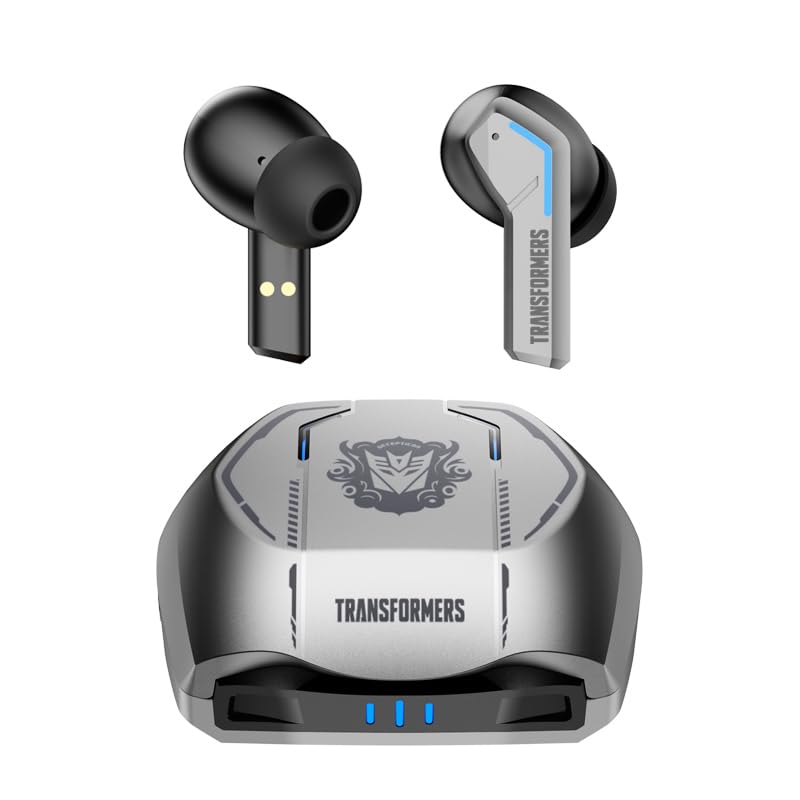
Image 1.1: The Transformers TF-T06 Wireless Earbuds and their charging case.
2. Obsah balení
Ověřte, zda jsou v balení přítomny všechny položky:
- Transformers In-Ear Headphones (2 units)
- Earbuds Charging Case (1 unit)
- Nabíjecí kabel typu C (1 kus)
- Uživatelská příručka (tento dokument)

Image 2.1: The TF-T06 Earbuds, charging case, and packaging.
3. Konec produktuview
3.1 Earbud Design and Ergonomics
The TF-T06 earbuds are designed for a comfortable and secure fit within the ear, ensuring stability during various activities. Their lightweight and skin-friendly construction allows for extended wear without discomfort.

Image 3.1: An earbud shown in an ear, highlighting its ergonomic design for comfortable wear.
3.2 Inteligentní dotykové ovládání
Each earbud features a touch-sensitive area for controlling various functions without needing to access your connected device. The controls are intuitive and responsive.

Image 3.2: Visual representation of the smart touch control functions on the earbuds.
- Přehrát/pozastavit: Jediným klepnutím na jedno sluchátko.
- Další skladba: Dvakrát klepněte na pravé sluchátko.
- Předchozí skladba: Dvakrát klepněte na levé sluchátko.
- Zvýšit hlasitost: Trojité poklepání na pravé sluchátko.
- Snížit hlasitost: Trojité poklepání na levé sluchátko.
- Přijmout/ukončit hovor: Jedno klepnutí na kterékoli sluchátko během příchozího nebo aktivního hovoru.
- Odmítnout hovor: Během příchozího hovoru stiskněte a podržte kterékoli ze sluchátek po dobu 2 sekund.
- Aktivovat Voice Assistant: Stiskněte a podržte kterékoli ze sluchátek po dobu 2 sekund (pokud nevoláte).
4. Nastavení
4.1 Nabíjení sluchátek a pouzdra
Před prvním použitím sluchátka a nabíjecí pouzdro plně nabijte.
- Vložte sluchátka do nabíjecího pouzdra. Ujistěte se, že jsou správně usazena; magnetické kontakty je udrží na místě.
- Connect the Type-C charging cable to the charging port on the case and the other end to a USB power adapter (not included).
- Kontrolky na nabíjecím pouzdře se rozsvítí, aby signalizovaly stav nabíjení. Úplné nabití pouzdra obvykle trvá přibližně 3 hodiny.
- Once fully charged, disconnect the charging cable. The earbuds will charge automatically when placed in the powered case.
4.2 Initial Pairing with a Device
The TF-T06 earbuds feature one-step pairing for convenience.
- Otevřete nabíjecí pouzdro. Sluchátka se automaticky zapnou a přejdou do režimu párování.
- Na smartphonu, tabletu nebo jiném zařízení s podporou Bluetooth přejděte do nastavení Bluetooth.
- Hledat available devices and select "TF-T06" from the list.
- Po připojení uslyšíte zvukové potvrzení a sluchátka budou připravena k použití.

Image 4.1: The earbuds in their open charging case, indicating they are ready for Bluetooth pairing.
Poznámka: After the initial pairing, the earbuds will automatically connect to the last paired device when removed from the charging case, provided Bluetooth is enabled on the device and it is within range.
5. Návod k obsluze
5.1 Zapnutí/vypnutí
- Zapnutí: Otevřete nabíjecí pouzdro nebo stiskněte a podržte dotykovou oblast na obou sluchátkách po dobu 3 sekund.
- Vypnout: Vložte sluchátka zpět do nabíjecího pouzdra a zavřete víko, nebo stiskněte a podržte dotykovou plochu na obou sluchátkách po dobu 5 sekund.
5.2 Přehrávání hudby
Use the smart touch controls as described in Section 3.2 to manage your music.
5.3 Správa hovorů
Handle incoming and active calls using the smart touch controls as described in Section 3.2. The built-in ENC noise-cancelling microphone ensures clear communication.
5.4 Hlasový asistent
Activate your device's voice assistant (e.g., Siri, Google Assistant) by pressing and holding the touch area on either earbud for 2 seconds (when not on a call).
5.5 Kvalita zvuku
The TF-T06 earbuds feature 10mm double-layer diaphragm drivers, delivering powerful bass, clear midrange, and bright treble for a high-fidelity audio experience.

Image 5.1: An illustration of the 10mm dynamic driver, responsible for the earbud's sound quality.
6. Údržba
- Čištění: Pravidelně čistěte sluchátka a nabíjecí pouzdro měkkým, suchým hadříkem, který nepouští vlákna. Nepoužívejte abrazivní čisticí prostředky ani rozpouštědla.
- Voděodolnost: The earbuds have an IPX4 waterproof rating, meaning they are resistant to splashing water and sweat. Do not submerge them in water or expose them to heavy rain. Ensure they are dry before placing them back in the charging case.
- Skladování: Pokud sluchátka nepoužíváte, uložte je do nabíjecího pouzdra, aby byla chráněna a nabitá. Skladujte na chladném a suchém místě mimo dosah extrémních teplot.
- Péče o baterie: Chcete-li prodloužit životnost baterie, vyvarujte se častého úplného vybíjení sluchátek a nabíjecího pouzdra. Pravidelně je nabíjejte, i když je nepoužíváte neustále.
7. Řešení problémů
If you encounter issues with your TF-T06 earbuds, refer to the following common solutions:
- Sluchátka se nespárují:
- Ujistěte se, že jsou obě sluchátka nabitá.
- Vypněte Bluetooth na svém zařízení a znovu jej zapněte.
- Forget "TF-T06" in your device's Bluetooth settings and attempt to pair again.
- Restartujte zařízení.
- Funguje pouze jedno sluchátko:
- Ujistěte se, že jsou obě sluchátka nabitá.
- Place both earbuds back into the charging case, close the lid, wait a few seconds, then open the lid and remove them.
- Try resetting the earbuds (refer to specific reset instructions if available in a separate quick start guide, or try forgetting the device and re-pairing).
- Žádný zvuk nebo nízká hlasitost:
- Zkontrolujte úroveň hlasitosti na sluchátkách i na připojeném zařízení.
- Ujistěte se, že jsou sluchátka správně připojena k vašemu zařízení.
- Vyčistěte mřížku reproduktoru sluchátek od nečistot.
- Problémy s nabíjením:
- Ujistěte se, že je nabíjecí kabel bezpečně připojen k pouzdru i ke zdroji napájení.
- Zkuste jiný nabíjecí kabel nebo napájecí adaptér.
- Vyčistěte nabíjecí kontakty na sluchátkách a uvnitř pouzdra.
8. Specifikace
| Název modelu | TF-T0602 |
| Značka | ZOMBIES CAT |
| Technologie připojení | Bezdrátové připojení (Bluetooth 5.3) |
| Verze Bluetooth | 5.3 |
| Typ zvukového ovladače | Dynamický měnič (10 mm) |
| Výdrž baterie (celkem s pouzdrem) | Až 30 hodin |
| Doba přehrávání sluchátek (na jedno nabití) | 3-4 hodin |
| Doba nabíjení | Approx. 3 Hours (Case) |
| Kontrolní metoda | Dotek |
| Úroveň odolnosti proti vodě | IPX4 (vodotěsný) |
| Zrušení šumu | ENC (Environmental Noise Cancellation) Mic |
| Kompatibilní zařízení | Most Bluetooth-enabled devices (smartphones, tablets, laptops, smartwatches) |
| Maximální provozní vzdálenost | 10 metrů |
| Hmotnost položky | 132 g |
| Rozměry produktu | 3.3 x 2.18 x 1.83 cm |
9. Záruka a podpora
Informace o záruce a zákaznické podpoře naleznete v dokumentaci dodané v místě nákupu nebo se obraťte na svého prodejce. Uschovejte si doklad o koupi pro případné reklamace.


