
1. Úvod
The LTC Nimbleback NB831 is a versatile 75% mechanical keyboard designed for various computing environments. It offers multiple connectivity options, customizable features, and a compact layout. This manual provides detailed instructions for setting up, operating, and maintaining your keyboard.

Obrázek 1.1: Konecview of the LTC Nimbleback NB831 Mechanical Keyboard.
2. Obsah balení
Ověřte, zda jsou v balení přítomny všechny položky:
- LTC Nimbleback NB831 Mechanical Keyboard
- Stahovač klíčů
- USB kabel (USB-A na USB-C)
- Karta uživatelské příručky
- Replacement Switches (4 pieces)

Image 2.1: Contents included in the LTC Nimbleback NB831 package, featuring the keyboard, USB cable, keycap/switch puller, and extra switches.
3. Nastavení
3.1 Režimy připojení
The NB831 supports three connection modes:
- Bezdrátové připojení 2.4 GHz: Use the included USB dongle for a stable wireless connection.
- Bluetooth 5.0: Pair with up to three Bluetooth-enabled devices.
- Kabelové USB-C: Connect directly via the USB-C cable for a wired connection and simultaneous charging.

Image 3.1: Visual representation of the three connectivity modes: 2.4GHz wireless, Bluetooth 5.0, and USB-C wired.
3.2 Kompatibilita operačních systémů
The NB831 keyboard is compatible with Windows (Win7, Win8, Win10, Win11), iOS, and macOS operating systems. Use the following key combinations to switch between modes:
- Režim Windows: Stiskněte fn + A
- macOS Mode: Stiskněte Fn + S

Image 3.2: Illustration of switching between Windows and macOS modes using Fn key combinations.
3.3 Fyzické úpravy
The keyboard features 2-level adjustable feet for ergonomic typing angles. The USB dongle can be stored in a dedicated magnetic socket on the underside of the keyboard when not in use. The USB-C cable can be routed through three different channels (left, center, right) for neat cable management.

Image 3.3: Details of the keyboard's underside, showing 2-level feet, 3-side cable routing, and the magnetic dongle socket.
4. Návod k obsluze
4.1 Ovladač hlasitosti
The integrated volume knob allows for quick audio adjustments:
- Otáčet po směru hodinových ručiček: Zvyšte hlasitost.
- Otočit proti směru hodinových ručiček: Snížit hlasitost.
- Stiskněte: Ztlumit/Zapnout zvuk.
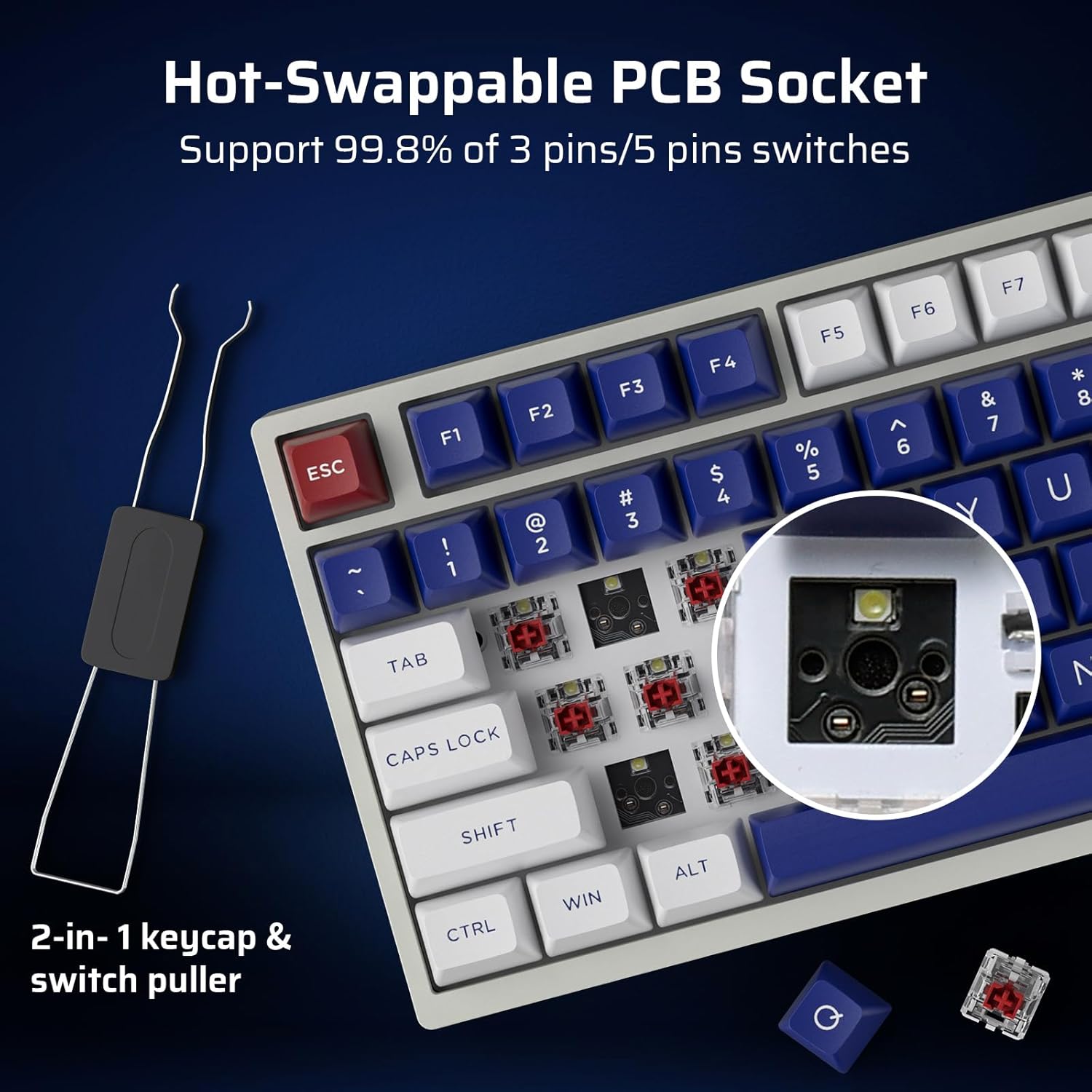
Image 4.1: Demonstrates the functionality of the convenient volume knob for adjusting audio levels and muting.
4.2 RGB podsvícení
The keyboard features 18 dynamic RGB lighting modes. Control them using the following key combinations:
- Přepínání režimů podsvícení: Stiskněte Fn + ↑ (Up Arrow)
- Switch Backlight Colors: Stiskněte Fn + ↓ (Down Arrow)
- Rychlost podsvícení +: Stiskněte Fn + → (Right Arrow)
- Rychlost podsvícení -: Stiskněte Fn + ← (Left Arrow)
- Podsvícení zapnuto/vypnuto: Stiskněte Fn + \
- Restore Factory Mode: Dlouhé stisknutí Fn + mezerník
4.3 Přepínače vyměnitelné za provozu
The NB831 features a hot-swappable PCB, allowing you to change mechanical switches without soldering. It supports both 3-pin and 5-pin MX-style switches (e.g., Gateron, Kailh). Use the included 2-in-1 keycap and switch puller for easy removal and installation.

Obrázek 4.2: Detail view of the hot-swappable PCB socket, demonstrating compatibility with different switch types.
4.4 Pro Software Support
Utilize the dedicated LTC software to customize your keyboard experience. The software allows you to:
- Remap key combinations.
- Přiřaďte makra pro složité příkazy.
- Přizpůsobte si efekty a barvy RGB osvětlení.

Image 4.3: Screenshot of the LTC Pro Software interface, showing options for key remapping, macro assignment, and RGB customization.
Video 4.1: Podrobný popisview of the LTC Nimbleback NB831 keyboard, including a demonstration of its software features and customization options.
5. Údržba
5.1 Čištění
To maintain optimal performance and appearance, regularly clean your keyboard. Use a soft, dry cloth to wipe the surface. For deeper cleaning, remove keycaps using the provided keycap puller and use compressed air to clear debris from between switches. The PBT keycaps are oil-resistant, making them easier to clean.
5.2 Výměna spínačů a kláves
Leverage the hot-swappable design to replace switches or keycaps. Use the included 2-in-1 tool to carefully remove keycaps first, then switches. Ensure new switches are aligned correctly before pressing them into the PCB to avoid bending pins.
5.3 Sound Dampening
The keyboard is designed with dual layers of sound-damping foam to minimize hollow sounds and reduce noise, contributing to a satisfying typing experience.

Image 5.1: Diagram illustrating the two-layer silencing foam structure within the keyboard, designed to reduce hollow sounds and noise.
6. Řešení problémů
- Klávesnice nereaguje: Ensure the keyboard is charged and properly connected (wired, 2.4GHz dongle, or Bluetooth paired). Try switching between connectivity modes.
- Problémy s párováním Bluetooth: Ensure the keyboard is in Bluetooth mode and discoverable. Remove previous pairings on your device and try re-pairing.
- RGB osvětlení nefunguje: Check if the backlight is turned on using Fn + \. If issues persist, try restoring factory settings with Fn + mezerník (dlouhý stisk).
- Software nerozpoznává klávesnici: Ensure the keyboard is connected via USB-C wired mode when using the software. Check for software updates.
- Obavy ohledně výdrže baterie: Check the battery level by pressing Fn + Backspace. Ensure the keyboard is fully charged.
7. Specifikace
| Funkce | Detail |
|---|---|
| Rozměry produktu | 12.64 x 5.24 x 1.65 palce |
| Hmotnost položky | 2.57 libry |
| Výrobce | LTC |
| Číslo modelu položky | NB831 |
| Baterie | Jsou vyžadovány 2 lithium-iontové baterie (součástí balení) |
| Technologie připojení | Bluetooth, RF (2.4GHz), USB-C |
| Popis klávesnice | Mechanical, 75% Layout (81-Keys) |
| Speciální funkce | Programmable Keys, Rechargeable, Volume Roller, Hot-Swappable |
| Podsvícení klávesnice | RGB |
7.1 Informace o baterii
The keyboard is equipped with a 4000mAh battery, providing up to 12 hours of continuous use with RGB backlight and up to 80 hours without. To check the battery level, press Fn + Backspace.

Image 7.1: Visual guide for checking the battery level using the Fn + Backspace key combination.
8. Záruka a podpora
For warranty information, technical support, or customer service inquiries, please refer to the official LTC webnebo se obraťte na prodejce. Uschovejte si doklad o koupi pro případ reklamace.


