
Zavedení
This manual provides essential instructions for the proper setup, operation, and maintenance of your 3nStar PTA0157-432 All-in-One POS System. Please read this manual thoroughly before using the device to ensure optimal performance and longevity.
Bezpečnostní informace
Dodržujte následující bezpečnostní opatření, abyste předešli poškození zařízení nebo zranění sebe či ostatních:
- Nevystavujte zařízení vodě ani nadměrné vlhkosti.
- Neumisťujte zařízení do blízkosti zdrojů tepla nebo na přímé sluneční světlo.
- Používejte pouze dodaný síťový adaptér.
- Nepokoušejte se zařízení otevírat ani opravovat sami. Veškerý servis svěřte kvalifikovanému personálu.
- Během provozu zajistěte dostatečné větrání v okolí zařízení.
Obsah balení
Ověřte, zda jsou v balení přítomny všechny položky:
- 3nStar PTA0157-432 All-in-One POS System
- AC adaptér
- Uživatelská příručka (tento dokument)
Konec produktuview
The 3nStar PTA0157-432 is a 15.6-inch All-in-One Point of Sale system designed for various business environments. It features a 10-point capacitive touchscreen, runs on Android 11, and is powered by a Quad-Core processor with 4GB RAM and 32GB storage. Integrated Wi-Fi and Bluetooth connectivity are also included.

Obrázek 1: Přední strana view of the 3nStar PTA0157-432 All-in-One POS System, showcasin15.6palcový displej a integrovaný stojan.

Figure 2: A user interacting with the 10-point capacitive touchscreen of the POS system, demonstrating its touch responsiveness.

Obrázek 3: Zadní view of the 3nStar POS System, showing the ventilation slots and the sturdy integrated stand.
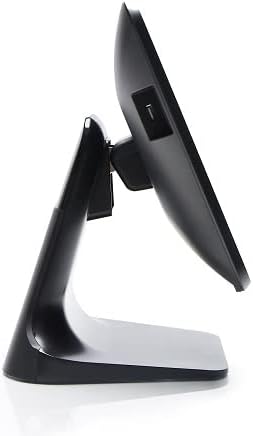
Obrázek 4: Boční profíkfile of the 3nStar POS System, highlighting its slim design and adjustable screen angle.
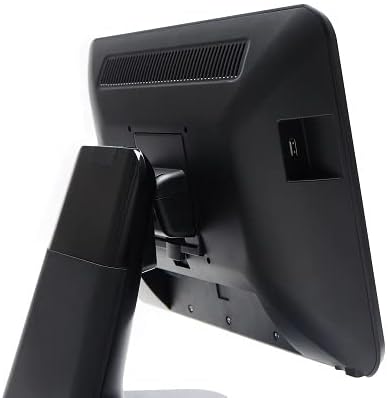
Obrázek 5: Zadní strana view of the 3nStar POS System, illustrating the location of various connectivity ports for peripherals.
Nastavení
- Rozbalení systému: Carefully remove the POS system and all accessories from the packaging.
- Position the System: Place the POS system on a stable, flat surface, ensuring adequate ventilation around the device.
- Připojte napájení: Connect the AC adapter to the power input port on the back of the POS system, then plug the adapter into a standard electrical outlet.
- Počáteční zapnutí: Press the power button, usually located on the side or back of the display. The system will boot up to the Android 11 operating system.
- Počáteční konfigurace: Follow the on-screen prompts to complete the initial Android setup, including language selection, Wi-Fi connection, and Google account setup (optional).
- Připojení periferií: Connect any necessary peripherals such as barcode scanners, receipt printers, or cash drawers to the available USB or other designated ports. Refer to the peripheral's manual for specific connection instructions.
Návod k obsluze
The 3nStar PTA0157-432 operates on Android 11, providing a familiar and intuitive user experience.
Základní navigace
- Dotyková obrazovka: Use your fingers to tap, swipe, pinch, and zoom on the 15.6-inch capacitive display.
- Domovská obrazovka: Access your installed applications and widgets from the main home screen.
- Zásuvka aplikace: Swipe up from the bottom of the screen or tap the app drawer icon to view všechny nainstalované aplikace.
- Oznámení: Přejetím prstem dolů od horního okraje obrazovky získáte přístup k oznámením a rychlému nastavení.
Připojování k Wi-Fi
- Přejít na Nastavení > Síť a internet > Wi-Fi.
- Přepnout Wi-Fi On.
- Vyberte požadovanou síť ze seznamu a v případě potřeby zadejte heslo.
Připojení zařízení Bluetooth
- Přejít na Nastavení > Připojená zařízení > Předvolby připojení > Bluetooth.
- Přepnout Bluetooth On.
- Ujistěte se, že je vaše zařízení Bluetooth v režimu párování.
- Select the device from the list to pair.
Using POS Software
The system is designed to run various Android-compatible Point of Sale applications. Install your preferred POS software from the Google Play Store or other trusted sources. Refer to your specific POS software's documentation for detailed usage instructions.
Údržba
Čištění zařízení
- Obrazovka: Použijte měkký hadřík, který nepouští vlákna dampened with water or a screen cleaner specifically designed for electronic displays. Do not spray cleaner directly onto the screen.
- Tělo: Vnější povrchy otřete měkkým, suchým hadříkem. Nepoužívejte abrazivní čisticí prostředky ani rozpouštědla.
- Větrání: Ensure ventilation slots are free from dust and debris to prevent overheating. Use compressed air if necessary.
Aktualizace softwaru
Regularly check for and install system updates for Android 11 to ensure optimal performance, security, and compatibility. Go to Nastavení > Systém > Aktualizace systému.
Správa úložiště
Monitor the 32GB internal storage to ensure sufficient space for applications and data. Delete unnecessary files or uninstall unused applications to free up space. Go to Nastavení > Skladování.
Odstraňování problémů
| Problém | Možná příčina | Řešení |
|---|---|---|
| Zařízení se nezapne. | Power cable not connected properly; AC adapter malfunction. | Ensure the AC adapter is securely connected to the device and a working power outlet. Test the outlet with another device. |
| Dotyková obrazovka nereaguje. | Software glitch; screen dirty; physical damage. | Restart the device. Clean the screen with a soft cloth. If the issue persists, contact support. |
| Problémy s připojením k Wi-Fi. | Nesprávné heslo; mimo dosah; problém s routerem. | Verify Wi-Fi password. Ensure the device is within range of the router. Restart the router and the POS system. |
| Peripheral (e.g., printer) not detected. | Incorrect connection; driver issue; peripheral not powered on. | Check physical connections. Ensure the peripheral is powered on. Install necessary drivers or apps for the peripheral. Restart the POS system. |
Specifikace
| Funkce | Detail |
|---|---|
| Číslo modelu | PTA0157-432 |
| Operační systém | Android 11 |
| Velikost obrazovky | 15.6 palce |
| Rozlišení obrazovky | 1920 x 1080 pixelů |
| Dotyková obrazovka | 10bodový kapacitní |
| Procesor | Quad-Core (Rockchip 3568, 2 GHz) |
| BERAN | 4GB LPDDR4 |
| Skladování | 32GB SSD (Flash Memory) |
| Grafika | Integrovaná grafika |
| Konektivita | Wi-Fi, Bluetooth |
| Rozměry produktu (DxŠxV) | 10 x 13 x 16 palce |
| Hmotnost položky | 11 libry |
| Barva | Černý |
Záruka a podpora
For warranty information, technical support, or service inquiries, please refer to the official 3nStar website or contact your authorized reseller. Keep your purchase receipt as proof of purchase for warranty claims.
Online resources and frequently asked questions may be available on the manufacturer's support page: Podpora 3nStar