
1. Úvod
Thank you for choosing the Shot Navi LaserSniper Nano GR+ Golf Laser Distance Measuring Device. This ultra-lightweight and compact device is designed to provide precise and rapid distance measurements, enhancing your golf experience. This manual provides essential information for the safe and effective use of your device.
Před použitím zařízení si prosím pečlivě přečtěte tento návod k obsluze a uschovejte si jej pro budoucí použití.

The Shot Navi LaserSniper Nano GR+ features a compact, lightweight design with a highly visible display, ensuring precision and ease of use on the golf course.
2. Bezpečnostní informace
This device is a Class 1M Laser Product / Class 1 Laser (Invisible) according to IEC60825-1. Observe the following safety precautions:
- Do not look directly into the laser beam with optical instruments (e.g., binoculars, telescopes), as this may cause eye damage.
- Do not aim the laser at other people or animals.
- Udržujte zařízení mimo dosah dětí.
- Do not disassemble or modify the device. Unauthorized modifications can result in damage, electric shock, or laser radiation exposure.
3. Obsah balení
Ověřte, zda jsou v balení přítomny všechny položky:
- Shot Navi LaserSniper Nano GR+ Device
- Dedicated Carrying Case
- Karabina
- Kabel USB typu C
- objektiv Cloth
- Návod k použití (tento dokument)
4. Nastavení
4.1 Nabíjení zařízení
The Shot Navi LaserSniper Nano GR+ is equipped with a rechargeable lithium polymer battery. Before first use, fully charge the device.
- Connect the supplied USB Type-C cable to the charging port on the device.
- Connect the other end of the USB Type-C cable to a compatible USB power adapter (not included) or a computer's USB port.
- The charging indicator will illuminate. Once fully charged, the indicator will change or turn off (refer to the device's display for exact status).
A full charge provides approximately 38,000 measurements.

Designed for durability, the device features IPX4 waterproofing for use in light rain. Its wide field of view OLED viewfinder provides clear green and red displays, and it is conveniently rechargeable via USB Type-C, offering approximately 38,000 measurements on a full charge.
4.2 Zapnutí/vypnutí
- To power on: Press the power button briefly.
- To power off: Press and hold the power button until the display turns off, or the device will automatically power off after a period of inactivity to conserve battery.
4.3 Nastavení jasu displeje
The OLED viewfinder offers 3 levels of brightness adjustment. Refer to the on-screen menu or specific button combinations (usually a short press of a dedicated button or a combination with the power button) to cycle through brightness settings for optimal visibility in various lighting conditions.
5. Návod k obsluze
The Shot Navi LaserSniper Nano GR+ offers various measurement modes and functions to assist your game.
5.1 Režimy měření
The device features three primary measurement modes:
- Normal Measurement (Short Press): Measures the distance to the area where the laser is irradiated. Look through the viewfinder and align the target mark with the desired object. A short press of the measurement button will display the distance.
- Continuous Measurement (Press Twice): Press the measurement button twice quickly to activate. The device will continuously measure for approximately 10 seconds, updating the distance as you move the unit across different targets. Useful for scanning bunkers, creeks, or multiple objects.
- Seek Measurement (Long Press): This is a Pin Search auxiliary mode. When it is difficult to match the pins, aim at the area around the pin. Press and hold the measurement button. The device will prioritize the closest object (the pin flag) and lock the number once the sight is aligned, often accompanied by a vibration.

The device offers three versatile measurement modes: Point Measurement for direct distance to a target, Pin Seek Measurement for easily locking onto the pin, and Scan Measurement for continuous distance updates across multiple targets.
5.2 3D Measuring Mode
The advanced 3D measuring mode allows you to measure distances from the ball to the pin, and then to other target objects on the course. This is particularly useful in areas with obstacles where the pin flag may not be visible from your ball's position.
- First, measure the distance to the pin.
- Then, measure the distance to your desired target object (e.g., a bunker, a tree, or a specific landing area).
- The device will provide the necessary distance information for strategic play.

The 3D measurement mode allows users to measure distances from the ball to the pin, and then to other objects on the course, even when the pin flag is not visible from the ball's position.

Utilize the 3D measurement mode for various situations, such as selecting the correct club from a golf cart, measuring distances for blind shots, or assisting playing partners with their measurements.
5.3 High and Low Difference (Slope) Function
This function is convenient for shots with elevation changes. In addition to the measured straight-line distance, the device calculates and displays the estimated distance to hit, accounting for the high and low difference required for launch and landing. This allows you to swing with confidence without needing to manually adjust for slope.
- Režim soutěže: The device includes a high and low difference ON/OFF function. When the slope function is OFF, a green LED light on the main unit will illuminate, indicating compliance with competition rules.
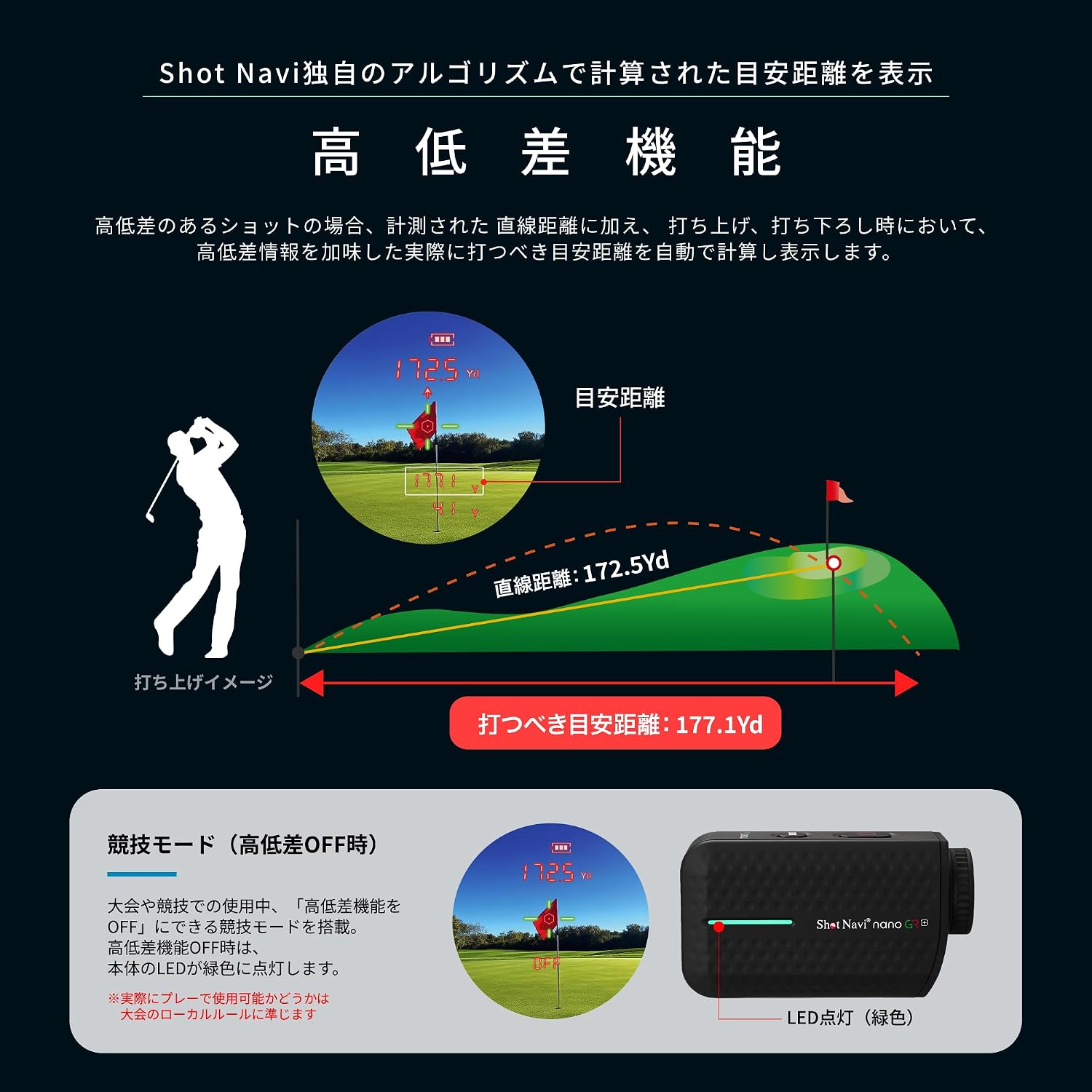
The high and low difference function automatically calculates and displays the estimated distance to hit, accounting for elevation changes, allowing for confident swings. An LED indicator shows when the slope function is off for competition play.
5.4 Using the OLED Viewnálezce
Široké pole view OLED viewfinder with 6x magnification provides a clear and vivid display using green and red colors, ensuring excellent visibility regardless of weather or sunlight. Focus on your target easily for quick and accurate measurements.

Experience exceptional precision with an error of just ±0.3m and rapid 0.05-second measurements. The device's ultra-lightweight (110g) and compact design, smaller than a credit card, ensures comfortable handling.
6. Údržba
6.1 Čištění
- Use the provided lens cloth to gently clean the lenses and display.
- For the device body, wipe with a soft, dry cloth. If necessary, a slightly damp cloth can be used, but ensure no moisture enters the device openings.
- Do not use abrasive cleaners, solvents, or alcohol, as these can damage the device's surface or coatings.
6.2 Skladování
- Store the device in its dedicated carrying case when not in use to protect it from dust, dirt, and impacts.
- Skladujte na chladném a suchém místě, mimo dosah přímého slunečního záření a extrémních teplot.
- Neskladujte v prostorách s vysokou vlhkostí.
7. Řešení problémů
If you encounter issues with your Shot Navi LaserSniper Nano GR+, try the following:
- Zařízení se nezapíná: Ensure the battery is charged. Connect to a power source using the USB Type-C cable and try again.
- Nepřesná měření: Ensure the lenses are clean. Make sure you are holding the device steady and aiming correctly at the target. Environmental factors like fog or heavy rain can affect accuracy.
- Displej není jasný: Adjust the brightness settings of the OLED viewfinder. Ensure the lenses are clean.
- Rychlé vybíjení baterie: Ensure the device is fully charged before use. Reduce display brightness if possible.
If problems persist, please refer to the manufacturer's support webnebo kontaktujte zákaznický servis.
8. Specifikace

This image highlights the comprehensive features of the Shot Navi LaserSniper Nano GR+, such as its ultra-lightweight design, advanced 3D measurement, high precision, slope compensation, and waterproof capabilities.
| Funkce | Specifikace |
|---|---|
| Číslo modelu | nano GR+ |
| Značka | Shot Navi |
| Hmotnost | 0.11 kg (110 g) |
| Materiál | Akrylonitril-butadien-styren |
| Zvětšení | 6x |
| Rozsah měření | Up to 1312 Yards (1000y stated in title, 1312Yd in specs) |
| Přesnost měření | ±0.3 meters (±11.8 inches) |
| Rychlost měření | Cca. 0.05 sekund |
| Zobrazit | OLED Viewfinder (Green/Red, 3-level brightness) |
| Voděodolnost | IPX4 (Life waterproof level) |
| Baterie | Rechargeable Lithium Polymer (USB Type-C) |
| Úroveň laserové bezpečnosti | IEC60825-1 Class 1M Laser Product / Class 1 Laser (Invisible) |
| Původ | Made in Japan (ISO9001 certified) |
9. Záruka a podpora
For warranty information, technical support, or service inquiries, please refer to the official Shot Navi webnebo se obraťte na místního autorizovaného prodejce. Uschovejte si účtenku jako doklad o koupi.