
Zavedení
This manual provides detailed instructions for the installation, operation, and maintenance of your ANNKE 5MP Wireless Camera System. This system features a 10-channel 5MP Wireless NVR and four 5MP weatherproof IP cameras, designed for reliable surveillance. Please read this manual thoroughly before using the product to ensure proper setup and functionality.
Obsah balení
Before installation, verify that all components are present in your package:
- 1x ANNKE 10-Channel 5MP Wireless NVR
- 4x ANNKE 5MP Weatherproof IP Cameras
- Napájecí adaptéry pro NVR a kamery
- USB myš
- Ethernetový kabel
- Sady montážních šroubů
- Rychlý průvodce
Note: Hard Disk Drive (HDD) is not included and must be purchased separately if local storage is desired.
Nastavení a instalace
Follow these steps for initial setup and installation of your ANNKE Wireless Camera System.
1. Počáteční připojení
The system is designed for true plug-and-play installation. The cameras and NVR are pre-paired at the factory.
- Připojte NVR k elektrické zásuvce pomocí dodaného napájecího adaptéru.
- Připojte každou kameru k elektrické zásuvce pomocí příslušného napájecího adaptéru.
- Wait for the cameras to power on and establish a wireless connection with the NVR. This may take a few minutes.

Figure 1: True Plug and Play Installation Steps
This image illustrates the two primary methods for setting up your ANNKE wireless camera system. The first method involves connecting the cameras and NVR to power, then using the ANNKE Sight app for live viewing. The second method involves connecting the cameras and NVR to power, then linking the NVR directly to a TV or monitor for live viewIng.
2. NVR Display Connection
Na view the camera feeds directly from the NVR:
- Connect the NVR to a TV or monitor using an HDMI or VGA cable (not included).
- Pro navigaci připojte USB myš k USB portu NVR.
- Follow the on-screen prompts for initial NVR configuration, including setting a password.
3. Mobile App Setup (ANNKE Sight)
For remote monitoring and advanced features, download the ANNKE Sight app:
- Download the "ANNKE Sight" app from your smartphone's app store (iOS App Store or Google Play Store).
- Zaregistrujte si účet a přihlaste se.
- Tap the '+' icon to add your device. Scan the QR code on the NVR or manually enter the device ID.
- Postupujte podle pokynů v aplikaci a dokončete přidání zařízení.

Figure 2: Cascading Connection and Auto Pairing
This image illustrates how the ANNKE wireless cameras automatically pair with the NVR and can utilize a cascading connection to extend wireless range within a home environment.
4. Umístění kamery
Consider the following when placing your cameras:
- Přímá viditelnost: Ensure minimal obstructions between cameras and the NVR for optimal wireless signal.
- Oblast pokrytí: Position cameras to cover critical entry points and areas of interest.
- Přístup k napájení: Each camera requires a power outlet.
- Ochrana proti počasí: While IP67 weatherproof, avoid direct exposure to extreme conditions if possible to prolong lifespan.
Návod k obsluze
This section details the various functions and features of your ANNKE Wireless Camera System.
1. Živě View a přehrávání
- Monitor síťového videorekordéru: Use the connected monitor and USB mouse to navigate the NVR interface for live viewing, recording playback, and system settings.
- Mobilní aplikace: Open the ANNKE Sight app on your smartphone or tablet to view live feeds from all connected cameras. You can also access recorded footage.

Obrázek 3: Vzdálené monitorování napříč zařízeními
This image demonstrates the system's capability for remote control and monitoring, allowing users to view live camera feeds on various devices such as laptops, desktop monitors, smartphones, and tablets.
2. Záznam a ukládání
The system supports continuous recording and motion-triggered recording.
- Místní úložiště: Install a compatible HDD (up to 10TB) into the NVR for local video storage. Configure recording schedules and modes via the NVR interface.
- Cloudové úložiště: Optional cloud storage services may be available through the ANNKE Sight app for off-site backup (subscription may be required).
- Komprese videa H.264+: The system utilizes advanced H.264+ compression to optimize storage space while maintaining video quality.
3. Detekce pohybu a upozornění
The system features smart motion detection to alert you to activity.
- Inteligentní detekce osob: The advanced AI can detect and distinguish human movement, reducing false alarms from pets or swaying branches.
- Customizable Motion Areas: Definujte specifické oblasti v záběru kamery view where motion detection should be active. This helps focus alerts on critical zones.
- Okamžitá upozornění: Dostávejte okamžitá oznámení aplikace a e-mailová upozornění se snímky obrazovky, když je detekován pohyb.

Figure 4: Smart Human Detection Alerts
This image highlights the system's smart human detection feature, which identifies human movement and sends immediate notifications to your email and the ANNKE Sight app, helping to focus on relevant security events.

Figure 5: Customizable Motion Detection Area
This image demonstrates the ability to customize specific zones for motion detection, allowing users to define areas of interest and reduce unnecessary alerts from non-critical zones.
4. Obousměrný zvuk
Each camera includes a built-in microphone and speaker for two-way communication.
- Listen In: Hear audio from the camera's location via the NVR or mobile app.
- Speak Out: Use the app's intercom function to speak through the camera's speaker, allowing you to communicate with visitors or deter intruders.

Obrázek 6: Obousměrná zvuková komunikace
This image illustrates the two-way audio feature, showing how a user can communicate with someone at their door, such as a delivery person, directly through the camera system via the mobile app.
5. Noční vidění
Kamery poskytují jasný obraz i za zhoršených světelných podmínek.
- Noční vidění do vzdálenosti 100 metrů: Equipped with Smart IR technology, cameras can see up to 100 feet in complete darkness.
- Režim Den/Noc: The system automatically switches between day (color) and night (black and white infrared) modes based on ambient light.
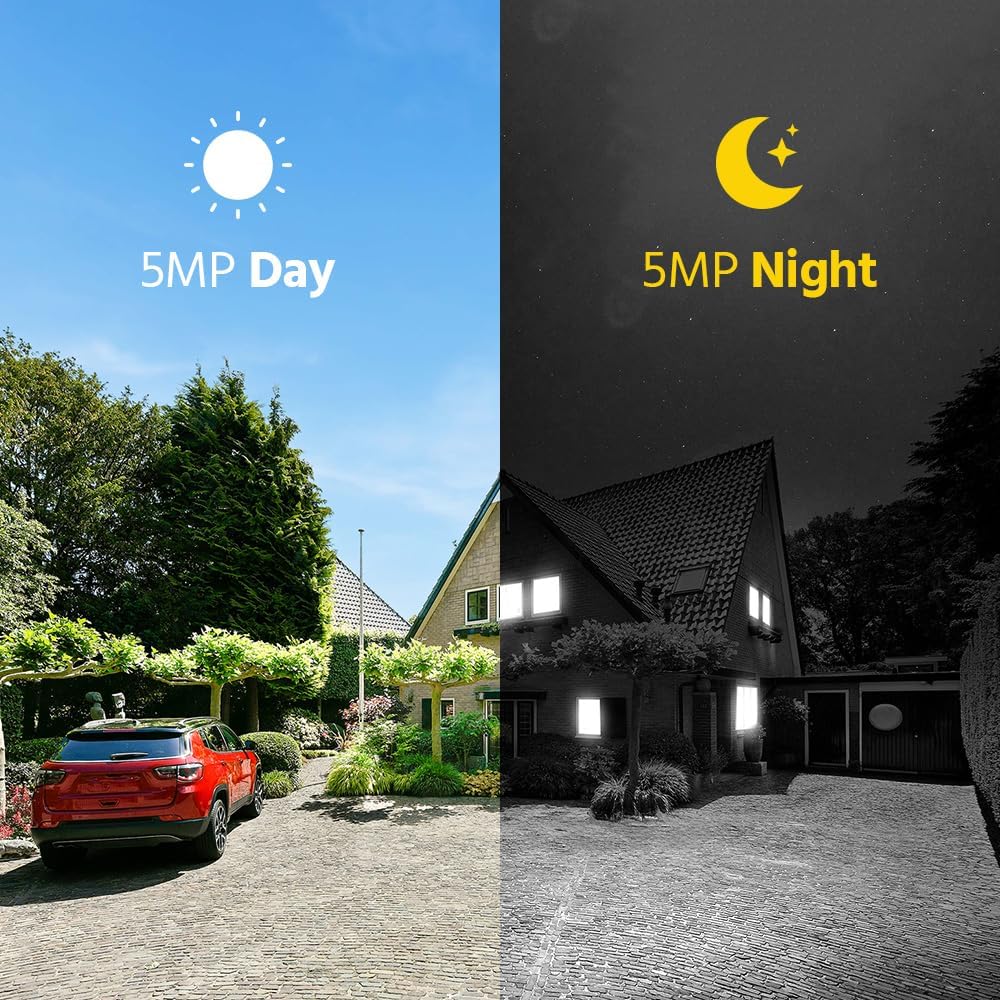
Obrázek 7: Porovnání denního a nočního vidění
This image visually compares the camera's performance during the day with full color and at night with infrared vision, demonstrating its ability to provide clear 5MP surveillance around the clock.
Údržba
Pravidelná údržba zajistí optimální výkon a dlouhou životnost vašeho bezpečnostního systému.
- Čištění objektivu fotoaparátu: Pravidelně čistěte objektivy fotoaparátu měkkým hadříkemamp cloth to remove dust, dirt, or smudges that may affect image clarity. Do not use harsh chemicals.
- Ochrana proti počasí: Although cameras are IP67 weatherproof, ensure they are securely mounted and protected from direct, prolonged exposure to extreme weather conditions where possible.
- Aktualizace firmwaru: Zkontrolujte ANNKE website or app regularly for firmware updates for your NVR and cameras. Keeping firmware updated ensures the latest features and security patches.
- Kontrola napájení: Ensure all power adapters and cables are securely connected and free from damage.
- Ventilace NVR: Ujistěte se, že je NVR umístěn v dobře větraném prostoru, aby nedošlo k přehřátí. Neblokujte větrací otvory.
Odstraňování problémů
Řešení běžných problémů naleznete v této části.
- Bez zobrazení videa:
- Zkontrolujte, zda jsou NVR a kamery zapnuté.
- Verify HDMI/VGA cable connection between NVR and monitor.
- Ujistěte se, že kamery jsou v dosahu bezdrátového signálu NVR.
- Restart the NVR and cameras.
- Cameras Not Connecting to NVR:
- Confirm cameras are powered.
- Check for physical obstructions or excessive distance between cameras and NVR.
- If previously paired, try re-pairing cameras to the NVR (refer to NVR manual for specific steps).
- Žádné upozornění na detekci pohybu:
- Ensure motion detection is enabled in NVR/app settings.
- Verify motion detection areas are correctly configured.
- Check alert notification settings in the ANNKE Sight app.
- Ensure the NVR has internet access for email alerts.
- Špatná kvalita obrazu:
- Vyčistěte objektivy fotoaparátu.
- Check for strong light sources directly facing the camera.
- Ensure stable power supply to cameras.
- Problémy s připojením aplikace:
- Ujistěte se, že váš smartphone má stabilní připojení k internetu.
- Verify the NVR is connected to the internet.
- Update the ANNKE Sight app to the latest version.
- Restart your router, NVR, and smartphone.
Specifikace
Key technical specifications for the ANNKE 5MP Wireless Camera System.
| Funkce | Specifikace |
|---|---|
| Značka | ANNKE |
| Technologie připojení | Bezdrátový |
| Rozlišení záznamu videa | 5MP (1920p, 1944p) |
| Speciální funkce | Motion Sensor, Night Vision, Waterproof (IP67), Wireless, Two-Way Audio |
| Počet kanálů | 10 |
| Zdroj napájení | Elektrický kabel |
| Rozsah nočního vidění | 100 stop |
| Snímková frekvence | 30 snímků za sekundu |
| Režim nahrávání | Nepřetržitý, detekce pohybu |
| Video vstup | hdmi, vga |
| Hodnocení odolnosti vůči povětrnostním vlivům | IP67 |
| Komprese videa | H.264 + |
| Maximální kapacita HDD | 10TB (HDD not included) |
Záruka a podpora
For warranty information, technical support, or service inquiries, please contact ANNKE customer support.
- Online podpora: Navštivte oficiální stránky ANNKE website for FAQs, troubleshooting guides, and support resources.
- Kontaktní údaje: Refer to the contact details provided in your product packaging or on the ANNKE official webmísto pro přímou pomoc.
- Registrace výrobku: Zaregistrujte si svůj produkt online a získejte aktualizace a zjednodušte si reklamace.