
1. Úvod
This manual provides essential information for the safe and efficient operation of your Metz MUD8500Z 43-inch 4K UHD Google Smart TV. Please read these instructions thoroughly before using the television and retain them for future reference. This television features a 43-inch Direct LED display with UHD 4K HDR resolution, integrated Google TV operating system, and a built-in soundbar with Wonder Audio technology.
2. Co je v krabici
Opatrně vybalte televizor a zkontrolujte, zda jsou součástí dodávky všechny následující položky:
- Metz MUD8500Z 43-inch Smart TV
- Napájecí adaptér
- Dálkové ovládání
- Uživatelská příručka (tento dokument)
- Součásti televizního stolku (pokud existují)
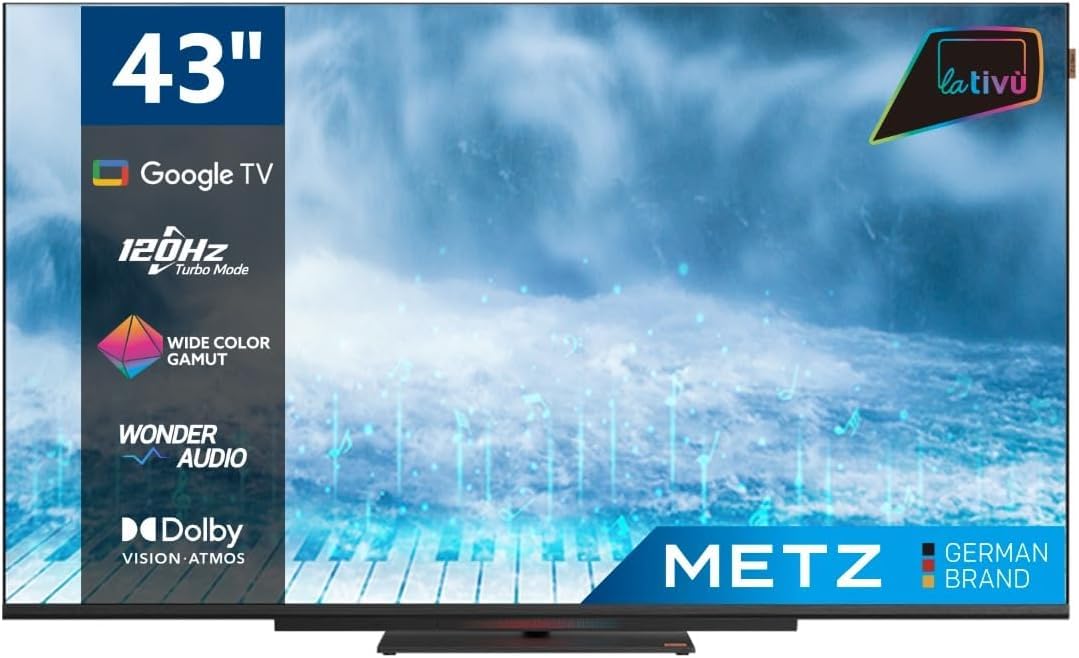
Obrázek: Přední strana view of the Metz MUD8500Z 43-inch Smart TV.
3. Nastavení
3.1. Vybalení a umístění
Vyjměte televizor z obalu. Umístěte televizor na stabilní, rovný povrch nebo jej připevněte na zeď pomocí kompatibilního držáku VESA (prodává se samostatně). Zajistěte dostatečné větrání kolem televizoru.

Image: Diagram showing the dimensions of the Metz MUD8500Z TV (96.6cm width, 57cm height, 11cm depth).
3.2. Připojení napájení
Connect the power adapter to the TV's power input, then plug the adapter into a wall outlet. The TV will enter standby mode.
3.3. Počáteční nastavení (Google TV)
Po prvním zapnutí vás televizor provede procesem počátečního nastavení. Ten zahrnuje:
- Výběr jazyka: Vyberte preferovaný jazyk.
- Internetové připojení: Connect the TV to your home Wi-Fi network or via an Ethernet cable.
- Přihlášení k účtu Google: Přihlaste se pomocí svého účtu Google a získejte přístup k funkcím, aplikacím a personalizovaným doporučením služby Google TV.
- Skenování kanálu: Vyhledejte dostupné televizní kanály (anténa/kabel).
4. Návod k obsluze
4.1. Základní funkce televizoru
- Zapnutí/vypnutí: Stiskněte tlačítko napájení na dálkovém ovladači nebo televizoru.
- Ovládání hlasitosti: Použijte tlačítka pro zvýšení/snížení hlasitosti na dálkovém ovladači.
- Výběr kanálu: Použijte tlačítka pro výběr kanálů nahoru/dolů nebo numerickou klávesnici.
- Vstupní zdroj: Press the 'Input' button to select HDMI, AV, or other connected devices.
4.2. Navigace Google TV
The Google TV interface provides access to streaming services, apps, and live TV. Use the directional pad and 'OK' button on your remote to navigate menus and select items.

Image: Remote control for the Metz Smart TV, highlighting dedicated buttons for popular streaming services and Google Assistant.
4.3. Asistent Google
Your TV has an integrated Google Assistant. Press the Google Assistant button on your remote or use the built-in microphone for voice commands to search for content, control smart home devices, and more.
4.4. App Access
Access a wide range of applications from the Google Play Store directly on your TV. Navigate to the 'Apps' section on the Google TV home screen to browse, download, and manage your applications.

Image: Screenshot of the Google TV interface displaying various streaming applications.
5. Vlastnosti
5.1. UHD 4K Resolution and HDR
Experience stunning visuals with a resolution of 3840x2160 pixels, providing exceptional clarity and detail. The 4K HDR (High Dynamic Range) support enhances contrast and color accuracy for a more lifelike picture.
5.2. Wide Color Gamut
The Wide Color Gamut technology allows the TV to display a broader spectrum of colors, resulting in more vibrant and realistic images.

Image: A visual comparison demonstrating the enhanced color range with Wide Color Gamut versus normal display.
5.3. Wonder Audio Soundbar
The integrated soundbar with Wonder Audio technology delivers an immersive and clear audio experience. This advanced sound processing algorithm improves treble and bass, offering a more realistic virtual surround sound.

Image: Diagram illustrating the internal structure of the Surging Soundbar, showing increased diaphragm area and net sound cavity volume.
5.4. Google TV Operating System
Powered by Google TV, this television provides a personalized experience with easy access to your favorite movies, shows, live TV, and apps from across your subscriptions. It also offers smart recommendations based on your viewnávyky.
5.5. 120Hz Turbo Mode
The 120Hz Turbo Mode enhances motion clarity, making fast-paced scenes and gaming content appear smoother and more fluid.

Image: Visual representation of the 120Hz Turbo Mode, illustrating enhanced smoothness for dynamic content.
5.6. Dolby Vision and Dolby Atmos
Enjoy cinematic picture quality with Dolby Vision, offering incredible brightness, contrast, and color. Dolby Atmos provides immersive, multi-dimensional audio that flows around you.
6. Připojení
Your Metz MUD8500Z TV offers various ports for connecting external devices:
- HDMI (x3): Připojte Blu-ray přehrávače, herní konzole, set-top boxy atd.
- USB 2.0 (x2): Připojte paměťová zařízení USB pro přehrávání médií.
- LAN (Ethernet): Pro kabelové připojení k internetu.
- AV IN: Připojte starší zařízení s kompozitním video a stereo audio výstupy.
- RF Input (Antenna/Satellite): Připojte pozemní nebo satelitní anténu.
- Optický výstup: For digital audio output to a sound system or soundbar.
- CI slot: Pro moduly Common Interface (např. pro služby placené televize).

Obrázek: Podrobný view of the rear panel connections, including CI, AV IN, RF Input, USB 2.0, HDMI, Optical Out, and LAN ports.
7. Specifikace
| Parametr | Hodnota |
|---|---|
| Číslo modelu | MUD8500Z (S9147779) |
| Velikost obrazovky | 43 palce (108 cm) |
| Technologie displeje | LED |
| Rezoluce | 4K UHD (3840x2160) |
| Obnovovací frekvence | 60 Hz (with 120Hz Turbo Mode) |
| Poměr stran | 16:9 |
| Konektivita | Ethernet, HDMI (3x), USB (2x), Wi-Fi |
| Speciální funkce | Flat Screen, Google TV, Google Assistant, Wonder Audio Soundbar, HDR, Wide Color Gamut |
| Rozměry produktu (ŠxHxV) | 96.6 x 10.9 x 56.9 cm |
| Hmotnost | 8.2 kg |
| Třída energetické účinnosti (SDR) | F |
| Spotřeba energie (SDR) | 50.0 W |
| Třída energetické účinnosti (HDR) | G |
| Spotřeba energie (HDR) | 90.0 W |
| Pohotovostní napájení | 0.4 W |
For detailed energy information, please refer to the official EU energy label: https://eprel.ec.europa.eu/qr/1530402
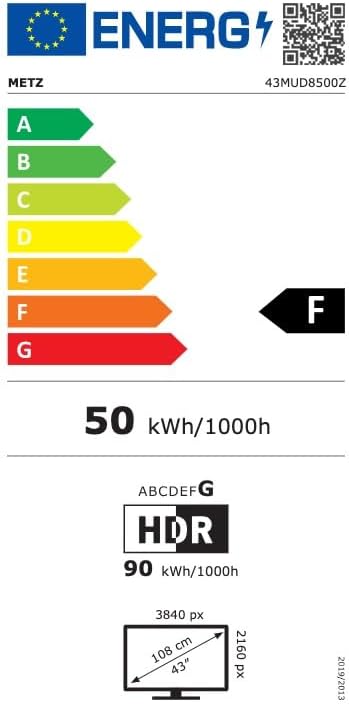
Image: EU Energy Label for the Metz MUD8500Z television, showing energy efficiency class F.
8. Řešení problémů
Pokud narazíte na problémy s televizorem, prostudujte si následující běžné problémy a jejich řešení:
- Bez napájení:
- Ensure the power cable is securely connected to both the TV and the wall outlet.
- Check if the wall outlet is functioning by plugging in another device.
- Press the power button on the remote or TV. - Žádný obraz/zvuk:
- Verify the correct input source is selected (e.g., HDMI 1, AV).
- Check all cable connections between the TV and external devices.
- For no sound, ensure volume is not muted or too low. - Dálkové ovládání nefunguje:
- Vyměňte baterie v dálkovém ovladači.
- Ujistěte se, že mezi dálkovým ovladačem a infračerveným senzorem televizoru nejsou žádné překážky.
- Point the remote directly at the TV. - Problémy s připojením k síti:
- Restartujte Wi-Fi router.
- Check Wi-Fi password and ensure it is entered correctly.
- Try connecting via an Ethernet cable if Wi-Fi issues persist. - Problémy s kvalitou obrazu (např. rozmazaný, zkreslený):
- Check the resolution settings of the input source.
- Ensure the signal source (antenna, cable box, streaming) is stable.
- Adjust picture settings in the TV menu (brightness, contrast, sharpness).
Pokud problém přetrvává i po vyzkoušení těchto řešení, kontaktujte zákaznickou podporu.
9. Údržba
9.1. Čištění obrazovky
Jemně otřete obrazovku měkkým hadříkem, který nepouští vlákna. V případě odolných skvrn lehceampOtřete hadřík vodou nebo specializovaným čističem obrazovek. Nepoužívejte agresivní chemikálie ani abrazivní materiály.
9.2. Čištění skříně
Wipe the TV cabinet with a soft, dry cloth. Avoid using liquid cleaners directly on the TV.
9.3. Větrání
Ensure that the ventilation openings on the back of the TV are not blocked. Proper airflow prevents overheating and prolongs the life of the TV.
10. Záruka a podpora
The Metz MUD8500Z television comes with a standard manufacturer's warranty. According to specifications, the minimum general warranty duration provided by the supplier is 2 years.
For warranty claims, technical assistance, or further support, please refer to the contact information provided with your purchase documentation or visit the official METZ CONNECT webmísto.