
Zavedení
The BAOFENG UV-5RM is a versatile multi-band two-way radio designed for reliable communication across various environments. It features a 1.77-inch LCD screen, 999 memory channels, and supports USB-C charging. This device is suitable for outdoor activities, professional use, and emergency communication, offering features like NOAA weather alerts, frequency hopping, and scramble functions for enhanced privacy.
This manual provides essential information for the proper setup, operation, and maintenance of your UV-5RM radio to ensure optimal performance and longevity.
Obsah balení
Než budete pokračovat v instalaci, ověřte si prosím, zda jsou v balení přítomny všechny položky:
- BAOFENG UV-5RM Radio Unit
- Anténa
- Nabíjecí lithium-iontová baterie
- Nabíjecí kabel USB-C
- Desktop Charger Dock
- Spona na opasek
- Řemínek na ruku
- Uživatelská příručka (tento dokument)
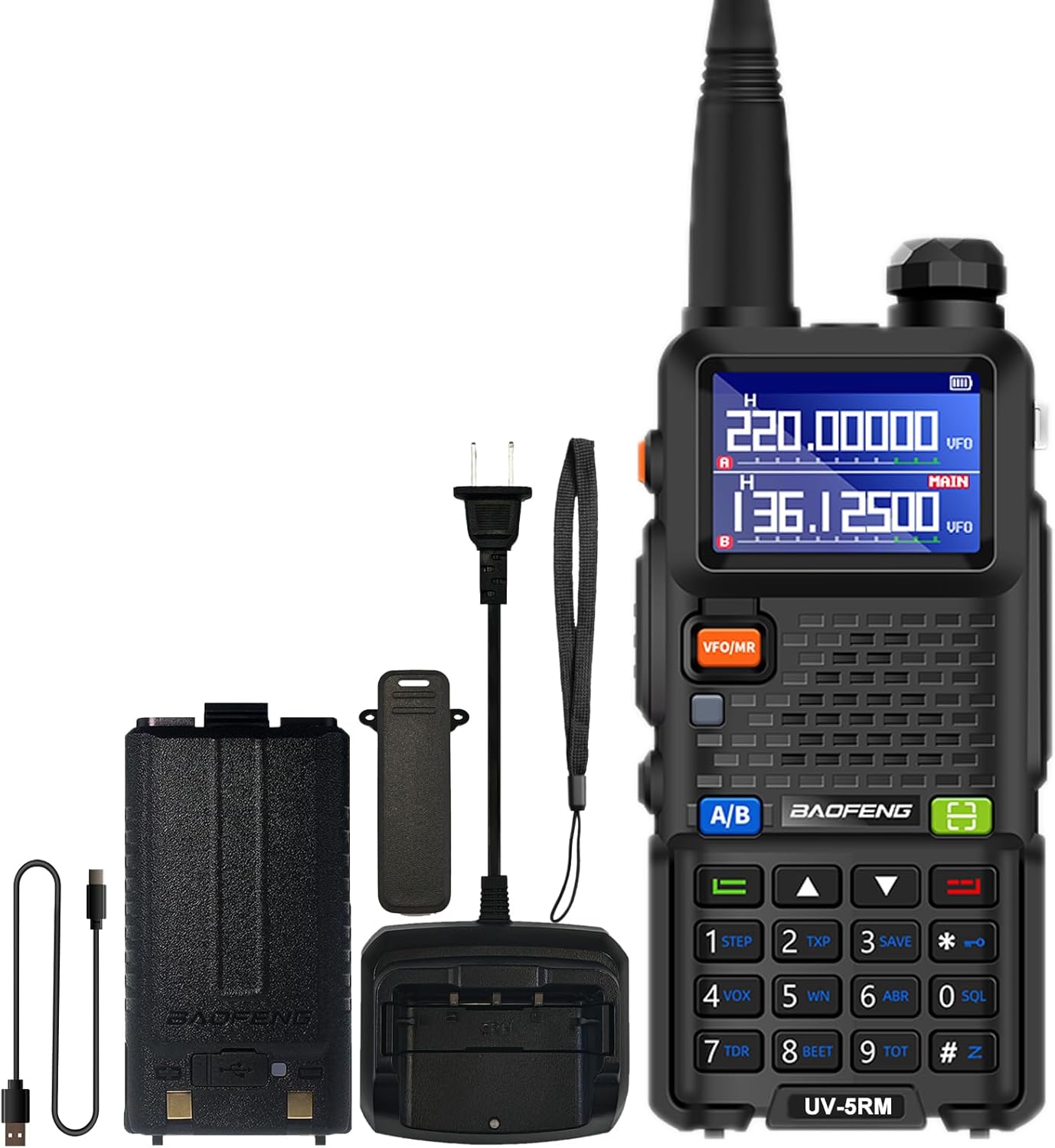
Image: The BAOFENG UV-5RM radio unit with its standard accessories, including the antenna, battery, and charging components.
Nastavení
1. Připojení antény
Carefully screw the antenna clockwise into the connector on the top of the radio until it is finger-tight. Do not overtighten.
2. Instalace baterie
Align the battery pack with the grooves on the back of the radio. Slide the battery upwards until it clicks into place. To remove, press the release latch (if present) and slide the battery downwards.
3. Nabíjení baterie
The UV-5RM offers two charging methods:
- Používání stolní nabíječky: Place the radio (with battery installed) into the charging dock. Ensure the charging contacts align. The indicator light on the charger will show the charging status.
- Používání portu USB-C: Connect the provided USB-C cable to the port on the back of the battery pack and to a compatible USB power source (e.g., car charger, power bank, laptop, USB wall adapter).
A full charge typically takes several hours. The radio can be charged in your car, with a power bank, or any USB interface device, providing flexibility for charging on the go.

Image: The BAOFENG UV-5RM radio demonstrating both USB-C direct charging and charging via its desktop dock.
4. Připevnění klipu na opasek a popruhu na ruku
Secure the belt clip to the back of the radio using the provided screws. Attach the hand strap to the designated loop for added security during use.
Návod k obsluze
Rádio skončiloview a ovládací prvky

Image: Labeled diagram of the BAOFENG UV-5RM radio highlighting key components and controls.
- Anténa: Pro vysílání a příjem signálů.
- Svítilna: Vestavěné LED světlo pro osvětlení.
- Ovladač napájení/hlasitosti: Otáčením zapnete/vypnete rádio a upravíte hlasitost.
- 1.77" LCD displej: Zobrazuje frekvenci, kanál, stav baterie a další informace.
- Tlačítko FM: Aktivuje funkci FM rádia.
- Tlačítko PTT (Push-To-Talk): Stiskněte a podržte pro vysílání, uvolněte pro příjem.
- Tlačítko VFO/MR: Přepíná mezi frekvenčním režimem (VFO) a kanálovým režimem (MR).
- 2-pin Jack: Pro připojení externího audio příslušenství, jako jsou sluchátka s mikrofonem nebo programovací kabely.
- Mikrofon: Mikrofon pro hlasový vstup.
- Tlačítko skenování: Zahájí skenování frekvence nebo kanálu.
- Tlačítko nabídky: Přístup k nastavení nabídky rádia.
- Klávesnice: Pro přímé zadávání frekvence, výběr kanálů a navigaci v menu.
- Port USB-C: Pro přímé nabíjení baterie.
1. Zapnutí/vypnutí a nastavení hlasitosti
Rotate the Power/Volume knob clockwise to turn the radio on. Continue rotating clockwise to increase volume, and counter-clockwise to decrease volume. Rotate fully counter-clockwise until a click is heard to turn the radio off.
2. Frekvenční a kanálový režim (VFO/MR)
Stiskněte tlačítko VFO/MR tlačítko pro přepínání mezi:
- Frekvenční režim (VFO): Allows direct input of frequencies using the keypad.
- Režim kanálu (MR): Allows selection of pre-programmed memory channels (up to 999).
3. One Key Match Frequency Function
Tato funkce umožňuje rychlé sladění frekvence s jiným rádiem.
- Krok 1: Turn on your UV-5RM radio. Press and hold the VYHLEDÁVÁNÍ button (often labeled with a magnifying glass icon or similar) until the screen displays "SEARCH".
- Krok 2: Press and hold the transmit button on the other radio you wish to match. Your UV-5RM will search for and decode its frequency and CTCSS/DCS tones. Once finished, press a confirmation button (e.g., MENU or EXIT) on your UV-5RM to save.
- Krok 3: Switch to channel mode to select the newly matched channel. The screen will display the frequency of the other radio, enabling communication.

Image: Visual guide for the 'One Key Match Frequency' feature, illustrating the steps to quickly synchronize frequencies with another radio.
4. Vysílání a příjem
Pro přenos stiskněte a podržte PTT tlačítko a mluvte jasně do mikrofonu. Uvolněte tlačítko PTT button to switch to receive mode.
5. Funkce VOX (hands-free komunikace)
The Voice Operated eXchange (VOX) function allows you to transmit without pressing the PTT button. When VOX is enabled, the radio will automatically transmit when it detects your voice. Adjust VOX sensitivity in the menu settings.
6. Funkce FM rádia
Stiskněte tlačítko FM button to activate the built-in FM radio. You can scan for local radio stations and enjoy entertainment when not actively communicating.
7. Meteorologické rádio NOAA
The UV-5RM supports NOAA weather channels, providing access to real-time weather alerts and forecasts. Refer to the menu for specific NOAA channel settings and activation.
8. Programování
The radio can be programmed using CHIRP software and a compatible programming cable (sold separately). This allows for advanced customization of frequencies, channels, and other settings.
Údržba
- Čištění: Použijte měkký, damp hadříkem k čištění vnější strany rádia. Nepoužívejte agresivní chemikálie ani abrazivní čisticí prostředky.
- Péče o baterie: Chcete-li prodloužit životnost baterie, vyvarujte se jejího přebíjení nebo úplného vybíjení. Pokud rádio a baterii delší dobu nepoužíváte, skladujte je na chladném a suchém místě.
- Skladování: Rádio skladujte v suchém a bezprašném prostředí mimo dosah přímého slunečního záření a extrémních teplot.
- Voděodolnost: The BAOFENG UV-5RM is není voděodolný. Avoid exposing the radio to rain, splashes, or immersion in water.
Odstraňování problémů
| Problém | Možná příčina | Řešení |
|---|---|---|
| Rádio se nezapne. | Baterie není nabitá nebo je nesprávně nainstalovaná. | Ujistěte se, že je baterie plně nabitá a správně usazená. |
| Nelze vysílat ani přijímat. | Nesprávná frekvence/kanál, nepřipojená anténa nebo slabá baterie. | Ověřte frekvenci/kanál, zkontrolujte připojení antény, nabijte baterii. |
| Špatná kvalita zvuku. | Příliš nízká hlasitost, příliš vysoká úroveň umlčování nebo rušení. | Upravte hlasitost, snižte úroveň umlčování, přesuňte se dál od zdrojů rušení. |
| Klávesnice nereaguje. | Zámek klávesnice aktivován. | Refer to the manual for keypad unlock procedure (usually a long press of a specific key). |
Specifikace
| Číslo modelu | UV-5RM |
| Značka | BAOFENG |
| Počet kanálů | 999 |
| Frekvenční rozsah | VHF: 144-148 MHz / UHF: 420-450 MHz (Multi-Band) |
| Zobrazit | 1.77palcový LCD displej |
| Nabíjení | USB-C Charging, Desktop Charger |
| Typ baterie | Lithium-iontová (součástí balení) |
| Průměrná životnost baterie | Až 48 hodin |
| Maximální dosah hovoru | Až 6 km (v závislosti na prostředí) |
| Speciální funkce | NOAA, VOX, FM Radio, LED Flashlight, Squelch, Battery Save, Repeater, CTCSS/DCS, Scan, TOT, BCL, DTMF, Power-on Password, Frequency Hopping, Scramble Functions |
| Úroveň odolnosti proti vodě | Není odolný vůči vodě |

Image: A comparison chart detailing the enhanced features of the BAOFENG UV-5RM model compared to the UV-5R, including channel capacity, screen size, battery, and charging options.
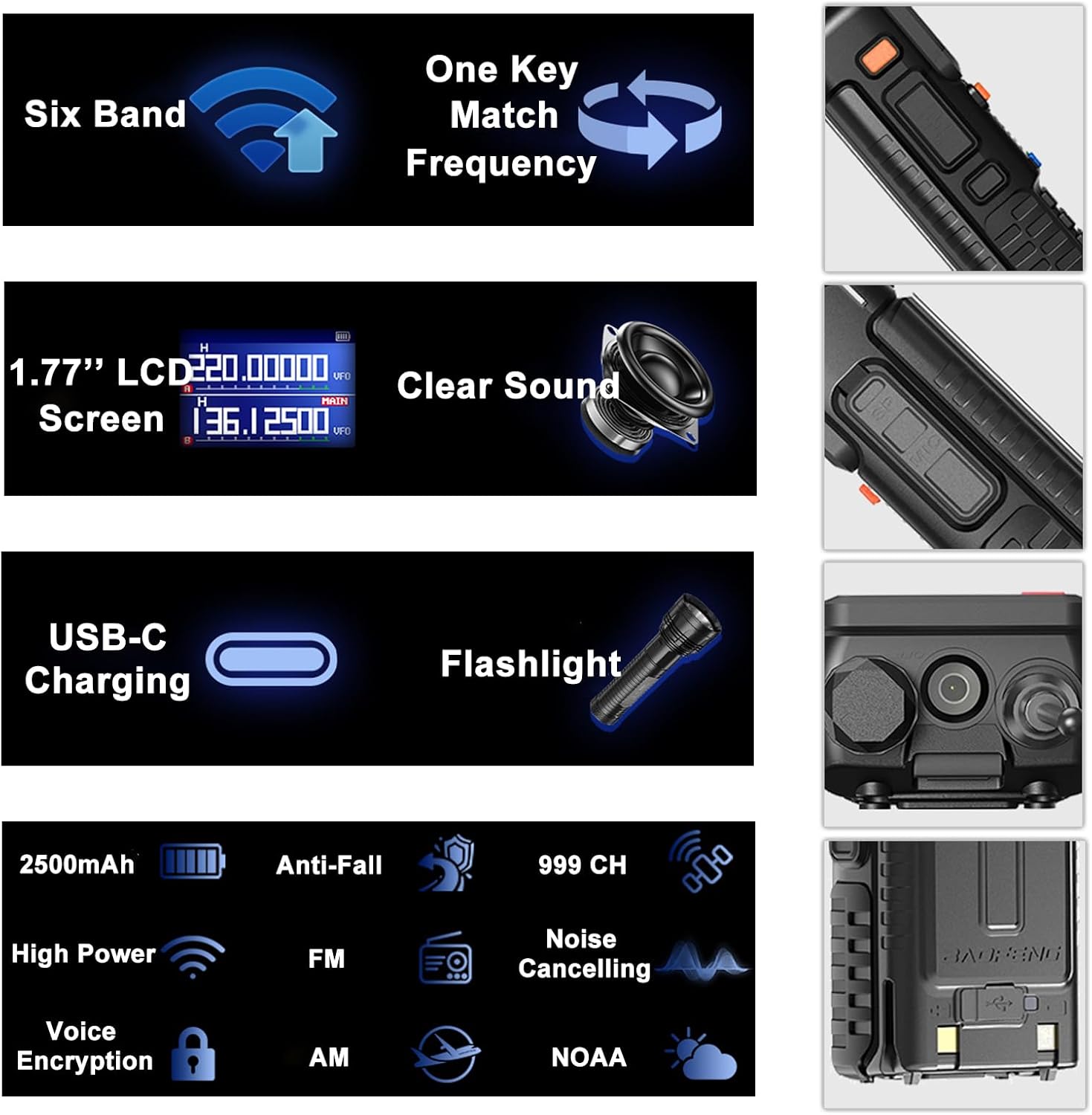
Image: An infographic summarizing the main features of the BAOFENG UV-5RM, such as multi-band capability, one-key frequency matching, USB-C charging, and a 1.77-inch LCD screen.

Obrázek: Podrobný view of the 1.77-inch LCD screen on the BAOFENG UV-5RM, illustrating its dual display capability and clear readability.
Záruka a podpora
Záruka: The BAOFENG UV-5RM Two Way Radio comes with a 1-year warranty. This warranty is provided exclusively through "Shiqun Electronics Co., Ltd." Please retain your proof of purchase for warranty claims.
For technical support, troubleshooting assistance, or warranty inquiries, please contact the seller or authorized service center. Refer to your purchase documentation for specific contact details.