
1. Úvod
The ATTACK SHARK X3PRO is a high-performance lightweight wireless gaming mouse designed for precision and responsiveness. Featuring tri-mode connectivity, a flagship optical sensor, and durable switches, it offers an exceptional gaming experience for PC and Mac users.

Figure 1: ATTACK SHARK X3PRO Wireless Gaming Mouse (Red)
2. Vlastnosti produktu
- 4K/8K Wireless Gaming Mouse: Equipped with wireless 4K polling and wired 8K polling, the X3PRO sends signals to the computer 4 to 8 times faster than standard gaming mice, ensuring best-in-class precision and responsiveness.
- Pixart PAW3395 Flagship Sensor: Utilizes a Pixart 3395 optical sensor, offering 6 adjustable DPI levels (800/1600/2400/3200/5000/26000), 650 IPS tracking speed, 4000/8000Hz response speed, and 50G acceleration limit for precise positioning.
- Třírežimové připojení: Supports USB-C wired mode, 2.4G wireless mode, and Bluetooth 5.2 mode for versatile use across different scenarios and up to 4 devices simultaneously.
- Kailh GM8.0 Switch & TTC Encoder: Features high-end Kailh Black Mamba GM8.0 Micro switches for crisp clicks, fast rebound, and quick trigger, with an 80 million click lifespan. The TTC scroll wheel encoder provides precise positioning.
- 60g Ultralight & Ergonomic Design: Weighing only 49g, the X3PRO's ergonomic design ensures a natural grip, reducing fatigue during extended gaming sessions and providing agility.
- 5 programovatelných tlačítek: Total of 5 programmable buttons allow customization of DPI, polling rate, LOD, shortcuts, and macros via the dedicated driver software.
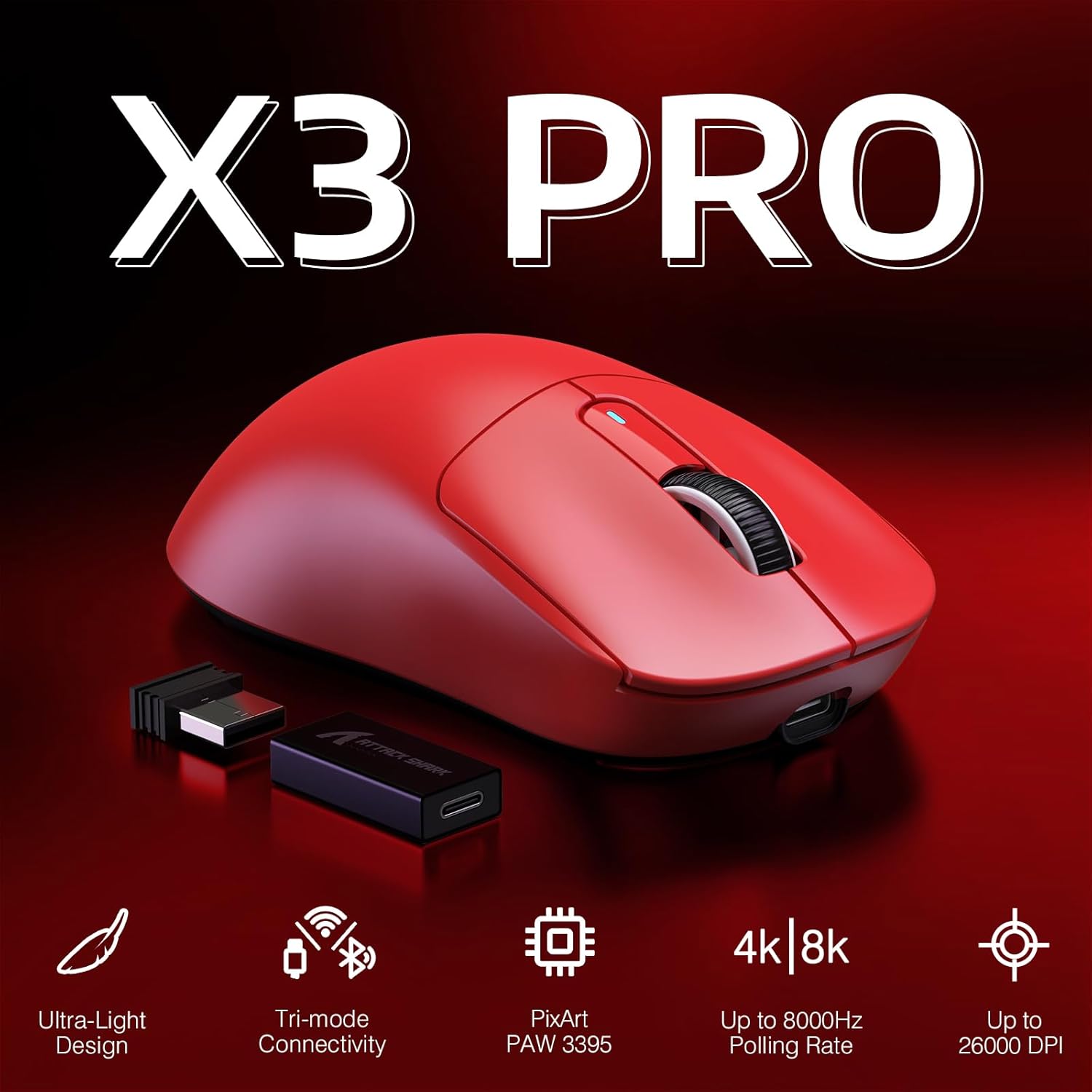
Figure 2: Key Features of the X3PRO Mouse

Figure 3: Ultra-Light Design for Effortless Action
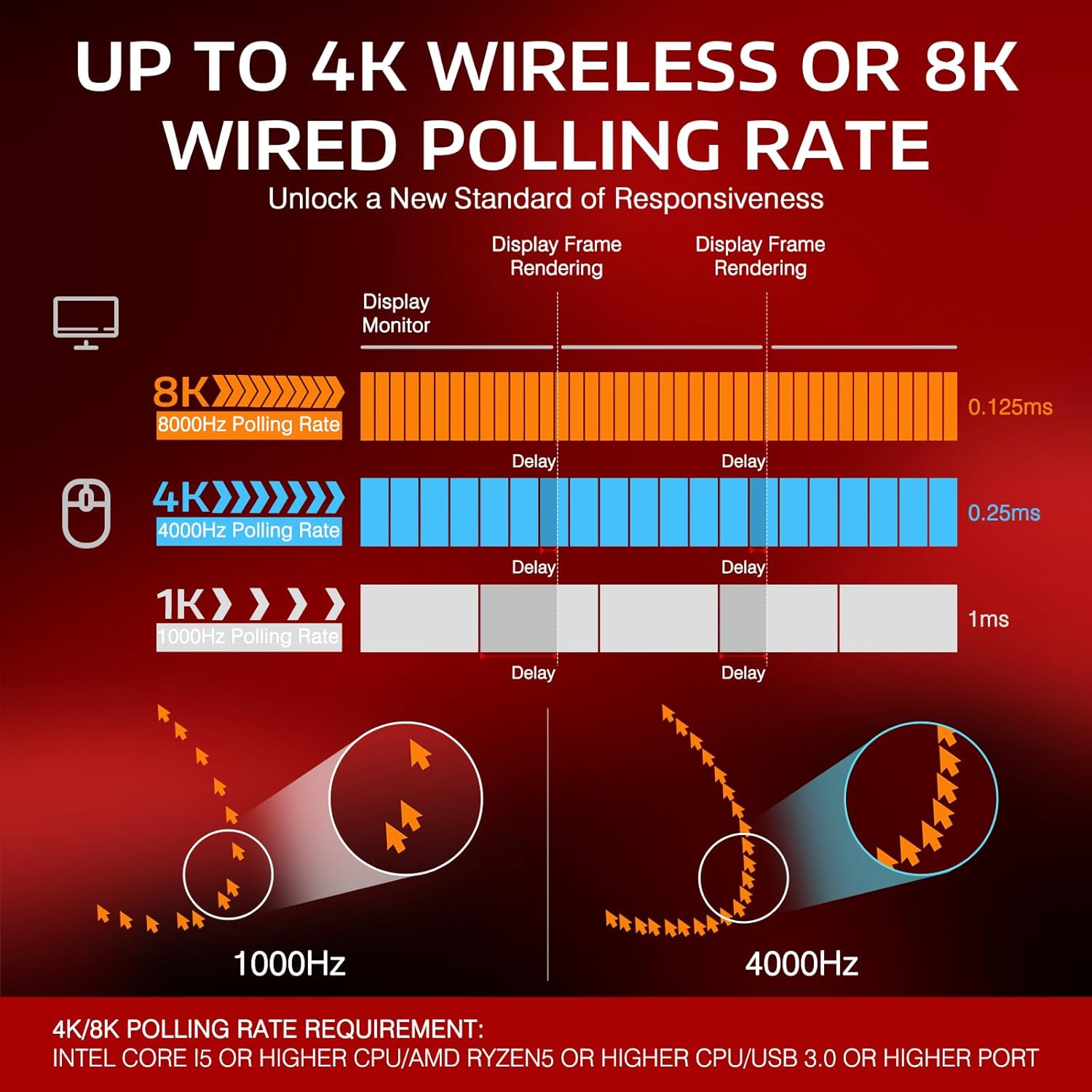
Figure 4: Polling Rate Comparison (1K, 4K, 8K)

Figure 5: Pixart PAW3395 Flagship Sensor

Figure 6: Kailh GM8.0 Switches & TTC Encoder
Konec produktuview Video
Toto video poskytuje komplexní přehledview of the ATTACK SHARK X3PRO 4K/8K Lightweight Wireless Gaming Mouse, highlighting its key features and benefits.
3. Obsah balení
Ujistěte se prosím, že balení obsahuje všechny položky:
- ATTACK SHARK X3PRO Wireless Gaming Mouse
- USB přijímač (umístěný ve spodní části myši)
- USB-C Charging Cable (Flexible Paracord Cable)
- Type-C to USB A Adapter

Figure 7: Product Parameters and Components
4. Nastavení
4.1. Připojení myši
The X3PRO mouse offers three connection modes:
- 2.4G bezdrátový režim:
- Locate the USB receiver on the bottom of the mouse. Open the cover and take out the receiver.
- Plug the USB receiver into an available USB port on your computer. For optimal performance, use a USB 3.0 or higher port.
- Switch the mode selector on the bottom of the mouse to '2.4G'. The mouse will automatically connect.
- Režim Bluetooth 5.2:
- Switch the mode selector on the bottom of the mouse to 'BT'.
- V počítači přejděte do nastavení Bluetooth a vyhledejte nová zařízení.
- Select 'ATTACK SHARK X3PRO' from the list of available devices to pair.
- Drátový režim USB-C:
- Connect the provided USB-C cable to the front port of the mouse.
- Connect the other end of the USB-C cable (or use the Type-C to USB A adapter if needed) to an available USB port on your computer.
- Switch the mode selector on the bottom of the mouse to 'OFF' or leave it in '2.4G'/'BT' mode; the mouse will function as a wired device and charge simultaneously.

Figure 8: Flashspeed Connectivity Modes
4.2. Driver/Software Installation
To unlock the full potential of your X3PRO mouse, including programmable buttons, DPI settings, polling rate adjustments, and macro functions, please download and install the official ATTACK SHARK driver software from the manufacturer's website. The software is compatible with Windows XP / VISTA / 7 / 8 / 10 / MAC.
5. Návod k obsluze
5.1. Nastavení DPI
The mouse features 6 adjustable DPI levels. You can cycle through these levels using the dedicated DPI button on the bottom of the mouse or customize them via the driver software. The default DPI levels are 800/1600/2400/3200/5000/26000.
5.2. Úprava míry dotazování
The polling rate can be adjusted to 4000Hz (wireless) or 8000Hz (wired) for maximum responsiveness. This setting is typically adjusted within the driver software.
5.3. Button Customization
The X3PRO has 5 programmable buttons. Use the ATTACK SHARK driver software to assign custom functions, macros, or shortcuts to these buttons according to your preferences and gaming needs.
5.4. Nabíjení myši
The mouse is equipped with a long-lasting lithium battery. To charge, connect the USB-C charging cable to the mouse and a USB power source (e.g., computer USB port, wall adapter). The mouse can be used while charging in wired mode.

Obrázek 9: Prodloužená životnost baterie
6. Údržba
To ensure the longevity and optimal performance of your ATTACK SHARK X3PRO mouse, follow these maintenance guidelines:
- Čištění: Povrch myši pravidelně otírejte měkkým, suchým hadříkem. V případě odolných nečistot lehceamphadřík vodou. Nepoužívejte agresivní chemikálie ani abrazivní materiály.
- Péče o senzor: Udržujte optický senzor na spodní straně myši čistý a bez prachu a nečistot. V případě potřeby použijte vatový tampon nebo stlačený vzduch.
- PTFE patky: The mouse features 100% virgin grade PTFE feet for consistent glide. Avoid scratching or damaging them. Replacement feet may be available from the manufacturer if worn.
- Skladování: Pokud myš delší dobu nepoužíváte, skladujte ji na chladném a suchém místě mimo dosah přímého slunečního záření a extrémních teplot.

Figure 10: 100% Virgin Grade PTFE Feet
7. Řešení problémů
If you encounter issues with your ATTACK SHARK X3PRO mouse, please refer to the following common troubleshooting steps:
- Myš nereaguje:
- Ensure the mouse is charged. Connect it via USB-C cable to charge and test in wired mode.
- Check the mode switch on the bottom of the mouse (2.4G, BT, OFF) and ensure it's set to the desired connection type.
- For 2.4G wireless, ensure the USB receiver is securely plugged into a working USB port. Try a different USB port.
- For Bluetooth, ensure Bluetooth is enabled on your computer and the mouse is paired correctly. Try unpairing and re-pairing the device.
- Restartujte počítač.
- Intermittent Disconnections (2.4G/Bluetooth):
- Ensure the mouse is within range of the receiver/Bluetooth adapter and there are no significant obstructions.
- Vyhněte se silnému elektromagnetickému rušení z jiných bezdrátových zařízení.
- Ujistěte se, že baterie myši není kriticky vybitá.
- Aktualizujte ovladače USB nebo Bluetooth v počítači.
- If using 2.4G, try connecting the USB receiver to a different USB port, preferably a USB 3.0 or higher port.
- DPI/Polling Rate Issues:
- Ensure the ATTACK SHARK driver software is installed and up to date.
- Verify settings within the software.
- Nefunkční tlačítka:
- Check button assignments in the driver software.
- Ensure no other software is conflicting with mouse button functions.
If the issue persists after trying these steps, please contact ATTACK SHARK customer support for further assistance.
8. Specifikace
| Funkce | Specifikace |
|---|---|
| Značka | ÚTOČNÉHO ŽRALOKA |
| Model | X3PRO |
| Technologie připojení | Bluetooth, USB (Wired, 2.4G Wireless, BT 5.2) |
| Technologie detekce pohybu | Optický (senzor PAW3395) |
| Úrovně DPI | 800/1600/2400/3200/5000/26000 (Adjustable) |
| Míra hlasování | Up to 4000Hz (Wireless), Up to 8000Hz (Wired) |
| Spínače | Kailh GM8.0 Micro Switches (80 Million Clicks) |
| Kodér | TTC Scroll Wheel Encoder |
| Programovatelná tlačítka | 5 |
| Hmotnost položky | 1.73 unce (přibližně 49 g) |
| Rozměry balení | 6.5 x 4.53 x 1.77 palce |
| Kompatibilita | Windows XP / VISTA / 7 / 8 / 10 / MAC |
9. Záruka a podpora
For warranty information and technical support regarding your ATTACK SHARK X3PRO gaming mouse, please refer to the official ATTACK SHARK webnebo se obraťte přímo na jejich zákaznický servis. Uschovejte si účtenku jako doklad o koupi pro případné reklamace.
ATTACK SHARK US Store: Navštivte obchod