
SABLUTE B0CT2R9TN9
SABLUTE Large Print Keyboard User Manual
Model: B0CT2R9TN9
Značka: SABLUTE
1. Úvod
The SABLUTE Large Print Keyboard is designed to enhance typing comfort and visibility. Featuring large, easy-to-read characters and an ergonomic design with an integrated wrist rest, this wired keyboard is suitable for various users, including the elderly, students, and office professionals. It also includes a convenient phone/tablet holder for improved multitasking.
2. Nastavení
The SABLUTE Large Print Keyboard offers a straightforward plug-and-play setup, requiring no additional drivers or software installation.
- Rozbalte klávesnici: Opatrně vyjměte klávesnici z obalu.
- Připojení k počítači: Locate an available USB-A port on your computer (desktop, laptop, etc.). Insert the USB-A cable from the keyboard firmly into the USB-A port.
- Rozpoznávání systému: Your operating system (Windows, macOS, Chrome OS, Vista) should automatically detect and configure the keyboard. A notification may appear indicating that the device is ready for use.
- Začněte psát: The keyboard is now ready for immediate use.

Figure 2.1: The keyboard features a USB-A connection for plug-and-play compatibility with various operating systems.
3. Návod k obsluze
3.1 Basic Typing and Ergonomics
The keyboard features large, high-contrast yellow keycaps with black characters for enhanced visibility. The ergonomic design includes a built-in wrist rest and bottom support to reduce wrist fatigue during extended use.

Figure 3.1: The ergonomic design with an integrated wrist rest promotes comfortable typing posture.
3.2 Integrated Phone/Tablet Holder
A dedicated slot is integrated into the keyboard's design to securely hold your smartphone or tablet, allowing for convenient viewing during computer use. This holder does not provide charging functionality.

Figure 3.2: The integrated slot provides a stable resting place for mobile devices.
3.3 Multimédia a klávesové zkratky
The keyboard includes several one-touch multimedia and shortcut keys located above the function row for quick access to common functions. These include navigation (forward, backward), refresh, search, stop loading, and calculator. Note that multimedia keys may have limited compatibility with macOS systems.
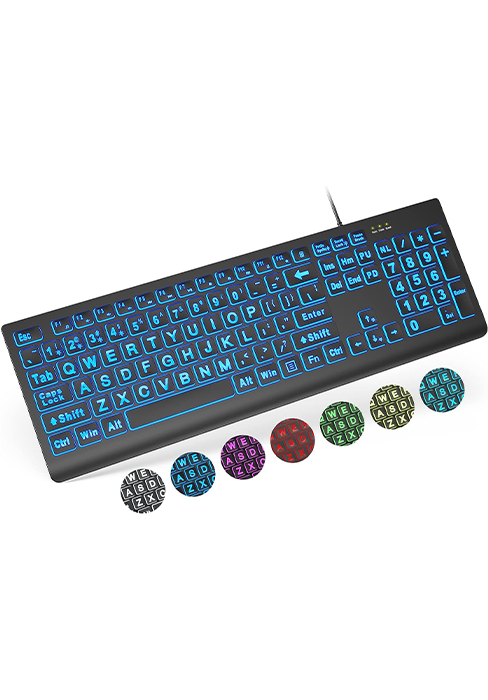
Obrázek 3.3: Přesview of the dedicated shortcut keys for enhanced productivity.
4. Údržba
To ensure the longevity and cleanliness of your SABLUTE Large Print Keyboard, regular maintenance is recommended.
- Cleaning the Keys: Použijte měkký hadřík, který nepouští vlákna dampened with water or a mild, non-abrasive cleaning solution to wipe down the keycaps. Avoid excessive moisture.
- Čištění opěrky zápěstí: The hard plastic wrist rest can be easily cleaned with a damp cloth. Avoid harsh chemicals that may damage the surface.
- Odstranění prachu: Periodically use compressed air to remove dust and debris from between the keys.
5. Řešení problémů
If you encounter issues with your SABLUTE Large Print Keyboard, consider the following troubleshooting steps:
- Klávesnice nereaguje:
- Ensure the USB-A cable is securely connected to both the keyboard and the computer's USB port.
- Zkuste připojit klávesnici k jinému USB portu na počítači.
- Restart your computer to refresh the USB connections.
- Klíče se neregistrují:
- Check for any physical obstructions or debris under the affected keys.
- Gently press the key multiple times to dislodge any stuck particles.
- Multimedia Keys Not Working (macOS):
- Some multimedia keys may have limited or no functionality on macOS systems due to operating system design. This is expected behavior and not a defect.
6. Specifikace
| Funkce | Detail |
|---|---|
| Značka | SABLUTE |
| Model | B0CT2R9TN9 |
| Technologie připojení | USB-A (kabelové) |
| Kompatibilní zařízení | Laptop, PC (Windows, macOS, Chrome OS, Vista) |
| Popis klávesnice | Flexibilní |
| Speciální funkce | Ergonomic, Large Print, Phone Holder, Wired, Wrist Rest |
| Barva | Žluť |
| Počet klíčů | 111 |
| Rozměry produktu | 43.99 x 24.10 x 4.60 cm (D x Š x V) |
| Hmotnost položky | 1.98 libry (0.90 kg) |
7. Záruka a podpora
SABLUTE is committed to customer satisfaction. For any inquiries or support needs, please refer to the following information:
- Záruka výrobce: The product is covered by a 360-day manufacturer warranty.
- Zásady výměny: A 90-day replacement policy is available for eligible issues.
- Služby zákazníkům: Očekávejte odpověď na vaše dotazy do 24 hodin.
- Kontaktní číslo (USA): 1-213-296-1273 (Mon-Fri 9am-1pm, 2pm-6pm PST)
- Brand Care: SABLUTE provides dedicated brand care for its products.

Figure 7.1: SABLUTE customer support details.
Ask a question about this manual
Ask about setup, troubleshooting, compatibility, parts, safety, or missing instructions. Manuals+ will review the question and use this page’s manual context to help answer it.