
1. Úvod
The TRIGKEY Key Mini N150 is a compact and efficient mini PC designed for various computing tasks, including office work, 4K video playback, web browsing, and educational use. It features an Intel Alder Lake N150 processor, DDR5 memory, and SSD storage, offering stable performance in a small form factor.
2. Co je v krabici
Ověřte, zda jsou v balení přítomny všechny položky:
- 1 x TRIGKEY Mini PC
- 1 x napájecí adaptér
- 1 x HDMI kabel
- 1 x Uživatelská příručka

This image displays the contents of the TRIGKEY Key Mini N150 package, including the mini PC unit, power adapter, HDMI cable, and the user manual.
3. Konec produktuview
3.1. Externí funkce a porty
The Key Mini N150 features a sleek and compact design, making it suitable for various environments. The front and rear panels provide essential connectivity options.

This image illustrates the front and rear interfaces of the mini PC. The front includes a power button, USB-C (data), and USB 3.2 ports. The rear panel features DC IN, two HDMI ports, multiple USB 3.2 ports, a 3.5mm audio jack, a CLR CMOS button, and a 2.5G LAN port.
3.2. Vnitřní komponenty
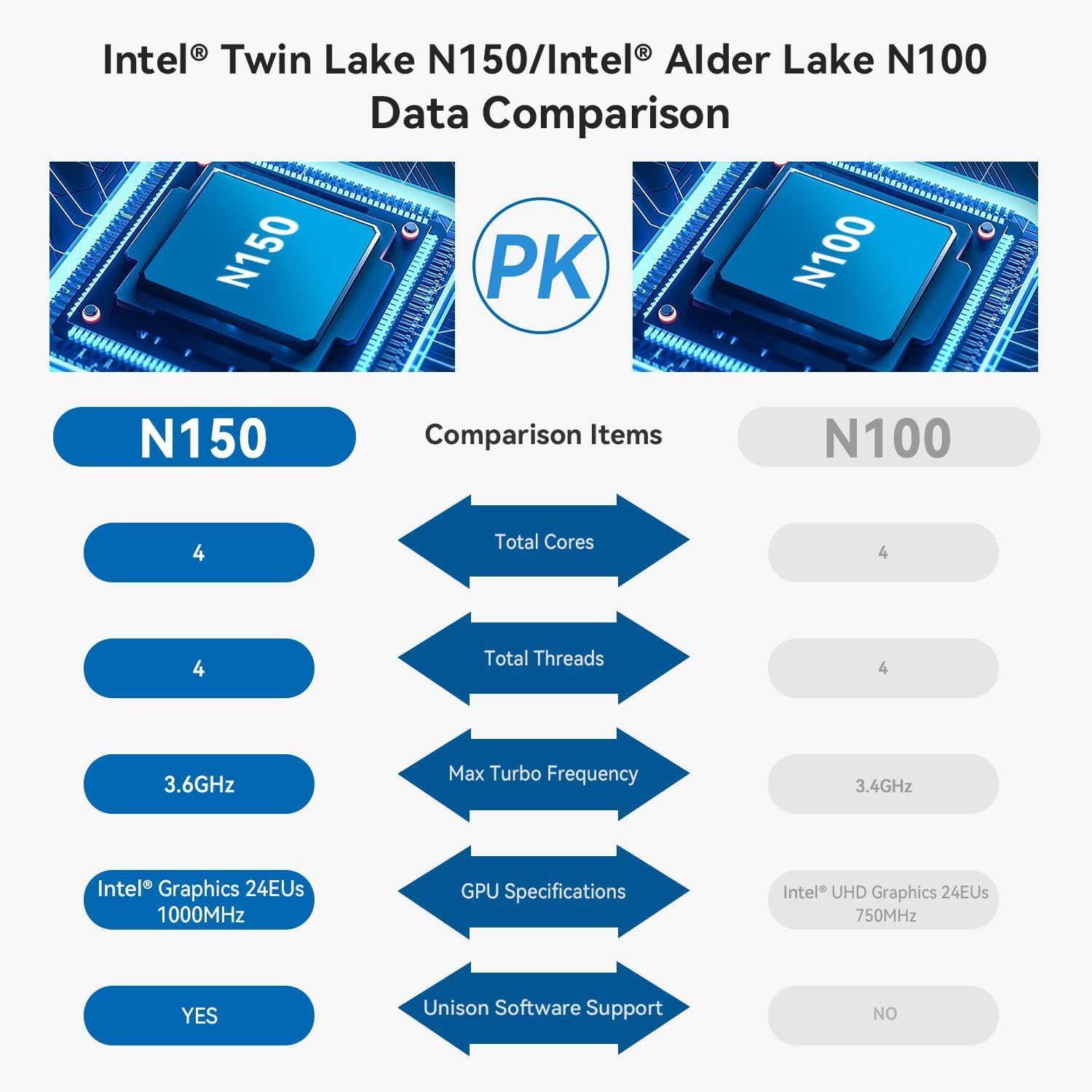
The mini PC is equipped with an Intel Twin Lake N150 Processor, 16GB DDR5 4800MHz RAM, and a 500GB SSD. It supports dual M.2 PCIe 3.0 SSDs for expanded storage.

Tento obrázek poskytuje vnitřní view of the mini PC, highlighting the DDR5 SODIMM memory module and the two M.2 SSD slots, one M.2 PCIe 3.0 x4 and one M.2 PCIe 3.0 x1.
3.3. Chladicí systém
An innovative airflow design with a dust filter ensures stable operation and quiet performance by efficiently dissipating heat.

This image shows the underside of the mini PC, illustrating the new airflow design with a visible cooling fan and dust filter, designed for stable and quiet operation.
3.4. Produktové videoview
This official TRIGKEY video provides a visual overview of the Key Mini N150, showcasing its compact design, internal components, and key features like the Intel Twin Lake N150 processor and DDR5 memory.
4. Pokyny k nastavení
4.1. Připojení periferií
- Připojení monitoru(ů): Use the provided HDMI cable to connect your monitor(s) to the HDMI ports on the rear of the mini PC. The device supports dual 4K@60Hz displays.
- Připojení klávesnice a myši: Plug your USB keyboard and mouse into any available USB 3.2 ports.
- Připojení k síti (volitelné): For a wired connection, plug an Ethernet cable into the 2.5G LAN port. For wireless, ensure your Wi-Fi network is available during initial setup.
4.2. Zapnutí
- Připojte napájecí adaptér: Plug the power adapter into the DC IN port on the rear of the mini PC, then connect it to a power outlet.
- Zapnutí: Press the power button located on the front panel of the mini PC. The power indicator light will illuminate.
4.3. Initial Operating System Setup
Upon first boot, the operating system (WOS) will guide you through the initial setup process. Follow the on-screen instructions to configure language, region, network, and user accounts.
5. Návod k obsluze
5.1. Základní obsluha
- Zapnutí/vypnutí: Press the power button to turn on the PC. To turn off, use the operating system's shutdown function. A short press of the power button can put the PC to sleep.
- Restartovat: Použijte funkci restartu operačního systému.
5.2. Nastavení duálního displeje
The Key Mini N150 supports connecting two monitors simultaneously via its two HDMI ports for extended desktop or mirrored display modes. Configure display settings within your operating system.
5.3. Připojení k síti
- Wired (2.5G LAN): Connect an Ethernet cable to the LAN port for high-speed internet access.
- Wireless (Wi-Fi 6): The integrated Intel AX101 Wi-Fi 6 module provides fast and stable wireless connectivity. Access Wi-Fi settings in your operating system to connect to available networks.
5.4. Zařízení Bluetooth
The mini PC includes Bluetooth 5.2 for connecting wireless peripherals such as keyboards, mice, headphones, and speakers. Pair devices through the Bluetooth settings in your operating system.
5.5. Intel Unison App Integration
Utilize the Intel Unison App to seamlessly connect your PC with mobile devices. This allows for features such as viewvytváření fotogalerií, převod files, extending your PC screen to a tablet, making/receiving phone calls, and managing notifications.
This image illustrates the capabilities of the Intel Unison App, enabling users to connect their PC and mobile devices for features like photo vieweng, file transfer, screen extension, calls, and notifications.
6. Specifikace
| Funkce | Specifikace |
|---|---|
| Procesor | Intel Alder Lake N150 (4C/4T, up to 3.6GHz) |
| Grafický koprocesor | Intel Graphics 24EUs 1000MHz |
| BERAN | 16GB DDR5 4800 MHz |
| Skladování | 500GB SSD (supports dual M.2 PCIe 3.0 SSDs) |
| Maximální rozlišení obrazovky | 3840 x 2160 pixelů (4K) |
| Zobrazení výstupu | 2× HDMI (max. 4K 60Hz) |
| Bezdrátové připojení | Wi-Fi 6 (Intel AX101), Bluetooth 5.2 |
| LAN | 2.5Gbps Ethernet |
| USB porty | 4 x USB 3.2 (10Gbps), 1 x USB-C (Data 10Gbps) |
| Audio Jack | 1 x 3.5 mm zvukový konektor |
| Operační systém | WOS |
| Hmotnost položky | 1.81 libry |
| Rozměry | 6.06 x 5.98 x 3.03 palce |
| Barva | Černý |
7. Údržba
7.1. Čištění
To maintain optimal performance and longevity, regularly clean the exterior of the mini PC with a soft, dry cloth. Ensure the ventilation openings are free from dust and obstructions. Do not use liquid cleaners directly on the device.
7.2. Rozšíření úložiště
The Key Mini N150 supports dual M.2 PCIe 3.0 SSDs. To expand storage, you can install an additional M.2 2280 SSD in the available slot. Refer to the detailed instructions for opening the chassis and installing components if you are comfortable with hardware modifications. It is recommended to back up data before any hardware changes.
7.3. Aktualizace softwaru
Regularly update your operating system and drivers to ensure system stability, security, and optimal performance. Check for updates through your operating system's settings.
8. Řešení problémů
8.1. Bez napájení
- Ujistěte se, že je napájecí adaptér bezpečně připojen k mini PC i k funkční zásuvce.
- Ověřte funkčnost elektrické zásuvky zapojením jiného zařízení.
- Zkuste jiný napájecí adaptér, pokud je k dispozici a je kompatibilní.
8.2. Žádný výstup na displej
- Check that the HDMI cable is securely connected to both the mini PC and the monitor.
- Ujistěte se, že je monitor zapnutý a nastavený na správný vstupní zdroj (HDMI 1, HDMI 2 atd.).
- Pokud je to možné, vyzkoušejte s jiným kabelem HDMI nebo monitorem.
8.3. Problémy s připojením k síti
- Kabelové: Check the Ethernet cable connection. Verify your router/modem is working correctly.
- Bezdrátový: Ensure Wi-Fi is enabled in the operating system. Check if the correct Wi-Fi network is selected and the password is entered correctly. Restart your router/modem.
8.4. System Unresponsive / Boot Issues
- Perform a hard shutdown by pressing and holding the power button for 5-10 seconds. Then restart the PC.
- CLR CMOS: If experiencing persistent boot issues or BIOS configuration problems, locate the CLR CMOS button on the rear panel. With the PC powered off and disconnected from power, press this button (often requires a paperclip) to reset BIOS settings to default. Reconnect power and attempt to boot.
9. Záruka a podpora
TRIGKEY poskytuje komplexní podporu pro své produkty:
- Záruka: 1-year worry-free warranty.
- Technická podpora: Doživotní technická podpora.
- Služby zákazníkům: 24-hour customer service.
For any questions or assistance, please contact TRIGKEY customer service. Refer to the official TRIGKEY webstránky s nejaktuálnějšími kontaktními informacemi.