
1. Úvod
Děkuji za nákupasing the Edifier QR65 Active Monitor Speakers. This manual provides detailed instructions for setting up, operating, and maintaining your speakers. Please read this manual thoroughly before use to ensure proper function and to maximize your listening experience.
The Edifier QR65 speakers feature 70W RMS output, Hi-Res 24bit wireless audio, a subwoofer output, and integrated 65W GaN fast charging capabilities. They are designed to deliver high-quality sound for various applications.
Důležité bezpečnostní informace: Při používání tohoto výrobku vždy dodržujte základní bezpečnostní opatření, abyste snížili riziko požáru, úrazu elektrickým proudem a zranění. Uschovejte si tento návod k obsluze pro budoucí použití.
2. Obsah balení
Zkontrolujte prosím obsah krabice a ujistěte se, že jsou v ní všechny položky:
- Edifier QR65 Active Monitor Speakers (1 pair)
- Speaker stands (1 pair)
- Napájecí kabel
- Kabel pro připojení reproduktoru
- Kabel USB-A na USB-C
- Zvukový kabel RCA na RCA
- Uživatelská příručka
3. Konec produktuview
The Edifier QR65 speakers are equipped with advanced audio components and user-friendly controls.
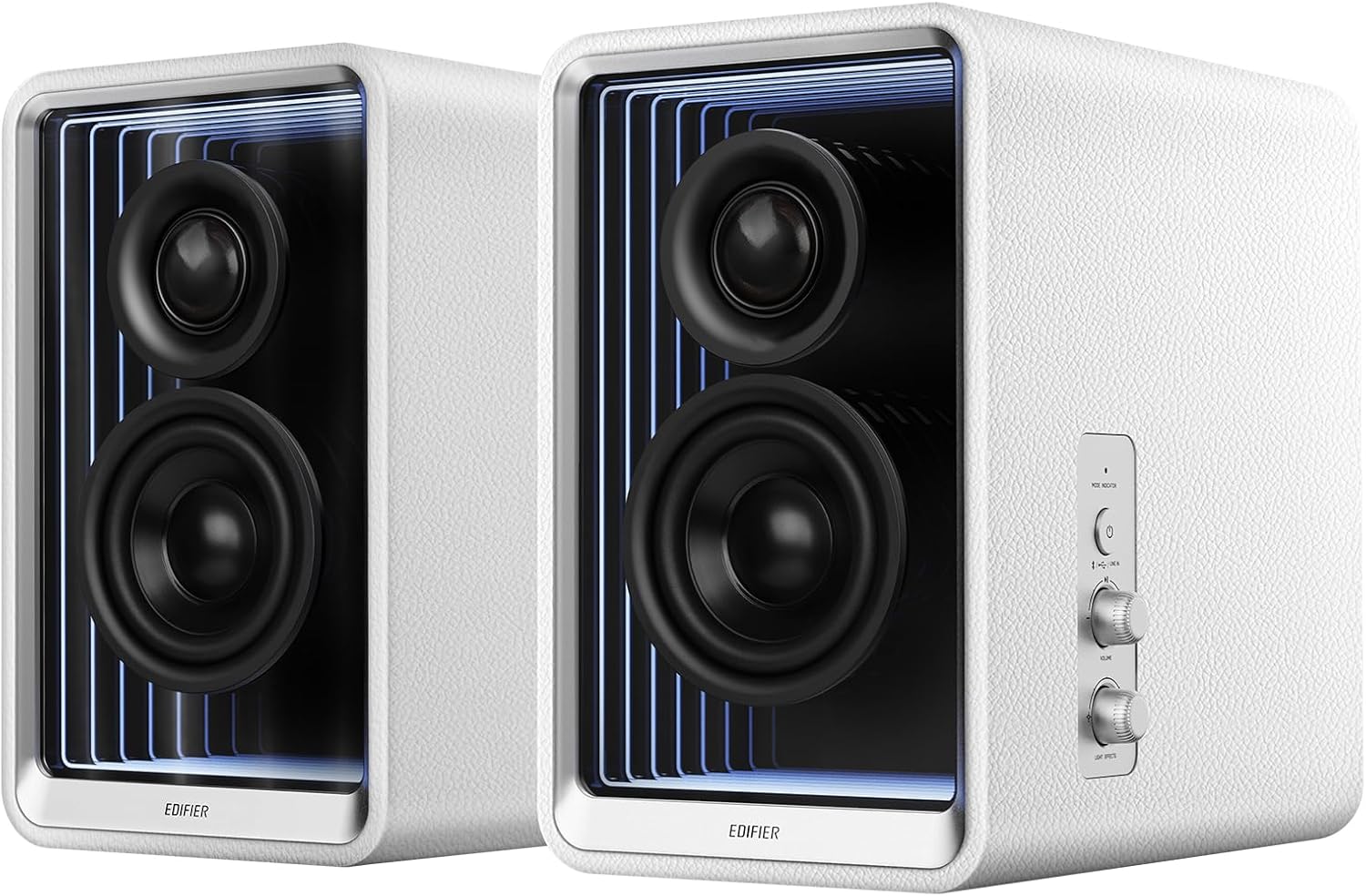
Obrázek 3.1: Přední strana view of Edifier QR65 speakers, highlighting the drivers and side controls.
3.1 Front and Side Panel Controls
- Tlačítko napájení / režimu: Press to power on/off. Short press to cycle through input modes (Bluetooth, USB, Line In).
- Knoflík hlasitosti: Otáčením upravíte hlavní hlasitost.
- Light Effects Button: Press to cycle through various lighting modes.
3.2 Připojení zadního panelu

Figure 3.2: Rear panel connections of the Edifier QR65 speaker.
- LINKOVÝ VSTUP (RCA): Pro připojení externích audio zdrojů pomocí RCA kabelů.
- Vstup USB: For connecting to a computer for digital audio playback.
- SUB OUT: Output for connecting an external active subwoofer.
- REPRODUKTOR: Připojuje se k pasivnímu reproduktoru.
- Vypínač: Hlavní vypínač.
- Příkon: Připojuje se k napájecímu kabelu.
- USB-C 1, USB-C 2, USB-A: GaN fast charging ports.
4. Nastavení
4.1 Umístění reproduktorů
Place the active speaker (with controls) and the passive speaker on a stable, flat surface. For optimal sound, position them at ear level and equidistant from your listening position. The included speaker stands are designed to angle the speakers at 10 degrees, which helps to reduce sound coloration and improve soundstage přesnost.

Figure 4.1: Optimal speaker placement with included stands for improved soundstage.
4.2 Připojení reproduktorů
- Connect the speaker connection cable from the 'SPEAKER OUT' port on the active speaker to the corresponding input on the passive speaker. Ensure a secure connection.
4.3 Připojení napájení
- Connect the power cable to the 'Power Input' port on the active speaker.
- Zapojte druhý konec napájecího kabelu do zásuvky ve zdi.
- Toggle the 'Power Switch' to the ON position.
5. Návod k obsluze
5.1 Zapnutí/vypnutí
To power on the speakers, ensure the rear power switch is ON, then press the 'Power/Mode' button on the side panel. Press and hold the 'Power/Mode' button to power off.
5.2 Výběr vstupu
Short press the 'Power/Mode' button to cycle through available input modes: Bluetooth, USB, and Line In. The indicator light will change color to indicate the selected mode.
5.3 Párování Bluetooth
- Select Bluetooth mode using the 'Power/Mode' button. The indicator light will flash rapidly.
- On your device (smartphone, tablet, computer), enable Bluetooth and search for 'EDIFIER QR65'.
- Select 'EDIFIER QR65' to pair. Once connected, the indicator light will glow steadily.
- The QR65 supports Bluetooth V5.3 with LDAC for high-resolution wireless audio streaming.
5.4 Přehrávání zvuku z USB
Connect the active speaker to your computer using a USB cable. Select USB input mode on the speakers. Your computer should recognize the speakers as an audio output device. The USB input supports 24bit/96kHz resolution signals.
5.5 Připojení linkového vstupu
Connect your audio source (e.g., CD player, TV) to the 'LINE IN' (RCA) ports on the rear panel using an RCA audio cable. Select Line In mode on the speakers. The Line In input also supports 24bit/96kHz resolution signals.
5.6 Výstup subwooferu
To enhance bass performance, connect an external active subwoofer to the 'SUB OUT' port on the rear panel. The speakers will automatically adjust their frequency response when a subwoofer is detected.
5.7 Light Effects (TempoAbyss)
The QR65 speakers feature customizable light effects. Press the 'Light Effects' button on the side panel to cycle through various preset lighting modes. For advanced customization and access to over 16 million colors, use the Edifier ConneX App.

Figure 5.1: Edifier QR65 light effects and app control.
5.8 Aplikace Edifier ConneX
Download the Edifier ConneX App from your device's app store or by scanning the QR code below. The app allows for seamless customization of sound effects, light effects, and playback control.

Figure 5.2: Edifier ConneX App interface for customization.
Download the Edifier ConneX App: https://foreign-app.edifier.com/index.php/edifier_provider/public/appDownload.html?appTag=EdifierConneX
6. GaN Fast Charging Function
The Edifier QR65 speakers integrate TurboGaN fast charging technology, providing convenient power delivery for your devices.

Figure 6.1: GaN fast charging ports and power distribution.
- USB Type-C Ports (USB-C 1 & USB-C 2): Offer up to 65W charging power individually.
- Port USB typu A: Offers up to 60W charging power.
- Supports various fast charging protocols.
- Total combined output for multiple devices will be distributed across the ports. Refer to the diagram on the speaker's rear panel for specific power distribution scenarios.
7. Péče a údržba
- Čištění: Use a soft, dry cloth to clean the speaker surfaces. Do not use abrasive cleaners, waxes, or solvents.
- Prostředí: Neumísťujte reproduktory na přímé sluneční světlo, do blízkosti zdrojů tepla nebo do míst s vysokou vlhkostí či prachem.
- Zacházení: Handle the speakers with care. Do not drop them or expose them to strong impacts.
- Moc: Pokud reproduktory nebudete delší dobu používat, odpojte napájecí kabel ze zásuvky.
8. Řešení problémů
If you encounter any issues with your Edifier QR65 speakers, please refer to the following table for common problems and solutions:
| Problém | Možná příčina | Řešení |
|---|---|---|
| Žádná síla | Power cable not connected; Rear power switch off; Wall outlet not working. | Ensure power cable is securely connected. Turn on the rear power switch. Test the wall outlet with another device. |
| Žádný zvuk | Incorrect input mode selected; Volume too low; Audio cable not connected; Device not playing audio. | Press 'Power/Mode' to select correct input. Increase volume. Check audio cable connections. Ensure source device is playing audio. |
| Párování Bluetooth se nezdařilo | Reproduktory nejsou v režimu párování; Zařízení je příliš daleko; Rušení. | Ensure speakers are in Bluetooth pairing mode (flashing indicator). Move device closer. Restart speakers and device. |
| Light effects not working or flickering | Incorrect setting; Speaker connection cable issue. | Check light effect settings via the side button or Edifier ConneX App. Ensure the speaker connection cable between active and passive speakers is fully inserted and undamaged. |
| GaN charging not working | Cable issue; Device not compatible; Overload. | Try a different charging cable. Ensure your device supports fast charging. Disconnect other devices if multiple are charging. |
9. Technické specifikace
Below are the key technical specifications for the Edifier QR65 Active Monitor Speakers:
| Funkce | Specifikace |
|---|---|
| Typ reproduktoru | Active Monitor / Bookshelf |
| Celkový výstupní výkon | 70W RMS |
| Tweeter | 1.25 palcový hedvábný dóm |
| Mid-low Driver | 2.75 inch Aluminum Diaphragm |
| Konektivita | Bluetooth V5.3 (LDAC), USB, LINE IN (RCA) |
| USB Audio Resolution | Až 24bit/96kHz |
| Dosah Bluetooth | 10 metrů (33 stop) |
| GaN Fast Charging | USB-C (up to 65W), USB-A (up to 60W) |
| Rozměry produktu (každý reproduktor) | 14 cm H x 10.5 cm Š x 11.3 cm V (přibližně) |
| Hmotnost položky | 11.68 libry (přibližně) |
| Zdroj napájení | Corded Electric (AC 1.2E+2 Volts) |
| Zahrnuté komponenty | Stojany na reproduktory |
10. Záruka a podpora
10.1 Informace o záruce
Edifier products are manufactured with high-quality standards. This product comes with a limited warranty. Please refer to the warranty card included in your package or visit the official Edifier webPodrobné záruční podmínky platné pro váš region naleznete na webových stránkách.
10.2 Zákaznická podpora
For technical assistance, product inquiries, or warranty claims, please contact Edifier customer support through their official website or the contact information provided in your product documentation. Please have your product model (QR65) and serial number ready when contacting support.