
1. Úvod
This manual provides detailed instructions for the setup, operation, and maintenance of your TELLUR Shade Wireless Mouse (Model 491261). This mouse features multi-device connectivity, silent click buttons, RGB lighting, and adjustable DPI settings for enhanced productivity and comfort across various operating systems.
2. Obsah balení
Ověřte, zda jsou v balení přítomny všechny položky:
- 1 x TELLUR Shade Wireless Mouse
- 1 x Nano receiver (USB-A)
- 1 x nabíjecí kabel typu C
- 1 x Uživatelská příručka (tento dokument)

Image: The TELLUR Shade Wireless Mouse, accompanied by its USB Nano receiver and Type-C charging cable, illustrating the complete package contents.
3. Konec produktuview
Familiarize yourself with the components of your TELLUR Shade Wireless Mouse:

Obrázek: Shora dolů view of the TELLUR Shade Wireless Mouse, highlighting the left and right silent click buttons, the main scroll wheel, DPI adjustment button, and the multi-device switch button.
- Levé tlačítko myši: Naprosto tichý provoz.
- Kliknutí pravým tlačítkem: Naprosto tichý provoz.
- Scroll Wheel (Main): Pro vertikální rolování.
- Tlačítko pro nastavení DPI: Cycles through DPI settings (800/1200/1600/2400/3200).
- Multi-Device Switch Button: Toggles between connected devices (1, 2, 3, 4).
- Tlačítko vpřed: Naviguje vpřed web prohlížeče popř file průzkumníci.
- Tlačítko zpět: Naviguje zpět web prohlížeče popř file průzkumníci.
- Horizontal Scroll Wheel: For horizontal scrolling.
- Windows Home Button: Minimizes all windows to show the desktop; pressing again restores them.
- Nabíjecí port USB-C: Located on the front for recharging the internal battery.
- Vypínač: On/Off switch on the bottom of the mouse.
- Nano Receiver Storage: Compartment on the bottom for storing the USB receiver.
4. Nastavení
4.1. Nabíjení myši
Before initial use, ensure the mouse is fully charged. Connect the provided Type-C charging cable to the USB-C port on the front of the mouse and the other end to a USB power source (e.g., computer USB port, USB wall adapter).

Obrázek: Boční view of the TELLUR Shade Wireless Mouse, clearly showing the USB-C charging port located at the front for convenient recharging.
The RGB lighting may indicate charging status. A full charge typically provides approximately 20 days of average use.
4.2. Připojení k zařízení
The TELLUR Shade Wireless Mouse supports up to 4 devices simultaneously via Bluetooth and a 2.4GHz USB Nano receiver. Turn on the mouse using the power switch on the bottom.
4.2.1. 2.4GHz Wireless Connection (USB Nano Receiver)
- Locate the USB Nano receiver stored in the compartment on the bottom of the mouse.
- Plug the Nano receiver into an available USB-A port on your computer.
- Press the Multi-Device Switch Button on the mouse to select one of the 2.4GHz channels (usually indicated by a specific LED color or number).
- The mouse should automatically connect. If not, ensure the mouse is powered on and try replugging the receiver.
4.2.2. Bluetooth Connection (BT1, BT2, BT3)
- Press the Multi-Device Switch Button to select one of the Bluetooth channels (BT1, BT2, or BT3). The corresponding indicator light will flash.
- Press and hold the Multi-Device Switch Button for 3-5 seconds until the indicator light flashes rapidly. This puts the mouse into pairing mode.
- Na svém zařízení (počítači, tabletu, chytrém telefonu) přejděte do nastavení Bluetooth a vyhledejte nová zařízení.
- Select "TELLUR Shade Mouse" or a similar name from the list of available devices.
- Once paired, the indicator light on the mouse will stop flashing and remain solid for a few seconds before turning off.
Repeat these steps for additional Bluetooth devices on BT2 and BT3 channels.
5. Návod k obsluze
5.1. Přepínání mezi zařízeními
To switch between connected devices, simply press the Multi-Device Switch Button. The mouse will cycle through the 2.4GHz channel and the three Bluetooth channels (BT1, BT2, BT3).
5.2. Nastavení citlivosti DPI
Press the DPI Adjustment Button to cycle through the available DPI settings: 800, 1200, 1600, 2400, and 3200 DPI. Each press will change the cursor speed, allowing you to find your preferred sensitivity.
5.3. Ovládání RGB osvětlení
The mouse features customizable RGB lighting. To change the RGB lighting mode or turn it off, simultaneously press the Forward and Backward buttons located on the side of the mouse. Continue pressing to cycle through different lighting effects or to disable the lighting.

Obrázek: Detail view of the TELLUR Shade Wireless Mouse, highlighting the side buttons (Forward and Backward) and the integrated RGB lighting strip.
5.4. Using the Windows Home Button
The dedicated Windows Home Button (often located near the thumb rest) allows for quick desktop access. Pressing this button will minimize all open windows, revealing your desktop. Pressing it again will restore the previously open windows.
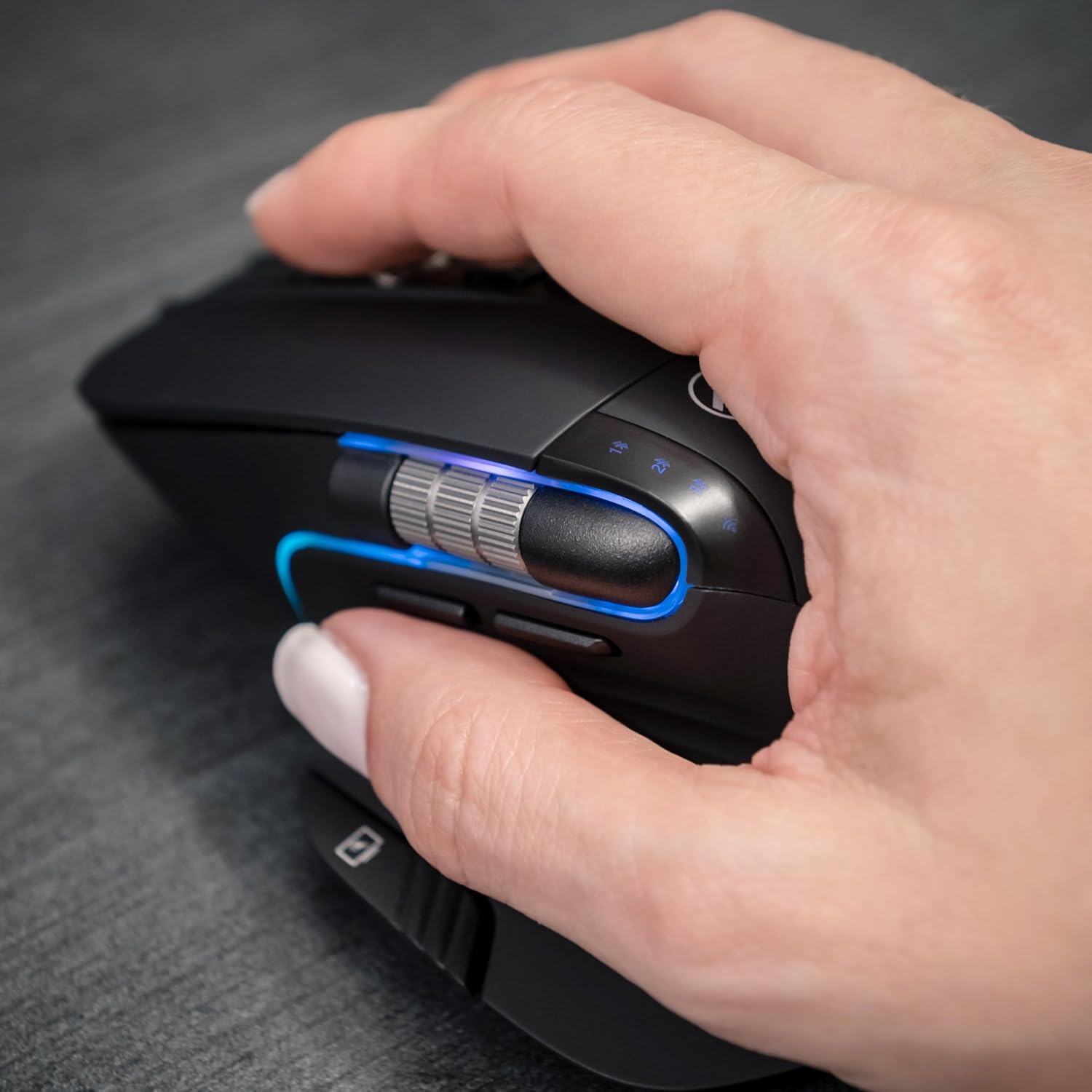
Image: A hand operating the TELLUR Shade Wireless Mouse, demonstrating the ergonomic grip and the placement of the Windows Home button accessible by the thumb.
6. Údržba
- Čištění: K čištění myši použijte měkký, suchý hadřík. V případě odolných nečistot použijte lehceamp Lze použít hadřík, ale dbejte na to, aby se do zařízení nedostala vlhkost.
- Skladování: Pokud myš delší dobu nepoužíváte, vypněte ji, abyste šetřili baterii. Skladujte ji na chladném a suchém místě.
- Péče o baterie: Vyhněte se častému úplnému vybíjení baterie. Dobijte ji, když je indikátor nabití baterie nízký.
- Vyhněte se extrémním podmínkám: Nevystavujte myš extrémním teplotám, přímému slunečnímu záření ani vysoké vlhkosti.
7. Řešení problémů
7.1. Myš nereaguje
- Ujistěte se, že je myš zapnutá.
- Zkontrolujte stav baterie a v případě potřeby myš nabijte.
- Verify that the correct connection channel (2.4GHz, BT1, BT2, or BT3) is selected using the Multi-Device Switch Button.
- For 2.4GHz connection, ensure the Nano receiver is securely plugged into a working USB port. Try a different USB port.
- Pro připojení Bluetooth se ujistěte, že je na vašem zařízení povoleno Bluetooth, a zkuste myš znovu spárovat.
- Restartujte počítač nebo zařízení.
7.2. Přerušované připojení
- Ensure the mouse is within the effective range (up to 10 meters).
- Minimize interference from other wireless devices (e.g., Wi-Fi routers, other Bluetooth devices).
- Nepoužívejte myš na kovových površích, které mohou rušit bezdrátové signály.
7.3. Problémy s pohybem kurzoru
- Vyčistěte optický senzor na spodní straně myši.
- Používejte myš na čistém, nereflexním povrchu nebo na podložce pod myš.
- Adjust the DPI setting using the DPI Adjustment Button.
7.4. RGB osvětlení nefunguje
- Ujistěte se, že je myš zapnutá.
- Press the Forward and Backward buttons simultaneously to cycle through lighting modes or to turn it on if it was previously off.
- Check battery level; low battery might disable RGB lighting to conserve power.
8. Specifikace
| Značka | TELLUR |
| Název modelu | 491261 TLL |
| Číslo modelu | 491261 |
| Technologie připojení | Bluetooth, 2.4GHz Wireless (via Nano receiver) |
| Detekce pohybu | Optický |
| Citlivost DPI | 800/1200/1600/2400/3200 DPI |
| Počet tlačítek | 8 (including silent click, DPI, multi-device switch, forward/backward, horizontal scroll, Windows Home) |
| Orientace rukou | Obouruký |
| Speciální funkce | Silent Click, RGB Light, Multi-device (4 devices), Lightweight, Portable |
| Kompatibilní zařízení | Personal Computer, Laptop, Smartphones, Tablets |
| Podpora operačního systému | Windows, Mac, iOS, Android, Linux |
| Bezdrátové Dosah | Až 10 metrů |
| Zdroj napájení | Napájení z baterie (nabíjecí přes USB-C) |
| Průměrná životnost baterie | Přibližně 20 dní |
| Materiál | Plast |
| Hmotnost položky | 0.29 kg |
9. Záruka a podpora
Informace o záruce a technickou podporu naleznete v záručním listu dodaném s vaším produktem nebo navštivte oficiální webové stránky TELLUR. webUschovejte si účtenku jako doklad o koupi pro případné reklamace.
Kontaktní informace pro podporu lze obvykle nalézt na webových stránkách výrobce webmístě nebo na obalu produktu.