
1. Úvod
This manual provides essential information for the installation, operation, and maintenance of the Generic MS-S1561 Server Motherboard. This motherboard is designed to support Intel Xeon E5-2600 V3 and V4 series processors and DDR4 memory, utilizing the C612 chipset. Please read this manual thoroughly before proceeding with installation to ensure proper setup and functionality.

Obrázek 1: Shora dolů view of the Generic MS-S1561 Server Motherboard, showing CPU socket, RAM slots, and various connectors.
2. Nastavení a instalace
Proper installation is crucial for the stable operation of your server system. Follow these steps carefully.
2.1 Kompatibilita komponent
- Procesor: Intel Xeon E5-2600 V3/V4 series. Ensure the CPU socket type matches your processor.
- Paměť: DDR4 ECC/Non-ECC UDIMM/RDIMM. Refer to specifications for supported speeds and capacities.
- Čipová sada: Intel C612.
2.2 Instalace základní desky
- Příprava podvozku: Ensure your server chassis is compatible with the motherboard form factor. Install standoffs in the chassis according to the motherboard's mounting holes.
- Instalace procesoru: Carefully open the CPU socket lever. Align the processor with the socket, ensuring the triangular marks match. Gently place the CPU into the socket without force. Close the lever to secure the CPU.
- Instalace chladiče CPU: Naneste teplovodivou pastu (pokud nebyla předem nanesena) a nainstalujte chladič CPU podle pokynů výrobce. Připojte kabel ventilátoru CPU k určenému konektoru na základní desce.
- Instalace paměti: Open the clips on the DDR4 memory slots. Align the memory modules with the key notch and press firmly until the clips snap into place. Refer to the motherboard's silkscreen for recommended slot population order for optimal performance.
- Montáž základní desky: Carefully place the motherboard into the chassis, aligning the mounting holes with the standoffs. Secure the motherboard with screws.
- Připojte napájení: Connect the 24-pin ATX main power connector and the 8-pin (or 4-pin) CPU power connector from your power supply unit (PSU) to the motherboard.
- Připojení úložných zařízení: Connect SATA data cables from your storage drives (HDDs/SSDs) to the SATA ports on the motherboard. Connect the corresponding power cables from the PSU to the drives.
- Připojení kabelů předního panelu: Connect the power switch, reset switch, HDD LED, power LED, and USB/audio headers from the chassis front panel to the corresponding pins on the motherboard. Refer to the motherboard's silkscreen or a detailed diagram for correct pin assignments.
- Instalace rozšiřujících karet: Insert any necessary PCIe expansion cards (e.g., graphics cards, network cards) into the appropriate PCIe slots and secure them with the chassis retention clips or screws.

Figure 2: Rear I/O panel of the Generic MS-S1561 Server Motherboard, showing various ports including USB, LAN, and VGA.
3. Návod k obsluze
Jakmile jsou všechny komponenty nainstalovány a připojeny, můžete systém zapnout.
3.1 Zapnutí
Ensure all power cables are securely connected. Press the power button on your chassis. The system should initiate the Power-On Self-Test (POST) process.
3.2 Přístup k BIOSu/UEFI
During the POST sequence, press the designated key (commonly DEL, F2nebo F10) to enter the BIOS/UEFI setup utility. Here you can configure boot order, system settings, and monitor hardware status.
3.3 Instalace operačního systému
Insert your operating system installation media (USB drive or DVD) and configure the boot order in the BIOS/UEFI to boot from the installation media. Follow the on-screen prompts to install your preferred operating system.
4. Údržba
Regular maintenance helps ensure the longevity and stable performance of your motherboard and server system.
4.1 Odstranění prachu
Periodically clean dust from the motherboard, CPU cooler, and chassis fans using compressed air. Ensure the system is powered off and unplugged before cleaning. Avoid using brushes or cloths that may generate static electricity.
4.2 Aktualizace BIOSu/firmwaru
Zkontrolujte výrobce website (if available) for updated BIOS/firmware versions. Updates can improve compatibility, stability, and performance. Follow the specific instructions provided with the update utility carefully.
4.3 Kontroly součástí
Occasionally inspect all cable connections (power, data, front panel) to ensure they are secure. Verify that all fans are spinning correctly and that there are no unusual noises or smells from the system.
5. Řešení problémů
Tato část obsahuje řešení běžných problémů, se kterými se můžete setkat.
5.1 Žádné napájení / Žádný POST (automatický test při zapnutí)
- Zkontrolujte připojení napájení: Ensure the 24-pin ATX and 8-pin CPU power cables are firmly connected to the motherboard and PSU. Verify the PSU is switched on and connected to a working power outlet.
- Znovu usaďte komponenty: Power off and unplug the system. Reseat the CPU, RAM modules, and any expansion cards. Ensure they are properly seated in their respective slots.
- Vymazat CMOS: Refer to the motherboard's manual or silkscreen for the CMOS clear jumper or button. Clearing CMOS can resolve boot issues caused by incorrect BIOS settings.
- Minimální konfigurace: Try booting with only the CPU, one RAM module, and the CPU cooler installed. If it boots, add components one by one to identify the faulty part.
5.2 Nestabilita systému / Pády
- Zkontrolujte teploty: Monitor CPU and system temperatures using BIOS or software utilities. Overheating can cause instability. Ensure CPU cooler is properly installed and fans are working.
- Test paměti: Spusťte diagnostický nástroj pro paměť (např. MemTest86) a zkontrolujte, zda nejsou moduly RAM vadné.
- Aktualizovat ovladače: Ensure all device drivers (chipset, LAN, etc.) are up to date for your operating system.
5.3 Periferní zařízení nebylo detekováno
- Zkontrolujte připojení: Verify that the peripheral (e.g., hard drive, USB device, expansion card) is correctly connected to the motherboard.
- Check BIOS Settings: Ensure the relevant ports (SATA, USB, PCIe) are enabled in the BIOS/UEFI settings.
- Nainstalujte ovladače: Install the necessary drivers for the peripheral device.
6. Specifikace
Key technical specifications for the Generic MS-S1561 Server Motherboard.
| Funkce | Specifikace |
|---|---|
| Číslo modelu | MS-S1561 (Mfr Part Number: LlMER_GBFG__18568) |
| Kompatibilní zařízení | Osobní počítač |
| Technologie paměti RAM | DDR4 |
| K dispozici paměťové sloty | 2 |
| Typ konektoru S/PDIF | Optický |
| Podporovaný standard systémové sběrnice | SATA 2 |
| ASIN | B0CSK62J8L |
| Datum první dostupnosti | 17. ledna 2024 |
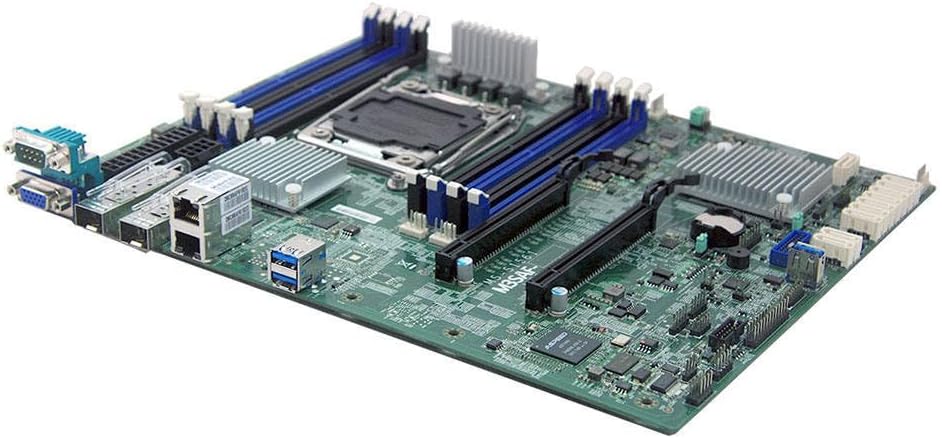
Obrázek 3: Úhlové view of the Generic MS-S1561 Server Motherboard, highlighting various components and expansion slots.
7. Záruka a podpora
As a Generic branded product, warranty and support are typically handled by the seller or distributor from whom the product was purchased. Please refer to your purchase documentation or contact your vendor for specific warranty terms and technical support.
- Záruční doba: Varies by seller. Consult your purchase receipt or seller's policy.
- Technická podpora: Contact the seller (e.g., MinParts on Amazon) for assistance with product-specific issues.
- Online zdroje: While specific manufacturer support for 'Generic' products may be limited, general troubleshooting guides for server motherboards and Intel C612 chipsets can be found online.