
Zavedení
This manual provides detailed instructions for the setup, operation, and maintenance of your ANSTEN AS60 Wireless TV Headphones and Optical Fiber Splitter. This system is designed to enhance your audio experience by allowing you to listen to TV audio wirelessly through headphones, and to connect multiple audio devices to a single optical output.
The ANSTEN AS60 utilizes 2.4GHz wireless RF technology for stable audio transmission with minimal interference and delay, offering a wireless range of up to 197 feet. The headphones feature an independent DSP enhanced audio decoder chip, providing three distinct audio modes: Musical, Movie, and Normal. The included Toslink fiber optic audio splitter allows you to connect one optical audio source to two receiving devices simultaneously, eliminating the need for frequent cable changes.

Figure 1: ANSTEN AS60 Wireless TV Headphones and Optical Fiber Splitter.
Obsah balení
Ověřte prosím, zda jsou ve vašem balení obsaženy všechny níže uvedené položky:
- ANSTEN AS60 Wireless Headphones
- Wireless Transmitter Charging Dock
- Optical Fiber Splitter (Toslink 1-in-2-out)
- Napájecí adaptér
- Optický audio kabel
- Audio kabel RCA
- Uživatelská příručka (tento dokument)
Note: A 3.5mm audio cable is not included in the package.
Bezpečnostní informace
To ensure safe and proper operation of your ANSTEN AS60 system, please observe the following precautions:
- Nevystavujte zařízení vodě, vlhkosti ani extrémním teplotám.
- Zabraňte pádu zařízení na zem nebo jejich vystavení silným nárazům.
- Do not attempt to disassemble or repair the devices yourself. Refer all servicing to qualified personnel.
- Keep the devices away from strong magnetic fields.
- Ensure proper ventilation around the transmitter and charging dock.
- Používejte pouze dodaný napájecí adaptér a kabely.
- Dlouhodobý poslech při vysoké hlasitosti může způsobit poškození sluchu. Nastavte hlasitost na pohodlnou úroveň.
Konec produktuview
Bezdrátová sluchátka
The ANSTEN AS60 headphones are over-ear headphones designed for comfort during extended use. They feature soft, durable padding and an adjustable foam band. Controls for volume and audio mode selection are located on the earcup.
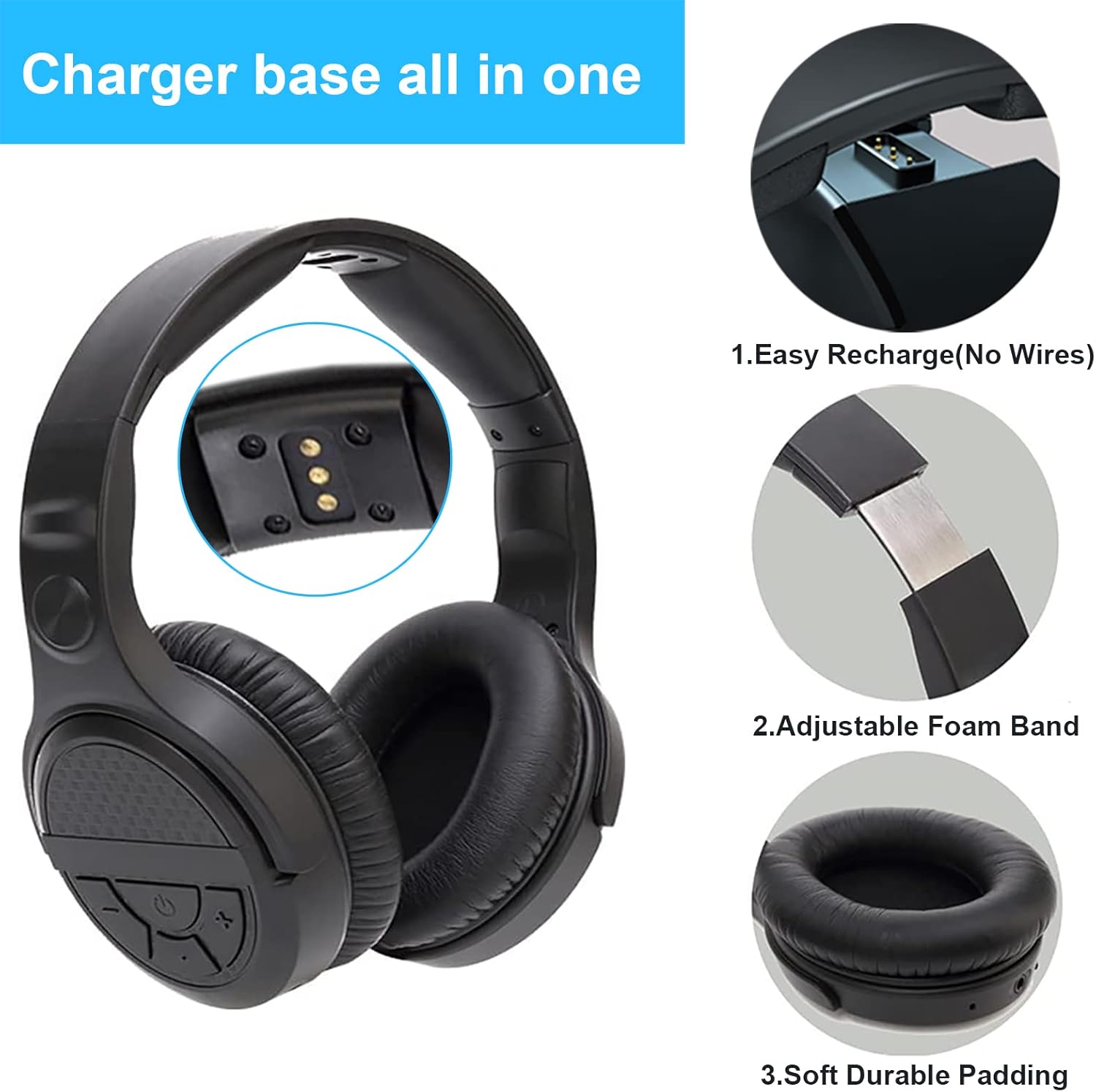
Figure 2: Headphone features including charging contacts, adjustable band, and soft ear padding.
Nabíjecí dok vysílače
The transmitter serves as the base station for the wireless headphones and also functions as their charging dock. It features input ports for Optical, RCA, and AUX audio connections from your TV or other audio sources. The headphones can be easily charged by placing them on the dock, utilizing contact points for a wire-free recharge.

Figure 3: Transmitter charging base with audio input ports.
Rozbočovač optických vláken
The included Toslink 1-in-2-out optical fiber splitter allows you to duplicate a single optical audio output into two separate optical outputs. This is useful for connecting your TV's optical audio to both the headphone transmitter and another device like a soundbar simultaneously.

Figure 4: Optical Fiber Splitter.
Nastavení
1. Nabíjení sluchátek
Before first use, fully charge the headphones. Place the headphones onto the transmitter charging dock. The indicator light on the dock will show charging status. A full charge provides approximately 10 hours of audio playtime.
2. Připojení vysílače k televizoru
The transmitter supports Optical, RCA, and AUX audio inputs. Choose the appropriate cable based on your TV's available audio output port.
- Optické připojení (doporučeno): Use the provided optical audio cable. Connect one end to your TV's Optical OUT port and the other end to the Optical IN port on the transmitter. Ensure the protective caps are removed from the optical cable ends before insertion.
- Připojení RCA: Use the provided RCA audio cable. Connect the red and white plugs to the corresponding red and white RCA Audio OUT ports on your TV. Connect the other end to the RCA IN ports on the transmitter.
- Připojení AUX: If your TV has a 3.5mm audio output (headphone jack), you can use a 3.5mm audio cable (not included) to connect it to the AUX IN port on the transmitter.
Note: The system does not support HDMI audio output. Ensure your TV's audio output is set to the correct format (e.g., PCM for optical).
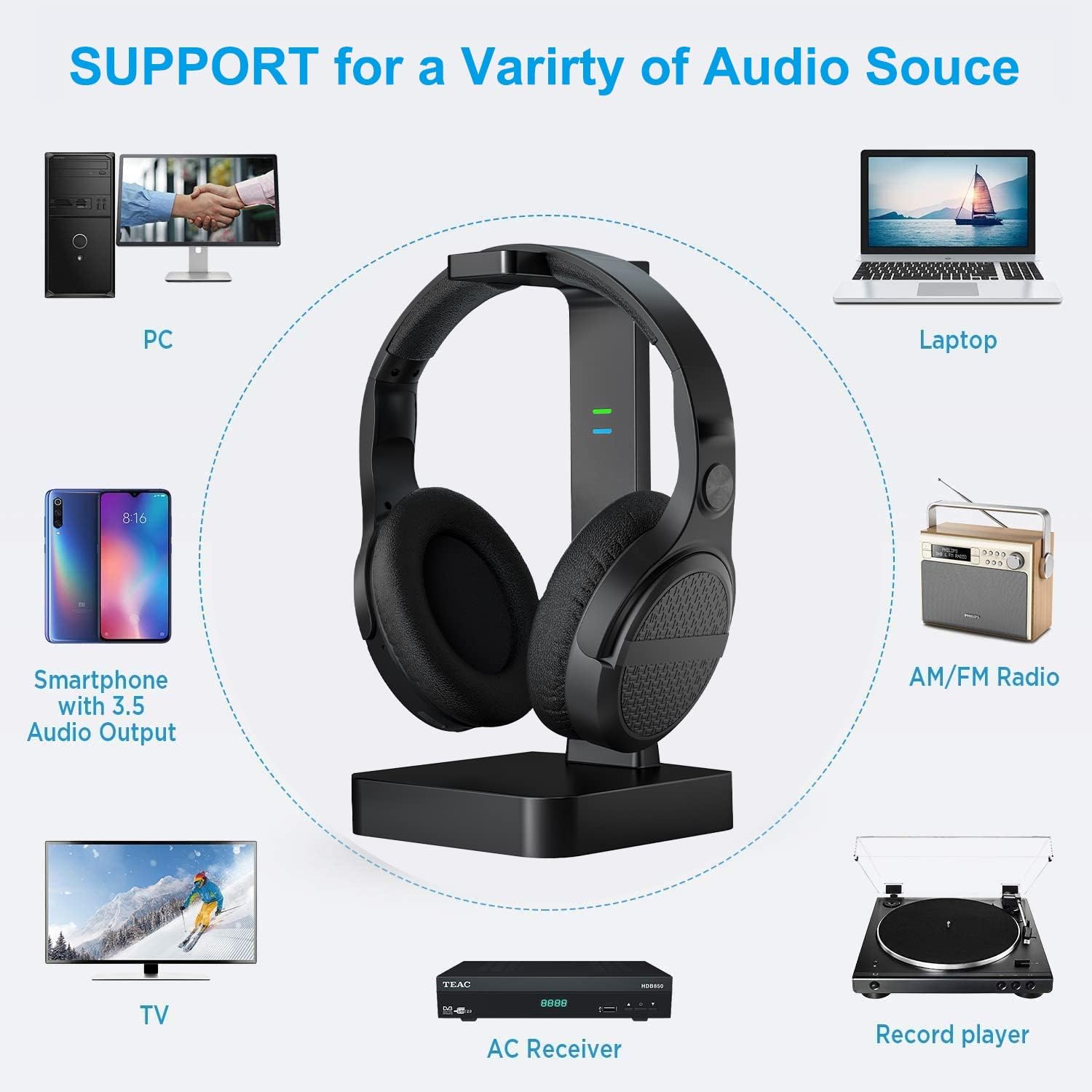
Figure 5: Compatible audio sources for the ANSTEN AS60 system.
3. Using the Optical Fiber Splitter (Optional)
If you need to connect both the headphone transmitter and another optical audio device (e.g., a soundbar) to a single optical output on your TV, use the optical fiber splitter:
- Connect one end of an optical audio cable (not included) to your TV's Optical OUT port.
- Connect the other end of this cable to the single input port on the optical fiber splitter.
- Connect one optical audio cable from one of the splitter's output ports to the Optical IN port on the ANSTEN AS60 transmitter.
- Connect another optical audio cable from the second splitter's output port to the optical input of your other audio device (e.g., soundbar).

Figure 6: Connecting multiple devices using the optical fiber splitter.
Návod k obsluze
1. Zapnutí/vypnutí
To power on the headphones, press and hold the power button on the earcup until the indicator light illuminates. To power off, press and hold the power button again until the light turns off.
2. Automatické připojení
Once the transmitter is powered on and receiving an audio signal, and the headphones are powered on, they should automatically connect via 2.4GHz RF technology. The indicator lights on both devices will confirm a successful connection.

Figure 7: The 2.4GHz RF signal provides a steady connection up to 197 feet, even through walls.
3. Nastavení hlasitosti
Use the volume control buttons located on the earcup of the headphones to adjust the listening volume to your preference.
4. Switching Audio Modes
The headphones feature three distinct audio modes for an optimized listening experience. Press the dedicated mode button on the earcup to cycle through the modes:
- Musical Mode: Enhanced for music playback, providing rich bass and clear highs.
- Režim filmu: Optimized for cinematic experiences, offering immersive 3D surround sound.
- Normální režim: Standardní audio profesionálfile suitable for general listening, such as news or dialogue.

Figure 8: Select from Normal, Music, or Movie audio modes to tailor your listening experience.
Údržba
Proper maintenance ensures the longevity of your ANSTEN AS60 system:
- Čištění: Use a soft, dry cloth to wipe down the headphones, transmitter, and splitter. Do not use abrasive cleaners or solvents.
- Skladování: When not in use, store the headphones on the charging dock in a cool, dry place away from direct sunlight.
- Péče o baterie: For optimal battery life, avoid fully discharging the headphones frequently. Recharge them regularly.
Odstraňování problémů
| Problém | Možná příčina | Řešení |
|---|---|---|
| Ze sluchátek není slyšet žádný zvuk. | Headphones not powered on or not charged. Transmitter not powered on or not connected to TV. TV audio output settings incorrect. | Ensure headphones are charged and powered on. Verify transmitter is powered and connected to TV. Check TV audio output settings (e.g., set to PCM for optical). Increase volume on headphones and TV. |
| Špatná kvalita zvuku nebo statický šum. | Interference from other 2.4GHz devices. Headphones out of range. Low battery. | Move closer to the transmitter. Ensure no strong interference sources nearby. Recharge headphones. |
| Sluchátka se nenabíjejí. | Headphones not properly seated on dock. Charging contacts dirty. Power adapter not connected to dock. | Reseat headphones on the dock. Clean charging contacts on both headphones and dock with a dry cloth. Ensure power adapter is securely connected to the dock and a power outlet. |
| Optical splitter not working. | Optical cables not fully inserted. Protective caps not removed. TV audio output not active. | Ensure all optical cables are securely connected and protective caps are removed. Verify TV is outputting audio via the optical port. |
Specifikace
| Funkce | Detail |
|---|---|
| Název modelu | AS60 |
| Technologie připojení | Bezdrátové (RF) |
| Technologie bezdrátové komunikace | RF (2.4 GHz) |
| Bezdrátové Dosah | Až 197 stop (60 m) |
| Jack pro sluchátka | 3.5 mm Jack (for wired connection, cable not included) |
| Zvukové režimy | Musical, Movie, Normal (with DSP) |
| Kompatibilní zařízení | Televisions, Soundbars, Headphones, Devices with Optical/RCA/AUX Audio Output, Devices with 3.5mm Audio Output |
| Typ ovládání | Volume Control, Media (Mode Selection) |
| Umístění uší | Přes ucho |
| Materiál | Plast |
| Barva | Černý |
| Frekvenční rozsah | 20 Hz - 20,000 XNUMX Hz |
| Úroveň odolnosti proti vodě | Není odolný vůči vodě |
Záruka a podpora
ANSTEN products are designed and manufactured to the highest quality standards. For warranty information, technical support, or customer service inquiries, please refer to the contact information provided on the ANSTEN official webwebu nebo v dokumentaci k nákupu.
Můžete také navštívit ANSTEN Store on Amazon pro další informace o produktu a zdroje podpory.