
RAINPOINT ITV105
RAINPOINT Digital Sprinkler Timer
Model: ITV105 - User Manual
Zavedení
Thank you for choosing the RAINPOINT Digital Sprinkler Timer, Model ITV105. This programmable 1-outlet automatic hose water timer is designed to provide convenient and precise control over your watering schedule, ensuring optimal moisture levels for your lawn and garden. This manual provides detailed instructions for setup, operation, maintenance, and troubleshooting to help you get the most out of your new device.
Konec produktuview a klíčové vlastnosti
The RAINPOINT ITV105 Sprinkler Timer is engineered for durability and ease of use, offering a reliable solution for automated garden irrigation.
- Standardní kompatibilita: Features a 3/4" inlet and outlet thread, compatible with most standard garden hoses.
- Odolnost vůči počasí: IP54 waterproof rating and heavy-duty weather-resistant ABS housing ensure durability for outdoor use.
- Přizpůsobitelné programování: Easy-to-use interface allows customization of start time, watering frequency, and duration for automated irrigation.
- Built-in Filter: Includes a built-in metal filter to improve water quality and protect plants from debris.
- Leakage Prevention: Upgraded strong and durable ABS material and water inlet thread, paired with Teflon tape and rubber washer to prevent water leakage.
- Velký LCD displej: Displays detailed information such as watering time, frequency, power, and battery life for easy readability.
- Upozornění na vybitou baterii: Powered by 2 AAA batteries (not included), with a low battery notification and automatic valve shut-off to prevent water waste.
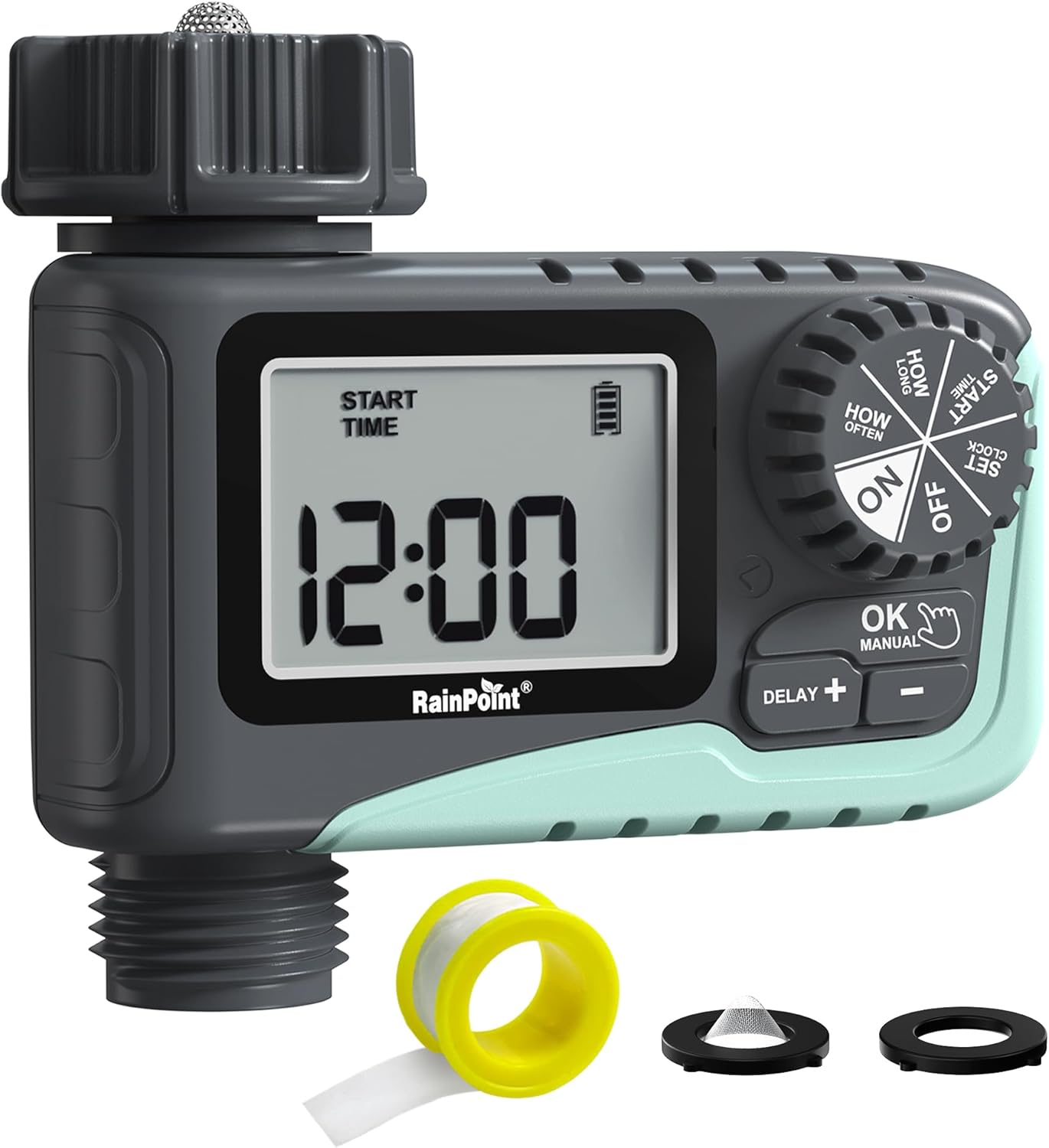
Obrázek 1: Přední strana view of the RAINPOINT Digital Sprinkler Timer (ITV105) showing the large LCD screen, control dial, and buttons.
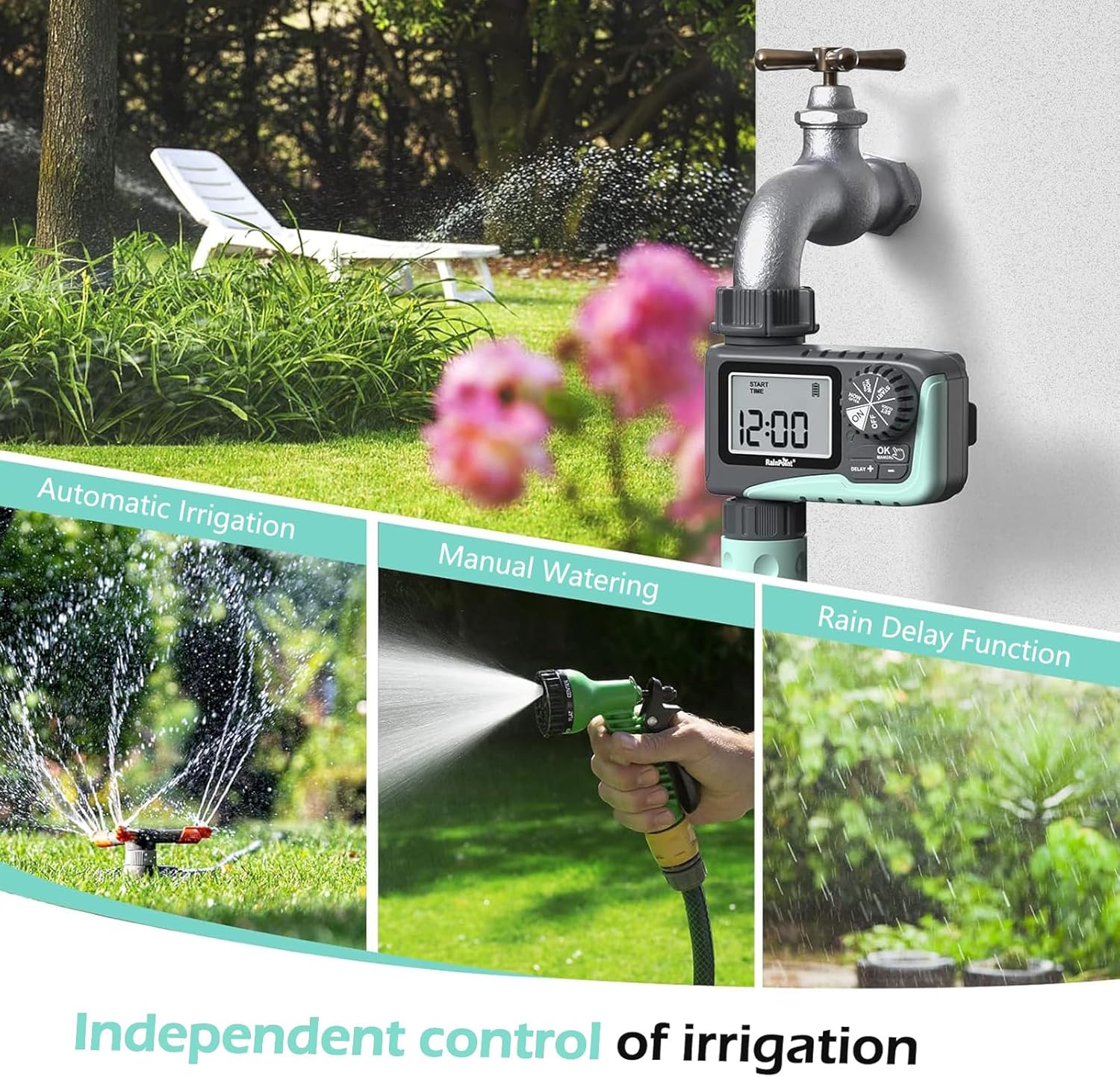
Figure 2: Illustration of the timer's three main functions: automatic irrigation, manual watering, and rain delay.
Obsah balení
Po otevření zkontrolujte obsah balení, abyste se ujistili, že jsou přítomny všechny položky:
- 1 x RAINPOINT Digital Sprinkler Timer (ITV105)
- 1 x Uživatelská příručka (tento dokument)
- 1 x teflonová páska
- 1 x Rubber washer
- 1 x Spare filter
Nastavení a instalace
Follow these steps to properly set up your sprinkler timer:
- Nainstalujte baterie:
Locate the battery compartment on the back of the timer. Insert 2 new AAA (1.5V) alkaline batteries, ensuring correct polarity. Close the battery compartment securely. The LCD screen will power on.
- Příprava kohoutku:
Ensure your outdoor hose faucet is clean and free of debris. If necessary, apply the included Teflon tape to the faucet threads for a watertight seal.
- Attach Timer to Faucet:
Screw the timer's inlet (top connector) onto your 3/4" outdoor hose faucet. Hand-tighten firmly. Ensure the rubber washer is properly seated inside the timer's inlet to prevent leaks. The timer features a 360° rotating connector for easy positioning.
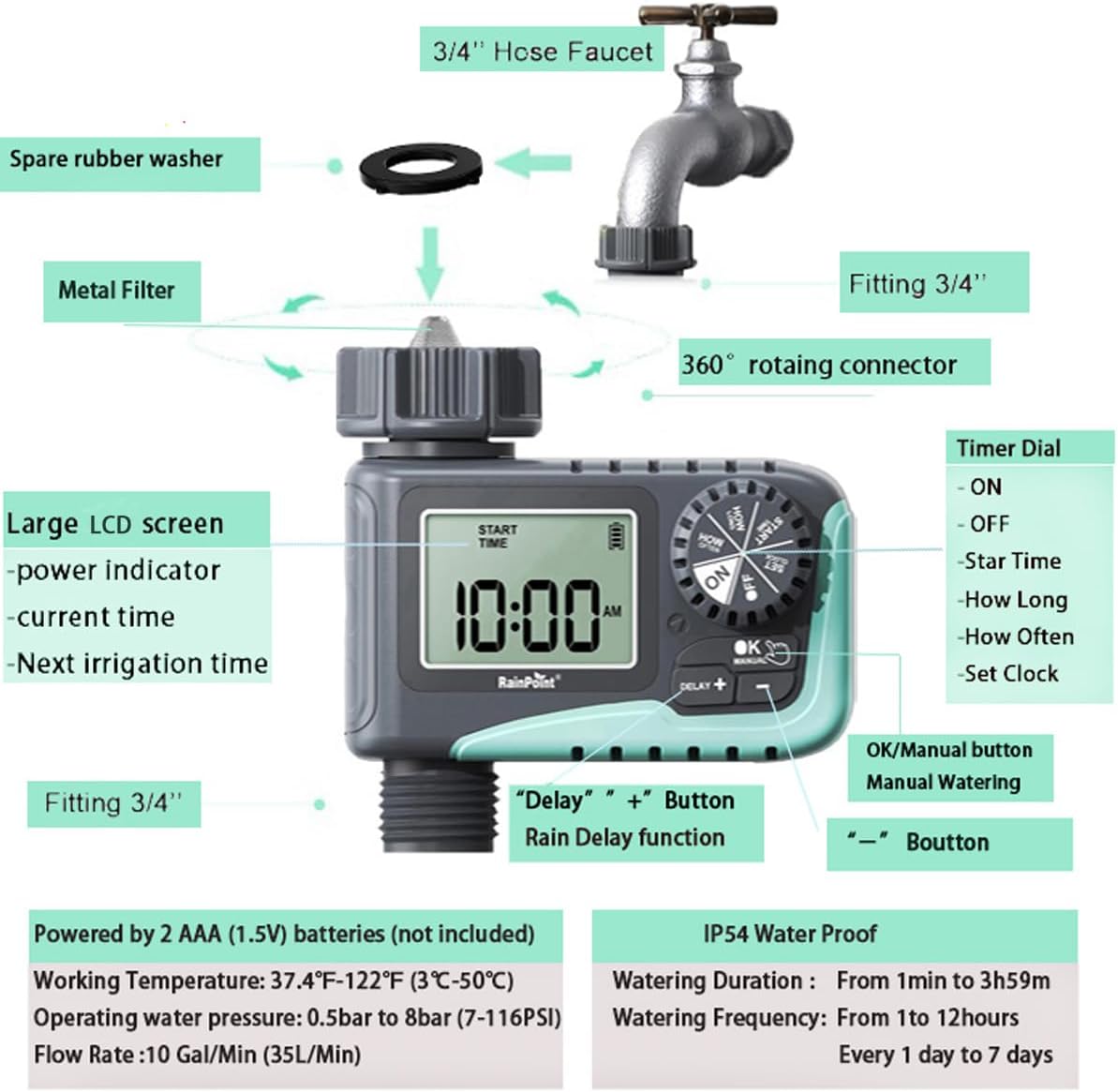
Figure 3: Diagram illustrating the components of the sprinkler timer, including the 3/4" hose faucet connection, metal filter, and LCD screen.
- Připojte hadici:
Attach your garden hose to the timer's outlet (bottom connector). Hand-tighten securely. Ensure a proper washer is in place at the hose connection point.
- Open Faucet:
Fully open your outdoor hose faucet. The timer is designed to withstand water pressure from 0.5 bar to 8 bar (7-116 PSI). The timer will control the water flow, not the faucet.
Návod k obsluze
The RAINPOINT ITV105 timer features a large dial and intuitive buttons for easy programming.
Pozice ovládacího voliče:
- NA: Activates the timer for automatic watering.
- OFF: Deactivates the timer, stopping all watering.
- NASTAVIT HODINY: Nastavte aktuální čas.
- DOBA SPUŠTĚNÍ: Set the desired start time for watering cycles.
- JAK DLOUHO: Set the duration of each watering cycle.
- JAK ČASTO: Set the frequency of watering cycles.
tlačítka:
- OK/MANUAL: Confirms settings or initiates manual watering.
- DELAY +: Increases values during setting or activates/adjusts rain delay.
- -: Snižuje hodnoty během nastavování.
Setting the Current Time (SET CLOCK):
- Otočte voličem na NASTAVIT HODINY.
- Použijte + a - tlačítka pro nastavení hodiny. Stiskněte OK potvrdit.
- Použijte + a - pro nastavení minut. Stiskněte OK potvrdit.
- Otočte voličem na ON to save the time and return to normal operation.
Setting Automatic Watering Program:
This timer allows you to set a start time, duration, and frequency for automated watering.
- Set Start Time (START TIME):
Otočte voličem na ČAS STARTU. Použití + a - to set the desired watering start hour and minute. Press OK pro potvrzení každého nastavení.
- Set Watering Duration (HOW LONG):
Otočte voličem na JAK DLOUHO. Použití + a - to set the watering duration from 1 minute to 3 hours and 59 minutes. Press OK potvrdit.

Figure 4: Screen showing settings for "HOW OFTEN" (frequency) and "HOW LONG" (duration) for automatic watering.
- Set Watering Frequency (HOW OFTEN):
Otočte voličem na JAK ČASTO. Použití + a - to set the frequency:
- Every 1 hour to 12 hours.
- Every 1 day to 7 days.
Stiskněte OK potvrdit.
- Aktivace programu:
Otočte voličem na ONČasovač nyní bude fungovat podle naprogramovaného plánu.
Ruční zalévání:
Pro okamžité zavlažování bez ovlivnění naprogramovaného plánu:
- Ujistěte se, že je volič v poloze ON pozice.
- Stiskněte tlačítko OK/MANUÁLNĚ button. The display will show the default manual watering duration (e.g., 10 minutes).
- Použijte + a - tlačítky pro nastavení doby trvání ručního zavlažování od 1 minuty do 8 hodin.
- Stiskněte OK again to start manual watering. The timer will count down the set duration.
- Chcete-li předčasně zastavit ruční zavlažování, stiskněte OK/MANUÁLNĚ znovu.

Figure 5: Display showing the manual watering duration setting, adjustable from 1 minute to 8 hours.
Funkce zpoždění deště:
The rain delay function allows you to pause your watering schedule for a set period due to rain or other reasons, preventing overwatering.
- Ujistěte se, že je volič v poloze ON pozice.
- Stiskněte tlačítko ZPOŽDĚNÍ + button. The display will show a default delay time (e.g., 24H).
- Stiskněte ZPOŽDĚNÍ + repeatedly to cycle through delay options (e.g., 24H, 48H, 72H).
- Once you select the desired delay, the timer will enter rain delay mode. The display will show the remaining delay time.
- After the delay period ends, the timer will automatically resume its programmed watering schedule.
- To cancel the rain delay, press the ZPOŽDĚNÍ + button until the delay time disappears, or rotate the dial to OFF and then back to ON.

Figure 6: The timer displaying the rain delay countdown, highlighting its IP54 waterproof rating.
Údržba
Správná údržba zajišťuje dlouhou životnost a optimální výkon vašeho zavlažovacího systému RAINPOINT.
- Vyčistit filtr: Periodically check and clean the metal filter located at the timer's inlet. Remove the timer from the faucet, unscrew the filter, rinse it under running water to remove any debris, and reinsert it.
- Výměna baterie: When the low battery indicator appears on the LCD screen, replace the 2 AAA batteries promptly. Always use new alkaline batteries.
- Zima: Before the first frost, remove the timer from the faucet and store it indoors in a dry, frost-free location. Remove the batteries before storage.
- Zkontrolujte netěsnosti: Regularly inspect all connections (faucet to timer, timer to hose) for any signs of leakage. Ensure all connections are hand-tightened and that rubber washers are properly seated.

Figure 7: Visual representation of the built-in metal filter and durable plastic material designed for anti-leakage and longer service life.
Odstraňování problémů
If you encounter issues with your RAINPOINT Sprinkler Timer, refer to the following common problems and solutions:
| Problém | Možná příčina | Řešení |
|---|---|---|
| Timer not turning on / LCD blank. | Vybité nebo nesprávně vložené baterie. | Replace with 2 new AAA alkaline batteries, ensuring correct polarity. |
| Žádný proud vody. |
|
|
| Únik vody z přípojek. |
|
|
| Časovač nedodržuje plán. |
|
|
Specifikace
| Funkce | Specifikace |
|---|---|
| Model | ITV105 |
| Rozměry produktu | 10.5 x 10.3 x 5 cm (4 x 4 x 2 palce) |
| Materiál | Akrylonitrilbutadienstyren (ABS) |
| Watering Duration (Automatic) | 1 minut až 3 hodin 59 minut |
| Watering Frequency (Automatic) | Every 1 hour to 12 hours, or every 1 day to 7 days |
| Watering Duration (Manual) | 1 minute to 8 hours (Default: 10 minutes) |
| Maximální průtok | 10 Gal/Min (35 L/Min) |
| Rozsah tlaku vody | 0.5 bar to 8 bar (7-116 PSI) |
| Pracovní teplota | 3 ℃ -50 ℃ (37.4 ℉ -122 ℉) |
| Zdroj napájení | 2 x AAA (1.5V) batteries (not included) |
| Hodnocení voděodolnosti | IP54 |
Záruka a podpora
RAINPOINT products are manufactured to high-quality standards. For specific warranty details, please refer to the warranty card included with your product or visit the official RAINPOINT website. If you encounter any issues or have questions not covered in this manual, please contact RAINPOINT customer support through their official webwebu nebo prodejce, kde jste produkt zakoupili.
Pro více informací a podporu můžete navštívit Obchod RAINPOINT na Amazonu.
Ask a question about this manual
Ask about setup, troubleshooting, compatibility, parts, safety, or missing instructions. Manuals+ will review the question and use this page’s manual context to help answer it.