
1. Úvod
This manual provides detailed instructions for the setup, operation, maintenance, and troubleshooting of your SWIFT 350T 40X-2500X Trinocular Compound Microscope. This instrument is designed for observing minute details on prepared slides, suitable for educational, clinical, and hobbyist applications. It features a trinocular head for simultaneous visual observation and digital imaging, a mechanical stage for precise sample movement, and an Abbe condenser for optimal illumination.
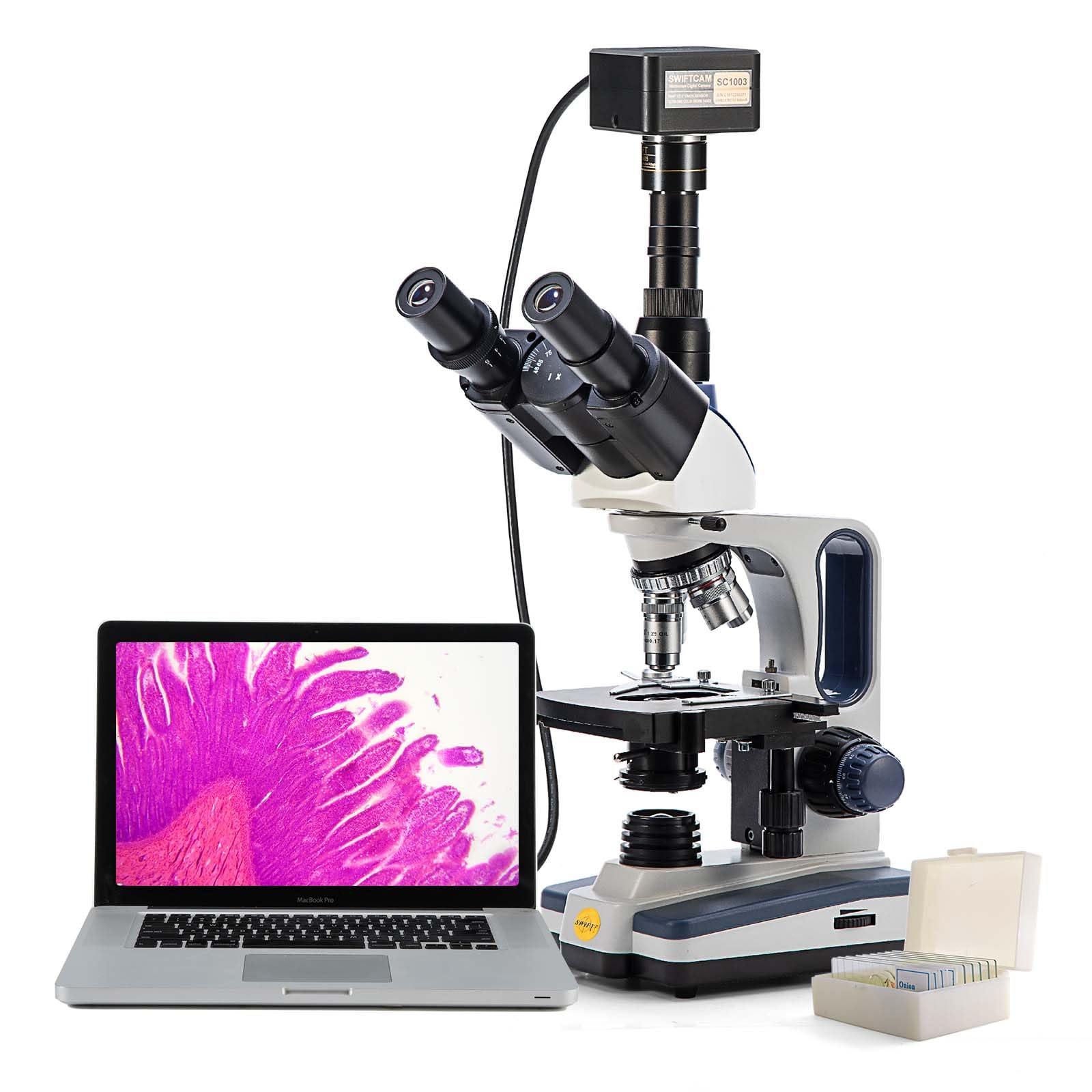
Konecview of the SWIFT 350T Trinocular Compound Microscope, showcasing its main components including the trinocular head, objective lenses, mechanical stage, and base.
2. Bezpečnostní informace
- S mikroskopem vždy zacházejte opatrně. Vyhněte se náhlým nárazům nebo vibracím.
- Ujistěte se, že je mikroskop umístěn na stabilním a rovném povrchu, aby se zabránilo jeho převrácení.
- Chraňte mikroskop před přímým slunečním zářením, vysokými teplotami, prachem a korozivními chemikáliemi.
- Před čištěním nebo prováděním jakékoli údržby odpojte napájecí kabel.
- Do not attempt to disassemble the optical or mechanical components unless specifically instructed.
- Use only the provided power adapter or one with identical specifications.
3. Obsah balení
Po vybalení ověřte, zda jsou všechny součásti přítomny a nepoškozené:
- SWIFT 350T Trinocular Compound Microscope Body
- Trinokulární hlava
- Okuláry WF10X (pár)
- Okuláry WF25X (pár)
- Objective Lenses (4X, 10X, 40X, 100X Oil)
- 10MP digitální fotoaparát
- USB Cable for Camera
- Digital Camera Software CD
- Napájecí adaptér
- Imerzní olej
- Prepared Slides (set)
- Prachový kryt
- Uživatelská příručka
4. Identifikace součásti
Familiarize yourself with the various parts of your microscope using the diagram below:

A detailed diagram identifying key parts of the microscope, such as the camera port, Siedentopf head, eyepieces, objective lenses, mechanical stage, and focusing knobs.
- Port fotoaparátu: For attaching the digital camera.
- Siedentopfova hlava: Rotatable head for comfortable viewIng.
- Hlava otočná o 360°: Allows the head to be rotated for shared viewIng.
- Otočný nosník: Holds the objective lenses and allows for easy magnification changes.
- Mechanický S.tage: Platform for holding and moving slides.
- Abbe Condenser Height Adjustment Wheel: Controls the vertical position of the condenser.
- Iris Diaphragm Adjustment: Controls the amount of light passing through the specimen.
- LED světlo: Illumination source.
- WF10X, 25X Eyepiece: Interchangeable eyepieces for different magnifications.
- Knoflík dioptrické korekce: Compensates for differences in vision between eyes.
- Head Fastening Screw: Secures the trinocular head to the microscope body.
- Objektiv: Primary magnification components (4X, 10X, 40X, 100X).
- Slide Holder: Secures the specimen slide on the mechanical stage.
- Hrubé nastavení: Large knob for rapid focusing.
- Jemné nastavení: Small knob for precise focusing.
- X-Y Translational Axis Control: Knobs for moving the mechanical stage horizontally.
- Dimming Handwheel: Adjusts the brightness of the LED illumination.
5. Nastavení
5.1 Vybalení a montáž
- Opatrně vyjměte všechny součásti z obalu.
- Place the microscope body on a stable, level surface.
- Loosen the head fastening screw on the top of the microscope body.
- Gently insert the trinocular head into the top opening, ensuring it is fully seated. Tighten the head fastening screw to secure it.
- Insert the desired eyepieces (WF10X or WF25X) into the eyepiece tubes of the trinocular head.
- Rotate the revolving nosepiece to ensure the 4X objective lens is positioned directly above the stage.
5.2 Připojení napájení
Connect the power adapter to the microscope's power input jack and then plug it into a suitable electrical outlet. Ensure the power switch is in the 'Off' position before connecting.
5.3 Digital Camera Installation
- Remove the dust cap from the camera port on the trinocular head.
- Carefully insert the 10MP digital camera into the camera port.
- Připojte fotoaparát k počítači pomocí dodaného kabelu USB.
- Install the camera software from the included CD or download the latest version from the manufacturer's webwebu. Postupujte podle pokynů na obrazovce pro instalaci.

The SWIFT microscope with its 10MP digital camera attached to the trinocular port, displaying a live image on a connected laptop, illustrating digital observation capabilities.

The 10MP digital camera, its accompanying software installation disk, and a USB cable for connecting the camera to a computer.
6. Návod k obsluze
6.1 Umístění podložního sklíčka
- Ensure the 4X objective lens is in position.
- Spusťte mechanické stage using the coarse adjustment knob to create enough space.
- Open the slide holder clip on the mechanical stage and carefully place a prepared slide onto the stage. Release the clip to secure the slide.
- Use the X-Y translational axis control knobs to position the desired area of the specimen directly under the objective lens.
6.2 Illumination Adjustment
- Turn on the microscope's power switch.
- Adjust the brightness of the LED light using the dimming handwheel.
- Adjust the Abbe condenser height using its adjustment wheel for optimal light focus on the specimen.
- Open or close the iris diaphragm to control contrast and resolution. A good starting point is to match the diaphragm opening to the numerical aperture of the objective lens in use.
6.3 Zaostřování a zvětšení
- With the 4X objective in place, slowly raise the mechanical stage using the coarse adjustment knob while looking through the eyepieces until the specimen comes into rough focus.
- Use the fine adjustment knob to achieve sharp focus.
- Adjust the interpupillary distance by moving the eyepiece tubes until a single, clear field of view je pozorován.
- If necessary, adjust the diopter on one eyepiece to compensate for vision differences between your eyes.
- To increase magnification, rotate the revolving nosepiece to the next objective lens (e.g., 10X). The microscope is parfocal, meaning only minor fine adjustment should be needed.
- Repeat the fine adjustment for each higher magnification. When using the 100X oil immersion objective, apply a small drop of immersion oil directly onto the slide in the area of interest before rotating the 100X objective into the oil.

An image demonstrating the visual output at various magnification levels (40x, 100x, 400x, 1000x) achievable with the SWIFT microscope, alongside the objective lenses.
7. Digital Camera Operation
After installing the camera and software (as per Section 5.3), launch the application on your computer.
- Ensure the microscope is powered on and a specimen is in focus through the eyepieces.
- The software should detect the connected 10MP camera and display a live feed from the microscope on your computer screen.
- Use the software interface to capture still images, record videos, and perform advanced functions such as stitching multiple images, Extended Depth of Field (EDF), and measurements.
- Refer to the camera software's help documentation for detailed instructions on its specific features and settings.
8. Údržba
8.1 Čištění
- Optické komponenty: Use a soft lens brush or compressed air to remove dust. For smudges, use lens cleaning solution and special lens paper or microfiber cloth. Wipe gently in a circular motion. Never use abrasive materials or harsh solvents.
- Tělo: Otřete tělo mikroskopu měkkým hadříkemamp cloth. Avoid getting moisture into electrical components.
- Imerzní olej: After using the 100X objective, always clean the objective lens and the slide immediately with lens paper moistened with lens cleaning solution to prevent oil from hardening.
8.2 Skladování
- Pokud mikroskop nepoužíváte, zakryjte jej dodaným protiprachovým krytem, abyste jej ochránili před prachem a nečistotami.
- Mikroskop skladujte na chladném a suchém místě, mimo dosah přímého slunečního záření a extrémních teplot.
- Ensure the 4X objective is in position and the stagPřed uložením se e sníží.
9. Řešení problémů
| Problém | Možná příčina | Řešení |
|---|---|---|
| Žádné osvětlení | Power cord disconnected; power switch off; LED burnt out. | Check power connections; turn on power switch; contact support for LED replacement. |
| Rozmazaný/neostrý obraz | Incorrect focusing; objective lens dirty; slide upside down. | Use coarse and fine adjustment; clean objective lens; reorient slide. |
| Tmavé pole view | Iris diaphragm closed; condenser too low; light intensity too low. | Open iris diaphragm; adjust condenser height; increase light intensity. |
| Dust/spots in view | Prach na okuláru, objektivu nebo sklíčku. | Clean eyepieces, objectives, and slide. Rotate eyepiece to determine source. |
| Kamera nebyla detekována | USB cable loose; driver not installed; camera not fully inserted. | Check USB connection; install/reinstall drivers; ensure camera is seated correctly. |
10. Specifikace
- Model: 350T (EF12021SF)
- Typ mikroskopu: Trinocular Compound Microscope
- Zvětšení: 40X-2500X (with WF10X and WF25X eyepieces and 4X, 10X, 40X, 100X objectives)
- Okuláry: WF10X, WF25X (interchangeable)
- Objektivy: Achromatic 4X, 10X, 40X (spring), 100X (spring, oil)
- Hlava: Siedentopf, 30-degree inclined, 360-degree rotatable
- Interpupilární vzdálenost: Nastavitelný
- Dioptrická korekce: On left eyepiece tube
- Nosník: Otočná čtyřnásobná
- Stage: Double-layer mechanical stage with X-Y translational axis control
- Zaměření: Coaxial coarse and fine adjustment knobs
- Kondenzátor: Abbe NA 1.25 with iris diaphragm and filter holder
- Osvětlení: LED, nastavitelný jas
- Digitální fotoaparát: 10MP, USB connection, compatible with Mac OS X / Windows Vista, 7, 8, 10 (32 and 64 bit)
- Zdroj napájení: Elektrický kabel (240 V)
- Hmotnost položky: 12.91 libry
- Rozměry balení: 23.46 x 13.39 x 9.61 palce
11. Záruka a podpora
For warranty information, technical support, or service inquiries, please refer to the warranty card included with your product or visit the official SWIFT webUschovejte si účtenku jako doklad o koupi pro případ reklamace.
Online zdroje: For additional support, software updates, and FAQs, please visit the SWIFT Store on Amazon nebo úředník výrobce webmísto.